
<img src="https://raw.githubusercontent.com/hurkanyakay/react-weekly-day-picker/master/imgs/main.png" alt="React Weekly Day Picker banner" align="center" />

<br />

# React Weekly Day Picker

This react component provides weekly view and day picker option like calendly.

This component makes use of moment.js.


## Installation

To install this Component, run `yarn add react-weekly-day-picker` or `npm install react-weekly-day-picker`.


## Usage

To use the component, In your react application just do

```javascript
  <ReactWeeklyDayPicker />
```

## Props

You can also provide additional configuration like

```javascript
<ReactWeeklyDayPicker
  daysCount={7}  //How many days will be shown
  classNames={}  //Overrides classnames for custom classes (below example)
  startDay={new Date()} // First day as Date Object or 22 June 2016
  selectedDays={['22 June 2017', new Date()]} // Selected days list
  multipleDaySelect={true} //enables multiple day selection
  selectDay={function(day){}}
  unselectDay={function(day){}}
  onPrevClick={function(startDay, selectedDays){}} // called with the new startDay
  onNextClick={function(startDay, selectedDays){}} // called with the new startDay
  unselectable={false} // if true allows to unselect a date once it has been selected. Only works when multipleDaySelect={false}
  format={'YYYY-MM-DD'} //format of dates that handled in selectDay and unselectDay functions
  firstLineFormat={'ddd'} // format for the first line of the day button
  secondLineFormat={'MMM D'} // format for the second line of the day button
  firstLineMobileFormat={'dddd'} // format for the first line of the day button mobile
  secondLineMobileFormat={'MMMM D, Y'} // format for the second line of the day button mobile
  unavailables={{
    dates:['22 July 2017'],  //unavailable dates list
    relative:[0,1],  //unavailable dates list relative to today (0:today, 1:tomorrow, -1:yesterday)
    weekly: [0] //unavailable dates list for each week (0:Sunday, 1:Monday ...)
  }}
  mobilView={window.innerWidth < 1024}  // enables mobil view
  beforeToday={false}   // all dates before today set as unavailable (default:true)
  hiddens={{  // makes dates invisible
    dates: ['22 July 2017'], //absolute dates list
    relative: [2], // relative to today (0:today, 1:tomorrow, -1:yesterday)
    weekly: [1]  //each week (0:Sunday, 1:Monday ...)
  }}
  todayText={"today"}  // replacing today text (default : - TODAY -)
  unavailableText={"Unavailable"}  // replacing unavailable text (default: unavailable )
/>
```

## Responsiveness and Mobil View
When mobilView props is true, mobilView enables:
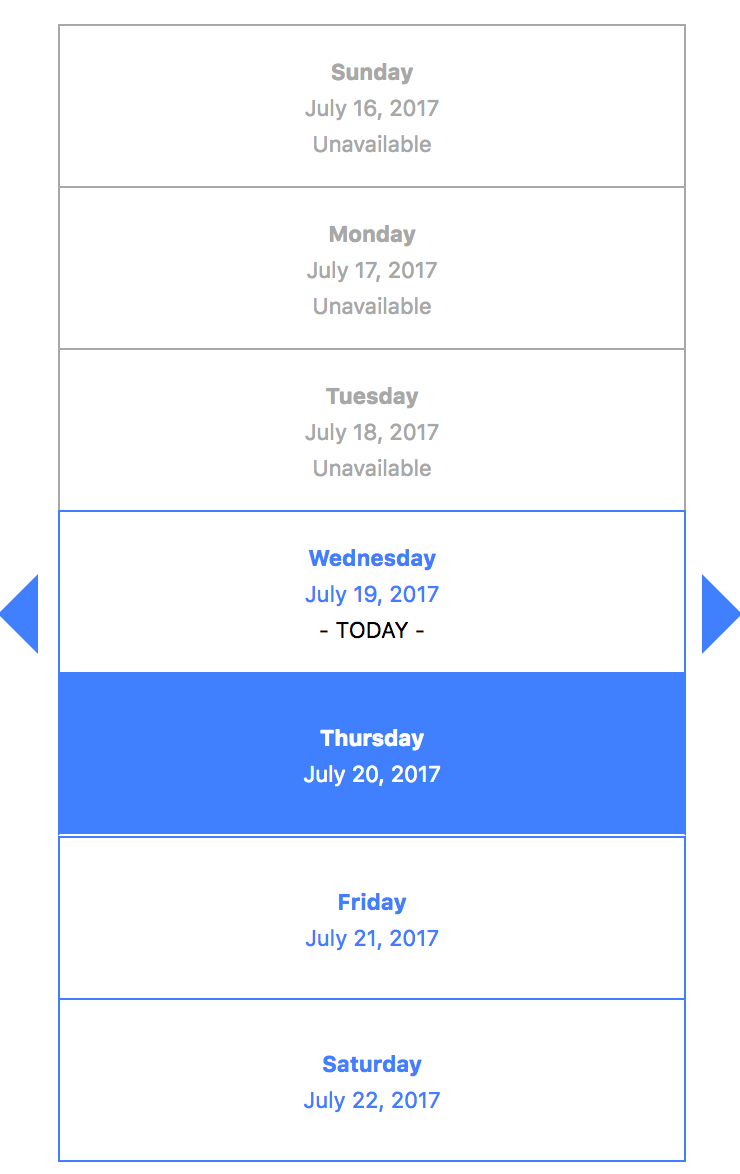
<img src="https://raw.githubusercontent.com/hurkanyakay/react-weekly-day-picker/master/imgs/smallScreen.png" alt="React Weekly Day Picker Responsiveness" width="300px" align="center" />


## Styling and Css classes

classNames prop overrides existed css classes

```javascript
render() {
  const classNames = {
    container : '',
    prevWeekArrow: '',
    nextWeekArrow: '',
    dayBox: '',
    dayCircleContainer: '',
    dayCicle: '',
    dayCircleTodayText: '',
    dayCircleUnavailable: '',
    dayCircleUnavailableText: '',
    dayCicleSelected: '',
  }
  return (
    <ReactWeeklyDayPicker
      classNames={classNames}
    />
  );
}
```
