[](https://gitpod.io/#https://github.com/mdmuhtasimfuadfahim/rmq-pub-sub)
## rmq-pub-sub
`rmq-pub-sub` is designed based on the [RabbitMQ](https://www.rabbitmq.com/) Pub-Sub functionality. A easier way to call a function named RMQPubStream to Produce any stream and consume by RMQSubStream.
## Table Of Contents
- [Installation](#installation)
- [Example](#example)
- [How To Contribute](#how-to-contribute)
- [Test](#test)
- [Changelog](#changelog)
- [Project Activity](#project-activity)
- [License](#license)
- [Contact](#contact)
Installation
```
$ npm i rmq-pub-sub
```
or
```
$ yarn add rmq-pub-sub
```
Example
This example shows you how to create microservice and add pub-sub to communicate between services by `rmq-pub-sub`.
#### Project Structure
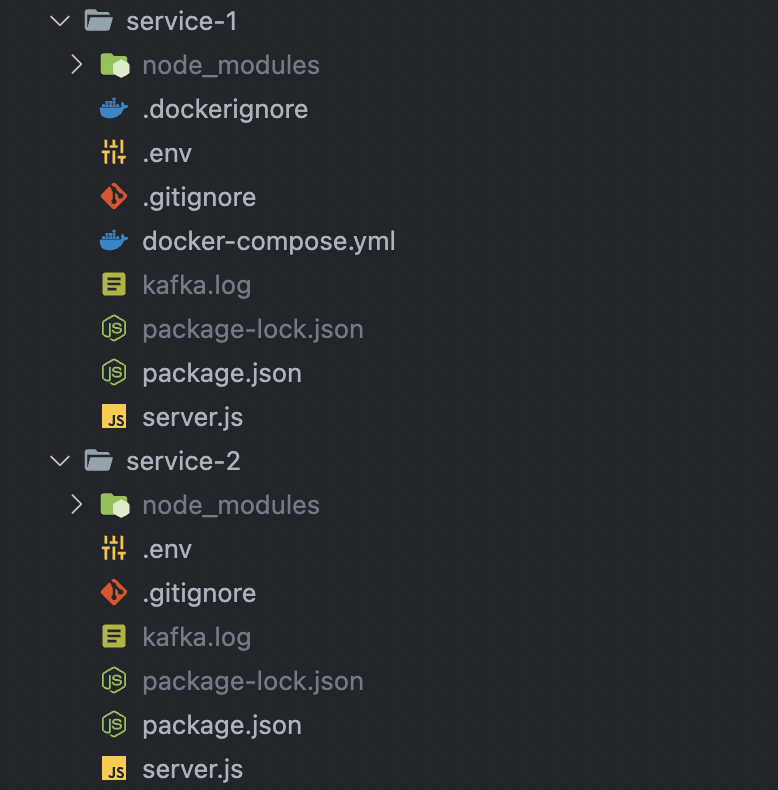 > Note: Create NodeJS environment in both service-1 and service-2 and create server using your favourite NodeJS framework.
#### service-1/server.js
```js
const RMQPubStream = require('rmq-pub-sub/RMQPubStream');
app.post('/send', async (req, res) => {
const fakeData = {
Name: "Md. Muhtasim Fuad Fahim",
Email: "mdmuhtasim.fahim@gmail.com",
};
const produce = await RMQPubStream("FAKE_DATA", fakeData);
console.log("Producer: ", produce);
return res.status(200).send("Done!");
});
```
#### service-2/server.js
```js
const RMQSubStream = require('rmq-pub-sub/RMQSubStream');
(async function rmqData() {
await RMQSubStream("FAKE_DATA").then((data) => {
console.log("CONSUME: ", data);
});
})();
```
#### service-1/.env & service-2/.env
```js
AMQP_URL = "amqp://localhost"
```
#### Pull RabbitMQ docker image by the following command
```js
docker run --name rabbitmq -p 5672:5672 rabbitmq
```
Now run the both services in your machine and hit the API: `http://localhost:${PORT}/send` 🥳
> Note: Create NodeJS environment in both service-1 and service-2 and create server using your favourite NodeJS framework.
#### service-1/server.js
```js
const RMQPubStream = require('rmq-pub-sub/RMQPubStream');
app.post('/send', async (req, res) => {
const fakeData = {
Name: "Md. Muhtasim Fuad Fahim",
Email: "mdmuhtasim.fahim@gmail.com",
};
const produce = await RMQPubStream("FAKE_DATA", fakeData);
console.log("Producer: ", produce);
return res.status(200).send("Done!");
});
```
#### service-2/server.js
```js
const RMQSubStream = require('rmq-pub-sub/RMQSubStream');
(async function rmqData() {
await RMQSubStream("FAKE_DATA").then((data) => {
console.log("CONSUME: ", data);
});
})();
```
#### service-1/.env & service-2/.env
```js
AMQP_URL = "amqp://localhost"
```
#### Pull RabbitMQ docker image by the following command
```js
docker run --name rabbitmq -p 5672:5672 rabbitmq
```
Now run the both services in your machine and hit the API: `http://localhost:${PORT}/send` 🥳
How To Contribute
- Fork it 😎
- Create a feature branch: `git checkout -b my-feature`
- Add your changes: `git add .`
- Commit your changes: `git commit -m 'My new feature'`
- Push to the branch: `git push origin my-feature`
- Submit a pull request
Contributions, issues and features requests are welcome!
📮 Submit PRs to help solve issues or add features
🐛 Find and report issues
🌟 Star the project
Test
- Fork it 😎
- Clone forked repository: `git clone https://github.com/username/forked-name.git`
- Install the dependencies from root directory: `npm install`
- Rename `.env.example` to `.env`
- Now run: `npm run test` or `npm run test:watch` or `npm run coverage` & see the results 🥳
Changelog
See [CHANGELOG.md](CHANGELOG.md).
Project Activity
License
`rmq-pub-sub` is licensed by [MIT License](https://api.github.com/licenses/mit).
Copyright © 2023 [Md. Muhtasim Fuad Fahim](https://github.com/mdmuhtasimfuadfahim)
- Github: [@mdmuhtasimfuadfahim](https://github.com/mdmuhtasimfuadfahim)
- LinkedIn: [@mdmuhtasimfuadfahim](https://www.linkedin.com/in/mdmuhtasimfuadfahim)