# React Native ActionSheet
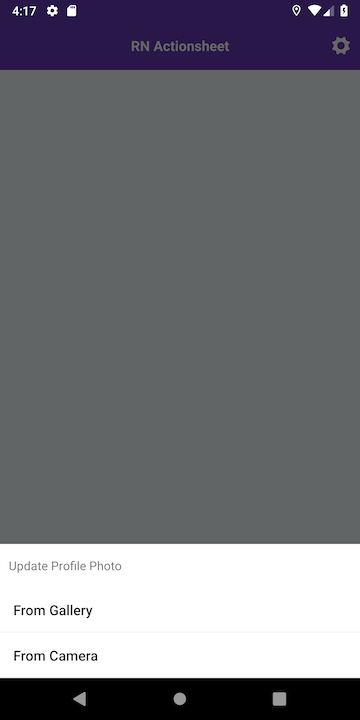
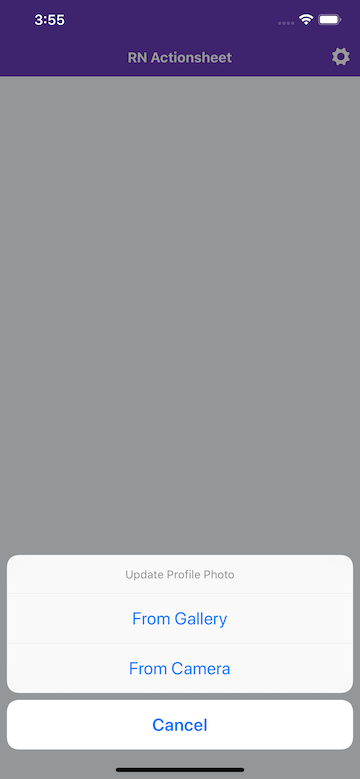
This package will help you to using ActionSheetIOS(IOS) and BottomSheetDialog(Android).
Usage of this package same as for IOS and Android. Also this package usage same as [ActionSheetIOS](https://facebook.github.io/react-native/docs/actionsheetios)
Using [`ActionSheetIOS`](https://facebook.github.io/react-native/docs/actionsheetios) component for IOS and using `RecyclerView` and `BottomSheetDialog` for Android as `NativeModule`.
 ### Version 1.0.4
- `tintColor` added for Android
- `backgroundColor` added for Android
## Getting Started
**With NPM**
```
npm install --save rn-actionsheet-module
```
**With YARN**
```
yarn add rn-actionsheet-module
```
#### After React Native v0.60 you don't need to link anything. [Native Modules are now Autolinked](https://facebook.github.io/react-native/blog/2019/07/03/version-60#native-modules-are-now-autolinked)
**Automatic linking**
```
react-native link rn-actionsheet-module
```
**Manual Linking**
**[Manual Installation](/docs/manual-installation.md)** (If something went wrong with react-native link)
## Props
| Props | Type | Required | OS |
|------------------------|------|----------|--------------|
| optionsIOS |array |**Yes** | IOS |
| optionsAndroid |array |**Yes** | Android |
| title |string|**Yes** | Android, IOS |
| message |string|No | IOS |
| tintColor |string|No | IOS, Android |
| backgroundColor |string|No | Android |
| destructiveButtonIndex |number|No | IOS |
| cancelButtonIndex |number|No | IOS |
| onCancelAndroidIndex |number|**Yes** | Android |
##### With v0.2.0
_Android doesn't need any cancel option but back button or outside click will return `onCancelAndroidIndex`_
## Usage
```javascript
import ActionSheet from 'rn-actionsheet-module'
{
ActionSheet(
{
title : "Lorem ipsum",
optionsIOS : ["Cancel", "From Gallery", "From Camera"],
optionsAndroid : ["From Gallery", "From Camera"],
destructiveButtonIndex: null, // undefined // 1, 2, etc.,
cancelButtonIndex : 0, //
onCancelAndroidIndex: 3 // android doesn't need any cancel option but back button or outside click will return onCancelAndroidIndex
}, (index) => {
switch (index) {
case Platform.OS === "ios" ? 1 : 0 :{
alert("From Camera clicked")
}
case Platform.OS === "ios" ? 2 : 1 :{
alert("From Camera clicked")
}
case Platform.OS === "ios" ? 0 : 3 :{
alert("onCancel")
}
default:{
alert("Default")
}
}
}
)
}}>
Show ActionSheet
```
## FYI
You can use more than one ActionSheet in same screen.
## License
This project is licensed under the MIT License - see the [LICENSE.md](./LICENSE.md) file for details
### Version 1.0.4
- `tintColor` added for Android
- `backgroundColor` added for Android
## Getting Started
**With NPM**
```
npm install --save rn-actionsheet-module
```
**With YARN**
```
yarn add rn-actionsheet-module
```
#### After React Native v0.60 you don't need to link anything. [Native Modules are now Autolinked](https://facebook.github.io/react-native/blog/2019/07/03/version-60#native-modules-are-now-autolinked)
**Automatic linking**
```
react-native link rn-actionsheet-module
```
**Manual Linking**
**[Manual Installation](/docs/manual-installation.md)** (If something went wrong with react-native link)
## Props
| Props | Type | Required | OS |
|------------------------|------|----------|--------------|
| optionsIOS |array |**Yes** | IOS |
| optionsAndroid |array |**Yes** | Android |
| title |string|**Yes** | Android, IOS |
| message |string|No | IOS |
| tintColor |string|No | IOS, Android |
| backgroundColor |string|No | Android |
| destructiveButtonIndex |number|No | IOS |
| cancelButtonIndex |number|No | IOS |
| onCancelAndroidIndex |number|**Yes** | Android |
##### With v0.2.0
_Android doesn't need any cancel option but back button or outside click will return `onCancelAndroidIndex`_
## Usage
```javascript
import ActionSheet from 'rn-actionsheet-module'
{
ActionSheet(
{
title : "Lorem ipsum",
optionsIOS : ["Cancel", "From Gallery", "From Camera"],
optionsAndroid : ["From Gallery", "From Camera"],
destructiveButtonIndex: null, // undefined // 1, 2, etc.,
cancelButtonIndex : 0, //
onCancelAndroidIndex: 3 // android doesn't need any cancel option but back button or outside click will return onCancelAndroidIndex
}, (index) => {
switch (index) {
case Platform.OS === "ios" ? 1 : 0 :{
alert("From Camera clicked")
}
case Platform.OS === "ios" ? 2 : 1 :{
alert("From Camera clicked")
}
case Platform.OS === "ios" ? 0 : 3 :{
alert("onCancel")
}
default:{
alert("Default")
}
}
}
)
}}>
Show ActionSheet
```
## FYI
You can use more than one ActionSheet in same screen.
## License
This project is licensed under the MIT License - see the [LICENSE.md](./LICENSE.md) file for details