# rn-gnavigator

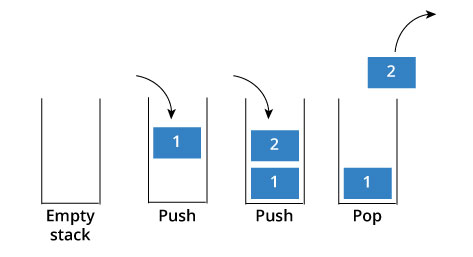
This is the normal Stack Navigator it is work like a Stack
 ## install cmd:
npm install rn-gnavigator
## Props:
| Props | Type | default | Discription |
|--|--|--|--|
| initialScreen | React Component | | set the initial Screen to the Stack |
| initialParam | Any | emty string | it sets the initial param |
| initialScreenBackHandler | function | exitApp() | called when we click backbutton on initial screen |
| transitionDirection | horizontal, vertical, normal | horizontal | it desides the transiton direction |
| transitionDuration | number in ms | 200 | it desides the transition duration |
| transition | none, fade | none | to add fading animations |
| type | normal, auth | normal | making login type screens or normal stack |
| loginScreen | React Component | | here give Login Screen Component |
| homeScreen | React Component | | here you can give home or dashboard component |
| loginParam | any | emty string | initial param for login ie. Home Screen |
| logoutParam | any | emty string | initial param for logut ie. Login Screen |
## Methods:
There are two components are here
// Here you can push screen
this.props.push({ Screen: Screen, param: data }); // Here the screen is the React Component
// Here you can pop screen
this.props.pop();
// Here you can restart with initial screen
this.props.restart();
// Here you can restart with Home or Dashboard screen
this.props.login();
// Here you can restart with Login screen
this.props.logout();
// Here you can manage common state of Stack
this.props.setState({ some: 'some' }); // Here same like setState method
this methods are send to all the screens via props
## Data:
this.props.pushedData // has the sended data to this 2nd screen
this.props.state // common state for all the screen
this will get the data send from previous screen with push() method.
## Usage:
import React from 'react';
import { View, Text } from 'react-native';
import { Stack } from 'rn-gnavigator';
class Test extends React.Component {
render() {
return
this.props.push(TestPage)}>
Go to Test Page
;
}
}
class TestPage extends React.Component {
render() {
return
this.props.pop()}>
Go back to Test
;
}
}
export default App extends React.Component {
render() {
return ;
}
}
# TekNik GG
This is a YouTube Channel for react-native exclusively
Please Support Our Channel
and [Click here](https://www.youtube.com/teknikgg?sub_confirmation=1) to SUBSCRIBE
### [website](http://teknikgg.ga)
## Learn Somthing...
## Happy Coding...
# : )
## install cmd:
npm install rn-gnavigator
## Props:
| Props | Type | default | Discription |
|--|--|--|--|
| initialScreen | React Component | | set the initial Screen to the Stack |
| initialParam | Any | emty string | it sets the initial param |
| initialScreenBackHandler | function | exitApp() | called when we click backbutton on initial screen |
| transitionDirection | horizontal, vertical, normal | horizontal | it desides the transiton direction |
| transitionDuration | number in ms | 200 | it desides the transition duration |
| transition | none, fade | none | to add fading animations |
| type | normal, auth | normal | making login type screens or normal stack |
| loginScreen | React Component | | here give Login Screen Component |
| homeScreen | React Component | | here you can give home or dashboard component |
| loginParam | any | emty string | initial param for login ie. Home Screen |
| logoutParam | any | emty string | initial param for logut ie. Login Screen |
## Methods:
There are two components are here
// Here you can push screen
this.props.push({ Screen: Screen, param: data }); // Here the screen is the React Component
// Here you can pop screen
this.props.pop();
// Here you can restart with initial screen
this.props.restart();
// Here you can restart with Home or Dashboard screen
this.props.login();
// Here you can restart with Login screen
this.props.logout();
// Here you can manage common state of Stack
this.props.setState({ some: 'some' }); // Here same like setState method
this methods are send to all the screens via props
## Data:
this.props.pushedData // has the sended data to this 2nd screen
this.props.state // common state for all the screen
this will get the data send from previous screen with push() method.
## Usage:
import React from 'react';
import { View, Text } from 'react-native';
import { Stack } from 'rn-gnavigator';
class Test extends React.Component {
render() {
return
this.props.push(TestPage)}>
Go to Test Page
;
}
}
class TestPage extends React.Component {
render() {
return
this.props.pop()}>
Go back to Test
;
}
}
export default App extends React.Component {
render() {
return ;
}
}
# TekNik GG
This is a YouTube Channel for react-native exclusively
Please Support Our Channel
and [Click here](https://www.youtube.com/teknikgg?sub_confirmation=1) to SUBSCRIBE
### [website](http://teknikgg.ga)
## Learn Somthing...
## Happy Coding...
# : )