# 🍞 rn-toastify
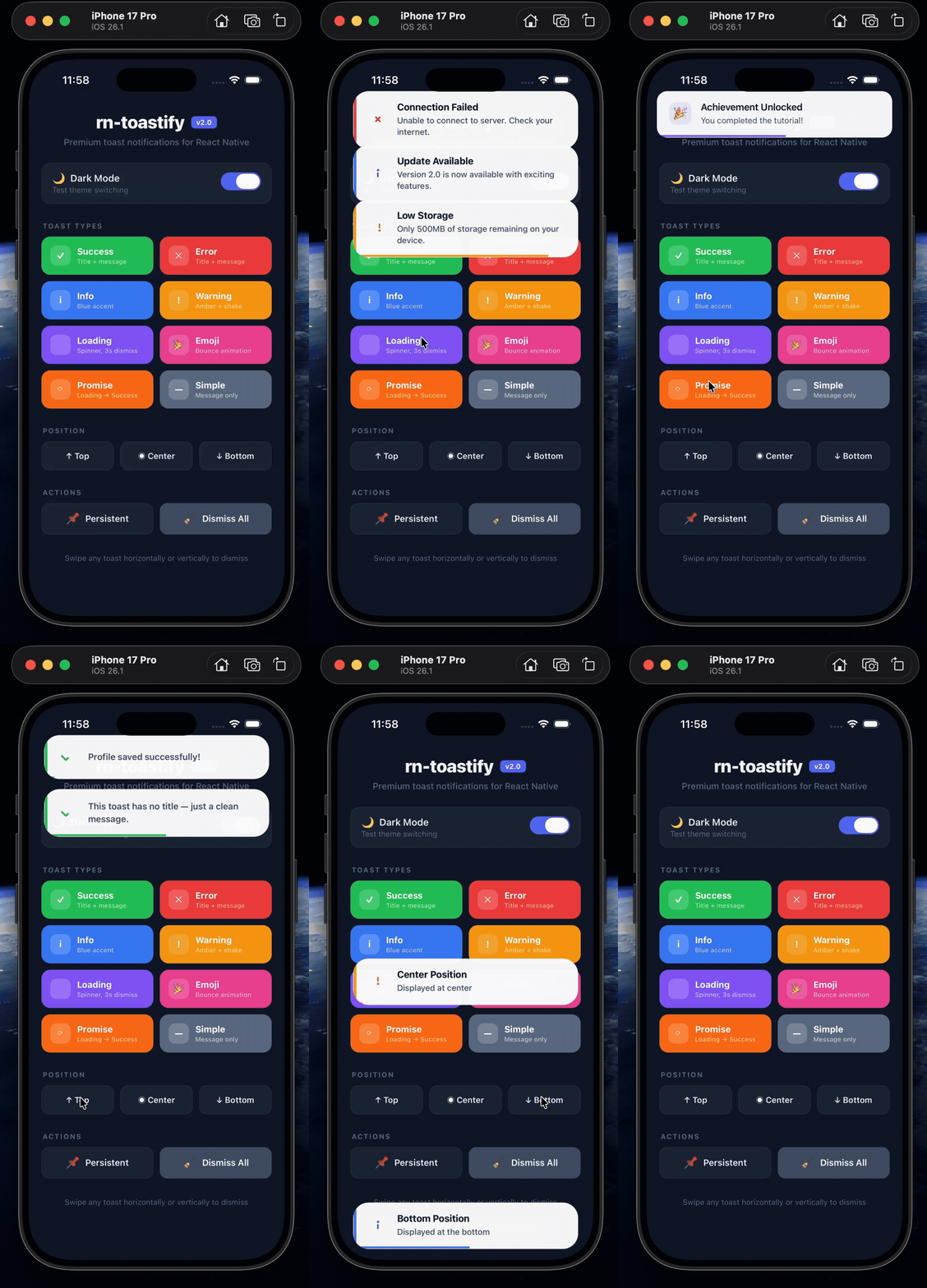
A professional, production-ready toast notification library for React Native.
Featuring a premium floating pill design, glassmorphic backgrounds, smooth spring animations, swipe-to-dismiss gestures, and seamless queue management.



---
## ✨ What's New in v2: The Premium Redesign
We completely overhauled rn-toastify to feel like a **native, premium OS feature** rather than a basic third-party library.
- 💎 **Ultra-Premium Design**: Compact "floating pill" layout with soft, multi-layered drop shadows.
- 🪞 **Glassmorphism**: Semi-transparent backgrounds that beautifully blend with your app's content in both light and dark modes.
- 🎨 **Edge Accents**: Elegant left-edge color indicators for Success, Error, Info, and Warning states.
- 🌊 **Fluid Physics**: Powered by `react-native-reanimated` for 60fps spring animations and interactive pan gestures.
- 📦 **Zero Asset Bloat**: Completely removed Lottie dependencies. All icons are now built-in, lightweight animated components.
---
## 🚀 Core Features
| Feature | Description |
|---------|-------------|
| 🎨 **6 Built-in Types** | Success, Error, Info, Warning, Loading, Emoji, plus full Custom support. |
| 👆 **Interactive Swipes** | Swipe horizontally or vertically to intuitively dismiss alerts. |
| 📊 **Progress Bar** | Animated, flush-to-bottom countdown indicator for auto-dismissal. |
| 🎭 **System Theme** | Automatically adapts to Light/Dark mode, or can be forced via props. |
| 📚 **Smart Queue** | Set a `maxVisible` limit; excess toasts automatically queue up. |
| ⏳ **Promise API** | Elegant loading → success/error state management for async tasks. |
| ⌨️ **Keyboard Aware** | Bottom toasts intelligently shift up when the keyboard appears. |
| 🔷 **TypeScript** | Built with TS for full type safety and autocompletion. |
---
## 📦 Installation
```bash
npm install rn-toastify
```
```bash
yarn add rn-toastify
```
### Required Peer Dependency
This library relies on the amazing `react-native-reanimated` for 60fps performance.
```bash
npm install react-native-reanimated
```
> **Note:** Follow the [Reanimated installation guide](https://docs.swmansion.com/react-native-reanimated/docs/fundamentals/getting-started/) and add the Babel plugin to your `babel.config.js`.
For iOS, don't forget to install pods:
```bash
cd ios && pod install
```
---
## 🏁 Quick Start
### Step 1: Mount the Container
Add `ToastContainer` at the very root of your app structure (e.g., in `App.js` or your main navigation wrapper).
```jsx
import React from 'react';
import { NavigationContainer } from '@react-navigation/native';
import { ToastContainer } from 'rn-toastify';
export default function App() {
return (
<>
{/* Mount it once at the top level */}
);
}
```
### Step 2: Show Toasts Anywhere!
Use the `useToast` hook inside any of your functional components.
```jsx
import React from 'react';
import { View, TouchableOpacity, Text } from 'react-native';
import useToast from 'rn-toastify';
export default function ProfileScreen() {
const toast = useToast();
const handleSave = () => {
toast.success('Your profile changes have been saved.', {
title: 'Success!',
duration: 3500,
});
};
return (
Save Profile
);
}
```
---
## 📖 API Reference
### The `useToast()` Hook
| Method | Returns | Description |
|--------|---------|-------------|
| `success(message, options?)` | `string` (id) | Show a green success toast |
| `error(message, options?)` | `string` (id) | Show a red error toast |
| `info(message, options?)` | `string` (id) | Show a blue info toast |
| `warning(message, options?)` | `string` (id) | Show an amber warning toast |
| `emoji(message, emoji, options?)` | `string` (id) | Show a toast with a custom emoji |
| `custom(content, options?)` | `string` (id) | Render entirely custom React nodes |
| `promise(promise, messages, options?)` | `Promise` | Automatically handle async states |
| `dismiss(id)` | `void` | Dismiss a specific toast |
| `dismissAll()` | `void` | Clear the screen of all toasts |
### Toast Options
Pass these options as the second argument to customize individual toasts:
| Option | Type | Default | Description |
|--------|------|---------|-------------|
| `title` | `string` | `undefined` | Bold title text displayed above the message |
| `duration` | `number` | `3000` | Delay in ms before auto-dismissing. Use `Infinity` to disable. |
| `position` | `'top' \| 'bottom' \| 'center'` | `'top'` | Screen positioning |
---
## 🌟 Beautiful Examples
### Promise Handling (Async Tasks)
Let rn-toastify handle your loading, success, and error states automatically:
```jsx
const updateProfile = fetch('/api/user', { method: 'PUT', body: data });
toast.promise(updateProfile, {
loading: 'Saving your changes...',
success: 'Changes saved successfully!',
error: 'Failed to save. Please try again.',
});
```
### Dynamic Promise Messages
You can pass functions to dynamically render the success/error messages based on the response:
```jsx
toast.promise(fetchUserData(), {
loading: 'Loading profile...',
success: (user) => `Welcome back, ${user.firstName}!`,
error: (err) => `Error: ${err.message}`,
});
```
### Persistent Toasts
Want a toast that never goes away until the user interacts with it?
```jsx
const id = toast.warning('Please verify your email address.', {
title: 'Action Required',
duration: Infinity,
});
// Dismiss it later via code
toast.dismiss(id);
```
---
## 🛠 ToastContainer Props
Customize global settings on the ``:
| Prop | Type | Default | Description |
|------|------|---------|-------------|
| `theme` | `'light' \| 'dark'` | system | Force a specific theme instead of following OS |
| `maxVisible` | `number` | `3` | Max number of toasts on screen (excess are queued) |
| `defaultPosition` | `'top' \| 'bottom' \| 'center'` | `'top'` | Default positioning for all toasts |
| `topOffset` | `number` | `0` | Extra padding from the top edge |
| `bottomOffset` | `number` | `0` | Extra padding from the bottom edge |
---
## 🤝 Contributing
Contributions, issues, and feature requests are welcome!
Feel free to check the [issues page](https://github.com/muku534/react-native-toast/issues).
## 📜 License
This project is [MIT](./LICENSE) licensed.
---
Crafted with ❤️ by Mukesh Prajapati