[](https://github.com/wesleytabaka/rpi-led-matrix-painter/actions/workflows/build.yml)
# About rpi-led-matrix-painter
Add drawing facilities to the excellent alexeden/rpi-led-matrix. Takes a declarative approach to drawing on the matrix. Manage sections of the board independently, draw shapes, text, images, and some simple effects.
# Example
Check out wesleytabaka/rpi-led-matrix-painter-example for a working example of the library.
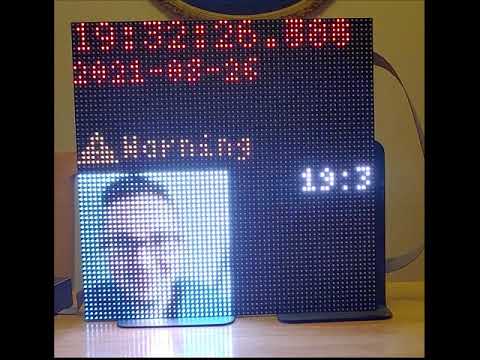
View on YouTube
# Installation
Install with npm using:
```bash
npm i rpi-led-matrix-painter --save
```
# API Overview
Import into your app using:
```typescript
import * as Board from "rpi-led-matrix-painter";
```
"Board" will contain the following TS modules:
- Painter (Class)
- This is the main class that controls drawing the PaintingInstructions and driving Effects. You'll have one instance of Painter that you'll need to access to do everything.
- Canvas (Class)
- Represents the entire LED matrix and consists of one or more CanvasSections that you define.
- CanvasSection (Class)
- A section of the board defined by x, y, width, height, and layer.
- DrawMode (Enum)
- Use in your PaintingInstruction to switch DrawModes. e.g., CIRCLE, RECTANGLE, POLYGON, TEXT, etc.
- DrawModeOption (Interface)
- Interface with properties fill?: boolean, font?: string, fontPath?: string, effects?: Effect[]
- Effect (Interface)
- Interface with properties effectType: EffectType, effectOptions: EffectOptions
- EffectOptions (Interface)
- Consists of the "rate" property for the speed of the effect.
- EffectType (Enum)
- One of: SCROLLLEFT, SCROLLRIGHT, SCROLLUP, SCROLLDOWN, BLINK, PULSE. Others are defined but not implemented.
- PaintingInstruction (Interface)
- List of properties defining what to draw and how to draw it.
- Point (Interface)
- Defines a point on the CanvasSection relative to the CanvasSection.
- RpiLedMatrix (Module -- re-export of [wesleytabaka/rpi-led-matrix](https://github.com/wesleytabaka/rpi-led-matrix) which itself is forked off of [alexeden/rpi-led-matrix](https://github.com/alexeden/rpi-led-matrix))
# API Detail
Here is the public API.
To get started, create a new Painter instance:
```typescript
import * as Board from "rpi-led-matrix-painter";
export class MyClass {
private mypainter = new Board.Painter(
{
...Board.RpiLedMatrix.LedMatrix.defaultMatrixOptions(),
rows: 32, // LED rows per panel
cols: 64, // LED columns per panel
chainLength: 2 // Number of panels chained together
},
{
...Board.RpiLedMatrix.LedMatrix.defaultRuntimeOptions()
}
);
}
```
To create a CanvasSection the full size of both panels, assuming they're laid out next to each other horizontally...
```typescript
this.mypainter.getCanvas().addCanvasSection(new Board.CanvasSection("mycanvassection", 0, 0, 1, 128, 32, [], true));
```
To set the new CanvasSection, mycanvassection to read something like "Hello, world!"...
```typescript
this.mypainter.getCanvas().getCanvasSection("mycanvassection")?.setRepresentation([
{
id: "helloworld",
drawMode: Board.DrawMode.TEXT,
color: 0x800000,
drawModeOptions: {font: "5x7", fontPath: "/home/pi/code/rpi-led-matrix-painter-test/fonts/5x7.bdf"},
points: {x: 0, y:0, z: 1},
text: "Hello, world!",
layer: 1
}
]);
```
The CanvasSection.setRepresentation() method takes an array of PaintingInstruction. The format of this can vary depending on the drawMode. For example, when using a DrawMode of LINE, the "points" property should be an array of Point. When using a DrawMode of TEXT, the "points" property should be one Point. The properties "id", "drawMode", and "color" are all required all of the time.
When you're ready to draw to the Canvas, call paint() on the Painter object...
```typescript
this.mypainter.paint();
```
That's it! Below is the public API spec.
## Painter (Class)
- constructor(matrixOptions: Board.RpiLedMatrix.MatrixOptions, runtimeOptions: Board.RpiLedMatrix.RuntimeOptions)
- resetClock(): void
- clear(): void
- getCanvas(): Canvas
- getFontInstance(name: string, path: string): Board.RpiLedMatrix.FontInstance
- getImageInstance(imagePath: string): Promise<Image>
- paint(): void
## Canvas (Class)
- constructor(matrixOptions: matrix.MatrixOptions, runtimeOptions: matrix.RuntimeOptions)
- getCanvasSections(): CanvasSection[]
- getCanvasSection(name: string): CanvasSection | undefined
- setCanvasSection(name: string, paintingInstructions: PaintingInstruction[]): void
- addCanvasSection(canvasSection: CanvasSection): void
- removeCanvasSection(canvasSectionName: string): void
- setCanvas(canvasSections: CanvasSectionSettings[]): void
## CanvasSection (Class)
- constructor(name: string, x: number, y: number, z: number, width: number, height: number, representation?: PaintingInstruction[], overflow?: boolean)
- get(): CanvasSection
- setRepresentation(paintingInstructions: PaintingInstruction[]): void
## DrawMode (Enum)
- POLYGON
- PaintingInstruction.points: Point[]
- RECTANGLE
- PaintingInstruction.points: Point
- CIRCLE
- PaintingInstruction.points: Point
- ELLIPSE
- PaintingInstruction.points: Point
- PIXEL
- PaintingInstruction.points: Point[]
- TEXT
- PaintingInstruction.points: Point
- IMAGE
- PaintingInstruction.points: Point
- BUFFER
- PaintingInstruction.points: Point
- LINE
- PaintingInstruction.points: Point[]
## DrawModeOption (Interface)
```typescript
interface DrawModeOption {
fill?: boolean,
font?: string,
fontPath?: string,
effects?: Effect[]
}
```
## Effect (Interface)
```typescript
interface Effect {
effectType: EffectType
effectOptions: EffectOptions;
}
```
## EffectOptions (Interface)
```typescript
interface EffectOptions {
rate: number // Expresses pixels per repaint.
}
```
## EffectType (Enum)
- BLINK
- PULSE
- FADETOBLACK
- FADEUP
- ROTATECLOCKWISE
- ROTATEANTICLOCKWISE
- SCROLLLEFT
- SCROLLRIGHT
- SCROLLUP
- SCROLLDOWN
## PaintingInstruction (Interface)
```typescript
interface PaintingInstruction {
id: string,
drawMode: DrawMode,
points: Point | Point[],
color: number,
layer: number,
drawModeOptions?: DrawModeOption,
width?: number,
height?: number,
text?: string,
imagePath?: string,
buffer?: Buffer
}
```
## Point (Interface)
```typescript
interface Point {
x: number,
y: number,
z: number
}
```
## RpiLedMatrix (Module)
This is a re-export of [wesleytabaka/rpi-led-matrix](https://github.com/wesleytabaka/rpi-led-matrix) which is forked off of [alexeden/rpi-led-matrix](https://github.com/alexeden/rpi-led-matrix). My fork just adds the filled shapes functionality.
# Issues and Contributing
For bugs or feature requests create an issue and tag it accordingly.
To contribute, fork and create a Pull Request.