# safari-ctl - Command Line Tool To Control Safari for MacOS
A Command Line Tool to Control Safari for MacOS. (Browsing/FillingForm/GetSetCopyURL/JavascriptInjection/GetTitle/Search)
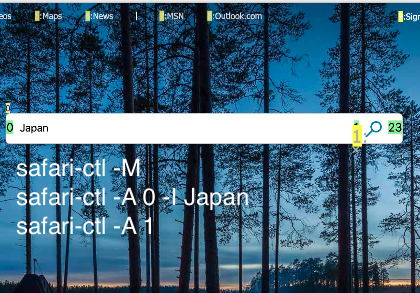
- [Documentation(npmjs)](https://www.npmjs.com/safari-ctl)
- [Bug Report(GitHub)](https://github.com/kssfilo/safari-ctl)
- [Home Page](https://kanasys.com/gtech/)
```
### Get current URL on Safari
$ safari-ctl
https://github.com
### Copy current URL on Safari to the clipboard
$ safari-ctl -s
### Navigating by command line
$ safari-ctl -m
# marks all with numbers
$ safari-ctl -a 32
# click 32'th
$ safari-ctl -b
# history back
### Filing form
$ safari-ctl -M
# marks all with numbers
$ safari-ctl -A 0 -I 'Japan'
# Fill 0th input with 'Japan'
$ safari-ctl -A 1
# click 1st input button
### Javascript Injection
$ safari-ctl -j 'document.getElementById("sb_form_q").value="Japan"'
Japan
```
## Install
npm i -g safari-ctl
You must enable the 'Allow JavaScript from Apple Events' option in Safari's Develop menu to use some features.
## Command line
safari-ctl [options]
A Command Line Tool to control Safari for MacOS. (Browsing/FillingForm/GetSetCopyURL/JavascriptInjection/GetTitle/Search)
Copyright (C) 2019-2019 @kssfilo(https://kanasys.com/gtech/)
## Prepare
(*)You must enable the 'Allow JavaScript from Apple Events' option in Safari's Develop menu to use some features.
## Options
- h show this help
- ?
- d debug mode
- p print current Safari's URL(default)
- t print current Safari's title
- g print selected string on current Safari's tab
- c copy current Safari's URL into the clipboard
- s set to Safari's active tab
- S same as -s but set focus to Safari
- q search to Safari's active tab
- Q same as -q but set focus to Safari
- m marks all link with number to click by next -a command(*)
- a click link. you can know link number by -m command(*)
- M marks all with number to click/set by next -A command(*)
- A click input. you can know input number by -M command(*)
- I works with -A, Input instead of click. for filling form(*)
- b history back(*)
- f history forward(*)
- n scroll to next page(*)
- N scroll to previous page (*)
- j run on active tab(*)
- J same as s but set focus to Safari(*)
## Examples
### Get current URL on Safari
$ safari-ctl
https://github.com
### Copy current URL on Safari to the clipboard
$ safari-ctl -s
### Open specified URL on Safari
$ safari-ctl -s 'http://github.com'
# withoug focus
$ safari-ctl -S 'github.com'
# with focus(omiting scheme->appends https://)
### Gets window title
$ safari-ctl -t
### Navigating by command line
$ safari-ctl -m
# marks all with numbers
$ safari-ctl -a 32
# click 32'th
$ safari-ctl -b
# history back
$ safari-ctl -M
# marks all with numbers
$ safari-ctl -A 0 -I 'Japan'
# Fill 0th input with 'Japan'
$ safari-ctl -A 1
# click 1st input button
### Searchs Bing with word "Japan" (JavaScript injection)
$ safari-ctl -s 'https://bing.com'
$ safari-ctl -j 'document.getElementById("sb_form_q").value="Japan";document.getElementById("sb_form_go").click()'
### Print string in Bing search form
$ safari-ctl -j 'document.getElementById("sb_form_q").value'
Japan
## Change Log
- 0.1.x: beta release
- 0.2.0: suppress result at anchor click/history forward/scroll
## Idea
- marking buttons