#  I18n fields
An alternative way to manage localization at field level in your Sanity Studio.
I18n fields
An alternative way to manage localization at field level in your Sanity Studio.

- [⚡️ Features](#%EF%B8%8F-features)
- [🔌 Installation](#-installation)
- [🧑💻 Usage](#-usage)
- [⚙️ Plugin Configuration](#%EF%B8%8F-plugin-configuration)
- [🔧 Field Configuration](#-field-configuration)
- [🗃️ Data Model](#%EF%B8%8F-data-model)
- [🚨 Validation](#-validation)
- [🤩 Examples Examples Examples](#-examples-examples-examples)
- [👀 Future features](#-future-features)
- [📝 License](#-license)
- [🧪 Develop & test](#-develop--test)
## ⚡️ Features
- Sanity v3 plugin.
- Field-level localization for the following Sanity types: `string`, `text`, and `number`.
- Optional UI (slider or dropdown).
- Locale visibility by user roles.
- Locale read-only by user roles.
- Object Validation.
- Customization available also at field level.
- Customizable types prefix.
## 🔌 Installation
```sh
npm install sanity-plugin-i18n-fields
```
## 🧑💻 Usage
Add it as a plugin in `sanity.config.ts` (or .js):
```ts
import {defineConfig} from 'sanity'
import {I18nFields} from 'sanity-plugin-i18n-fields'
export default defineConfig({
//...
plugins: [I18nFields({
// your configuration here
})],
})
```
The plugin will provide three new types: `i18n.string`, `i18n.text`, and `i18n.number`. All three types will be objects with a dynamic number of fields based on the localizations provided during configuration.
## ⚙️ Plugin Configuration
This is the main configuration of the plugin, and the available options are as follows:
```ts
{
prefix?: string // You can configure the prefix of the types created by the plugin. If you are already using them or prefer a different name for any reason, you can change it. The default is 'i18n'.
// The 'ui' option allows you to customize the appearance of the plugin's UI. By default, it is set to 'slider'.
ui?: {
type?: 'slider' | 'dropdown' // The UI of the plugin, Default is 'slider'
position?: 'top' | 'bottom' // You can specify the position of the 'slider' above or below the input field, with the default being 'bottom'.
selected?: 'border' | 'background' // For the 'slider' type, you can configure the UI of the selected locale, and the default setting is 'border'.
},
// The 'locales' option is the core of the configuration, enabling you to set up all available locales for your project.
locales: [
{
code: string // the code of the locale
label: ReactNode | ComponentType // the label of the locale
title: string // the title of the locale
default?: boolean // This is the flag to identify the default locale. If set to true, the locale is placed in the first position.
visibleFor?: string[] // You can define a list of roles for which this locale is visible. By using the '!' operator, you can make it not visible.
editableFor?: string[] // You can define a list of roles for which this locale is editable. The '!' operator allows you to specify the opposite condition.
},
// other locales
]
}
```
Sample configuration:
```ts
import {defineConfig} from 'sanity'
import {I18nFields} from 'sanity-plugin-i18n-fields'
export default defineConfig({
//...
plugins: [I18nFields({
ui: {
position: 'bottom'
},
locales: [
{code: 'en', label: '🇬🇧', title: 'English', default: true},
{code: 'en_us', label: '🇺🇸🇬🇧', title: 'American English'},
{code: 'it', label: '🇮🇹', title: 'Italian', visibleFor: ['it_editor']}, // country visible only for administrator and it_editor roles
{code: 'es', label: '🇪🇸', title: 'Spanish'},
]
})],
})
```
## 🔧 Field Configuration
Other than global configuration, you can customize your configuration at field level. For example, for a specific field, you can have a dropdown layout or hide a particular locale.
```ts
import {ConditionalProperty, NumberOptions, StringOptions} from 'sanity'
export default defineType({
type: 'document',
name: 'myDocument',
title: 'My Document',
fields: [
defineField({
type: 'i18n.string' | 'i18n.text' | 'i18n.number',
// ...
options: {
ui?: {
type?: 'slider' | 'dropdown'
position?: 'top' | 'bottom'
selected?: 'border' | 'background'
},
locales?: [
{
code: string // the code of the locale. MUST be the same as the one used in the global configuration.
readOnly?: ConditionalProperty
hidden?: ConditionalProperty
options?: StringOptions | { rows?:number } | NumberOptions
visibleFor?: string[] // same as global configuration
editableFor?: string[] // same as global configuration
},
// other locales
]
}
})
]
})
```
## 🗃️ Data model
```ts
// sample with 'en', 'en_us', 'it' and 'es' locales
{
_type: 'i18n.string',
en: string,
en_us: string,
it: string,
es: string,
}
{
_type: 'i18n.text',
en: string,
en_us: string,
it: string,
es: string,
}
{
_type: 'i18n.number',
en: number,
en_us: number,
it: number,
es: number,
}
```
## 🚨 Validation
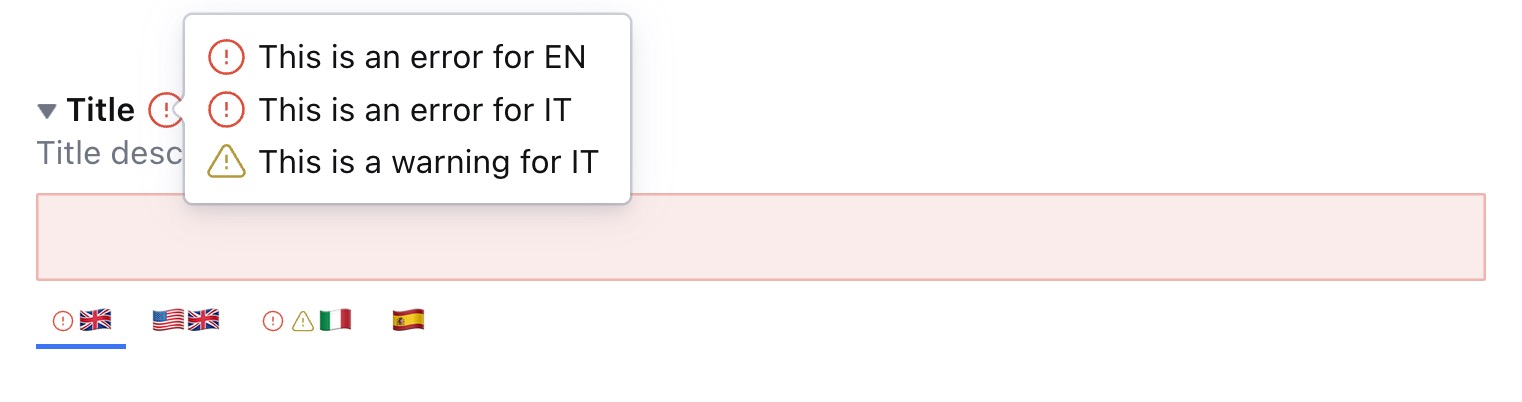
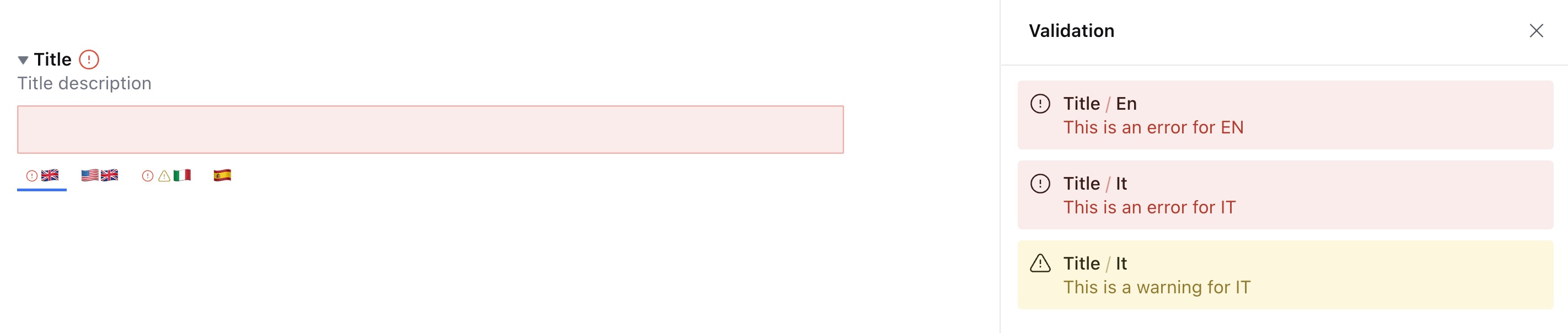
Since the new types introduced by the plugin are objects, you can use [children validation](https://www.sanity.io/docs/validation#9e69d5db6f72) to apply specific validation to a particular locale.
All error/warning messages are then collected and visible near the title of your field or in the right menu.
## 🤩 Examples Examples Examples
- [Basic Configuration](docs/examples/basic-configuration.md)
- [Global user roles visibility](docs/examples/global-user-roles-visibility.md)
- [String field](docs/examples/string-field.md)
- [Text field](docs/examples/text-field.md)
- [Number field](docs/examples/number-field.md)
- [Slider top position](docs/examples/slider-top-position.md)
- [Slider with background option](docs/examples/slider-with-background-ui-option.md)
- [Dropdown UI](docs/examples/dropdown-ui.md)
- [Multiple UI on different fields](docs/examples/multiple-ui-on-different-fields.md)
- [Hide specific locale for a single field](docs/examples/hide-specific-locale-for-a-single-field.md)
- [Locale not editable for a specific field](docs/examples/locale-not-editable-for-a-specific-field.md)
- [Conditionally set a locale visible or not editable](docs/examples/conditionally-set-a-locale-visible-or-not-editable.md)
- [List of values](docs/examples/list-of-values.md)
- [Custom rows for i18n.text](docs/examples//custom-rows-for-i18ntext.md)
- [Global validation](docs/examples/global-validation.md)
- [Children validation](docs/examples/children-validation.md)
- [Alternative locale label](docs/examples/alternative-locale-label.md)
- [Alternative locale label 2](docs/examples//alternative-locale-label-2.md)
- [Customized prefix](docs/examples//customized-prefix.md)
## 👀 Future features
- New Sanity default types (boolean, date...)
- Filters
- Show all locales without slider/dropdown
- Show only fulfilled translations
- Show only empty translations
- AI integration? 🤔
- ...
> While writing this documentation, I realized that with the 'prefix' option, you can define the plugin multiple times with different prefixes.
>
> Codes and Labels are customizable, and this plugin could be used for other use cases, not only for internationalization.
>
> So, perhaps the name 'I18N Fields' is already outdated? 😅 Should I find a different name? Any suggestions? 😂
## 📝 License
[MIT](LICENSE) © William Iommi
## 🧪 Develop & test
This plugin uses [@sanity/plugin-kit](https://github.com/sanity-io/plugin-kit)
with default configuration for build & watch scripts.
See [Testing a plugin in Sanity Studio](https://github.com/sanity-io/plugin-kit#testing-a-plugin-in-sanity-studio)
on how to run this plugin with hotreload in the studio.
### Release new version
Run ["CI & Release" workflow](https://github.com/williamiommi/sanity-plugin-i18n-fields/actions/workflows/main.yml).
Make sure to select the main branch and check "Release new version".
Semantic release will only release on configured branches, so it is safe to run release on any branch.