# sc-voice
Javascript implemenation of SuttaCentral Voice Assistance (SC-Voice) for vision-impaired. Includes:
* TTS adapter for [Amazon AWS Polly Text-to-Speech](https://aws.amazon.com/polly/)
* romanized search for Pali terms (e.g., Mulapariyayasutta vs. Mūlapariyāyasutta)
* integration with SuttaCentral [bilara-data](https://github.com/suttacentral/bilara-data)
### Prerequisites
* Linux Debian 10 or Ubuntu 20.04
* Nodejs 14.x
* AWS Polly account (required)
### Installation
With a Linux console, install the software:
```
git clone https://github.com/sc-voice/sc-voice.git
cd sc-voice
```
Initialization requires super user access for your computer and you will
be asked to enter your computer superuser password.
```
./scripts/init.sh
```
Now update the content but do not reboot (i.e., Respond with no when asked to reboot)
```
./scripts/update-latest
```
As part of installation you will need to configure the AWS Polly TTS service adapter.
##### Configure Amazon AWS Polly
The [Amazon AWS Polly Text-to-Speech](https://aws.amazon.com/polly/) service can be used to convert sutta text to speech.
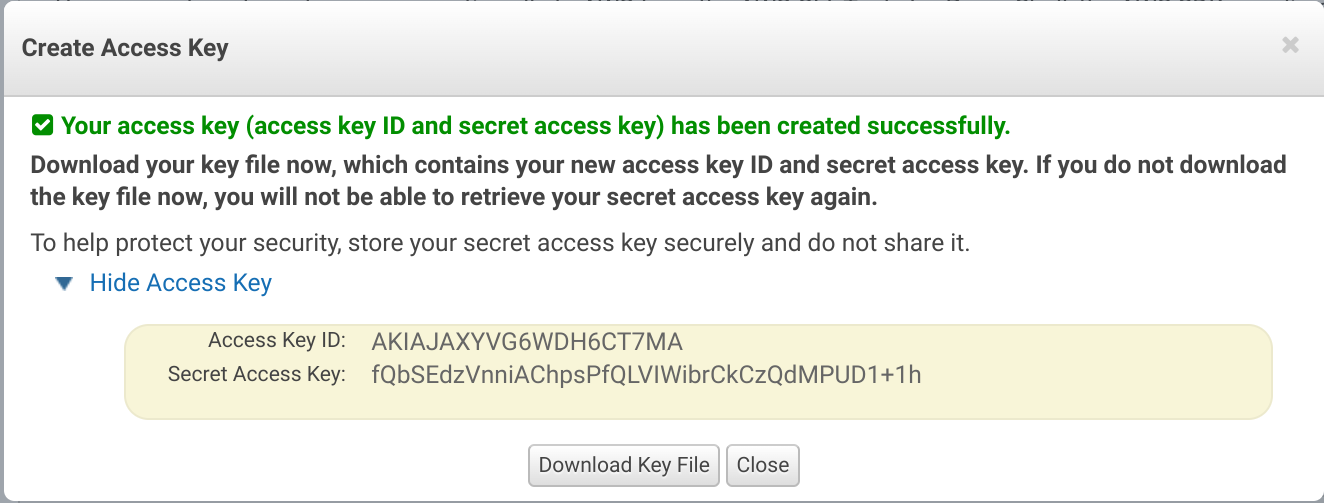
To enable AWS Polly, you will need to [configure your credentials](https://docs.aws.amazon.com/sdk-for-javascript/v2/developer-guide/getting-started-nodejs.html#getting-started-nodejs-credentials)
Login to your AWS account and go to the IAM dashboard|Delete your root access keys|Manage Security Credentials|Access Keys...|Create New Access Key
 ```
aws configure
```
##### Launch localhost server
```
npm start
```
Open up localhost in your local browser and you will see Voice.
When you are done with voice, type CTRL-C in the terminal.
### Unit tests
```
npm run test
```
Unit tests take about 2 minutes.
The unit tests require AWS Polly.
To execute a single unit/test, simply insert the text `TESTTEST`
into the `it("...")` title argument. Then run `npm run test:test`,
which selectively tests such unit tests whenever a source file changes.
This makes quick work of debugging or implementing a feature.
##### Test failures
* Some tests validate online APIs and may fail due to timeouts
or `EAI_AGAIN` responses. Re-run tests and they should pass.
* Some tests validate online content which may change. For example, the number of search results may change slightly. Update the unit tests accordingly and re-run tests.
### Scripts
| Command line script | Description |
| :----- | :---------- |
| `npm run test` | Run service unit tests (about 2 minutes). |
| `npm run serve` | Compile and reload SC-Voice Vue for development at http://localhost:8080 |
| `npm run build` | Create production Vue build in `dist` folder |
| `npm run lint` | Run esLint to check *.js and *.vue files `|
### Other
#### Directory structure
* **src** contains Javascript source code
* **test** contains Javascript unit tests
* **scripts** contains miscellaneous scripts
* **local** contains local content not archived in git
* **public** Vue/Vuetify public HTML assets
* **words** contains language lexicons for search and speech.
```
aws configure
```
##### Launch localhost server
```
npm start
```
Open up localhost in your local browser and you will see Voice.
When you are done with voice, type CTRL-C in the terminal.
### Unit tests
```
npm run test
```
Unit tests take about 2 minutes.
The unit tests require AWS Polly.
To execute a single unit/test, simply insert the text `TESTTEST`
into the `it("...")` title argument. Then run `npm run test:test`,
which selectively tests such unit tests whenever a source file changes.
This makes quick work of debugging or implementing a feature.
##### Test failures
* Some tests validate online APIs and may fail due to timeouts
or `EAI_AGAIN` responses. Re-run tests and they should pass.
* Some tests validate online content which may change. For example, the number of search results may change slightly. Update the unit tests accordingly and re-run tests.
### Scripts
| Command line script | Description |
| :----- | :---------- |
| `npm run test` | Run service unit tests (about 2 minutes). |
| `npm run serve` | Compile and reload SC-Voice Vue for development at http://localhost:8080 |
| `npm run build` | Create production Vue build in `dist` folder |
| `npm run lint` | Run esLint to check *.js and *.vue files `|
### Other
#### Directory structure
* **src** contains Javascript source code
* **test** contains Javascript unit tests
* **scripts** contains miscellaneous scripts
* **local** contains local content not archived in git
* **public** Vue/Vuetify public HTML assets
* **words** contains language lexicons for search and speech.