# ![SelectMenu](https://terryz.github.io/image/logo/SelectMenu.png)

> Simple, easily and diversity menu solution

[简体中文文档](README-CN.md)

## Docs、Demo、Guide

Explorer on

- [English official site](https://terryz.github.io/selectmenu/index.html)

- [中文官网](https://terryz.oschina.io/selectmenu/index.html)


## Status

[![travis ci](https://travis-ci.org/TerryZ/SelectMenu.svg?branch=master)](https://travis-ci.org/TerryZ/SelectMenu)
[![npm version](https://img.shields.io/npm/v/selectmenu.svg)](https://www.npmjs.com/package/selectmenu)
[![license](https://img.shields.io/badge/license-MIT-brightgreen.svg)](https://mit-license.org/)

## Plugin Preview

*Regular menu mode*
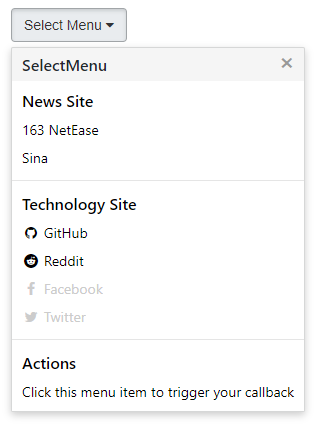

![SelectMenu1](https://terryz.github.io/image/SelectMenuBase.png)

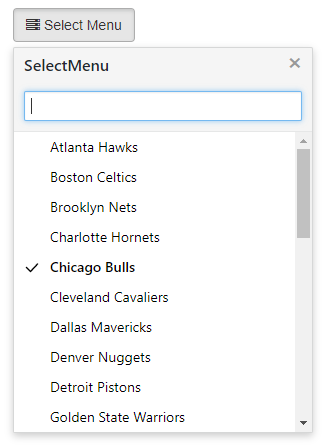
*Advanced menu mode*

![SelectMenu2](https://terryz.github.io/image/SelectMenu.png)

*Advanced menu mode (multiple group data)*
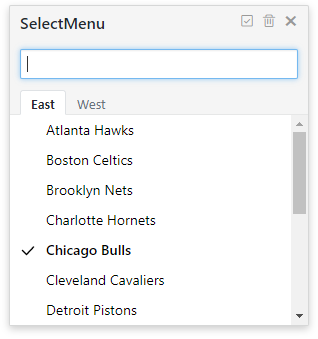

![SelectMenu3](https://terryz.github.io/image/SelectMenuGroup.png)


<br><br>


### Key Features

- a jQuery plugin
- simple style interface, can adapt to most UI environments
- quick search item by input autocomplete
- multiple group data used tabs form to show
- use keybord to quick navigate and selection
- multiple select item in advanced menu mode
- used static data type or dynamic data to be menu data source
- used mouse right button click to called menu
- i18n support
- rich setting parameters
- brower supper IE8+,chrome,firefox

### License

MIT

<br><br>


### Install  
  download SelectMenu plugin zip file by last release, or [click me](https://github.com/TerryZ/SelectMenu/archive/master.zip) to download SelectMenu  
  or use **NPM**
  ```
  npm install selectmenu
  ```
### Usage
  As you can see in the [Demo Page](https://terryz.github.io/selectmenu/demo.html), you will need to include:
  - [jQuery library](http://jquery.com) (1.6.0+), untest on jquery2.x & 3.x
  - The JavaScript file `selectmenu.js` (or its minified version `selectmenu.min.js`)
  - The css file `selectmenu.css`
  
  **Including files**  
  ```html
  <!-- Basic environment reference -->
  <!-- jQuery library include -->
  <script type="text/javascript" src="jquery.min.js" >< /script>
  
  <!-- SelectMenu style sheet -->
  <link rel="stylesheet" href="selectmenu.css" type="text/css">
  
  <!-- SelectMenu plugin js file include -->
  <script type="text/javascript" src="selectmenu.js" >< /script>
  ```

  **HTML element set**  
  ```html
  <!--
  Set the trigger menu to open the object, where
  only the most commonly used button as an example
  -->
  <button type="button" id="btnDemo">Select Menu</button>
  ```

  **Javascript init plugin**
  ```js
  //defined data source
  //data format：Array[{Object},{...}]
  var data = [
      {id:1 ,name:'Chicago Bulls',desc:'芝加哥公牛'},
      {id:2 ,name:'Cleveland Cavaliers',desc:'克里夫兰骑士'},
      {id:3 ,name:'Detroit Pistons',desc:'底特律活塞'},
      {id:4 ,name:'Indiana Pacers',desc:'印第安纳步行者'}
  ];
  //initialize selectmenu
  $('#btnDemo').selectMenu({
      showField : 'desc',
      keyField : 'id',
      data : data
  });
  ```

**If you think this project is helpful, please star it.**