# SenangWebs Buy (SWB)
SenangWebs Buy (SWB) is a lightweight JavaScript library that transforms HTML attributes into a basic WhatsApp based e-commerce solution. Create dynamic shopping experiences with WhatsApp checkout integration, advanced product filtering, multi-store support, and more - all with minimal setup and zero dependencies.
[](LICENSE.md)
[](https://github.com/bookklik-technologies/senangstart-icons)
| listings | checkout |
| --------------------------------------------------------------------------------------------------------- | --------------------------------------------------------------------------------------------------------- |
| 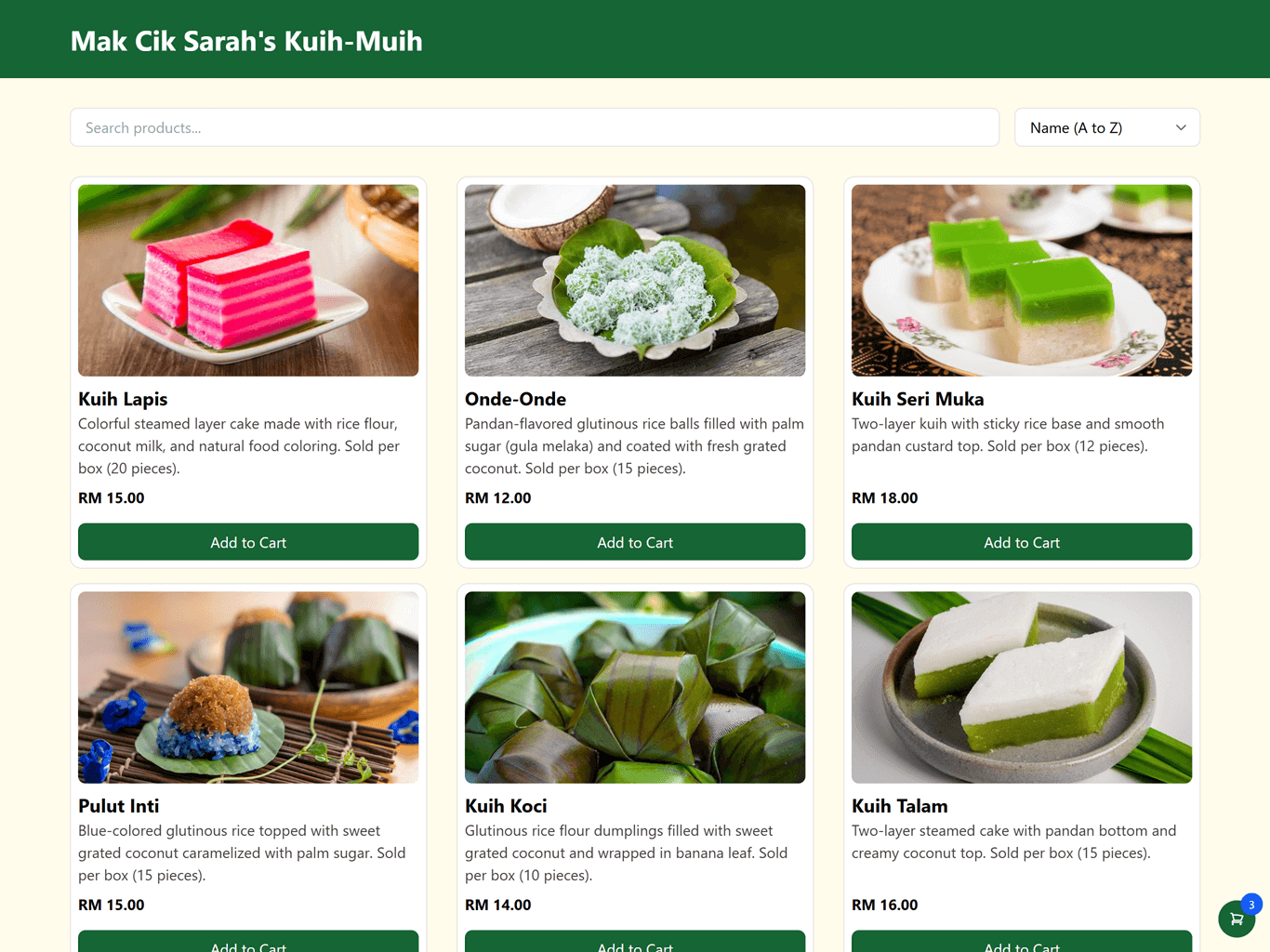 | 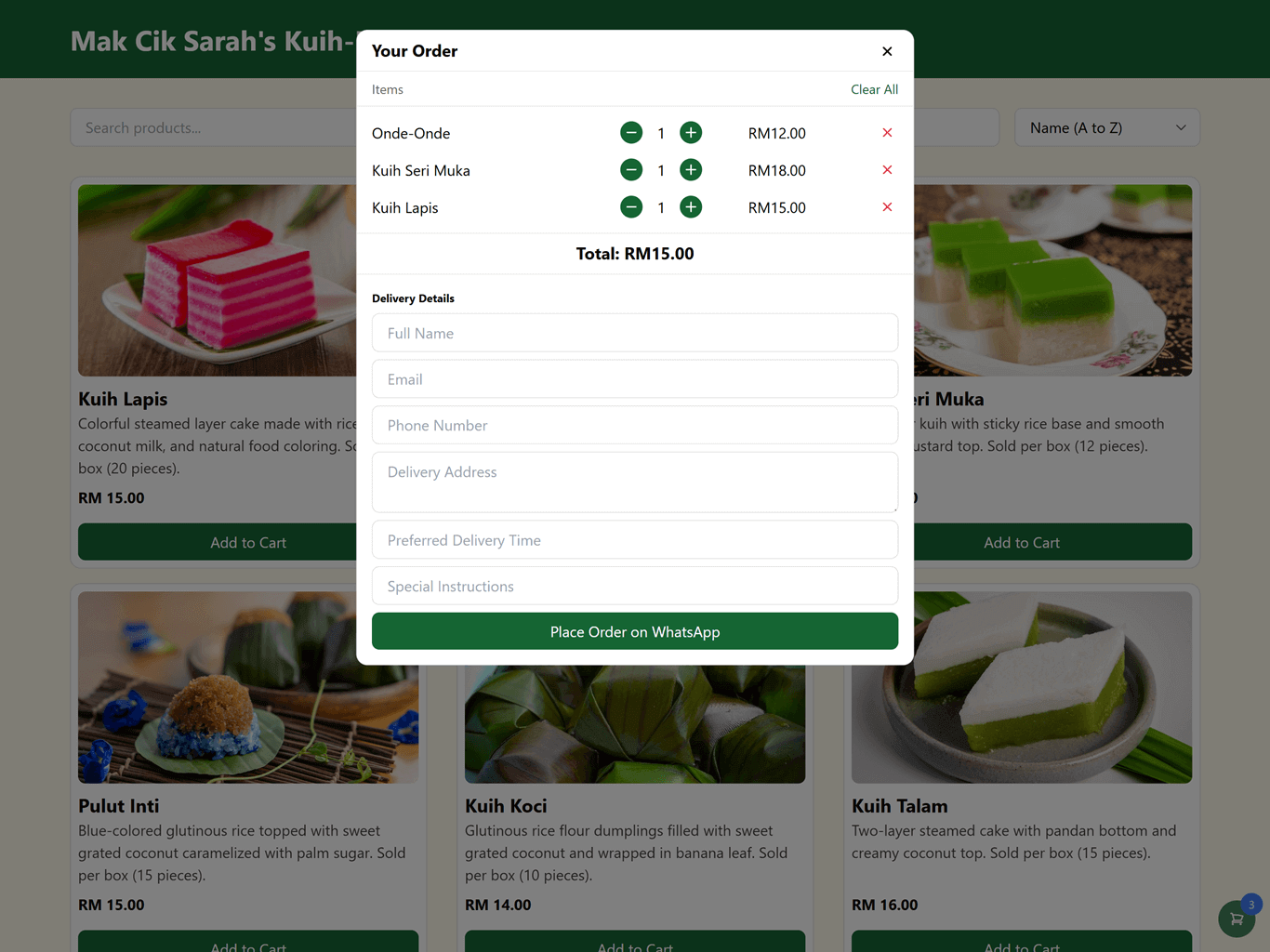 |
## Example
[Mak Cik Sarah's Kuih-Muih](https://unpkg.com/senangwebs-buy@latest/examples/store-d/index.html)
## Features
- Declarative HTML attribute-based configuration
- Multi-store support with independent carts and settings
- Persistent shopping cart using localStorage
- WhatsApp-based checkout system with customizable forms
- Advanced product filtering and sorting
- Real-time search functionality
- Multi-currency support with automatic formatting
- Customizable theming system
- Floating cart option
- External product links
- Independent product and cart components
- Responsive design for all devices
- Zero external dependencies
- TypeScript support
- Custom checkout fields support
- Customizable checkout UI text
- Enhanced cart management
- Advanced billing form options
## Installation
### Using npm
```bash
npm install senangweb-buy
```
### Using a CDN
Include SenangWebs Buy directly in your HTML file:
```html
```
## Usage
### Basic Catalog Setup
```html
Product Name
$99.99
Product description goes here...
```
### Independent Components
```html
```
## Configuration Options
### Catalog Attributes
| Attribute | Type | Description | Default |
| -------------------------- | ------- | ----------------------------------- | --------------------- |
| `data-swb-catalog` | flag | Main catalog container identifier | required |
| `data-swb-store-id` | string | Unique store identifier | required |
| `data-swb-store` | string | Store name for checkout messages | required |
| `data-swb-whatsapp` | string | WhatsApp number for checkout | required |
| `data-swb-currency` | string | Currency code (USD, EUR, MYR, etc.) | USD |
| `data-swb-color-primary` | string | Primary theme color (hex) | #007bff |
| `data-swb-color-secondary` | string | Secondary theme color (hex) | #dc3545 |
| `data-swb-cart` | boolean | Enable/disable cart functionality | true |
| `data-swb-cart-floating` | boolean | Enable floating cart button | false |
| `data-swb-checkout-title` | string | Custom checkout modal title | "Your Cart" |
| `data-swb-enable-billing` | boolean | Enable/disable billing form | true |
| `data-swb-billing-title` | string | Custom billing form title | "Billing Details" |
| `data-swb-submit-text` | string | Custom submit button text | "Proceed to WhatsApp" |
| `data-swb-custom-fields` | JSON | Custom form fields configuration | [] |
### Product Attributes
| Attribute | Type | Description | Default |
| --------------------------------- | ------ | --------------------------------- | -------------- |
| `data-swb-product` | flag | Product container identifier | required |
| `data-swb-product-sku` | string | Product SKU/ID | required |
| `data-swb-product-name` | string | Product name | required |
| `data-swb-product-price` | number | Product price | required |
| `data-swb-product-link` | string | External product link URL | optional |
| `data-swb-product-link-title` | string | External link button text | "View Details" |
| `data-swb-product-add-cart-title` | string | Add to cart button text | "Add to Cart" |
| `data-swb-product-description` | flag | Container for product description | optional |
| `data-swb-product-buttons` | flag | Container for product buttons | required |
## Advanced Features
### Custom Form Fields
- Support for various field types:
- Text inputs
- Textareas
- Select dropdowns
- Custom field types
- Configurable field attributes:
- Required/optional
- Placeholders
- Custom validation patterns
- Min/max values
- Fields appear in checkout form
- Data included in WhatsApp message
### Enhanced Checkout Experience
- Customizable UI text
- Configurable form titles
- Custom submit button text
- Optional billing information
- Flexible form layout
- Real-time validation
- Clear cart functionality
- Quantity management
- Price calculations
### Multi-Store Management
- Support for multiple independent stores on a single page
- Each store maintains its own:
- Shopping cart
- Theme settings
- Currency configuration
- WhatsApp checkout
- Product catalog
- Custom fields
- Checkout configuration
### Enhanced Shopping Cart
- Persistent cart state across page refreshes
- Real-time quantity updates
- Automatic price calculations
- Clear cart functionality
- Cart item count badge
- Optional floating cart button
- Individual item removal
- Bulk clear option
### Product Management
- Real-time search by name or SKU
- Advanced sorting options:
- Alphabetical (A-Z/Z-A)
- Price (Low-High/High-Low)
- Product grid layout with responsive design
- Support for product images and descriptions
- Custom button text and external links
- Sale badges support
### Checkout Process
1. Cart Review
- Item list with quantities
- Price summaries
- Edit quantities
- Remove items
- Clear all option
2. Customer Information Collection
- Full Name
- Email Address
- Phone Number
- Delivery Address
- Custom Fields
3. WhatsApp Integration
- Formatted order details
- Customer information
- Custom field data
- Total calculations
- Store identification
### Theming System
- Custom color schemes
- Consistent styling across components
- Responsive design patterns
- Modern UI elements
- Custom button styling
- Modal interfaces
- Floating cart design
- Sale badge styling
## Supported Currencies
The library includes formatting for multiple currencies:
- USD ($)
- EUR (€)
- GBP (£)
- JPY (¥)
- CNY (¥)
- MYR (RM)
- SGD (S$)
- AUD (A$)
- CAD (C$)
- INR (₹)
- KRW (₩)
- THB (฿)
- PHP (₱)
- IDR (Rp)
- VND (₫)
## Browser Support
Compatible with all modern browsers:
- Chrome
- Firefox
- Safari
- Edge
- Opera
## Contributing
Contributions are welcome! Please feel free to submit a Pull Request.
## License
This project is licensed under the MIT License - see the [LICENSE.md](LICENSE.md) file for details.
## Acknowledgments
- Thanks to all contributors who have helped improve this library
- Inspired by the need for simple, WhatsApp-based e-commerce solutions
