## shadcn/ui inspired typography components
> ⚠️ Update V1.1.0: I upgraded Tailwind to V4 and changed the module type to `node` in the ts-config. This should fix the issues with the `clsx` and `tailwind-merge` imports. Be aware things could break on update. Test carefully
This is a collection of typography components created off of the [shadcn/ui](https://ui.shadcn.com/docs/components/typography) website. The components are built using Tailwind CSS and React. You can use `className` to add additional styles to the components.
### Features
- 💅 Extendable through `className` (Tailwind CSS)
- ⏩ forwardRef support
- 📦 Customizable through prop overrides
- 🦭 TypeScript support
#### Table of Contents
1. [Components](#components)
2. [Prerequisites for using the copy method](#prerequisites-for-using-the-copy-method)
3. [Installation](#installation)
4. [License](LICENSE.md)
## Components
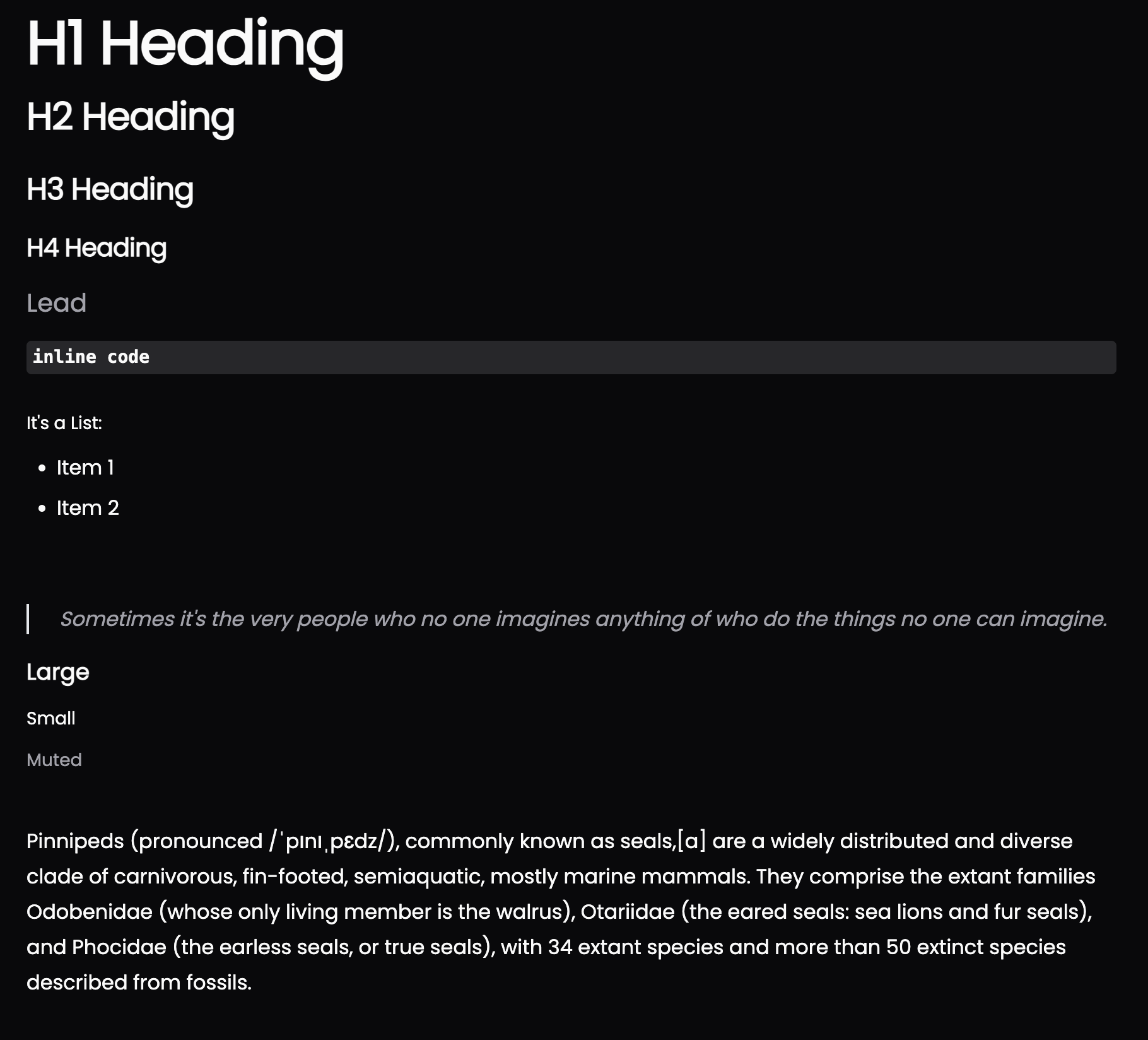
`H1` - `H4` - Heading components
> If you want the `H2` to have no underline, add the class `border-none` to the component
```jsx
Big Heading Text
Some smaller Text
Even smaller text
Smallest text
```
`P` - Paragraph component
```jsx
I am the paragraph 🦭
```
`Large` - Larger text component
```jsx
Some large text
```
`Small` - Obviously a smaller text component
```jsx
Some damn small text
```
`Lead` - A large text component for headings
```jsx
Some text
```
`Quote` - A blockquote component
```jsx
I like to look at one or two random quotes each morning. It can be a good exercise for
journaling prompts.
```
`InlineCode` - Inline code component
```jsx
npm install shadcn-typography
```
`List` - A list component
```jsx
Item 1
Item 2
Item 3
```
## Prerequisites for using the Copy Method
1. twMerge and clsx must be available in the project
```bash
npm install clsx tailwind-merge
```
2. create a file `./lib/utils.tsx` and paste the following:
```tsx
import { type ClassValue, clsx } from 'clsx';
import { twMerge } from 'tailwind-merge';
export function cn(...inputs: ClassValue[]) {
return twMerge(clsx(inputs));
}
```
## Installation
### Option 1: as Package
```bash
npm install shadcn-typography
```
```bash
yarn add shadcn-typography
```
### Option 2: Copy the components into your project
Create the file `./components/ui/typography.tsx` and paste the following:
```tsx
import React, { forwardRef, JSX } from 'react';
import { cn } from '.@/lib/utils';
// Reusable helper to create components with consistent structure
const createComponent = (
tag: keyof JSX.IntrinsicElements,
defaultClassName: string,
displayName: string
) => {
const Component = forwardRef>((props, ref) => {
return React.createElement(
tag,
{ ...props, ref, className: cn(defaultClassName, props.className) },
props.children
);
});
Component.displayName = displayName;
return Component;
};
export const H1 = createComponent(
'h1',
'scroll-m-20 text-4xl font-extrabold tracking-tight lg:text-5xl',
'H1'
);
export const H2 = createComponent(
'h2',
'scroll-m-20 border-b py-2 text-3xl font-semibold tracking-tight first:mt-0',
'H2'
);
export const H3 = createComponent(
'h3',
'scroll-m-20 text-2xl font-semibold tracking-tight',
'H3'
);
export const H4 = createComponent(
'h4',
'scroll-m-20 text-xl font-semibold tracking-tight',
'H4'
);
export const Lead = createComponent(
'p',
'text-xl text-muted-foreground',
'Lead'
);
export const P = createComponent(
'p',
'leading-7 [&:not(:first-child)]:mt-6',
'P'
);
export const Large = createComponent(
'div',
'text-lg font-semibold',
'Large'
);
export const Small = createComponent(
'p',
'text-sm font-medium leading-none',
'Small'
);
export const Muted = createComponent(
'span',
'text-sm text-muted-foreground',
'Muted'
);
export const InlineCode = createComponent(
'code',
'relative rounded-sm bg-muted px-[0.3rem] py-[0.2rem] font-mono text-sm font-semibold',
'InlineCode'
);
export const MultilineCode = createComponent(
'pre',
'relative rounded-sm bg-muted p-4 font-mono text-sm font-semibold overflow-x-auto',
'MultilineCode'
);
export const List = createComponent(
'ul',
'my-6 ml-6 list-disc [&>li]:mt-2',
'List'
);
export const Quote = createComponent(
'blockquote',
'mt-6 border-l-2 pl-6 italic text-muted-foreground',
'Quote'
);
```
## License
This project is licensed under the MIT License - see the [LICENSE.md](LICENSE.md) file for details.