




support set cell style for sheetjs!
API is the same as sheetjs!
## install ``` npm install sheetjs-style ``` ## How to Use? Please read [SheetJs Documents](https://github.com/SheetJS/sheetjs/blob/3468395494c450ea8ba7e20afb1bd6127f516ccd/README.md)! ## How to set cell Style? for example: ```js ws["A1"].s = { // set the style for target cell font: { name: '宋体', sz: 24, bold: true, color: { rgb: "FFFFAA00" } }, }; ``` 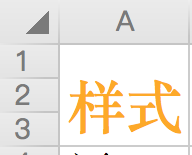 # Cell Styles Cell styles are specified by a style object that roughly parallels the OpenXML structure. The style object has five top-level attributes: `fill`, `font`, `numFmt`, `alignment`, and `border`. | Style Attribute | Sub Attributes | Values | | :-------------- | :------------- | :------------- | | fill | patternType | `"solid"` or `"none"` | | fgColor | `COLOR_SPEC` | | bgColor | `COLOR_SPEC` | font | name | `"Calibri"` // default | | sz | `"11"` // font size in points | | color | `COLOR_SPEC` | | bold | `true` or `false` | | underline | `true` or `false` | | italic | `true` or `false` | | strike | `true` or `false` | | outline | `true` or `false` | | shadow | `true` or `false` | | vertAlign | `true` or `false` | numFmt | | `"0"` // integer index to built in formats, see StyleBuilder.SSF property | | | `"0.00%"` // string matching a built-in format, see StyleBuilder.SSF | | | `"0.0%"` // string specifying a custom format | | | `"0.00%;\\(0.00%\\);\\-;@"` // string specifying a custom format, escaping special characters | | | `"m/dd/yy"` // string a date format using Excel's format notation | alignment | vertical | `"bottom"` or `"center"` or `"top"` | | horizontal | `"left"` or `"center"` or `"right"` | | wrapText | `true ` or ` false` | | readingOrder | `2` // for right-to-left | | textRotation | Number from `0` to `180` or `255` (default is `0`) | | | `90` is rotated up 90 degrees | | | `45` is rotated up 45 degrees | | | `135` is rotated down 45 degrees | | | `180` is rotated down 180 degrees | | | `255` is special, aligned vertically | border | top | `{ style: BORDER_STYLE, color: COLOR_SPEC }` | | bottom | `{ style: BORDER_STYLE, color: COLOR_SPEC }` | | left | `{ style: BORDER_STYLE, color: COLOR_SPEC }` | | right | `{ style: BORDER_STYLE, color: COLOR_SPEC }` | | diagonal | `{ style: BORDER_STYLE, color: COLOR_SPEC }` | | diagonalUp | `true` or `false` | | diagonalDown | `true` or `false` **COLOR_SPEC**: Colors for `fill`, `font`, and `border` are specified as objects, either: * `{ auto: 1}` specifying automatic values * `{ rgb: "FFFFAA00" }` specifying a hex ARGB value * `{ theme: "1", tint: "-0.25"}` specifying an integer index to a theme color and a tint value (default 0) * `{ indexed: 64}` default value for `fill.bgColor` **BORDER_STYLE**: Border style is a string value which may take on one of the following values: * `thin` * `medium` * `thick` * `dotted` * `hair` * `dashed` * `mediumDashed` * `dashDot` * `mediumDashDot` * `dashDotDot` * `mediumDashDotDot` * `slantDashDot` Borders for merged areas are specified for each cell within the merged area. So to apply a box border to a merged area of 3x3 cells, border styles would need to be specified for eight different cells: * left borders for the three cells on the left, * right borders for the cells on the right * top borders for the cells on the top * bottom borders for the cells on the left ## Thanks [sheetjs](https://github.com/SheetJS/sheetjs) [js-xlsx](https://github.com/protobi/js-xlsx)