# shp-to-gltf
shp-to-gltf is a javascript lib use to convert SHP(shapefile) to gltf(glb).
**Read this in other languages: [English](README.md), [中文](README_ZH.md).**
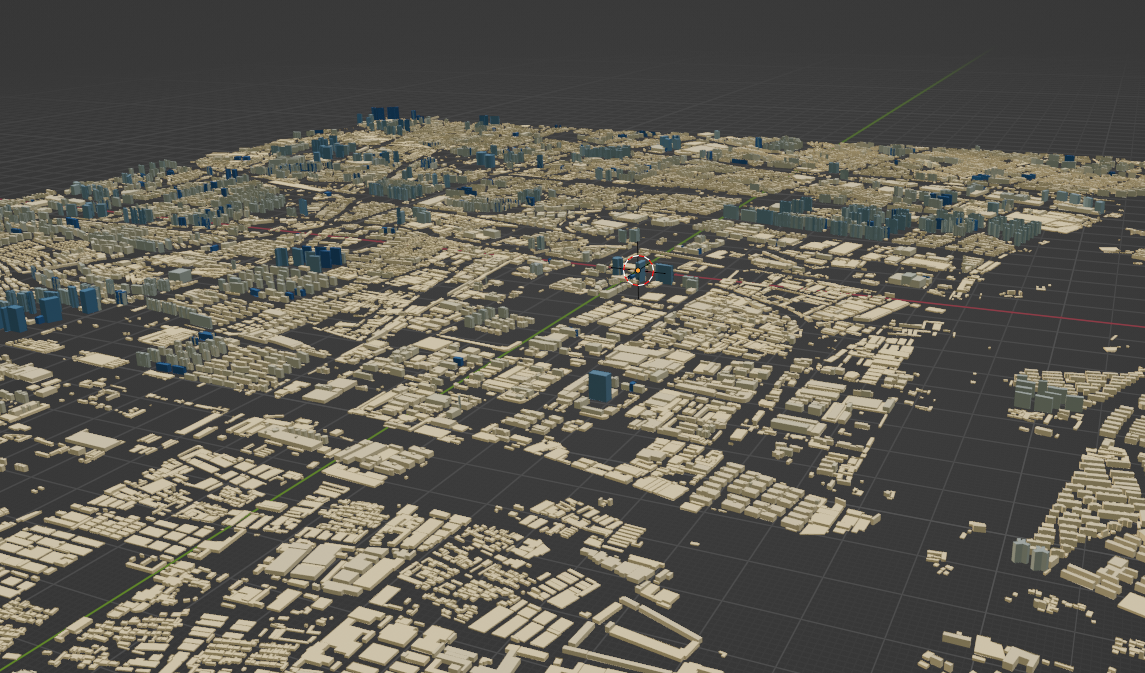
## How to use
```js
npm install shp-to-gltf -g
```
```
shp-to-gltf -i ./data/polygon.zip -o ./data/b.glb -f Elevation -c true -s color.json
```
## params
| -i | input file path that file path is a shp file must a zip file |
| ------ | ------------------------------------------------------------ |
| **-o** | **output file path** |
| **-c** | **set model center to origin true is to origin false is not** |
| **-f** | **set model extrude height by shp field** |
| **-d** | **use draco compress model true is use false is not** |
| **-s** | **style file path is a json a file use to render per feature** |
| **-h** | **show help** |
| **-g** | **It is used to group the output of elements.** |
### style file
```js
{
"filed" : "Elevation", // filed is use to compute style
"style" : [
// this item mean when the feature propert of Elevation biger than range[0] and small range[1] render this color
{
"range": [
0,
10
],
"color": "rgb(253 , 215,154)"
},
{
"range": [
180,
190
],
"color": "rgb(25 , 84,123)"
},
{
"range": [
290,
300
],
"color": "rgb(25 , 84,123)"
}
],
"defaultColor" : "rgb(25 , 84,123)" // Render the default color when no style is hit
}
```
# Used in browser
```html
shp
ss
```
# Used in node
```js
import {ShpParse} from 'shp-to-gltf'
const shpParse = new ShpParse()
// Set the style output for the shp object
const config = fs.readFileSync('./data/color.json')
shpParse.setColorJson(JSON.parse(config))
const dir = ['test1.zip' , 'test2.zip']
for (let i = 0 ; i < dir.length ; i++) {
const item = dir[i]
if (item.search('.zip') === -1) continue
// Get the shp file
const data = fs.readFileSync(item)
// Parse shp files to glb
const glb = await shpParse.parseWithBuffer(data , {
height : 'Elevation',
center : true,
chunk : 100000 // More than 10000 elements of a single glb file are grouped for output
})
if (Array.isArray(glb)) {
glb.forEach(async (items , index)=>{
const tem = Buffer.from(items)
fs.writeFileSync(`test${index}.glb` , tem )
})
} else {
const tem = Buffer.from(glb)
fs.writeFileSync(`test$.glb` , tem)
}
}
```
# api
## ShpParse
A class that parses shp files into gltf
### method
#### parseWithUrl
```js
/**
*
* @param {string} url
* @param {{height : string , center : boolean , chunk ?: number , outputType ?: string}} option
*
*/
async parseWithUrl(url , option)
```
| **url** | **An address used to represent the shp file** |
| ----------------- | ------------------------------------------------------------ |
| **option-height** | **Sets the field used to extrude the plane into the model, the value of this field will be set to the height of the 3D mode** |
| **option-center** | **Whether to set the center point of the model to (0,0,0)** |
| **option-chunk** | **The maximum number of elements per glb, beyond which it is automatically grouped** |
#### **parseWithBuffer**
```js
/**
*
* @param {ArrayBuffer} buffer
* @param {{height : string , center : boolean , chunk ?: number , outputType ?: string}} option
*
*
*/
async parseWithBuffer(buffer , option)
```
| **url** | **A buffer used to represent the shp file** |
| ----------------- | ------------------------------------------------------------ |
| **option-height** | **Sets the field used to extrude the plane into the model, the value of this field will be set to the height of the 3D mode** |
| **option-center** | **Whether to set the center point of the model to (0,0,0)** |
| **option-chunk** | **The maximum number of elements per glb, beyond which it is automatically grouped** |
#### **setColorJson**
**The style used to set the output model. See Style file above for the style rules**
```js
setColorJson(colors)
```
# **Pay attention**
**1 When your shp file is large, use the -g command to block the output, and specify the chunk attribute when using the api**