# jQuery Smart Wizard v7
### A modern and accessible step wizard plugin for jQuery
[](https://www.npmjs.com/package/smartwizard)
[](https://www.jsdelivr.com/package/npm/smartwizard)
[](https://www.npmjs.com/package/smartwizard)
[](https://raw.githubusercontent.com/techlab/jquery-smartwizard/master/LICENSE)
[](https://github.com/techlab/jquery-smartwizard)
[](https://github.com/sponsors/techlab)
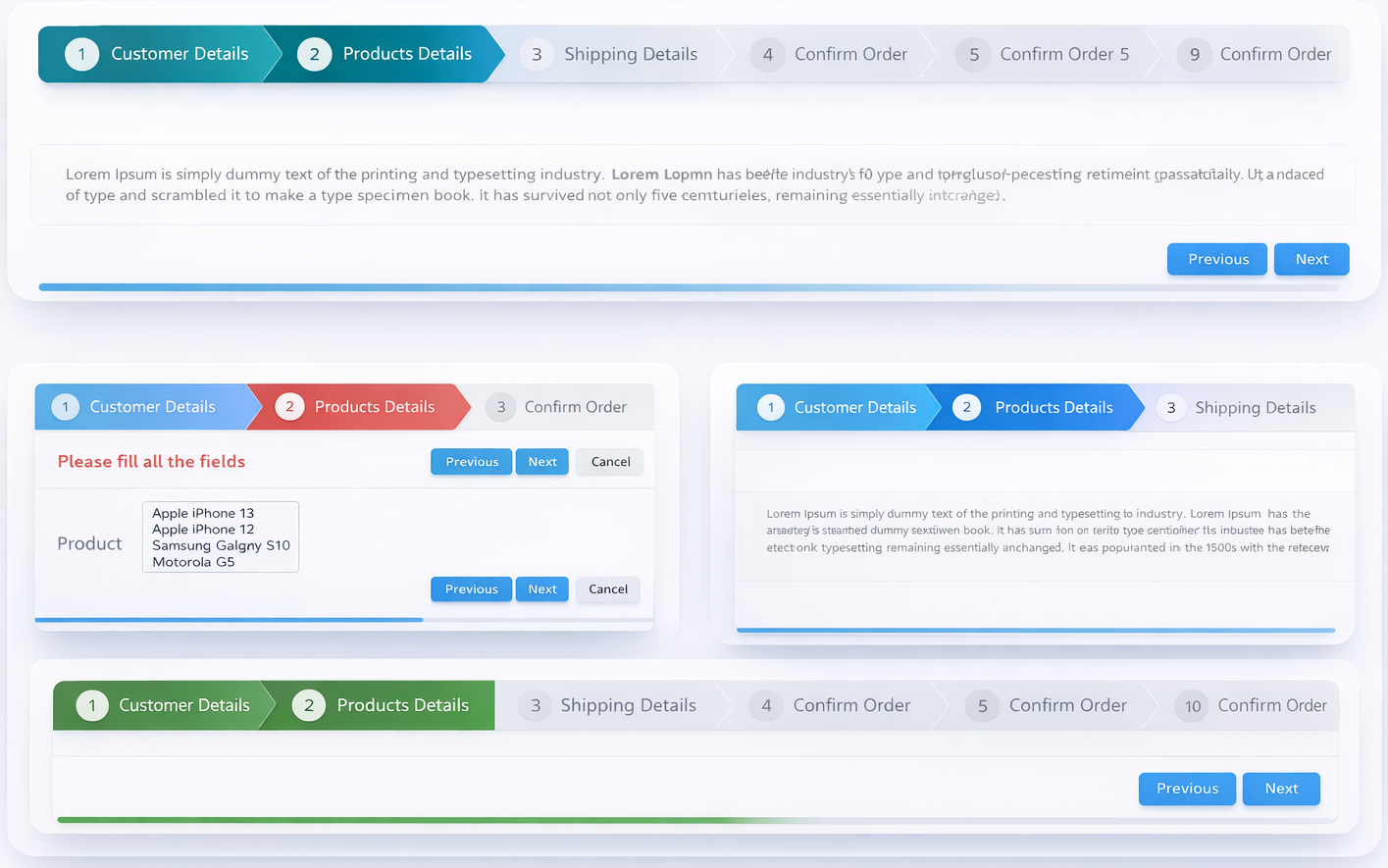
**jQuery Smart Wizard v7** is a lightweight and extensible step wizard plugin built for modern web applications using jQuery. It provides a clean, intuitive interface for managing multi-step processes such as registration forms, checkout screens, surveys, configuration flows, and more.
**jQuery Smart Wizard v7** focuses on usability and flexibility. It offers customizable navigation styles, toolbars, transitions, and events, making it easy to integrate into existing applications. Whether you’re building a simple step form or a complex workflow, Smart Wizard adapts to your needs.
+ [Homepage](https://techlaboratory.net/jquery-smartwizard)
+ [Documentation](https://techlaboratory.net/jquery-smartwizard#documentation)
+ [Demos](https://techlaboratory.net/jquery-smartwizard#demo)
+ [StackOverflow Q&A](https://stackoverflow.com/questions/tagged/smart-wizard)
+ [GitHub Issues](https://github.com/techlab/jquery-smartwizard/issues)
Screenshots
-----
Requirements
-----
+ [jQuery](https://jquery.com/) >= 1.11.1 (jQuery 4.x and jQuery Slim versions are also supported)
Installation
-----
### [NPM](https://www.npmjs.com/package/smartwizard)
npm install smartwizard
### [Yarn](https://yarn.pm/smartwizard)
yarn add smartwizard
### [CDN - jsDelivr](https://www.jsdelivr.com/package/npm/smartwizard)
```html
```
### [CDN - UNPKG](https://unpkg.com/browse/smartwizard/)
```html
```
### ES Module / Bundler
```js
import $ from "jquery";
import "smartwizard/dist/css/smartwizard.min.css";
import "smartwizard/dist/css/themes/arrows.min.css";
import smartWizard from "smartwizard";
$(function() {
$('#smartwizard').smartWizard();
});
```
### CommonJS / Webpack
```js
var $ = require("jquery");
require("smartwizard/dist/css/smartwizard.min.css");
require("smartwizard/dist/css/themes/arrows.min.css");
const smartWizard = require("smartwizard");
$(function() {
$('#smartwizard').smartWizard();
});
```
### Download
#### [Download from GitHub](https://github.com/techlab/jquery-smartwizard/archive/master.zip)
Features
-----
- Easy to implement with minimal and clean HTML structure
- Fully rewritten in TypeScript (v7) with built-in type declarations
- Compatible with all modern browsers
- Responsive and mobile-ready design
- Multiple built-in themes (`basic` | `arrows` | `glow` | `pills`), easily customizable
- Flexible color customization using CSS variables
- Light / dark / auto display mode support
- Built-in transition animations (`default` | `fade` | `slideHorizontal` | `slideVertical` | `slideSwing` | `css`)
- Compatible with CSS animation libraries (including [Animate.css](https://animate.style/))
- Extendable transition system with custom animation handlers
- Comprehensive step states: `completed`, `active`, `disabled`, `hidden`, `error`, `warning`
- Runtime option updates via `setOptions()`
- Automatic horizontal scrolling when steps overflow (mouse wheel supported)
- Keyboard navigation (left/right arrow keys)
- Form validation support via `leave.sw` event
- RTL (right-to-left language) support
- Accessible navigation controls
- Support for external navigation controls
- Dynamic content loading via `contentLoader` callback
- Auto content height adjustment
- Customizable toolbar with support for additional HTML elements
- Integrated progress bar
- URL hash navigation with browser history integration
- UMD (Universal Module Definition) compatible
- Supports jQuery >= 1.11.1, jQuery 3.x, jQuery 4.x, and jQuery Slim versions
Usage
-----
Include SmartWizard CSS
```html
```
Include HTML (*This is the basic HTML markup. Customize it by adding your own step content*).
```html
```
### Include JavaScript
_Note:- jQuery should be included before the jQuery SmartWizard JavaScript file._
Include SmartWizard plugin JavaScript
```html
```
### Initialize the jQuery SmartWizard
```javascript
$(function() {
// SmartWizard initialize
$('#smartwizard').smartWizard();
});
```
That's it!
Please see the detailed [documentation](https://techlaboratory.net/jquery-smartwizard#documentation) for implementation and usage.
### All options
```javascript
$('#smartwizard').smartWizard({
initialStep: 0, // Initial selected step (0 = first step)
theme: 'basic', // Theme: basic | arrows | dots | round | square | progress (ensure related CSS is included)
displayMode: 'auto', // Display mode: auto (system preference) | dark | light | none
behavior: {
autoHeight: true, // Auto-adjust content height to active step
useUrlHash: false, // Enable step selection via URL hash
supportBrowserHistory: false // Enable browser back/forward button support
},
navigation: {
enabled: true, // Enable/disable anchor click navigation
alwaysClickable: false, // Allow clicking any step at any time
completed: {
enabled: true, // Mark visited steps as completed
completeAllPreviousSteps: true, // Mark all prior steps done when navigating via URL hash
clearOnBack: false, // Clear completed state when navigating backward
clickable: true // Allow navigating back to completed steps
}
},
transition: {
effect: 'default', // none | fade | slideHorizontal | slideVertical | slideSwing | css
speed: 400, // Animation speed in ms (not used for 'css')
easing: '', // jQuery easing (requires easing plugin; not used for 'css')
css: { // Settings used only when effect is 'css'
prefix: '', // CSS animation class prefix (e.g. 'animate__animated')
forward: { show: '', hide: '' }, // Classes for forward animation
backward: { show: '', hide: '' } // Classes for backward animation
}
},
toolbar: {
position: 'bottom', // none | top | bottom | both
buttons: {
showNext: true, // Show/hide the Next button
showPrevious: true // Show/hide the Previous button
},
extraElements: '' // Additional HTML or jQuery elements to append to toolbar
},
keyboardNavigation: {
enabled: true, // Enable left/right arrow key navigation
keys: {
left: [37], // Key codes for backward navigation
right: [39] // Key codes for forward navigation
}
},
swipeNavigation: {
enabled: false, // Enable swipe navigation on touch devices
threshold: 50 // Minimum swipe distance in px to trigger navigation
},
localization: {
buttons: {
next: 'Next',
previous: 'Previous'
}
},
stepStates: {
completed: [], // Step indexes to mark as completed on init
disabled: [], // Step indexes to disable on init
hidden: [], // Step indexes to hide on init
error: [], // Step indexes to mark as error on init
warning: [] // Step indexes to mark as warning on init
},
scrollToView: false, // Scroll the active step anchor into view on step change
contentLoader: null // function(stepIndex, stepDirection, stepPosition, stepElement, callback)
// Dynamically load step content; call callback(htmlContent) when ready
});
```
### Events
```javascript
// Fires after the wizard is fully initialized
$('#smartwizard').on('initialized.sw', function(e) { });
// Fires after the initial step is shown for the first time
$('#smartwizard').on('loaded.sw', function(e) { });
// Fires before leaving the current step
// Return false from the handler to cancel navigation
$('#smartwizard').on('leave.sw', function(e, args) {
// args: { stepIndex, nextStepIndex, stepElement, stepDirection, stepPosition }
});
// Fires after a new step is shown
$('#smartwizard').on('shown.sw', function(e, args) {
// args: { stepIndex, stepElement, stepDirection, stepPosition }
});
```
### Public methods
```javascript
const wizard = $('#smartwizard');
wizard.smartWizard('next'); // Navigate to next step
wizard.smartWizard('prev'); // Navigate to previous step
wizard.smartWizard('goToStep', 2); // Go to step index 2
wizard.smartWizard('goToStep', 2, true); // Go to step index 2 (force, marks previous as done)
wizard.smartWizard('reset'); // Reset wizard to initial state
wizard.smartWizard('setOptions', { theme: 'arrows' }); // Update options at runtime
wizard.smartWizard('setState', [1, 2], 'disable'); // Disable steps 1 and 2
wizard.smartWizard('setState', [3], 'error'); // Mark step 3 as error
wizard.smartWizard('unsetState', [1, 2], 'disable'); // Re-enable steps 1 and 2
wizard.smartWizard('loader', 'show'); // Show loader
wizard.smartWizard('loader', 'hide'); // Hide loader
wizard.smartWizard('adjustHeight'); // Manually re-adjust content height
const info = wizard.smartWizard('getStepInfo');
// Returns: { currentStep, totalSteps }
```
License
----
**jQuery SmartWizard v7** is dual-licensed:
**[MIT License](https://github.com/techlab/jquery-smartwizard/blob/master/LICENSE)** — Free for personal and open-source projects.
**[Commercial License](https://techlaboratory.net/jquery-smartwizard#license)** — Required for closed-source, SaaS, or any commercial projects.
If you use **jQuery SmartWizard v7** in a commercial or client application, please purchase a commercial license.
Commercial licenses help support continued development, maintenance, and new features.
Contribute
----
If you like the project please support with your contribution.
[GitHub Sponsor](https://github.com/sponsors/techlab)
Happy Coding ❤️