
A zoom/pan/drag plugin for Snap.svg
This is an adaptation of Andrea Leofreddi's [SVGPan library](https://code.google.com/p/svgpan/), version 1.2.2, for use as a [Snap.svg](http://snapsvg.io/) plugin.
This usually use on present view only. **NOT** for the purpose of Storing or Modifying the paper.
[DEMO](http://hueitan.github.io/snap.svg.zpd) [DEMO2](http://hueitan.github.io/snap.svg.zpd/demo2.html)
[DEMO3](http://hueitan.github.io/snap.svg.zpd/reservation_seat.html)
### In the Wild
Drop me an issue/PR for the showcase
### Install
$ bower install snap.svg.zpd --save
$ npm install snap.svg.zpd --save
### How The Plugin Works
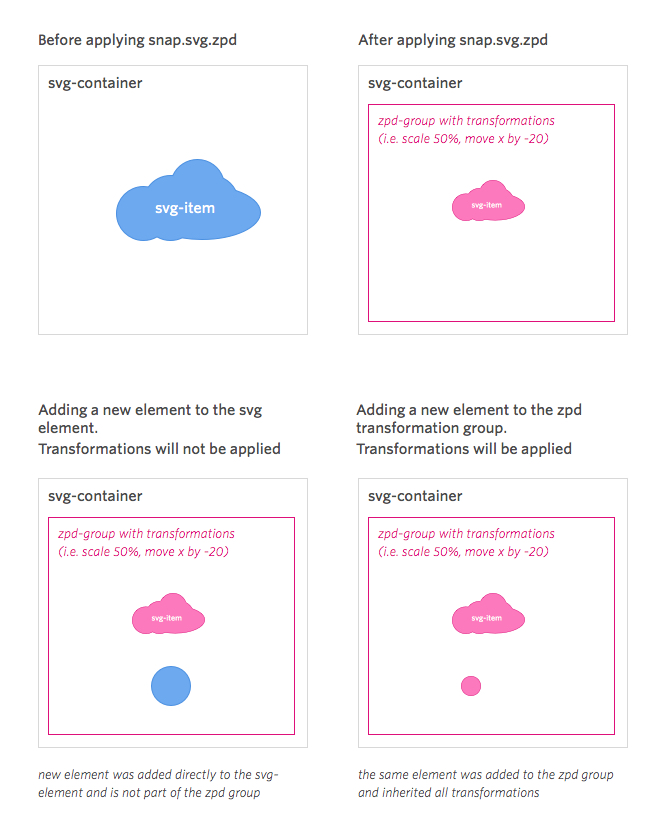
The plugin will put all child elements in the svg into a group-element and apply the
"global transformations" to this group - like zooming, panning or rotating the whole canvas.
When dragging is enabled, the respective transformations will be applied directly to
the element that is under the mouse-cursor.
Svg manipulations after applying the plugin should take part inside of the zpd group.
I.e. if you would like to add a new element that should inherit zooming and panning, you
should not add it directly to the svg, but to the zpd-group within.
 ### Usage
Include `snap.svg.zpd.js` after `snap.svg.js`
```html
```
Writing the script
```js
var paper = Snap();
var bigCircle = paper.circle(150, 150, 100);
paper.zpd();
// with options and callback
paper.zpd(options, function (err, paper) {
console.log(paper);
});
// with callback
paper.zpd(function (err, paper) {
console.log(paper);
});
```
### options
#### zoom
true or false: enable or disable zooming (default true)
#### pan
true or false: enable or disable panning (default true)
#### drag
true or false: enable or disable dragging (default false)
#### zoomScale
number: Zoom sensitivity (default 0.2)
#### zoomThreshold
array: min and max zoom level threshold [min, max] (default null)
#### touch
true or false: enable or disable touch support (default true)
#### preventDefaultEvent
true or false: enable or disable call to preventDefault in events (default true)
or an object with these values:
- `handleMouseOrTouchUp`: true or false: enable or disable call to preventDefault for this particular event (default true)
- `handleMouseOrTouchDown`: true or false: enable or disable call to preventDefault for this particular event (default true)
- `handleMouseMove`: true or false: enable or disable call to preventDefault for this particular event (default true)
- `handleMouseWheel`: true or false: enable or disable call to preventDefault for this particular event (default true)
- `handleTouchMove`: true or false: enable or disable call to preventDefault for this particular event (default true)
if defined as a boolean every value of the object will take the defined value
WARNING : using this option can lead to unexpected behavior.
### More
#### paper.zpd('destroy')
```js
paper.zpd('destroy');
```
Destroy all the zpd elements, events and nodes
#### paper.zpd('save')
```js
paper.zpd('save');
// => return SVGMatrix {a:0.6787972450256348,b:0,c:0,d:0.6787972450256348,e:159.63783264160156,f:12.84811782836914}
paper.zpd('save', function (err, data) {
console.log(data);
// => return SVGMatrix {a:0.6787972450256348,b:0,c:0,d:0.6787972450256348,e:159.63783264160156,f:12.84811782836914}
});
```
return current transform attribute (matrix) - only in pan,zoom, not for drag now
#### paper.zpd({ load: SVGMatrix {}})
```js
paper.zpd({ load: {a:0.6787972450256348,b:0,c:0,d:0.6787972450256348,e:159.63783264160156,f:12.84811782836914}});
```
set the initial transform matrix
#### paper.zpd('origin')
```js
paper.zpd('origin');
```
back to the origin location
#### paper.zpd('toggle')
```js
paper.zpd('toggle');
paper.zpd('toggle', function (err, state) { console.log(state); }); // return current enable state
```
By default, zpd is enabled, but you can toggle or set its activation using this function. (Useful to toggle mouse event (zpd))
#### zoomTo
```js
paper.zoomTo(1.5, 3000, mina.bounce, function (err, paper) {
console.log(paper);
});
```
zoom (must > 0), interval (ms optional), mina (optional), callback (optional)
#### panTo
```js
paper.panTo('-1'); // go left -1 x location
paper.panTo('+0', '-1'); // go up -1 y location
paper.panTo(100,100); // go to location (x, y) (100, 100)
paper.panTo(100, 100, 3000, mina.bounce, function (err, paper) {
console.log(paper);
});
```
x, y (can be number or string with + -), interval (ms optional), mina (optional), callback (optional)
#### rotate
```js
paper.rotate(15);
paper.rotate(a, x, y, mina.bounce, function (err, paper) {
console.log(paper);
});
```
a (rotate degree) x, y (original point), interval (ms optional), mina (optional), callback (optional)
### Experimental: Edit
to add an element to the transformation matrix.
select the group that contains the matrix
```js
canvas = Snap.select('#snapsvg-zpd-'+paper.id);
```
create an element and add
```js
canvas.add(element);
```
#### understanding the matrix
Basic concepts of [matrix](https://developer.mozilla.org/en-US/docs/Web/SVG/Attribute/transform)
to get the current matrix
```js
paper.zpd('save');
return
SVGMatrix {
a: zoom,
b: 0,
c: 0,
d: zoom,
e: offset X,
f: offset Y
}
```
if you need to map one point, for example event.click (x, y)
```js
matrix X = (original X + offsetX) / zoom
matrix Y = (original Y + offsetY) / zoom
```
### Contributor List
[Huei Tan](https://github.com/hueitan)
### Usage
Include `snap.svg.zpd.js` after `snap.svg.js`
```html
```
Writing the script
```js
var paper = Snap();
var bigCircle = paper.circle(150, 150, 100);
paper.zpd();
// with options and callback
paper.zpd(options, function (err, paper) {
console.log(paper);
});
// with callback
paper.zpd(function (err, paper) {
console.log(paper);
});
```
### options
#### zoom
true or false: enable or disable zooming (default true)
#### pan
true or false: enable or disable panning (default true)
#### drag
true or false: enable or disable dragging (default false)
#### zoomScale
number: Zoom sensitivity (default 0.2)
#### zoomThreshold
array: min and max zoom level threshold [min, max] (default null)
#### touch
true or false: enable or disable touch support (default true)
#### preventDefaultEvent
true or false: enable or disable call to preventDefault in events (default true)
or an object with these values:
- `handleMouseOrTouchUp`: true or false: enable or disable call to preventDefault for this particular event (default true)
- `handleMouseOrTouchDown`: true or false: enable or disable call to preventDefault for this particular event (default true)
- `handleMouseMove`: true or false: enable or disable call to preventDefault for this particular event (default true)
- `handleMouseWheel`: true or false: enable or disable call to preventDefault for this particular event (default true)
- `handleTouchMove`: true or false: enable or disable call to preventDefault for this particular event (default true)
if defined as a boolean every value of the object will take the defined value
WARNING : using this option can lead to unexpected behavior.
### More
#### paper.zpd('destroy')
```js
paper.zpd('destroy');
```
Destroy all the zpd elements, events and nodes
#### paper.zpd('save')
```js
paper.zpd('save');
// => return SVGMatrix {a:0.6787972450256348,b:0,c:0,d:0.6787972450256348,e:159.63783264160156,f:12.84811782836914}
paper.zpd('save', function (err, data) {
console.log(data);
// => return SVGMatrix {a:0.6787972450256348,b:0,c:0,d:0.6787972450256348,e:159.63783264160156,f:12.84811782836914}
});
```
return current transform attribute (matrix) - only in pan,zoom, not for drag now
#### paper.zpd({ load: SVGMatrix {}})
```js
paper.zpd({ load: {a:0.6787972450256348,b:0,c:0,d:0.6787972450256348,e:159.63783264160156,f:12.84811782836914}});
```
set the initial transform matrix
#### paper.zpd('origin')
```js
paper.zpd('origin');
```
back to the origin location
#### paper.zpd('toggle')
```js
paper.zpd('toggle');
paper.zpd('toggle', function (err, state) { console.log(state); }); // return current enable state
```
By default, zpd is enabled, but you can toggle or set its activation using this function. (Useful to toggle mouse event (zpd))
#### zoomTo
```js
paper.zoomTo(1.5, 3000, mina.bounce, function (err, paper) {
console.log(paper);
});
```
zoom (must > 0), interval (ms optional), mina (optional), callback (optional)
#### panTo
```js
paper.panTo('-1'); // go left -1 x location
paper.panTo('+0', '-1'); // go up -1 y location
paper.panTo(100,100); // go to location (x, y) (100, 100)
paper.panTo(100, 100, 3000, mina.bounce, function (err, paper) {
console.log(paper);
});
```
x, y (can be number or string with + -), interval (ms optional), mina (optional), callback (optional)
#### rotate
```js
paper.rotate(15);
paper.rotate(a, x, y, mina.bounce, function (err, paper) {
console.log(paper);
});
```
a (rotate degree) x, y (original point), interval (ms optional), mina (optional), callback (optional)
### Experimental: Edit
to add an element to the transformation matrix.
select the group that contains the matrix
```js
canvas = Snap.select('#snapsvg-zpd-'+paper.id);
```
create an element and add
```js
canvas.add(element);
```
#### understanding the matrix
Basic concepts of [matrix](https://developer.mozilla.org/en-US/docs/Web/SVG/Attribute/transform)
to get the current matrix
```js
paper.zpd('save');
return
SVGMatrix {
a: zoom,
b: 0,
c: 0,
d: zoom,
e: offset X,
f: offset Y
}
```
if you need to map one point, for example event.click (x, y)
```js
matrix X = (original X + offsetX) / zoom
matrix Y = (original Y + offsetY) / zoom
```
### Contributor List
[Huei Tan](https://github.com/hueitan)
[Ramon Saccilotto](https://github.com/tikiatua)
and [you](https://github.com/hueitan/snap.svg.zpd/graphs/contributors)!
### Reference
[svgpan](https://code.google.com/p/svgpan/)
[raphael-zpd](https://github.com/andrewseddon/raphael-zpd)
[svg-pan-zoom](https://github.com/ariutta/svg-pan-zoom)