# Space Repetition
> A Spaced Repetition Library
[![NPM Version][npm-version-image]][npm-url]
[![NPM Install Size][npm-install-size-image]][npm-install-size-url]
 ---
## Install + Import
```bash
$ npm install spacerepetition
```
And import it
```javascript
import SpaceRepetition from 'spacerepetition'
```
It doesn't matter what your data looks like, it will always return an array of flashcards:
```javascript
const deck = new SpaceRepetition([{
question: "What types does Space Repetition accept?",
answer: "Any type of data"
}])
```
Or you can include it from a CDN:
```html
```
And use it:
```html
```
---
## Usage
A deck contains multiple cards (in this case a single card):
```javascript
const deck = new Deck(1);
```
Here is what it contains:
```javascript
/*
Deck {
cards: [
Card {
interval: 1,
repetition: 0,
easeFactor: 2.7,
minEaseFactor: 1.3,
dueDate: 1734034389755,
value: 1,
learningAlgorithm: 'default'
}
]
}
*/
```
You can get the next card to study by calling `getNextCard` which finds a random card that is due:
```javascript
const currentCard = deck.getNextCard();
```
On the card you can call the following convenience methods after you've studied it:
```javascript
currentCard.again() // 0
currentCard.hard() // 1
currentCard.good() // 2
currentCard.easy() // 3
currentCard.updateDifficulty(3) // easy
```
The corresponding values are in comments next to the methods.
---
## Spaced Repetition Algorithms
There is support for [SM-2](https://en.wikipedia.org/wiki/SuperMemo) and a custom-made algorithm called `fenestral-lacuna`..
```javascript
new SpaceRepetition([], 'sm-2');
new SpaceRepetition([], 'fenestral-lacuna');
```
Here is an overview:
| Algorithm | Acceptable Values | Purpose | Explanation |
|--------------------|-------------------------|--------------------------------------------|----------------------------------------------------------------------------------------------|
| **SM-2** | `sm-2`, `default` and more | The default algorithm | Implements the [SM-2 algorithm](https://en.wikipedia.org/wiki/SuperMemo#Description_of_SM-2_algorithm), designed for long-term spaced repetition. |
| **Fenestral-Lacuna** | `fenestral-lacuna` | For short study sessions | Adds few minutes to the next review time based on difficulty, prioritizing speed over retention. |
Furthermore, you could also pass your own algorithm like below. Both parameters are optional:
```javascript
function myAlgorithm(card, difficulty) {
return "use the card parameter to update the state of the card"
}
new SpaceRepetition([], myAlgorithm);
```
---
## Utility Functions
If you don't want to work with the Deck class, the library also provides some utility functions:
```javascript
import { createFlashcards, getNextCard, createUI } from 'spacerepetition'
```
| Function Name | Description |
|--------------------|--------------------------------------------|
| createFlashcards | Creates a single Card. |
| getNextCard | Retrieves the next card to review. |
| createUI | Creates a HTML UI for flashcard reviews |
---
## Config
Besides manually adjusting values on the cards, you can also pass a config object as the third parameter to initialize cards with different values:
```javascript
const config = {
interval: 7
}
const flashcards = new SpaceRepetition([], "default", config)
```
Here is what the config object looks like:
| Key | Default Value | Target Algorithm |
|------------------|---------------|------------------|
| easeFactor | 2.7 | SM-2 |
| minEaseFactor | 1.3 | SM-2 |
| interval | 1 | SM-2 |
| repetition | 0 | SM-2 |
---
## UI
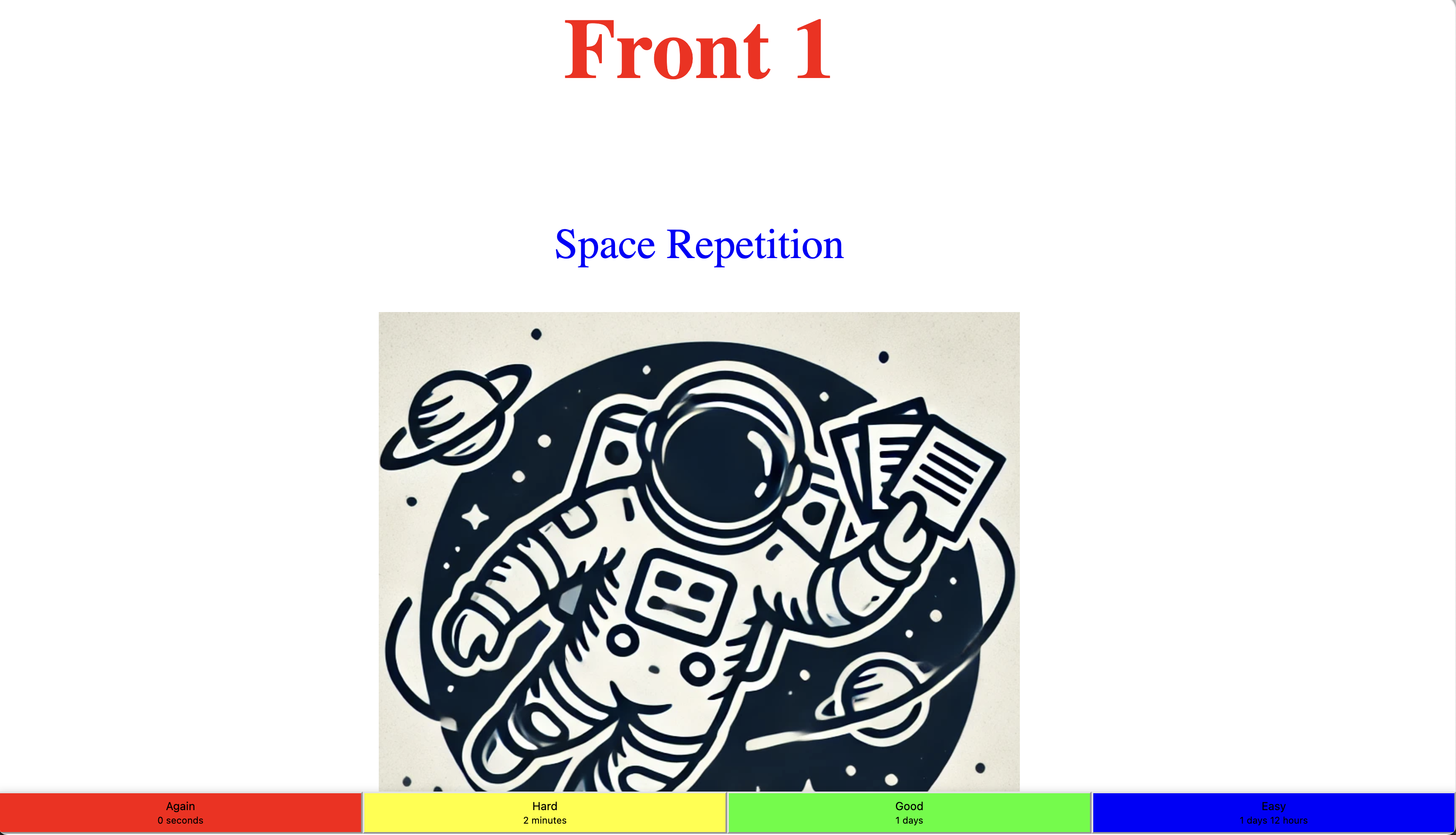
You can use the built-in UI for HTML. You can style the `front` and `back` property with **text** or any **HTML**:
```html
Space Repetition
```
The end result will look like this:
---
## Install + Import
```bash
$ npm install spacerepetition
```
And import it
```javascript
import SpaceRepetition from 'spacerepetition'
```
It doesn't matter what your data looks like, it will always return an array of flashcards:
```javascript
const deck = new SpaceRepetition([{
question: "What types does Space Repetition accept?",
answer: "Any type of data"
}])
```
Or you can include it from a CDN:
```html
```
And use it:
```html
```
---
## Usage
A deck contains multiple cards (in this case a single card):
```javascript
const deck = new Deck(1);
```
Here is what it contains:
```javascript
/*
Deck {
cards: [
Card {
interval: 1,
repetition: 0,
easeFactor: 2.7,
minEaseFactor: 1.3,
dueDate: 1734034389755,
value: 1,
learningAlgorithm: 'default'
}
]
}
*/
```
You can get the next card to study by calling `getNextCard` which finds a random card that is due:
```javascript
const currentCard = deck.getNextCard();
```
On the card you can call the following convenience methods after you've studied it:
```javascript
currentCard.again() // 0
currentCard.hard() // 1
currentCard.good() // 2
currentCard.easy() // 3
currentCard.updateDifficulty(3) // easy
```
The corresponding values are in comments next to the methods.
---
## Spaced Repetition Algorithms
There is support for [SM-2](https://en.wikipedia.org/wiki/SuperMemo) and a custom-made algorithm called `fenestral-lacuna`..
```javascript
new SpaceRepetition([], 'sm-2');
new SpaceRepetition([], 'fenestral-lacuna');
```
Here is an overview:
| Algorithm | Acceptable Values | Purpose | Explanation |
|--------------------|-------------------------|--------------------------------------------|----------------------------------------------------------------------------------------------|
| **SM-2** | `sm-2`, `default` and more | The default algorithm | Implements the [SM-2 algorithm](https://en.wikipedia.org/wiki/SuperMemo#Description_of_SM-2_algorithm), designed for long-term spaced repetition. |
| **Fenestral-Lacuna** | `fenestral-lacuna` | For short study sessions | Adds few minutes to the next review time based on difficulty, prioritizing speed over retention. |
Furthermore, you could also pass your own algorithm like below. Both parameters are optional:
```javascript
function myAlgorithm(card, difficulty) {
return "use the card parameter to update the state of the card"
}
new SpaceRepetition([], myAlgorithm);
```
---
## Utility Functions
If you don't want to work with the Deck class, the library also provides some utility functions:
```javascript
import { createFlashcards, getNextCard, createUI } from 'spacerepetition'
```
| Function Name | Description |
|--------------------|--------------------------------------------|
| createFlashcards | Creates a single Card. |
| getNextCard | Retrieves the next card to review. |
| createUI | Creates a HTML UI for flashcard reviews |
---
## Config
Besides manually adjusting values on the cards, you can also pass a config object as the third parameter to initialize cards with different values:
```javascript
const config = {
interval: 7
}
const flashcards = new SpaceRepetition([], "default", config)
```
Here is what the config object looks like:
| Key | Default Value | Target Algorithm |
|------------------|---------------|------------------|
| easeFactor | 2.7 | SM-2 |
| minEaseFactor | 1.3 | SM-2 |
| interval | 1 | SM-2 |
| repetition | 0 | SM-2 |
---
## UI
You can use the built-in UI for HTML. You can style the `front` and `back` property with **text** or any **HTML**:
```html
Space Repetition
```
The end result will look like this:
 [npm-version-image]: https://img.shields.io/npm/v/spacerepetition.svg
[npm-url]: https://www.npmjs.com/package/spacerepetition
[npm-install-size-image]: https://packagephobia.com/badge?p=spacerepetition
[npm-install-size-url]: https://packagephobia.com/result?p=spacerepetition
[npm-version-image]: https://img.shields.io/npm/v/spacerepetition.svg
[npm-url]: https://www.npmjs.com/package/spacerepetition
[npm-install-size-image]: https://packagephobia.com/badge?p=spacerepetition
[npm-install-size-url]: https://packagephobia.com/result?p=spacerepetition