_[Home](index.html) > Widgets_
# Sparnatural widgets
This is a reference documentation for Sparnatural widgets.
-----
## List widget
### Appearance
| Example | Description |
| ----- | ----------- |
| 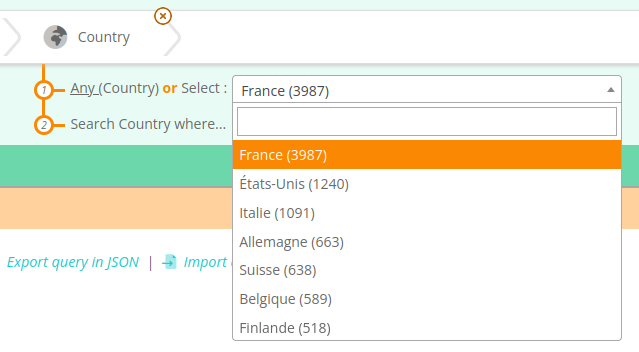 | Typical appearance of a list widget, allowing to select a URI value, shown with a label and number of occurrences, ordered by decreasing number of occurrences |
|
| Typical appearance of a list widget, allowing to select a URI value, shown with a label and number of occurrences, ordered by decreasing number of occurrences |
| 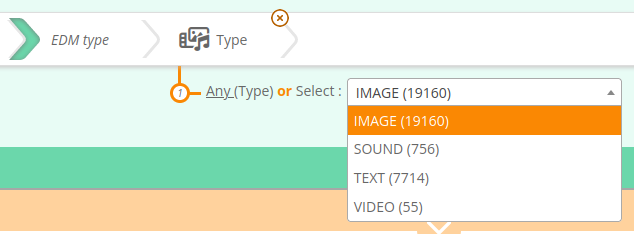 | Showing literal values only (EDM Type is a literal value) |
|
| Showing literal values only (EDM Type is a literal value) |
| 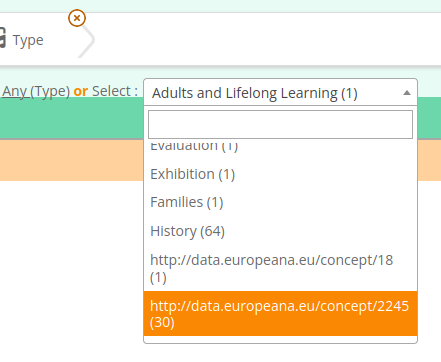 | Showing a mix of literal values and URIs |
| | Listing URI values with a label listed alphabetically |
|
| Showing a mix of literal values and URIs |
| | Listing URI values with a label listed alphabetically |
|  | Listing values using optgroup |
### Description
List widgets allow to select a value from a dropdown list. They are suitable if the list of distinct values is limited in size (typically less than 500 items). The widget provides a dropdown list combined with a filtering/search input to search within the list content. The input field to search within the list does not appear if the list is very small, under 20 items.
List widget is implemented using the [select2 JQuery component](https://select2.org/).
List widgets can work both with URIs + labels, or with literal values. It can even mix URIs and literals in the same list.
The sort order of the elements in the list, as well as their precise labels, depends on the underlying SPARQL query that populates the list. Sparnatural provides [default datasources](http://docs.sparnatural.eu/OWL-based-configuration-datasources.html#preconfigured-datasources-for-a-listproperty) that can be ordered alphabetically, alphabetically showing the number of occurrences in parenthesis, or ordered by decreasing number of occurrences.
List widgets supports `optgroup` to group values into sections. The grouping is also provided by the SPARQL query, and is used in particular when [querying multiple endpoints](Querying-multiple-endpoints).
### Configuration
In your SHACL configuration, add a `dash:searchWidget` annotation with the value [`config-core:ListProperty`](http://data.sparna.fr/ontologies/sparnatural-config-core#ListProperty).
### Default configuration
By default, list widgets are used if the statistics are available to the configuration and if the number of distinct objects for the property is less than 500.
### Datasources
The list of URI as well as their labels needs to be [configured using a SPARQL datasource](http://docs.sparnatural.eu/OWL-based-configuration-datasources.html#preconfigured-datasources-for-a-listproperty).
The default datasource used is [`datasources:list_URI_or_literal_count`](http://data.sparna.fr/ontologies/sparnatural-config-datasources#list_URI_or_literal_count), itself relying on the SPARQL query [`datasources:query_list_URI_or_literal_count`](http://data.sparna.fr/ontologies/sparnatural-config-datasources#query_list_URI_or_literal_count)
### SPARQL generation
If a single value is selected, the value is inserted directly as the triple object:
```sparql
?Museum_1 .
```
If more than one value is selected, or if the corresponding variable is selected for inclusion in the result set, then a `VALUES` keyword is used:
With more than one values:
```sparql
?Museum_1 ?Country_2.
VALUES ?Country_2 {
}
}
```
or with the variable selected:
```sparql
SELECT DISTINCT ?Museum_1 ?Country_2 WHERE {
?Museum_1 ?Country_2.
VALUES ?Country_2 {
}
}
```
-----
## Autocomplete widget
### Appearance
| Listing values using optgroup |
### Description
List widgets allow to select a value from a dropdown list. They are suitable if the list of distinct values is limited in size (typically less than 500 items). The widget provides a dropdown list combined with a filtering/search input to search within the list content. The input field to search within the list does not appear if the list is very small, under 20 items.
List widget is implemented using the [select2 JQuery component](https://select2.org/).
List widgets can work both with URIs + labels, or with literal values. It can even mix URIs and literals in the same list.
The sort order of the elements in the list, as well as their precise labels, depends on the underlying SPARQL query that populates the list. Sparnatural provides [default datasources](http://docs.sparnatural.eu/OWL-based-configuration-datasources.html#preconfigured-datasources-for-a-listproperty) that can be ordered alphabetically, alphabetically showing the number of occurrences in parenthesis, or ordered by decreasing number of occurrences.
List widgets supports `optgroup` to group values into sections. The grouping is also provided by the SPARQL query, and is used in particular when [querying multiple endpoints](Querying-multiple-endpoints).
### Configuration
In your SHACL configuration, add a `dash:searchWidget` annotation with the value [`config-core:ListProperty`](http://data.sparna.fr/ontologies/sparnatural-config-core#ListProperty).
### Default configuration
By default, list widgets are used if the statistics are available to the configuration and if the number of distinct objects for the property is less than 500.
### Datasources
The list of URI as well as their labels needs to be [configured using a SPARQL datasource](http://docs.sparnatural.eu/OWL-based-configuration-datasources.html#preconfigured-datasources-for-a-listproperty).
The default datasource used is [`datasources:list_URI_or_literal_count`](http://data.sparna.fr/ontologies/sparnatural-config-datasources#list_URI_or_literal_count), itself relying on the SPARQL query [`datasources:query_list_URI_or_literal_count`](http://data.sparna.fr/ontologies/sparnatural-config-datasources#query_list_URI_or_literal_count)
### SPARQL generation
If a single value is selected, the value is inserted directly as the triple object:
```sparql
?Museum_1 .
```
If more than one value is selected, or if the corresponding variable is selected for inclusion in the result set, then a `VALUES` keyword is used:
With more than one values:
```sparql
?Museum_1 ?Country_2.
VALUES ?Country_2 {
}
}
```
or with the variable selected:
```sparql
SELECT DISTINCT ?Museum_1 ?Country_2 WHERE {
?Museum_1 ?Country_2.
VALUES ?Country_2 {
}
}
```
-----
## Autocomplete widget
### Appearance
 ### Description
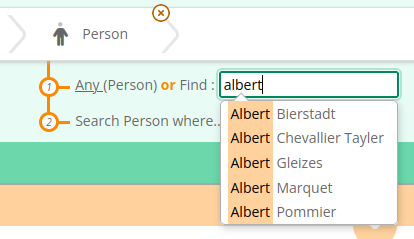
The autocomplete widget allows to select a URI by typing a few letters, and selecting a value from a list of proposals. The search is triggered when 3 characters at least have been entered. The search is done on one or more properties configured in the widget datasource (it can be configured to search on preferred label as well as synonyms, acronyms, identifiers, etc.).
Autocompletion also works for searching on literal values.
Autocomplete widget is implemented based on [awesomeplete library](https://projects.verou.me/awesomplete/).
### Configuration
In your SHACL configuration, add a `dash:searchWidget` annotation with the value [`config-core:AutocompleteProperty`](http://data.sparna.fr/ontologies/sparnatural-config-core#AutocompleteProperty).
### Default configuration
By default, autocomplete widgets are used if none of the other widget matched.
### Datasources
The list of proposals displayed to the user needs to be [configured using a SPARQL datasource](http://docs.sparnatural.eu/OWL-based-configuration-datasources.html#preconfigured-datasources-for-an-autocompleteproperty).
The default datasource used is [`datasources:search_URI_contains`](http://data.sparna.fr/ontologies/sparnatural-config-datasources#search_URI_contains), itself relying on the SPARQL query [`datasources:query_search_URI_contains`](http://data.sparna.fr/ontologies/sparnatural-config-datasources#query_search_URI_contains). If the range is a literal, the default datasource is [`datasources:search_literal_contains`](http://data.sparna.fr/ontologies/sparnatural-config-datasources#search_literal_contains), itself relying on the SPARQL query [`datasources:query_search_literal_contains`](http://data.sparna.fr/ontologies/sparnatural-config-datasources#query_search_literal_contains)
### SPARQL clause
The SPARQL query generation logic is identical to the ListWidget (see above).
-----
## Tree widget
### Appearance
### Description
The autocomplete widget allows to select a URI by typing a few letters, and selecting a value from a list of proposals. The search is triggered when 3 characters at least have been entered. The search is done on one or more properties configured in the widget datasource (it can be configured to search on preferred label as well as synonyms, acronyms, identifiers, etc.).
Autocompletion also works for searching on literal values.
Autocomplete widget is implemented based on [awesomeplete library](https://projects.verou.me/awesomplete/).
### Configuration
In your SHACL configuration, add a `dash:searchWidget` annotation with the value [`config-core:AutocompleteProperty`](http://data.sparna.fr/ontologies/sparnatural-config-core#AutocompleteProperty).
### Default configuration
By default, autocomplete widgets are used if none of the other widget matched.
### Datasources
The list of proposals displayed to the user needs to be [configured using a SPARQL datasource](http://docs.sparnatural.eu/OWL-based-configuration-datasources.html#preconfigured-datasources-for-an-autocompleteproperty).
The default datasource used is [`datasources:search_URI_contains`](http://data.sparna.fr/ontologies/sparnatural-config-datasources#search_URI_contains), itself relying on the SPARQL query [`datasources:query_search_URI_contains`](http://data.sparna.fr/ontologies/sparnatural-config-datasources#query_search_URI_contains). If the range is a literal, the default datasource is [`datasources:search_literal_contains`](http://data.sparna.fr/ontologies/sparnatural-config-datasources#search_literal_contains), itself relying on the SPARQL query [`datasources:query_search_literal_contains`](http://data.sparna.fr/ontologies/sparnatural-config-datasources#query_search_literal_contains)
### SPARQL clause
The SPARQL query generation logic is identical to the ListWidget (see above).
-----
## Tree widget
### Appearance
 ### Description
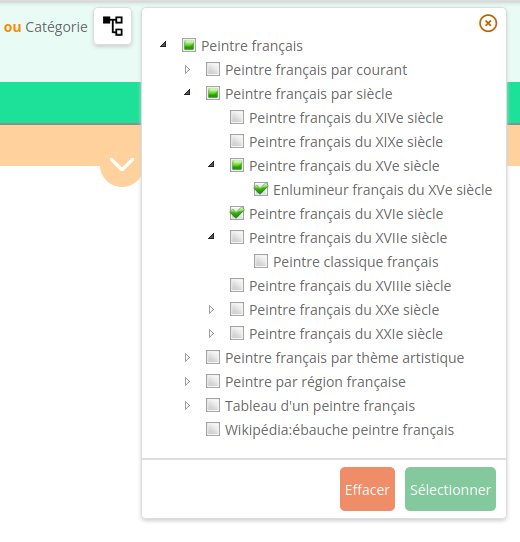
The tree widget allows to select entities from a tree of values, typically a SKOS ConceptScheme. A maximum of 3 values can be selected. The typical behavior is that the complete tree is always shown, even with the values that are never used, which will appear disabled and can't be selected.
Tree widget is implemented using the [JS tree library](https://www.jstree.com/).
### Configuration
In SHACL configuration, add a `dash:searchWidget` annotation with the value [`config-core:TreeProperty`](http://data.sparna.fr/ontologies/sparnatural-config-core#TreeProperty).
### Default configuration
The tree widget does not have a default behavior, it needs to be declared explicitely in the configuration.
### Datasources
A tree widget requires 2 datasources:
- One to list the root nodes to be displayed (at the first level).
- One to list the children of a node, when a node is clicked.
The root datasource is configured using the [`datasources:treeRootsDatasource`](http://data.sparna.fr/ontologies/sparnatural-config-datasources#treeRootsDatasource) annotation. The default datasource used if none is indicated is [`datasources:tree_root_skostopconcept`].
The children datasource is configured using the [`datasources:treeChildrenDatasource`](http://data.sparna.fr/ontologies/sparnatural-config-datasources#treeChildrenDatasource) annotation. The default datasource used if none is indicated is [`datasources:tree_children_skosnarrower`](http://data.sparna.fr/ontologies/sparnatural-config-datasources#tree_children_skosnarrower).
### SPARQL clause
The SPARQL query generation logic is identical to the ListWidget (see above). However please note that it is expected that Tree widgets are configured on properties that use a "*" SPARQL property path, indicating that the search is made recursively on the selected node but also all its children. A typical SPARQL property path configured on a property associated to a tree widget is `/(|^)*` : note how it searches for a connection using the `dcterms:subject` predicate, extended to either a `skos:broader` or inverse of `skos:narrower` up to the selected node in the tree.
## String search widget
### Appearance
### Description
The tree widget allows to select entities from a tree of values, typically a SKOS ConceptScheme. A maximum of 3 values can be selected. The typical behavior is that the complete tree is always shown, even with the values that are never used, which will appear disabled and can't be selected.
Tree widget is implemented using the [JS tree library](https://www.jstree.com/).
### Configuration
In SHACL configuration, add a `dash:searchWidget` annotation with the value [`config-core:TreeProperty`](http://data.sparna.fr/ontologies/sparnatural-config-core#TreeProperty).
### Default configuration
The tree widget does not have a default behavior, it needs to be declared explicitely in the configuration.
### Datasources
A tree widget requires 2 datasources:
- One to list the root nodes to be displayed (at the first level).
- One to list the children of a node, when a node is clicked.
The root datasource is configured using the [`datasources:treeRootsDatasource`](http://data.sparna.fr/ontologies/sparnatural-config-datasources#treeRootsDatasource) annotation. The default datasource used if none is indicated is [`datasources:tree_root_skostopconcept`].
The children datasource is configured using the [`datasources:treeChildrenDatasource`](http://data.sparna.fr/ontologies/sparnatural-config-datasources#treeChildrenDatasource) annotation. The default datasource used if none is indicated is [`datasources:tree_children_skosnarrower`](http://data.sparna.fr/ontologies/sparnatural-config-datasources#tree_children_skosnarrower).
### SPARQL clause
The SPARQL query generation logic is identical to the ListWidget (see above). However please note that it is expected that Tree widgets are configured on properties that use a "*" SPARQL property path, indicating that the search is made recursively on the selected node but also all its children. A typical SPARQL property path configured on a property associated to a tree widget is `/(|^)*` : note how it searches for a connection using the `dcterms:subject` predicate, extended to either a `skos:broader` or inverse of `skos:narrower` up to the selected node in the tree.
## String search widget
### Appearance
 ### Description
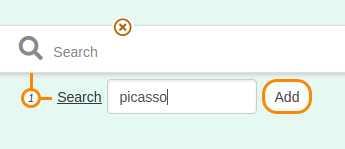
The search widget simply allows to enter some characters that will be searched for, using different techniques (see below), either using a regex or custom proprietary full-text search functions.
### Configuration
In SHACL configuration, add a `dash:searchWidget` annotation with the value [`config-core:SearchProperty`](http://data.sparna.fr/ontologies/sparnatural-config-core#SearchProperty) **or one of its sub-properties**, which will influence the SPARQL generation logic (see below).
### Default configuration
String search widget is used by default if the sh:nodeKind is `sh:Literal` and if there is either no statistics available or a number of distinct values greater than 500.
### Datasources
No datasource required.
### SPARQL clause
The generated SPARQL clause depends on the exact super-property used when configuring the property:
**SearchProperty**
The string will be searched using a `regex` function.
```sparql
FILTER(REGEX(STR(?Text_6), "picasso", "i"))
```
**StringEqualsProperty**
The string will be searched in an exact way, case-insensitive. This is useful when searching for exact identifiers.
```sparql
FILTER((LCASE(?Cote_1)) = (LCASE("ABC")))
```
**GraphDBSearchProperty**
The string will be searched using GraphDB proprietary Lucene connector. Make sure you follow the [additional documentation](http://docs.sparnatural.eu/Integration-with-GraphDB-Lucene-Connector.html) provided for this, as this imposes some naming convention on the URI of the range class and the property.
**VirtuosoSearchProperty**
The string will be searched using Virtuoso proprietary `bif:contains` operator.
-----
## Date range widget
### Appearance
### Description
The search widget simply allows to enter some characters that will be searched for, using different techniques (see below), either using a regex or custom proprietary full-text search functions.
### Configuration
In SHACL configuration, add a `dash:searchWidget` annotation with the value [`config-core:SearchProperty`](http://data.sparna.fr/ontologies/sparnatural-config-core#SearchProperty) **or one of its sub-properties**, which will influence the SPARQL generation logic (see below).
### Default configuration
String search widget is used by default if the sh:nodeKind is `sh:Literal` and if there is either no statistics available or a number of distinct values greater than 500.
### Datasources
No datasource required.
### SPARQL clause
The generated SPARQL clause depends on the exact super-property used when configuring the property:
**SearchProperty**
The string will be searched using a `regex` function.
```sparql
FILTER(REGEX(STR(?Text_6), "picasso", "i"))
```
**StringEqualsProperty**
The string will be searched in an exact way, case-insensitive. This is useful when searching for exact identifiers.
```sparql
FILTER((LCASE(?Cote_1)) = (LCASE("ABC")))
```
**GraphDBSearchProperty**
The string will be searched using GraphDB proprietary Lucene connector. Make sure you follow the [additional documentation](http://docs.sparnatural.eu/Integration-with-GraphDB-Lucene-Connector.html) provided for this, as this imposes some naming convention on the URI of the range class and the property.
**VirtuosoSearchProperty**
The string will be searched using Virtuoso proprietary `bif:contains` operator.
-----
## Date range widget
### Appearance
 ### Description
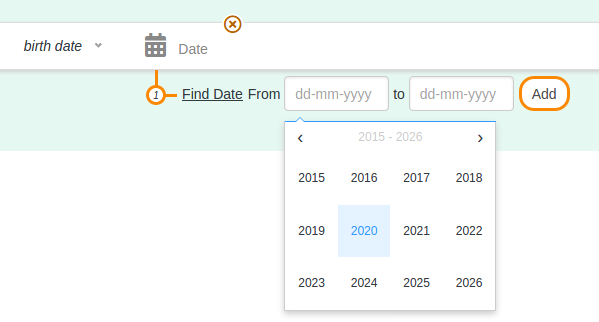
Allows to express a date range to search on, using a begin date and end date selected from calendars. Open ranges are allowed (only the start date or only the end date).
Date range widget is implemented using [@chenfengyuan/datepicker](https://fengyuanchen.github.io/datepicker/).
### Configuration
In your SHACL configuration, add a `dash:searchWidget` annotation with the value [`config-core:TimeProperty-Date`](http://data.sparna.fr/ontologies/sparnatural-config-core#TimeProperty-Date).
In addition, if the entities in the knowledge graph are associated to a date range and possibly an exact date, and you want to test if the searche date range overlaps with the entities date range, you can use the annotations [`config-core:beginDateProperty`](http://data.sparna.fr/ontologies/sparnatural-config-core#beginDateProperty), [`config-core:endDateProperty`](http://data.sparna.fr/ontologies/sparnatural-config-core#endDateProperty) and optionnaly [`config-core:exactDateProperty`](http://data.sparna.fr/ontologies/sparnatural-config-core#exactDateProperty) to indicate respectively the URIs used to express the begin date, end date and exact date on the entities. More details can be found in the [detailled documentation of the date-range query feature](http://docs.sparnatural.eu/Querying-date-ranges.html).
### Default configuration
Date range widget is used by default if the sh:datatype is `xsd:date` or `xsd:dateTime`.
### Datasources
No datasource required.
### SPARQL clause
```sparql
FILTER(((xsd:dateTime(?Date_2)) >= "1948-06-12T23:00:00Z"^^xsd:dateTime) && ((xsd:dateTime(?Date_2)) <= "1948-12-31T22:59:59Z"^^xsd:dateTime))
```
For advanced date-range querying, see the [detailled documentation](http://docs.sparnatural.eu/Querying-date-ranges.html).
-----
## Year range widget
### Appearance
### Description
Allows to express a date range to search on, using a begin date and end date selected from calendars. Open ranges are allowed (only the start date or only the end date).
Date range widget is implemented using [@chenfengyuan/datepicker](https://fengyuanchen.github.io/datepicker/).
### Configuration
In your SHACL configuration, add a `dash:searchWidget` annotation with the value [`config-core:TimeProperty-Date`](http://data.sparna.fr/ontologies/sparnatural-config-core#TimeProperty-Date).
In addition, if the entities in the knowledge graph are associated to a date range and possibly an exact date, and you want to test if the searche date range overlaps with the entities date range, you can use the annotations [`config-core:beginDateProperty`](http://data.sparna.fr/ontologies/sparnatural-config-core#beginDateProperty), [`config-core:endDateProperty`](http://data.sparna.fr/ontologies/sparnatural-config-core#endDateProperty) and optionnaly [`config-core:exactDateProperty`](http://data.sparna.fr/ontologies/sparnatural-config-core#exactDateProperty) to indicate respectively the URIs used to express the begin date, end date and exact date on the entities. More details can be found in the [detailled documentation of the date-range query feature](http://docs.sparnatural.eu/Querying-date-ranges.html).
### Default configuration
Date range widget is used by default if the sh:datatype is `xsd:date` or `xsd:dateTime`.
### Datasources
No datasource required.
### SPARQL clause
```sparql
FILTER(((xsd:dateTime(?Date_2)) >= "1948-06-12T23:00:00Z"^^xsd:dateTime) && ((xsd:dateTime(?Date_2)) <= "1948-12-31T22:59:59Z"^^xsd:dateTime))
```
For advanced date-range querying, see the [detailled documentation](http://docs.sparnatural.eu/Querying-date-ranges.html).
-----
## Year range widget
### Appearance
 ### Description
Allows to express a year range to search on, using a begin year and end year. Open ranges are allowed (only the start year or only the end year).
Year range widget is implemented using [@chenfengyuan/datepicker](https://fengyuanchen.github.io/datepicker/), configured to use only years.
### Configuration
In your SHACL configuration, add a `dash:searchWidget` annotation with the value [`config-core:TimeProperty-Year`](http://data.sparna.fr/ontologies/sparnatural-config-core#TimeProperty-Year).
### Default configuration
Year range widget is used by default if the sh:datatype is `xsd:gYear`.
### Datasources
No datasource required.
### SPARQL clause
```sparql
FILTER((xsd:dateTime(?Date_2)) >= "2017-12-31T23:00:01Z"^^xsd:dateTime)
```
(here with only a start year). Note how the values is cast to an xsd:dateTime explicitely.
-----
## Number widget
### Appearance
### Description
Allows to express a year range to search on, using a begin year and end year. Open ranges are allowed (only the start year or only the end year).
Year range widget is implemented using [@chenfengyuan/datepicker](https://fengyuanchen.github.io/datepicker/), configured to use only years.
### Configuration
In your SHACL configuration, add a `dash:searchWidget` annotation with the value [`config-core:TimeProperty-Year`](http://data.sparna.fr/ontologies/sparnatural-config-core#TimeProperty-Year).
### Default configuration
Year range widget is used by default if the sh:datatype is `xsd:gYear`.
### Datasources
No datasource required.
### SPARQL clause
```sparql
FILTER((xsd:dateTime(?Date_2)) >= "2017-12-31T23:00:01Z"^^xsd:dateTime)
```
(here with only a start year). Note how the values is cast to an xsd:dateTime explicitely.
-----
## Number widget
### Appearance
 ### Description
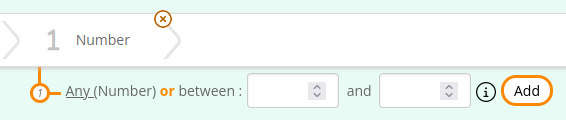
Allows to select a number range, with a lower bound and upper bound.
Can limit the range of input fields based on the datatype indicated in the SHACL config (e.g. xsd:byte will be limited betwen -127 and 128)
### Configuration
In your SHACL configuration, add a `dash:searchWidget` annotation with the value [`config-core:NumberProperty`](http://data.sparna.fr/ontologies/sparnatural-config-core#NumberProperty).
### Datasources
No datasource required.
### Default configuration
Numeric range widget is used by default if the sh:datatype is this list : `xsd:byte`,`xsd:decimal`,`xsd:double`,`xsd:float`,`xsd:int`,`xsd:integer`,`xsd:long`,`xsd:nonNegativeInteger`,`xsd:short`,`xsd:unsignedByte`,`xsd:unsignedInt`,`xsd:unsignedLong`,`xsd:unsignedShort`.
### SPARQL clause
Either with a lower and upper bound:
```sparql
FILTER((?Number_2 >= "1"^^xsd:decimal) && (?Number_2 <= "1000"^^xsd:decimal))
```
With only lower bound:
```sparql
FILTER(?Number_2 >= "11"^^xsd:decimal)
```
With only upper bound:
```sparql
FILTER(?Number_2 <= "11"^^xsd:decimal)
```
-----
## Boolean widget
### Appearance
### Description
Allows to select a number range, with a lower bound and upper bound.
Can limit the range of input fields based on the datatype indicated in the SHACL config (e.g. xsd:byte will be limited betwen -127 and 128)
### Configuration
In your SHACL configuration, add a `dash:searchWidget` annotation with the value [`config-core:NumberProperty`](http://data.sparna.fr/ontologies/sparnatural-config-core#NumberProperty).
### Datasources
No datasource required.
### Default configuration
Numeric range widget is used by default if the sh:datatype is this list : `xsd:byte`,`xsd:decimal`,`xsd:double`,`xsd:float`,`xsd:int`,`xsd:integer`,`xsd:long`,`xsd:nonNegativeInteger`,`xsd:short`,`xsd:unsignedByte`,`xsd:unsignedInt`,`xsd:unsignedLong`,`xsd:unsignedShort`.
### SPARQL clause
Either with a lower and upper bound:
```sparql
FILTER((?Number_2 >= "1"^^xsd:decimal) && (?Number_2 <= "1000"^^xsd:decimal))
```
With only lower bound:
```sparql
FILTER(?Number_2 >= "11"^^xsd:decimal)
```
With only upper bound:
```sparql
FILTER(?Number_2 <= "11"^^xsd:decimal)
```
-----
## Boolean widget
### Appearance
 ### Description
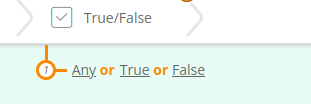
Allows to select either a boolean value "true" or "false".
### Configuration
In your SHACL configuration, add a `dash:searchWidget` annotation with the value [`config-core:NumberProperty`](http://data.sparna.fr/ontologies/sparnatural-config-core#BooleanProperty).
### Default configuration
Boolean widget is used by default if the sh:datatype is `xsd:boolean`.
### Datasources
No datasource required.
### SPARQL clause
```sparql
?Person_1 ex:isAlive true .
```
-----
## Map widget
### Appearance
### Description
Allows to select either a boolean value "true" or "false".
### Configuration
In your SHACL configuration, add a `dash:searchWidget` annotation with the value [`config-core:NumberProperty`](http://data.sparna.fr/ontologies/sparnatural-config-core#BooleanProperty).
### Default configuration
Boolean widget is used by default if the sh:datatype is `xsd:boolean`.
### Datasources
No datasource required.
### SPARQL clause
```sparql
?Person_1 ex:isAlive true .
```
-----
## Map widget
### Appearance
 ### Description
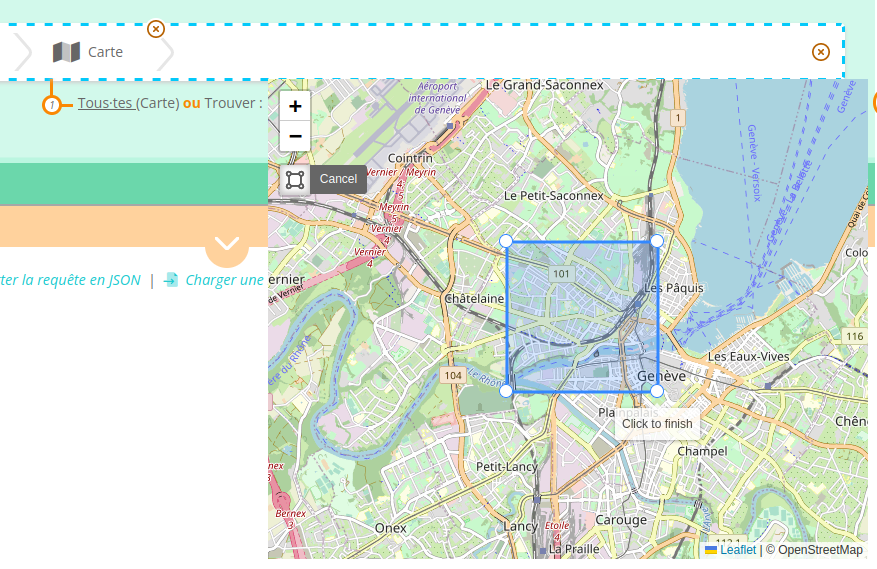
Allows to select a rectangle on a map, and generates a corresponding GeoSPARQL query, using a `geof:sfWithin` function. This implies that the data in the triplestore must be encoded with literal values using the `` datatype, such as in this example (this is a tiny extract from Wikidata, of course you can use different predicates, the important thing is the use of `^^geo:wktLiteral` :
```turtle
@prefix geo: .
@prefix wd: .
@prefix wdt: .
wd:Q16214 wdt:P31 wd:Q484170 ;
wdt:P625 "Point(4.613611111 47.098055555)"^^geo:wktLiteral ;
wdt:P1448 "Bessey-la-Fontaine"@fr .
wd:Q16233 wdt:P31 wd:Q484170 ;
wdt:P625 "Point(4.673611111 47.091111111)"^^geo:wktLiteral ;
wdt:P1448 "Lusigny-sur-Ouche"@fr .
wd:Q16213 wdt:P31 wd:Q484170 ;
wdt:P625 "Point(4.624444444 47.123611111)"^^geo:wktLiteral ;
wdt:P1448 "Auxant"@fr .
```
WKT literals can be used to encode points or polygons. WKT literals can also include an optional IRI before the geometry to indicate the reference system (see the example from the spec : `" Point(33.95 -83.38)"^^`)
For more information on WKT literals, see the [Wikipedia page](https://fr.wikipedia.org/wiki/Well-known_text), and the [GeoSPARQL spec](https://opengeospatial.github.io/ogc-geosparql/geosparql11/spec.html#geo:wktLiteral).
### Configuration
In your SHACL configuration, add a `dash:searchWidget` annotation with the value [`config-core:MapProperty`](http://data.sparna.fr/ontologies/sparnatural-config-core#MapProperty).
### Default configuration
Boolean widget is used by default if the sh:datatype is `geo:wktLiteral`.
### Datasources
No datasource required.
### SPARQL clause
```sparql
?MuseumWikidata_2 ?Map_4.
FILTER((?Map_4, "Polygon((6.113179202657193 46.196063994634265, 6.113179202657193 46.21649770912313, 6.149914737325163 46.21649770912313, 6.149914737325163 46.196063994634265, 6.113179202657193 46.196063994634265))"^^))
```
-----
## No selection widget
### Appearance
### Description
Allows to select a rectangle on a map, and generates a corresponding GeoSPARQL query, using a `geof:sfWithin` function. This implies that the data in the triplestore must be encoded with literal values using the `` datatype, such as in this example (this is a tiny extract from Wikidata, of course you can use different predicates, the important thing is the use of `^^geo:wktLiteral` :
```turtle
@prefix geo: .
@prefix wd: .
@prefix wdt: .
wd:Q16214 wdt:P31 wd:Q484170 ;
wdt:P625 "Point(4.613611111 47.098055555)"^^geo:wktLiteral ;
wdt:P1448 "Bessey-la-Fontaine"@fr .
wd:Q16233 wdt:P31 wd:Q484170 ;
wdt:P625 "Point(4.673611111 47.091111111)"^^geo:wktLiteral ;
wdt:P1448 "Lusigny-sur-Ouche"@fr .
wd:Q16213 wdt:P31 wd:Q484170 ;
wdt:P625 "Point(4.624444444 47.123611111)"^^geo:wktLiteral ;
wdt:P1448 "Auxant"@fr .
```
WKT literals can be used to encode points or polygons. WKT literals can also include an optional IRI before the geometry to indicate the reference system (see the example from the spec : `" Point(33.95 -83.38)"^^`)
For more information on WKT literals, see the [Wikipedia page](https://fr.wikipedia.org/wiki/Well-known_text), and the [GeoSPARQL spec](https://opengeospatial.github.io/ogc-geosparql/geosparql11/spec.html#geo:wktLiteral).
### Configuration
In your SHACL configuration, add a `dash:searchWidget` annotation with the value [`config-core:MapProperty`](http://data.sparna.fr/ontologies/sparnatural-config-core#MapProperty).
### Default configuration
Boolean widget is used by default if the sh:datatype is `geo:wktLiteral`.
### Datasources
No datasource required.
### SPARQL clause
```sparql
?MuseumWikidata_2 ?Map_4.
FILTER((?Map_4, "Polygon((6.113179202657193 46.196063994634265, 6.113179202657193 46.21649770912313, 6.149914737325163 46.21649770912313, 6.149914737325163 46.196063994634265, 6.113179202657193 46.196063994634265))"^^))
```
-----
## No selection widget
### Appearance
 ### Description
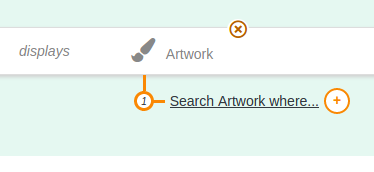
Completely disables the possibility for the user to select a value. Only the "where" option is active in order to "traverse" this entity. This is useful to show intermediate nodes to the user without allowing for a selection on a label, but only on other properties attached to that node. This is typically useful for event-based models like the CIDOC-CRM where events are usually not selectables by themselves but serves to connect other properties.
### Configuration
In your SHACL configuration, add a `dash:searchWidget` annotation with the value [`config-core:NonSelectableProperty`](http://data.sparna.fr/ontologies/sparnatural-config-core#NonSelectableProperty).
### Datasources
No datasource required.
### Default configuration
There is no default behavior for this widhet, it needs to be configured explicitely.
### SPARQL clause
No SPARQL generated.
### Description
Completely disables the possibility for the user to select a value. Only the "where" option is active in order to "traverse" this entity. This is useful to show intermediate nodes to the user without allowing for a selection on a label, but only on other properties attached to that node. This is typically useful for event-based models like the CIDOC-CRM where events are usually not selectables by themselves but serves to connect other properties.
### Configuration
In your SHACL configuration, add a `dash:searchWidget` annotation with the value [`config-core:NonSelectableProperty`](http://data.sparna.fr/ontologies/sparnatural-config-core#NonSelectableProperty).
### Datasources
No datasource required.
### Default configuration
There is no default behavior for this widhet, it needs to be configured explicitely.
### SPARQL clause
No SPARQL generated.