

 tl;dr: SpeedyBot helps you efficiently design, deploy, and secure rich conversation systems-- go from zero to a bot in seconds **[here](https://speedybot.js.org/new)**
## Setup
```
npm install speedybot
```
## Speedy & Easy
- SpeedyBot offers a buttery-smooth developer experience to keep you building your bots rather than scouring the docs. It's written in typescript + built-in type hints with autocomplete, **has zero external dependencies**, supports ESM + CommonJS, provides lots of other DX goodness like live-reload on code changes that makes building bots speedy and easy (see **[here for details](https://speedybot.js.org/new)**).
- SpeedyBot shrinks away all the complexity and makes it a breeze to handle user input regardless of the source/modality-- text, file uploads, form submission from SpeedyCards, etc
- SpeedyBot seamlessly operates across diverse severless/container-less platforms (Lambda/Deno/Workers/etc) as well as conventional fixed servers and even within CI/CD scripts. As long you've got internet connectivity, SpeedyBot functions seamlessly
## SpeedyBot basics
You can get a bot up and running fast by grabbing one of the batteries-included samples at **[https://speedybot.js.org/examples](https://speedybot.js.org/examples/)** and see how SpeedyBot has you covered for crafting bots that can do it all-- **[securely integrate w/ LLMs + content management systems](https://speedybot.js.org/examples/voiceflow/README)**, **[process file-uploads](https://speedybot.js.org/patterns#handle-file-uploads)**, **[segment content based on user data + behavior](https://speedybot.js.org/patterns#restrict-emails)**, create + manage **[SpeedyCards](https://speedybot.js.org/speedycard)**, **[ask for a user's location in a privacy-respecting way](https://speedybot.js.org/examples/location/README)** and lots more.
## The basics
- SpeedyBot streamlines the creation of conversation systems, making it easy to deploy and manage bots. When your SpeedyBot receives an event from a user (such as a message, card, or file upload), it processes the event through a sequence of steps, similar to how a car moves through a carwash.
- Each step is just a function which **must** return either $.next to proceed to the next step or $.end to terminate the chain. Each step can be synchronous or asynchronous depending on what you need to do
- A step can do **whatever** you want (ex send the user a message or a **[SpeedyCard](https://speedybot.js.org/speedycard)**, call an API to interact with some external system, or do nothing at all)
- Whatever you're up to in a step, however, try not to take too long to do it because you probably don't want to keep your user waiting
Here's a starter `bot.ts`:
```ts
import { SpeedyBot } from "speedybot";
const Bot = new SpeedyBot();
Bot.addStep(async ($) => {
await $.send("Step 1");
if ($.text === "hi") {
await $.reply(`Hi there ${$.author.name}!`);
}
return $.next;
});
Bot.addStep(($) => {
$.ctx.scribbledData = "someData_" + Math.random();
return $.next;
});
Bot.addStep(async ($) => {
await $.send("Step 2");
const card = $.card()
.addTitle("My great card!")
.addText(`The random scribbled data is ${$.ctx.scribbledData}`)
.addTable([
["Label", "Data 1"],
["Label 2", "Data 2"],
["Label 3", "Data 3"],
]);
await $.send(card); // send a card, not just text
return $.next;
});
Bot.addStep(async ($) => {
await $.send("Step 3");
return $.end; // <--- Stops the train!
});
Bot.addStep(async ($) => {
await $.send("Step 4 (we never reach this!");
return $.end;
});
```
tl;dr: SpeedyBot helps you efficiently design, deploy, and secure rich conversation systems-- go from zero to a bot in seconds **[here](https://speedybot.js.org/new)**
## Setup
```
npm install speedybot
```
## Speedy & Easy
- SpeedyBot offers a buttery-smooth developer experience to keep you building your bots rather than scouring the docs. It's written in typescript + built-in type hints with autocomplete, **has zero external dependencies**, supports ESM + CommonJS, provides lots of other DX goodness like live-reload on code changes that makes building bots speedy and easy (see **[here for details](https://speedybot.js.org/new)**).
- SpeedyBot shrinks away all the complexity and makes it a breeze to handle user input regardless of the source/modality-- text, file uploads, form submission from SpeedyCards, etc
- SpeedyBot seamlessly operates across diverse severless/container-less platforms (Lambda/Deno/Workers/etc) as well as conventional fixed servers and even within CI/CD scripts. As long you've got internet connectivity, SpeedyBot functions seamlessly
## SpeedyBot basics
You can get a bot up and running fast by grabbing one of the batteries-included samples at **[https://speedybot.js.org/examples](https://speedybot.js.org/examples/)** and see how SpeedyBot has you covered for crafting bots that can do it all-- **[securely integrate w/ LLMs + content management systems](https://speedybot.js.org/examples/voiceflow/README)**, **[process file-uploads](https://speedybot.js.org/patterns#handle-file-uploads)**, **[segment content based on user data + behavior](https://speedybot.js.org/patterns#restrict-emails)**, create + manage **[SpeedyCards](https://speedybot.js.org/speedycard)**, **[ask for a user's location in a privacy-respecting way](https://speedybot.js.org/examples/location/README)** and lots more.
## The basics
- SpeedyBot streamlines the creation of conversation systems, making it easy to deploy and manage bots. When your SpeedyBot receives an event from a user (such as a message, card, or file upload), it processes the event through a sequence of steps, similar to how a car moves through a carwash.
- Each step is just a function which **must** return either $.next to proceed to the next step or $.end to terminate the chain. Each step can be synchronous or asynchronous depending on what you need to do
- A step can do **whatever** you want (ex send the user a message or a **[SpeedyCard](https://speedybot.js.org/speedycard)**, call an API to interact with some external system, or do nothing at all)
- Whatever you're up to in a step, however, try not to take too long to do it because you probably don't want to keep your user waiting
Here's a starter `bot.ts`:
```ts
import { SpeedyBot } from "speedybot";
const Bot = new SpeedyBot();
Bot.addStep(async ($) => {
await $.send("Step 1");
if ($.text === "hi") {
await $.reply(`Hi there ${$.author.name}!`);
}
return $.next;
});
Bot.addStep(($) => {
$.ctx.scribbledData = "someData_" + Math.random();
return $.next;
});
Bot.addStep(async ($) => {
await $.send("Step 2");
const card = $.card()
.addTitle("My great card!")
.addText(`The random scribbled data is ${$.ctx.scribbledData}`)
.addTable([
["Label", "Data 1"],
["Label 2", "Data 2"],
["Label 3", "Data 3"],
]);
await $.send(card); // send a card, not just text
return $.next;
});
Bot.addStep(async ($) => {
await $.send("Step 3");
return $.end; // <--- Stops the train!
});
Bot.addStep(async ($) => {
await $.send("Step 4 (we never reach this!");
return $.end;
});
```
 - The $ parameter provides a bunch of useful features, allowing you to reply to messages, send and check card data (see **[details on that](https://speedybot.js.org/patterns.html#simple-card-handler)**), and access information about the message and its author.
 - Important: Avoid excessive usage of steps. If you find yourself writing a lot of "handlers" or checks in your steps you might be making things harder than they need to be. For a natural language "conversation", for example, focus on capturing user utterances (`$.text`) in your steps and then all you need to do is transmit back and forth to an external service and keep your steps short and sweet and simple
- Execution Order: Generally speaking, steps will fire in the order they are added to your `bot.ts`-- for convenience, there is a `Bot.insertStepToFront` step which will slip the supplied step to the front of the chain and also `Bot.addStepSequence` to add a list of steps all at once
## Garage
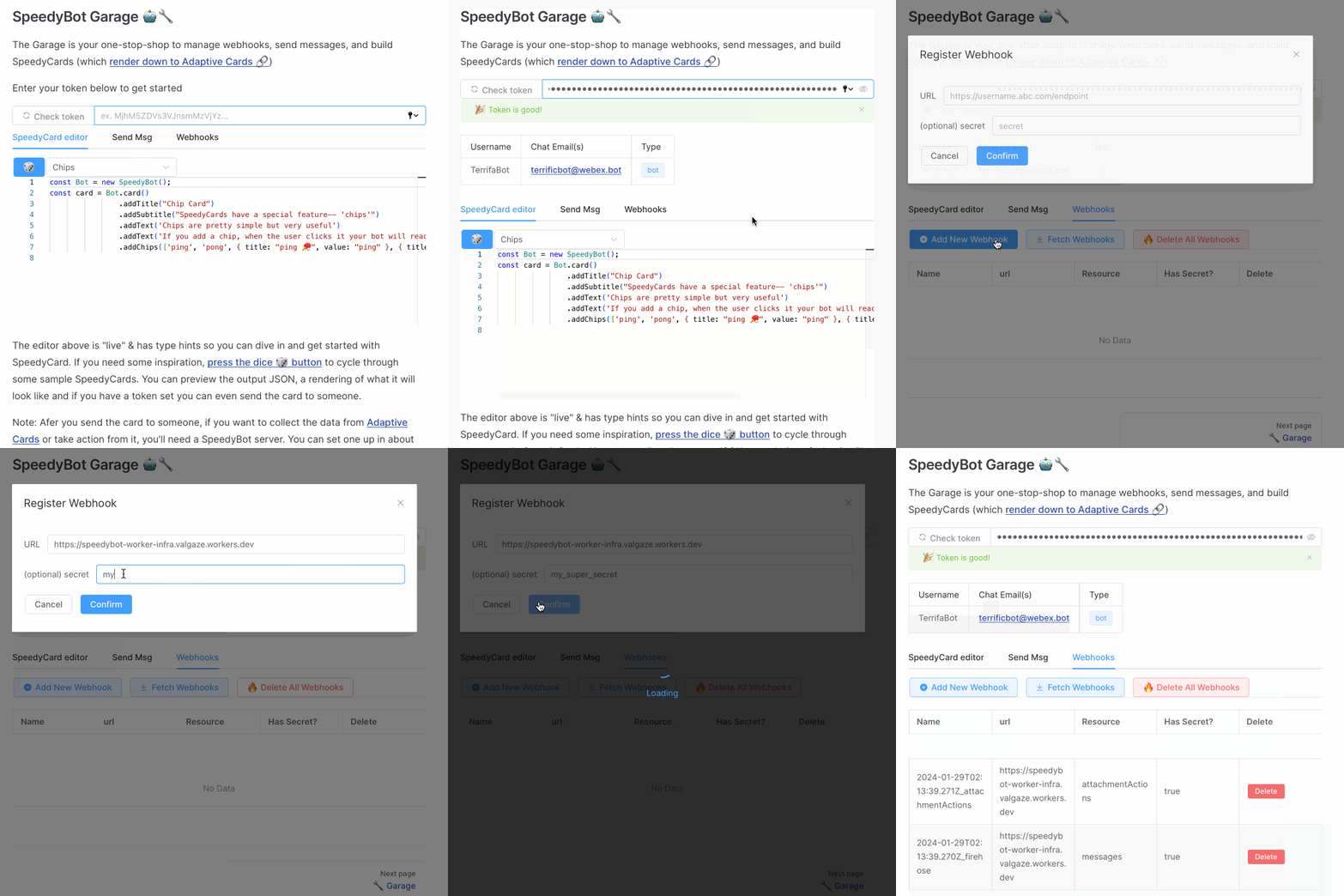
SpeedyBot's docs are special-- they're interactive and you can do things with them. From the Patterns docs you can grab **[code snippets](https://speedybot.js.org/patterns)** and throw them right into your bot. Inside the visual **[SpeedyBot Garage](https://speedybot.js.org/garage)** experience you can register webhooks and design + preview + send **[SpeedyCards](https://speedybot.js.org/speedycard)**
- Important: Avoid excessive usage of steps. If you find yourself writing a lot of "handlers" or checks in your steps you might be making things harder than they need to be. For a natural language "conversation", for example, focus on capturing user utterances (`$.text`) in your steps and then all you need to do is transmit back and forth to an external service and keep your steps short and sweet and simple
- Execution Order: Generally speaking, steps will fire in the order they are added to your `bot.ts`-- for convenience, there is a `Bot.insertStepToFront` step which will slip the supplied step to the front of the chain and also `Bot.addStepSequence` to add a list of steps all at once
## Garage
SpeedyBot's docs are special-- they're interactive and you can do things with them. From the Patterns docs you can grab **[code snippets](https://speedybot.js.org/patterns)** and throw them right into your bot. Inside the visual **[SpeedyBot Garage](https://speedybot.js.org/garage)** experience you can register webhooks and design + preview + send **[SpeedyCards](https://speedybot.js.org/speedycard)**
 ## SpeedyCards
SpeedyCards make it speedy and easy to build **[Adaptive Cards](https://adaptivecards.io)** where you can easily collect structured data from users and add colors, "chips", formatting and other visual embellishments.
## SpeedyCards
SpeedyCards make it speedy and easy to build **[Adaptive Cards](https://adaptivecards.io)** where you can easily collect structured data from users and add colors, "chips", formatting and other visual embellishments.

 ## LLM Token Streaming
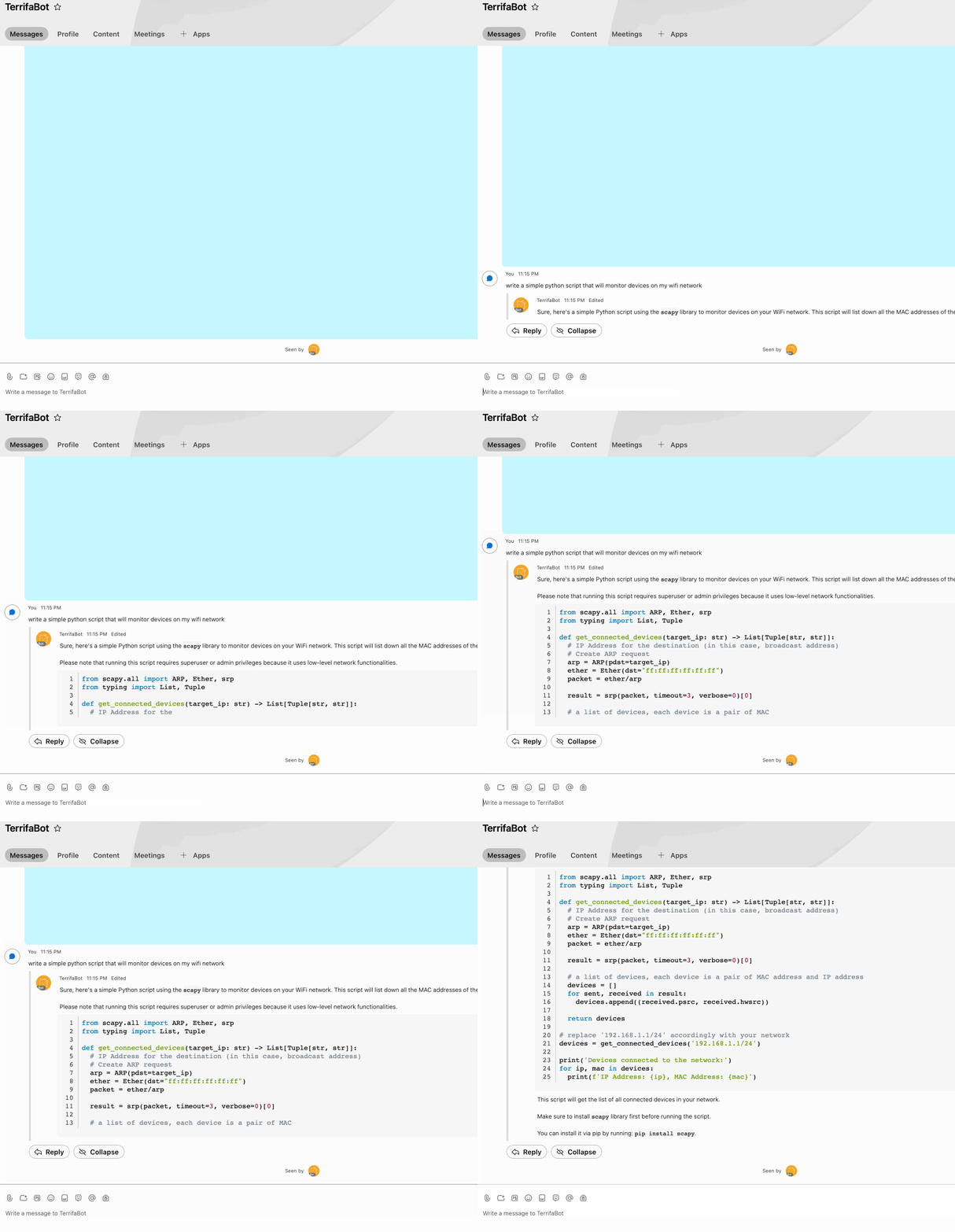
SpeedyBot makes it speedy & easy to build serverless bots for the LLM era. See the **[LLM steam example](https://speedybot.js.org/examples/llm-stream)**
## LLM Token Streaming
SpeedyBot makes it speedy & easy to build serverless bots for the LLM era. See the **[LLM steam example](https://speedybot.js.org/examples/llm-stream)**
 ## 🐍 Speedybot-Python
If you want to build bots with Python rather than Typescript, you can also check out [🐍Speedybot-Python🐍](https://pypi.org/project/speedybot)
## CLI
It's SpeedyBot all the way down-- the **[SpeedyBot Documentation](https://speedybot.js.org)** is powered by SpeedyBot but SpeedyBot also has a fast and powerful CLI.
- Can run as `npm init speedybot@latest` or `npx -y speedybot`
- Add `--help` flag to end of commands (ex. `npx -y speedybot setup --help`)
## Setup
Download, scaffold, setup, and even boot SpeedyBot projects locally
```
npm init speedybot@latest setup -- --help
npx -y speedybot@latest setup --help
npx -y speedybot@latest setup
npx -y speedybot@^2.0.0 setup --project default --boot --install
npx -y speedybot@^2.0.0 setup --project voiceflow-kb -e BOT_TOKEN -e VOICEFLOW_API_KEY --install --boot
```
## Token
Inspect a WebEx token, see if its valid and see if any associated agents
```
npm init speedybot@latest token -- --help
npx -y speedybot@latest token --help
```
## Webhook
Manage webhooks-- Create, List, and Destroy webhooks associated with a token
```
npm init speedybot@latest webhook -- --help
npx -y speedybot@latest webhook --help
npx -y speedybot@latest webhook list
npx -y speedybot@latest webhook create -w https://www.myinfra.com -t tokenvalue -s secretvalue
npx -y speedybot@latest webhook remove
```
## 🐍 Speedybot-Python
If you want to build bots with Python rather than Typescript, you can also check out [🐍Speedybot-Python🐍](https://pypi.org/project/speedybot)
## CLI
It's SpeedyBot all the way down-- the **[SpeedyBot Documentation](https://speedybot.js.org)** is powered by SpeedyBot but SpeedyBot also has a fast and powerful CLI.
- Can run as `npm init speedybot@latest` or `npx -y speedybot`
- Add `--help` flag to end of commands (ex. `npx -y speedybot setup --help`)
## Setup
Download, scaffold, setup, and even boot SpeedyBot projects locally
```
npm init speedybot@latest setup -- --help
npx -y speedybot@latest setup --help
npx -y speedybot@latest setup
npx -y speedybot@^2.0.0 setup --project default --boot --install
npx -y speedybot@^2.0.0 setup --project voiceflow-kb -e BOT_TOKEN -e VOICEFLOW_API_KEY --install --boot
```
## Token
Inspect a WebEx token, see if its valid and see if any associated agents
```
npm init speedybot@latest token -- --help
npx -y speedybot@latest token --help
```
## Webhook
Manage webhooks-- Create, List, and Destroy webhooks associated with a token
```
npm init speedybot@latest webhook -- --help
npx -y speedybot@latest webhook --help
npx -y speedybot@latest webhook list
npx -y speedybot@latest webhook create -w https://www.myinfra.com -t tokenvalue -s secretvalue
npx -y speedybot@latest webhook remove
```