[](https://npmjs.com/package/strlen.awf) [](https://github.com/mklement0/strlen.awf/blob/master/LICENSE.md)
**Contents**
- [strlen.awf: an Alfred 3 workflow for measuring string length](#strlenawf-an-alfred-3-workflow-for-measuring-string-length)
- [Installation](#installation)
- [Prerequisites](#prerequisites)
- [Installation from the npm registry](#installation-from-the-npm-registry)
- [Manual installation](#manual-installation)
- [Customization](#customization)
- [Hotkeys (keyboard shortcuts)](#hotkeys-keyboard-shortcuts)
- [Keywords](#keywords)
- [License](#license)
- [Acknowledgements](#acknowledgements)
- [npm dependencies](#npm-dependencies)
- [Changelog](#changelog)
# strlen.awf: an Alfred 3 workflow for measuring string length
**strlen.awf** is a simple [Alfred 3](http://www.alfredapp.com) [workflow](http://www.alfredapp.com/workflows) for counting the
number of characters and bytes in a string (piece of text):
It comes with a hotkey (global keyboard shortcut) that operates on the
selected text in the currently active macOS application; alternatively, use
keyword `sl`.
Both character and byte count (to see the actual storage requirements of
UTF-8-encoded text containing multibyte characters) are measured simultaneously,
e.g.:
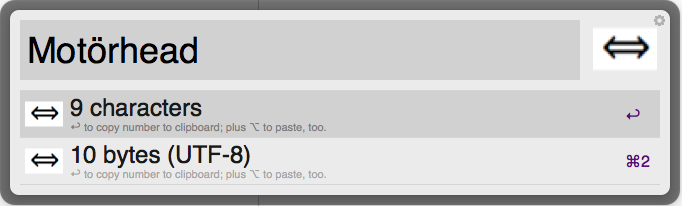
* Pressing ↩ (Return) on the count of interest copies it to the clipboard (as a mere number).
* Pressing ⌥↩ (Option + Return) additionally _pastes_ the number into the active application.
# Installation
## Prerequisites
* macOS (OS X
* [Alfred 3](http://alfredapp.com) with its paid [Power Pack](https://www.alfredapp.com/powerpack/) add-on.
## Installation from the npm registry
Note: Even if you don't use Node.js itself: its package manager, `npm`, works across platforms and is easy to install; try
[`curl -L https://git.io/n-install | bash`](https://github.com/mklement0/n-install)
With [Node.js](http://nodejs.org/) installed, install [the package](https://www.npmjs.com/package/strlen.awf) as follows:
[sudo] npm install -g strlen.awf
**Note**:
* Whether you need `sudo` depends on how you installed Node.js and whether you've [changed permissions later](https://docs.npmjs.com/getting-started/fixing-npm-permissions); if you get an `EACCES` error, try again with `sudo`.
* Alfred 3 will prompt you to import the workflow - select a category (optional), and confirm.
* After importing, proceed with [customization](#customization) below.
## Manual installation
* **Click [here](https://github.com/mklement0/strlen.awf/blob/stable/archive/net.same2u.strlen.awf.alfredworkflow?raw=true)** to download the installer.
* Open the downloaded file: Alfred 3 will prompt you to import the workflow - select a category (optional), and confirm.
* After importing, proceed with [customization](#customization) below.
# Customization
Note:
* Custom hotkeys and modified keywords are _retained_ on reinstallation / upgrade.
* To customize a workflow again later, click on Alfred's menu-bar extras icon,
(the bowler hat symbol), select `Preferences...`, switch to the `Workflows` tab
at the top, then locate the workflow in the list on the left.
## Hotkeys (keyboard shortcuts)
Alfred initially installs a workflow without actual hotkeys, so you must
assign them manually:
* Double-click the `Hotkey` element(s) of interest, click on the `Hotkey:` input field,
and press the desired key combination.
## Keywords
Optionally, you may customize the keyword(s) a workflow comes with:
* Double-click the `Keyword` or `Script Filter` element(s) of interest and
modify the value of the `Keyword:` input field.
# License
Copyright (c) 2015-2016 Michael Klement (http://same2u.net), released under the [MIT license](https://spdx.org/licenses/MIT#licenseText).
## Acknowledgements
This project gratefully depends on the following open-source components, according to the terms of their respective licenses.
[npm](https://www.npmjs.com/) dependencies below have an optional suffix denoting the type of dependency: the *absence* of a suffix denotes a required *run-time* dependency; `(D)` denotes a *development-time-only* dependency, `(O)` an *optional* dependency, and `(P)` a *peer* dependency.
## npm dependencies
* [doctoc (D)](https://github.com/thlorenz/doctoc)
* [json (D)](https://github.com/trentm/json)
* [replace (D)](https://github.com/harthur/replace)
* [semver (D)](https://github.com/npm/node-semver#readme)
* [urchin (D)](https://github.com/tlevine/urchin)
# Changelog
* **[v0.2.1](https://github.com/mklement0/strlen.awf/compare/v0.1.1...v0.2.0)** (2016-10-02):
* [breaking change] Upgraded to support Alfred 3.
If you still need Alfred 2 support, use version v0.1.1.
* **[v0.1.1](https://github.com/mklement0/strlen.awf/compare/v0.1.0...v0.1.1)** (2015-11-08):
* [doc] Wording of placeholder title for keyword `sl` improved.
* [doc] `README.md` fix
* **v0.1.0** (2015-11-08):
* Initial release.