# syringe.js [](https://travis-ci.org/holt/syringe) #
 Syringe is a small JavaScript library that allows you to dynamically assign data contracts to your functions, constructor functions, and methods.
No more worrying about passing information directly, indirectly, or relying on the lexical scope as Syringe can vaccinate your operations ahead of time.
Now, let's roll up our sleeves and begin!
## Table of Contents
- [Installation](#installation)
- [Overview](#overview)
- [Questions](#questions)
- [API](#api)
- [Examples](#examples)
- [License](#license)
## Installation
### Browser
Just download [syringe.min.js](https://raw.github.com/holt/syringe/master/syringe.min.js) and add it to your to your environment.
#### Dependencies
Syringe uses `JSON.parse` and also the following ECMAScript 5 / JavaScript 1.6 methods:
- `Array.filter`
- `Array.map`
- `Array.reduce`
- `Function.bind`
- `Object.keys`
- `Object.create`
- `String.trim`
All of the above methods are available natively on modern browsers. If you need to support older browsers, the polyfills for these methods are provided in [lib/polyfill.min.js](https://raw.github.com/holt/syringe/master/lib/polyfill.min.js)
#### Compatibility
Syringe has been tested on the following browsers:
- Firefox 2+
- Chrome 11+
- Safari 3+
- Opera 9+
- Internet Explorer 7+
### Node
Ensure that you have installed the latest version of [node.js](http://nodejs.org) and run the following from the command prompt:
`npm install syringejs`
### Bower
Ensure that you have installed the latest version of [Bower](http://bower.io/) and run the following from the command prompt:
`bower install syringe --save`
### NuGet
Run the following command in the [Package Manager Console](http://docs.nuget.org/docs/start-here/using-the-package-manager-console):
`Install-Package syringe.js`
## Overview ##
Syringe works by taking a function and binding it with deep or shallow references to data items located within a *data registry*. When this *pre-bound* function executes, the references are reconciled against the registry and the corresponding data items are passed into the function automatically. This technique is known as *dependency injection*.
### Tutorial
In the following tutorial we're going to demonstrate how dependency injection works by using Syringe to build a small set of pre-bound functions that allow us to interact in various ways with a simple datastore.
#### Defining the Data
Let's start by creating a Syringe object that holds some departmental information for a fictional organization. `Syringe.create()` is used to generate a new instance of an empty Syringe object, but can also be initialized with a payload of fresh data if you pass in an object map like this:
```javascript
var syr = Syringe.create({
depts: {
'sales' : {id: 'A1', name: 'Sales'},
'finance' : {id: 'B2', name: 'Finance'},
'marketing' : {id: 'C3', name: 'Marketing'}
}
});
```
Now we'll check our new `syr` object instance to ensure that it does indeed contain some data:
```javascript
syr.get('depts.sales.id'); // Returns: "A1"
syr.get('depts.finance.name'); // Returns: "Finance"
```
The first important thing to note here is that the `syr` object's `get` method uses a *dot-delimited* string to retrieve data.
Unlike using *dot-notation* to fetch items directly from a JavaScript object (e.g., `obj.foo.bar`), this method of retrieval will not cause the system to throw an exception if you attempt to access the data of a property that doesn't exist. Instead, if you execute something like `syr.get('depts.engineering.id')` you'll get a return value of `false`.
Okay, so we've confirmed that we have now got a brand new `syr` object that holds some basic data. Let's use Syringe's binding capabilities to create a retrieval function called `report` that receives the `depts` object data automatically when it executes.
To do this we use the `on` method to create a new bound function:
```javascript
var report = syr.on(['depts'], function (data, key) {
return data[key] || false;
});
```
Now we can execute our `report` function like so:
```javascript
report('sales'); // Returns: {id: "A1", name: "Sales"}
```
Notice how we only passed in *one* argument: the name of the department we're interested in. Arguments passed by the function's caller are known as *free* arguments. The `depts` argument is pre-bound to the function and passed in automatically.
When defining a pre-bound function, data registry item *names* and argument *names* (the `depts` array item and the `data` argument respectively in the above example) do *not* have to match. However, there *must* be at least as many pre-bound arguments as registry items.
To make this a little clearer, consider the following example:
```javascript
var func = syr.on(['foo', 'bar.fly', 'buzz.lightyear'], function (a, b, c, key) {
// ...
});
```
In the above example the `a`, `b`, and `c` arguments are bound to their corresponding data registry items `foo`, `bar.fly`, and `buzz.lightyear`, with `key` being the only *free* (unbound) argument.
Bound arguments always match the array order of their corresponding data registry items and precede the free arguments (if any) in the function signature.
#### Storing Bound Functions
Syringe's `on` method allows us the create *ad hoc* pre-bound functions. However the `report` function is useful, so let's add it to the Syringe data registry as a utility method in its own right so it can be used throughout our system.
The code for adding pre-bound functions to the registry looks like this:
```javascript
syr.add('utils.report', function (data, key) {
return data[key] || false;
}, ['depts']);
```
The first argument specifies where we want our method to reside inside the Syringe data registry. It doesn't matter that the registry does not yet have a `utils` property as it is created automatically when we add the `utils.report` item.
**Note:** If a `utils` property containing a `report` property *was* already present in the registry, Syringe would throw an error and suggest that we first use the `remove` method to unregister the `report` property.
The second argument is the function definition, and the third argument is the array of items we want to pull from the Syringe data registry and inject directly into our `utils.report` function when it executes.
The third argument is optional. You don't *have* to store a pre-bound function; you could just store a regular function (however, in this case we want to).
Unlike `on`, the `add` operation returns the *entire* Syringe object, so it isn't useful to assign it to a variable. If we want to test our newly added method (or any a method contained within the Syringe registry) we can execute it like this:
```javascript
syr.exec('report', ['sales']); // Returns: {id: "A1", name: "Sales"}
```
However, apart from calling newly-defined pre-bound methods directly for testing purposes, you probably won't be using the `exec` method very often. The real value of adding pre-bound methods to the Syringe data registry is that they too can be injected into other functions. And that's what we're going to look at next.
#### Injecting Bound Functions
So far we've created a Syringe object that contains some basic departmental information, and defined a getter-like `report` function that grants any executor access to a specific named item within the `depts` data object.
Let's enhance `report` by improving its data-retrieval capabilities. We'll expand it to accept either a name *or* an ID as a lookup key in order to locate departmental information.
Because `utils.report` already exists, we must use the `set` method instead of the `add` method to change the function definition:
```javascript
syr.set('utils.report', function(data, key) {
if (data[key]) {
return data[key];
} else {
var str = Object.keys(data).filter(function(item) {
return data[item].id === key;
});
return str ? data[str] : false;
}
}, ['depts']);
```
As before, we can use the `exec` method test our enhanced `utils.report` function:
```javascript
syr.exec('utils.report', ['sales']); // Returns: {id: "A1", name: "Sales"}
syr.exec('utils.report', ['B2']); // Returns: {id: "B2", name: "Finance"}
```
We are now going to extend the Syringe registry to include some members of staff:
```javascript
syr.add({
personnel: {
'smith_r': {id: '001', name: 'Robert Smith', dept: 'A1'},
'jones_t': {id: '002', name: 'Edward Jones', dept: 'B2'},
'coope_a': {id: '003', name: 'Andrea Coope', dept: 'C3'}
}
});
```
It would be useful to create a function that uses what we've created so far in order to provide us with profile data about a member of staff that also includes information about their department.
Like `report`, this function should be able to accept either a name or an ID as a lookup key in order to locate the corresponding profile.
We'll call this new method `utils.profile`. When it's executed, the method gets passed the `utils.report` function as its first argument:
```javascript
syr.add('utils.profile', function(fn, key) {
var
personnel = this.copy(['personnel'], fn),
employee = personnel(key);
if (employee && employee.dept) {
return {
id : employee.id,
name: employee.name,
dept: fn(employee.dept)
};
} else {
return false;
}
}, ['utils.report']);
```
Syringe provides a method called `copy` that allows you to duplicate an existing pre-bound function but specify a new injection payload.
We can use this method to create a new internal function called `personnel` that uses the same mechanism as `utils.report` but is pre-bound to a different data payload.
As before, we can test this new function by executing the following:
```javascript
syr.exec('utils.profile', 'coope_a'); // Returns:
// {
// "id" : "003",
// "name": "Andrea Coope",
// "dept": {
// "id" : "C3",
// "name": "Marketing"
// }
// }
syr.exec('utils.profile', '002'); // Returns:
// {
// "id" : "002",
// "name": "Edward Jones",
// "dept": {
// "id" : "B2",
// "name": "Finance"
// }
// }
```
#### Wrappers
When our `utils.profile` method is called, we want some way to indicate that this activity has taken place by logging a message to the console.
One way we can do this is by wrapping the `utils.profile` method in another method that itself receives pre-bound arguments upon execution.
First, let's create a boilerplate alert message in our data registry:
```javascript
syr.add('data.messages.access', 'Profile accessed: {0}');
```
Next, create a logger function that is pre-bound with the `data.messages` object and can receive both the original `utils.profile` function and also a lookup key (name or ID) to pass to it:
```javascript
var log = syr.on(['data.messages'], function (msg, fn, key) {
var profile = fn(key);
console.log(msg.access.replace('{0}', profile.name));
return profile;
});
```
We can now use Syringe's `wrap` method to wrap our `log` function around the `utils.profile` method. Then we'll use the result to update the original `utils.profile` method in the registry:
```javascript
syr.set('utils.profile', syr.wrap(syr.get('utils.profile'), log));
```
As before, we can use the `exec` method to test our freshly wrapped `utils.report` function:
```javascript
syr.exec('utils.profile', ['coope_a']) // Returns:
// {
// "id" : "003",
// "name": "Andrea Coope",
// "dept": {
// "id" : "C3",
// "name": "Marketing"
// }
// }
// Logs:
// Profile accessed: "Andrea Coope"
```
#### Listeners
In much the same way that you might want to be alerted when a stored function executes, you may also want to be notified when the registry itself changes. For this purpose, Syringe provides listeners that can execute when they detect a particular registry event.
Listeners can be created to detect operations that use the `get`, `set`, `add`, `remove`, `listops` methods (or all of the above). In addition, they can be mapped to specific registry items, or to general items using the `*` wildcard. Example:
```javascript
syr.listen('add:data.personnel.*', function (name, value, data) {
console.log('The following data was added to "%s": %o', value, data);
});
```
The above binding will fire if any additions are made to the `data.personnel` object. So, now if we do this:
```javascript
syr.add('data.personnel.moore_l', {id: '004', name: 'Leanna Moore', dept: 'D4'});
```
... the following is logged to the console:
```javascript
The following data was added to "data.personnel.moore_l": {
dept: 'D4',
id : '004',
name: 'Leanna Moore'
}
```
## Questions
### "Does injection work with constructor functions?"
Yes it does, and we can demonstrate this with another simple example. Create a data object:
```javascript
var syr2 = Syringe.create({
'data': {
'A00': {
'name' : 'Slothrop, Tyrone',
'rank' : 'Lieutenant',
'locale' : 'GB',
'division' : 'ACHTUNG'
},
'A01': {
'name' : 'Mucker-Maffick, Oliver',
'rank' : 'Lieutenant',
'locale' : 'GB',
'division' : 'ACHTUNG'
}
}
});
```
Create a simple constructor that automatically adds `data` to its context and bind the `data` object to the constructor:
```javascript
StaffObj = syr2.on(['data'], function (data, id) {
data = data || {};
if (({}).toString.call(data[id]) === '[object Object]') {
for (var prop in data[id]) {
if (data[id].hasOwnProperty(prop)) {
this[prop] = data[id][prop];
}
}
}
});
```
... and create a couple of new objects:
```javascript
var slothrop = new StaffObj('A00'); // Creates:
// {
// "name" : "Slothrop, Tyrone",
// "rank" : "Lieutenant",
// "locale" : "GB",
// "division": "ACHTUNG"
// }
var tantivy = new StaffObj('A01'); // Creates:
// {
// "name" : "Mucker-Maffick, Oliver",
// "rank" : "Lieutenant",
// "locale" : "GB",
// "division": "ACHTUNG"
// }
```
### "Can I see a more complex example?"
[Here's a Todos application](http://holt.github.io/syringe-todos)+ that uses Syringe dependency injection to construct collection and view objects and manage controller operations. You can view the source code for this app in the [syringe-todos](https://github.com/holt/syringe-todos) repo.
Syringe is a small JavaScript library that allows you to dynamically assign data contracts to your functions, constructor functions, and methods.
No more worrying about passing information directly, indirectly, or relying on the lexical scope as Syringe can vaccinate your operations ahead of time.
Now, let's roll up our sleeves and begin!
## Table of Contents
- [Installation](#installation)
- [Overview](#overview)
- [Questions](#questions)
- [API](#api)
- [Examples](#examples)
- [License](#license)
## Installation
### Browser
Just download [syringe.min.js](https://raw.github.com/holt/syringe/master/syringe.min.js) and add it to your to your environment.
#### Dependencies
Syringe uses `JSON.parse` and also the following ECMAScript 5 / JavaScript 1.6 methods:
- `Array.filter`
- `Array.map`
- `Array.reduce`
- `Function.bind`
- `Object.keys`
- `Object.create`
- `String.trim`
All of the above methods are available natively on modern browsers. If you need to support older browsers, the polyfills for these methods are provided in [lib/polyfill.min.js](https://raw.github.com/holt/syringe/master/lib/polyfill.min.js)
#### Compatibility
Syringe has been tested on the following browsers:
- Firefox 2+
- Chrome 11+
- Safari 3+
- Opera 9+
- Internet Explorer 7+
### Node
Ensure that you have installed the latest version of [node.js](http://nodejs.org) and run the following from the command prompt:
`npm install syringejs`
### Bower
Ensure that you have installed the latest version of [Bower](http://bower.io/) and run the following from the command prompt:
`bower install syringe --save`
### NuGet
Run the following command in the [Package Manager Console](http://docs.nuget.org/docs/start-here/using-the-package-manager-console):
`Install-Package syringe.js`
## Overview ##
Syringe works by taking a function and binding it with deep or shallow references to data items located within a *data registry*. When this *pre-bound* function executes, the references are reconciled against the registry and the corresponding data items are passed into the function automatically. This technique is known as *dependency injection*.
### Tutorial
In the following tutorial we're going to demonstrate how dependency injection works by using Syringe to build a small set of pre-bound functions that allow us to interact in various ways with a simple datastore.
#### Defining the Data
Let's start by creating a Syringe object that holds some departmental information for a fictional organization. `Syringe.create()` is used to generate a new instance of an empty Syringe object, but can also be initialized with a payload of fresh data if you pass in an object map like this:
```javascript
var syr = Syringe.create({
depts: {
'sales' : {id: 'A1', name: 'Sales'},
'finance' : {id: 'B2', name: 'Finance'},
'marketing' : {id: 'C3', name: 'Marketing'}
}
});
```
Now we'll check our new `syr` object instance to ensure that it does indeed contain some data:
```javascript
syr.get('depts.sales.id'); // Returns: "A1"
syr.get('depts.finance.name'); // Returns: "Finance"
```
The first important thing to note here is that the `syr` object's `get` method uses a *dot-delimited* string to retrieve data.
Unlike using *dot-notation* to fetch items directly from a JavaScript object (e.g., `obj.foo.bar`), this method of retrieval will not cause the system to throw an exception if you attempt to access the data of a property that doesn't exist. Instead, if you execute something like `syr.get('depts.engineering.id')` you'll get a return value of `false`.
Okay, so we've confirmed that we have now got a brand new `syr` object that holds some basic data. Let's use Syringe's binding capabilities to create a retrieval function called `report` that receives the `depts` object data automatically when it executes.
To do this we use the `on` method to create a new bound function:
```javascript
var report = syr.on(['depts'], function (data, key) {
return data[key] || false;
});
```
Now we can execute our `report` function like so:
```javascript
report('sales'); // Returns: {id: "A1", name: "Sales"}
```
Notice how we only passed in *one* argument: the name of the department we're interested in. Arguments passed by the function's caller are known as *free* arguments. The `depts` argument is pre-bound to the function and passed in automatically.
When defining a pre-bound function, data registry item *names* and argument *names* (the `depts` array item and the `data` argument respectively in the above example) do *not* have to match. However, there *must* be at least as many pre-bound arguments as registry items.
To make this a little clearer, consider the following example:
```javascript
var func = syr.on(['foo', 'bar.fly', 'buzz.lightyear'], function (a, b, c, key) {
// ...
});
```
In the above example the `a`, `b`, and `c` arguments are bound to their corresponding data registry items `foo`, `bar.fly`, and `buzz.lightyear`, with `key` being the only *free* (unbound) argument.
Bound arguments always match the array order of their corresponding data registry items and precede the free arguments (if any) in the function signature.
#### Storing Bound Functions
Syringe's `on` method allows us the create *ad hoc* pre-bound functions. However the `report` function is useful, so let's add it to the Syringe data registry as a utility method in its own right so it can be used throughout our system.
The code for adding pre-bound functions to the registry looks like this:
```javascript
syr.add('utils.report', function (data, key) {
return data[key] || false;
}, ['depts']);
```
The first argument specifies where we want our method to reside inside the Syringe data registry. It doesn't matter that the registry does not yet have a `utils` property as it is created automatically when we add the `utils.report` item.
**Note:** If a `utils` property containing a `report` property *was* already present in the registry, Syringe would throw an error and suggest that we first use the `remove` method to unregister the `report` property.
The second argument is the function definition, and the third argument is the array of items we want to pull from the Syringe data registry and inject directly into our `utils.report` function when it executes.
The third argument is optional. You don't *have* to store a pre-bound function; you could just store a regular function (however, in this case we want to).
Unlike `on`, the `add` operation returns the *entire* Syringe object, so it isn't useful to assign it to a variable. If we want to test our newly added method (or any a method contained within the Syringe registry) we can execute it like this:
```javascript
syr.exec('report', ['sales']); // Returns: {id: "A1", name: "Sales"}
```
However, apart from calling newly-defined pre-bound methods directly for testing purposes, you probably won't be using the `exec` method very often. The real value of adding pre-bound methods to the Syringe data registry is that they too can be injected into other functions. And that's what we're going to look at next.
#### Injecting Bound Functions
So far we've created a Syringe object that contains some basic departmental information, and defined a getter-like `report` function that grants any executor access to a specific named item within the `depts` data object.
Let's enhance `report` by improving its data-retrieval capabilities. We'll expand it to accept either a name *or* an ID as a lookup key in order to locate departmental information.
Because `utils.report` already exists, we must use the `set` method instead of the `add` method to change the function definition:
```javascript
syr.set('utils.report', function(data, key) {
if (data[key]) {
return data[key];
} else {
var str = Object.keys(data).filter(function(item) {
return data[item].id === key;
});
return str ? data[str] : false;
}
}, ['depts']);
```
As before, we can use the `exec` method test our enhanced `utils.report` function:
```javascript
syr.exec('utils.report', ['sales']); // Returns: {id: "A1", name: "Sales"}
syr.exec('utils.report', ['B2']); // Returns: {id: "B2", name: "Finance"}
```
We are now going to extend the Syringe registry to include some members of staff:
```javascript
syr.add({
personnel: {
'smith_r': {id: '001', name: 'Robert Smith', dept: 'A1'},
'jones_t': {id: '002', name: 'Edward Jones', dept: 'B2'},
'coope_a': {id: '003', name: 'Andrea Coope', dept: 'C3'}
}
});
```
It would be useful to create a function that uses what we've created so far in order to provide us with profile data about a member of staff that also includes information about their department.
Like `report`, this function should be able to accept either a name or an ID as a lookup key in order to locate the corresponding profile.
We'll call this new method `utils.profile`. When it's executed, the method gets passed the `utils.report` function as its first argument:
```javascript
syr.add('utils.profile', function(fn, key) {
var
personnel = this.copy(['personnel'], fn),
employee = personnel(key);
if (employee && employee.dept) {
return {
id : employee.id,
name: employee.name,
dept: fn(employee.dept)
};
} else {
return false;
}
}, ['utils.report']);
```
Syringe provides a method called `copy` that allows you to duplicate an existing pre-bound function but specify a new injection payload.
We can use this method to create a new internal function called `personnel` that uses the same mechanism as `utils.report` but is pre-bound to a different data payload.
As before, we can test this new function by executing the following:
```javascript
syr.exec('utils.profile', 'coope_a'); // Returns:
// {
// "id" : "003",
// "name": "Andrea Coope",
// "dept": {
// "id" : "C3",
// "name": "Marketing"
// }
// }
syr.exec('utils.profile', '002'); // Returns:
// {
// "id" : "002",
// "name": "Edward Jones",
// "dept": {
// "id" : "B2",
// "name": "Finance"
// }
// }
```
#### Wrappers
When our `utils.profile` method is called, we want some way to indicate that this activity has taken place by logging a message to the console.
One way we can do this is by wrapping the `utils.profile` method in another method that itself receives pre-bound arguments upon execution.
First, let's create a boilerplate alert message in our data registry:
```javascript
syr.add('data.messages.access', 'Profile accessed: {0}');
```
Next, create a logger function that is pre-bound with the `data.messages` object and can receive both the original `utils.profile` function and also a lookup key (name or ID) to pass to it:
```javascript
var log = syr.on(['data.messages'], function (msg, fn, key) {
var profile = fn(key);
console.log(msg.access.replace('{0}', profile.name));
return profile;
});
```
We can now use Syringe's `wrap` method to wrap our `log` function around the `utils.profile` method. Then we'll use the result to update the original `utils.profile` method in the registry:
```javascript
syr.set('utils.profile', syr.wrap(syr.get('utils.profile'), log));
```
As before, we can use the `exec` method to test our freshly wrapped `utils.report` function:
```javascript
syr.exec('utils.profile', ['coope_a']) // Returns:
// {
// "id" : "003",
// "name": "Andrea Coope",
// "dept": {
// "id" : "C3",
// "name": "Marketing"
// }
// }
// Logs:
// Profile accessed: "Andrea Coope"
```
#### Listeners
In much the same way that you might want to be alerted when a stored function executes, you may also want to be notified when the registry itself changes. For this purpose, Syringe provides listeners that can execute when they detect a particular registry event.
Listeners can be created to detect operations that use the `get`, `set`, `add`, `remove`, `listops` methods (or all of the above). In addition, they can be mapped to specific registry items, or to general items using the `*` wildcard. Example:
```javascript
syr.listen('add:data.personnel.*', function (name, value, data) {
console.log('The following data was added to "%s": %o', value, data);
});
```
The above binding will fire if any additions are made to the `data.personnel` object. So, now if we do this:
```javascript
syr.add('data.personnel.moore_l', {id: '004', name: 'Leanna Moore', dept: 'D4'});
```
... the following is logged to the console:
```javascript
The following data was added to "data.personnel.moore_l": {
dept: 'D4',
id : '004',
name: 'Leanna Moore'
}
```
## Questions
### "Does injection work with constructor functions?"
Yes it does, and we can demonstrate this with another simple example. Create a data object:
```javascript
var syr2 = Syringe.create({
'data': {
'A00': {
'name' : 'Slothrop, Tyrone',
'rank' : 'Lieutenant',
'locale' : 'GB',
'division' : 'ACHTUNG'
},
'A01': {
'name' : 'Mucker-Maffick, Oliver',
'rank' : 'Lieutenant',
'locale' : 'GB',
'division' : 'ACHTUNG'
}
}
});
```
Create a simple constructor that automatically adds `data` to its context and bind the `data` object to the constructor:
```javascript
StaffObj = syr2.on(['data'], function (data, id) {
data = data || {};
if (({}).toString.call(data[id]) === '[object Object]') {
for (var prop in data[id]) {
if (data[id].hasOwnProperty(prop)) {
this[prop] = data[id][prop];
}
}
}
});
```
... and create a couple of new objects:
```javascript
var slothrop = new StaffObj('A00'); // Creates:
// {
// "name" : "Slothrop, Tyrone",
// "rank" : "Lieutenant",
// "locale" : "GB",
// "division": "ACHTUNG"
// }
var tantivy = new StaffObj('A01'); // Creates:
// {
// "name" : "Mucker-Maffick, Oliver",
// "rank" : "Lieutenant",
// "locale" : "GB",
// "division": "ACHTUNG"
// }
```
### "Can I see a more complex example?"
[Here's a Todos application](http://holt.github.io/syringe-todos)+ that uses Syringe dependency injection to construct collection and view objects and manage controller operations. You can view the source code for this app in the [syringe-todos](https://github.com/holt/syringe-todos) repo.
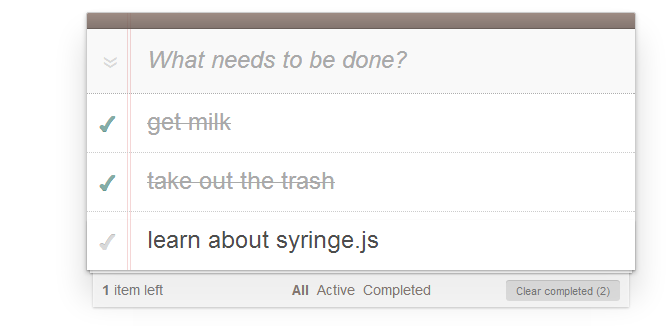 + CSS and images courtesy of the awesome [TodoMVC](http://todomvc.com) project
### "Aren't we just making a curry?"
When you [curry](https://en.wikipedia.org/wiki/Partial_application) a function you typically have some values in your hand before you create a version of the function that has some (or all) of those values partially applied to it. With Syringe, instead of actual values we bind pointers to a registry which is interrogated at execution time when the bound method is invoked.
This is very convenient because you can arbitrarily change the registry values for a parameter so that completely different data gets passed the next time your bound function gets called. To further labor the medical theme, it's as if the flu shot you received last Winter could be remotely updated throughout the year. Only minus the Nobel Prize, obviously.
Currying _does_ take place, just at a different point. Syringe curries _your_ bound function into a factory that examines the passed parameters and applies the corresponding registry values to your function when it is called.
### "What's this about a registry?"
The registry is a closured dependency map unique to each Syringe object instance that holds all of the data items you're interested in automatically provisioning to your bound functions on invocation. You can provision objects, arrays, values, functions, strings, numbers, anything really. You can map to their values directly, or by reference.
**Note:** The free arguments you pass to a *bound* function don't have to match the signature; this is consistent with ordinary JavaScript functions. However, the bound parameters are expected to exist in the registry when the bound function is invoked.
### "Why doesn't Syringe just use the function signature?"
Some JavaScript dependency injection tutorials and libraries out there describe or provide ways of deriving function dependencies by _inference_ - that is, by scraping the contents of the bound function's signature:
```javascript
var f = function ($dep1, $dep2, freearg1, frearg2) { ... };
Injection.bind(f); // The library uses RegEx to figure out the parameters
// of `f` in order to pull them from the data registry
// and apply them to `f` when the function is executed
```
There are a number of reasons why Syringe does not work this way, the main one being that parameters often get renamed when run through compression / obfuscation systems such as Google Closure or UglifyJS. This makes any subsequent reconciliation of the parameters against named items impossible.
In addition, unless you namespace the dependencies it is impossible to disambiguate them from the free arguments. Also, dot-notation is not allowed in parameter names so you end up using something goofy like `$leve1_level2_level3` to retrieve deep items.
## API ##
This following table describes the methods provided by the `Syringe` object:
Method | Parameter(s) | Description
---------|--------------|-------------
*create* | `[map]` | Create a new syringe object.
+ CSS and images courtesy of the awesome [TodoMVC](http://todomvc.com) project
### "Aren't we just making a curry?"
When you [curry](https://en.wikipedia.org/wiki/Partial_application) a function you typically have some values in your hand before you create a version of the function that has some (or all) of those values partially applied to it. With Syringe, instead of actual values we bind pointers to a registry which is interrogated at execution time when the bound method is invoked.
This is very convenient because you can arbitrarily change the registry values for a parameter so that completely different data gets passed the next time your bound function gets called. To further labor the medical theme, it's as if the flu shot you received last Winter could be remotely updated throughout the year. Only minus the Nobel Prize, obviously.
Currying _does_ take place, just at a different point. Syringe curries _your_ bound function into a factory that examines the passed parameters and applies the corresponding registry values to your function when it is called.
### "What's this about a registry?"
The registry is a closured dependency map unique to each Syringe object instance that holds all of the data items you're interested in automatically provisioning to your bound functions on invocation. You can provision objects, arrays, values, functions, strings, numbers, anything really. You can map to their values directly, or by reference.
**Note:** The free arguments you pass to a *bound* function don't have to match the signature; this is consistent with ordinary JavaScript functions. However, the bound parameters are expected to exist in the registry when the bound function is invoked.
### "Why doesn't Syringe just use the function signature?"
Some JavaScript dependency injection tutorials and libraries out there describe or provide ways of deriving function dependencies by _inference_ - that is, by scraping the contents of the bound function's signature:
```javascript
var f = function ($dep1, $dep2, freearg1, frearg2) { ... };
Injection.bind(f); // The library uses RegEx to figure out the parameters
// of `f` in order to pull them from the data registry
// and apply them to `f` when the function is executed
```
There are a number of reasons why Syringe does not work this way, the main one being that parameters often get renamed when run through compression / obfuscation systems such as Google Closure or UglifyJS. This makes any subsequent reconciliation of the parameters against named items impossible.
In addition, unless you namespace the dependencies it is impossible to disambiguate them from the free arguments. Also, dot-notation is not allowed in parameter names so you end up using something goofy like `$leve1_level2_level3` to retrieve deep items.
## API ##
This following table describes the methods provided by the `Syringe` object:
Method | Parameter(s) | Description
---------|--------------|-------------
*create* | `[map]` | Create a new syringe object.
**Example**: `var syr = Syringe.create();`
*add* | `name, value [, bindings]` | Register an item with the dependency map, where `name` is the dependency name and `value` is any valid JavaScript value. Alias: _register_.
**Example**: `syr.add('data', {'name': 'Mike'});`
If `value` is a function that you want to automatically bind as a Syringe method, set the `bindings` property to the array of properties you want to inject. Alias: _register_.
**Example**: `syr.add('data', function (props) {...}, ['props']);`
*add* | `map` | Register a map of dependencies, where `map` is an object. Alias: _register_.
**Example**: `syr.add({'data': {'name': 'Mike'}});`
*add* | `array` | Register an array of map of dependencies, where each map is an object. Useful for asserting order when additions are functions that are side-effectful. Alias: _register_.
**Example**: `syr.add([{'data.name': 'Mike'}, {'data.age': '39'}]);`
*remove* | `name` | Remove a named item from the dependency map. Alias: _unregister_.
**Example**: `syr.remove('data');`
*remove* | `array` | Remove an array of named items from the dependency map. Alias: _unregister_.
**Example**: `syr.remove(['data', 'foo.bar']);`
*on* | `bindings, fn [, ctx]` | Return a bound function that can access the dependency map. An optional `ctx` parameter makes the bound function execute in a specific context. Alias: _bind_.
**Example**: `var f = syr.on(['data'], function (data) {...});`
If you want to bind the current Syringe object, use the keyword `this` instead of a keyname in the bindings array.
**Example**: `var f = syr.on(['this'], function (syr) {...});`
If you want to bind the _entire_ dependency map, use an asterisk (`*`) instead of a keyname in the bindings array.
**Example**: `var f = syr.on(['*'], function (map) {...});`
If you want to bind a shallow or deep item located _outside_ of the dependency map in the global object, use the prefix `global:` before the keyname in the bindings array.
**Example**: `var f = syr.on(['global:jQuery'], function ($) {..});`
*on* | `name, bindings, fn [, ctx]`| Bind a named function. The `name` string can be a character-delimited path; if the path doesn't exist it will be created dynamically as a nested object structure in the global context.
An optional `ctx` parameter makes the bound function execute in a specific context. Alias: _bind_.
**Example**: `syr.on('f', ['data'], function (data) {...}, this);`
*get* | `name` | Returns the named value from dependency map object. Dot-notation is permitted. Passing no argument returns the dependency map object.
**Example**: `syr.get('data');`
*set* | `name, value [, bindings]` | Directly sets the value of a named key in the dependency map, if it exists.
**Example**: `syr.set('data.name', 'Bob');`
If `value` is a function that you want to automatically bind as a Syringe method, set the `bindings` property to the array of properties you want to inject.
**Example**: `syr.set('get', function (name) {...}, ['data.name']);`
*exec* | `name, args [, ctx]` | Directly execute a method within the dependency map. Provided as a convenience for occasions where binding isn't possible. An optional `ctx` parameter executes the method against a specified context.
**Example**: `syr.exec('f', ['Mike', '39']);`
*fetch* | `array, props` | Retrieve array-defined items asynchronously. Each array item is an object that contains a `path` property and a `bind` property. The `path` property is a string containing the (local) URI of the resource. The `bind` property specifies the Syringe key you want to associate with the JSON object retrieved from the resource.
**Note:** This method is only available in the browser.
**Example**: [See below](#register-items-asynchronously)
*wrap* | `fn, wrapper [, ctx]` | Wrap a bound method with another method in order to develop middleware. An optional `ctx` parameter adds the bound function to a specified context.
**Example**: [See below](#fibonacci-number-add-on-remove-wrap-get)
*copy* | `bindings, fn [, ctx]` | Create a new bound function from an existing one using a new dependency map binding.
**Example**: `var f2 = syr.copy(['data2'], f);`
*mixin* | `map` | Add mixin methods to the Syringe object prototype.
**Example**: `syr.mixin({'f': function () { return this; }});`
*separator* | `value` | Change the name separator character used to create, retrieve, and bind objects. The default character is a period (`.`). The character must be non-alphanumeric.
**Example**: `syr.separator('#');`
*listen* | `name, fn` | Binds a listener to a named Syringe method (`get`, `set`, `add`, `remove`, `listops`, or `all`). Shallow or deep path namespacing is also supported.
**Example**: `syr.listen('add', function (name, value) {...});`
**Example**: `syr.listen('set:name', function (name, value) {...});`
**Example**: `syr.listen('remove:data.name', function (name) {...});`
*listops* | `name, fn` | A convenience function that allows you to directly perform operations on stored arrays, raising an event on completion.
**Example**: `syr.listops('data.names', function (arr) { ... });`
### Register Items Asynchronously
You can retrieve JSON data items from a remote source and add them to the Syringe registry using the `fetch` method:
```javascript
syr.fetch([{
path: '/syringe/test1',
bind: 'data1'
}, {
path: '/syringe/test2',
bind: 'data2'
}], {
'success': function () {
console.log(this.get('data1'));
console.log(this.get('data2'));
}
});
```
## Additional Examples ##
The following generic examples show how some of the API methods provided by Syringe might be used to manage function operations.
### FizzBuzz (add, bind, exec, remove) ###
A FizzBuzz is a program that prints the numbers from 1 to 100. But for multiples of three it prints `Fizz` instead of the number. For multiples of five it prints `Buzz`. For numbers which are multiples of both three and five it prints `FizzBuzz`. It's also a drinking game, and a surprisingly tricky one.
```javascript
Syringe.add('fn', function (syr, fn, lg, n) {
// Examine the passed integer and log the evaluation
n = n || 1, lg((n % 3?'':'Fizz')+(n % 5?'':'Buzz') || n);
// Execute against self with current integer or remove self
return (100 >= ++n ? fn(n) : syr.remove('fn'));
}, ['this', 'fn', 'global:console.log']);
// Execute the function:
Syringe.exec('fn');
```
The above code shows how a simple functional FizzBuzz can be created with Syringe, and illustrates a number of different qualities. The first is obviously recursion - a function can inject itself into itself when executed.
The bound function also receives its action (in this case a logger from the `global:` context) as a passed parameter, which decouples side-effectful operations from the main operation slightly. When the function completes, it removes itself from the dependency map and returns the Syringe object.
### Sieve Of Eratosthenes (add, bind, on, copy) ###
The sieve of Eratosthenes is a simple, ancient algorithm for finding all prime numbers up to any given limit. It does so by iteratively marking as composite (that is, not prime) the multiples of each prime, starting with all multiples of 2.
For this example we're going to implement two slightly different ways of recursively processing the data and see which one is more performant. First we create a processor that sieves the data using `reduce`:
```javascript
Syringe.add('reduce', function (proc, arr, cnt) {
if ((cnt = cnt || 1) > Math.sqrt(arr.length)) {
return 1 === arr[0] && arr.shift(), arr;
}
return proc(arr.reduce(function (prv, cur, idx, lst) {
0 === cur % lst[cnt] && cur !== lst[cnt] || prv.push(cur);
return prv;
}, []), ++cnt);
}, ['reduce']);
```
Next we create an alternate processor that sieves the data using an incrementing `while` loop:
```javascript
Syringe.add('while', function (proc, arr, cnt) {
var len = 0, newarr = [];
if ((cnt = cnt || 1) > Math.sqrt(arr.length)) {
return 1 === arr[0] && arr.shift(), arr;
}
while (len < arr.length) {
arr[len] % arr[cnt] === 0
&& arr[len] !== arr[cnt] || newarr.push(arr[len])
len++;
}
return proc(newarr, ++cnt);
}, ['while']);
```
Now we create a sieving function that builds the seed array and passes it to the `while` processor:
```javascript
var sieve_while = Syringe.on(['while'], function (proc, to) {
to = to || 10;
var n = 1, arr = [];
while (to--) arr[to] = n++;
return proc(arr.reverse());
});
```
We can copy `sieve_while` and create an alternate sieving function that uses the `reduce` processor:
```javascript
var sieve_reduce = Syringe.copy(['reduce'], sieve_while);
```
Finally, let's ask both to return all prime numbers between 1 and 10,000 and see what happens:
```javascript
console.time('sieve while');
console.log(sieve_while(10000)); // Logs:
// [ 2, 3, 5, 7, 11, 13, 17, 19, 23, 29, 31, 37, 41 ... ]
console.timeEnd('sieve while'); // Logs:
// sieve while: 80ms
console.time('sieve reduce');
console.log(sieve_reduce(10000)); // Logs:
// [ 2, 3, 5, 7, 11, 13, 17, 19, 23, 29, 31, 37, 41 ... ]
console.timeEnd('sieve reduce'); // Logs:
// sieve reduce: 120ms
```
The `while` processor appears to be considerably more performant!
### Fibonacci Number (add, on, remove, wrap, get)
The Fibonacci sequence is a numeric list where the first two numbers are 0 and 1 and each subsequent number is the sum of the previous two. The following example describes a simple function that calculates the Fibonacci value of a specific number.
```javascript
var fib = function () {
var fn = Syringe.on(['store'], function (store, a) {
var res = store[a];
if ('number' !== typeof res) {
res = fn(a - 1) + fn(a - 2);
store[a] = res;
}
return res;
});
return fn;
}();
```
To improve performance, the storage of each preceding number is held inside the dependency map:
```javascript
Syringe.add('store', [0, 1]);
```
In the Sieve Of Eratosthenes example we bookended the bound function with a console timer to determine the overall performance of the operation. In this example we'll use Syringe to wrap our bound function with a timer in order to produce a new function:
```javascript
fib = Syringe.wrap(fib, function (fn, num, name) {
var start, stop, ret;
start = (new Date()).getTime();
ret = fn();
stop = (new Date()).getTime();
this.remove('log.' + name)
.add('log.' + name, 'The ' + name + ' function took ' + (stop - start) + 'ms');
return ret;
});
```
Now we execute the function, providing an argument that specifies the number for which we want know the Fibonacci value, and the name of the function for logging purposes:
```javascript
fib(100, 'fib'); // Returns:
// 55
Syringe.get('log'); // Returns:
// {
// fib: "The fib function took 11ms"
// }
```
## License
Syringe is freely distributable under the terms of the MIT license.