# Test file generator
This is a simple module to generate many different random files, which could be used for testing other algorithms that work with files.
Currently supported formats (**jpeg**, **gif**, **cvs** and **txt**).
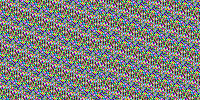
| Image | Gif |
| --------- | --------- |
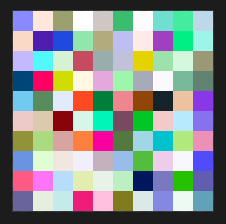 | 
For other examples on random cvs / txt check the exampleOutput folder.
## How to use from command line:
```bash
npm install -g test-file-generator
generate --help
generate
```
If you want to generate more than one file
```bash
generate --number 10
```
## How to use from your project:
* Install ```npm install test-file-generator``` or ```yarn install test-file-generator```
* Include in your project
```typescript
import { TestFileGenerator } from 'test-file-generator';
let generator = new TestFileGenerator('txt');
generator.generateFile();
```
1. To generate one txt file and random name, at the default path "**./**".
```typescript
let generator = new TestFileGenerator('txt');
generator.generateFile();
```
2. This will generate a gif file with the specified parameters.
```typescript
let generator = new TestFileGenerator('gif');
generator.setLocation('my_path/');
generator.setImageSize(100, 100);
generator.setName('my_file_name');
generator.generateFile();
```
3. This will generate a cvs file of 3000 KB.
```typescript
let generator = new TestFileGenerator('csv');
generator.setLocation('output/');
generator.setSize(3000);
generator.setName('my_file_name');
generator.generateFile();
```
## API:
| # | Method | Input / Type | Output / Type | Description
|-----|---------------- | --------------- | --------------- | --------------- |
1 | new TestFileGenerator(type: string, clean?: boolean) | [**required**] type : string
[**optional**] name: string
[**optional**] location: string
[**optional**] size: number
[**optional**] clean: boolean | **TestFileGenerator** object | The constructor of the object. The default values for the optional parameters are: (name = **'random'**, location = '**'./'**', size = **20**, clean = **false**), and even though not passed in the constructor for the images is **(100, 100)**. If you want to modify any parameter just use setter methods.|
2 | generateFile() | None | **boolean** (true if created, false otherwise) | This method generates the file with the specified parameters. |
3 | setLocation(location: string) | **string** | None | This method sets the location on which the file is going to be written. |
4 | setName(location: string) | **string** | None | This method sets the name of the file. If not specified the file will have a random name which you can get with getName(). |
5 | setType(type: string) | **string** | None | This method sets the file type, currently supported (**jpeg**, **gif**, **cvs** and **txt**), lowercased. |
6 | setSize(size: number) | **number** | None | This method sets the size that the file should have, currently only works for **txt** and **cvs** file types. |
6 | setImageSize((x: **number**, y: **number**) | **number**, **number** | None | This method sets the size of the **jpeg** or **gif** to be generated. |
7 | setClean(location: string) | **string** | None | This method deletes the created file after creation (just for writing unit tests). |
8 | getLocation() | None | **string** | This method gets the file path. |
9 | getName() | None | **string** | This method gets the file name. |
10 | getSize() | None | **string** | This method gets the file generation setted size (only for cvs/txt). |
11 | getFileType() | None | **string** | This method gets the file type. |
# License
**MIT**
# Issues, errors, requests or contributions
[**Open an issue here**](https://github.com/pacmax2/file-generator/issues)