# ⏰ Time Series Generator

 `time-series-generator` is a library for generating time-series. Works on NodeJS, and browsers
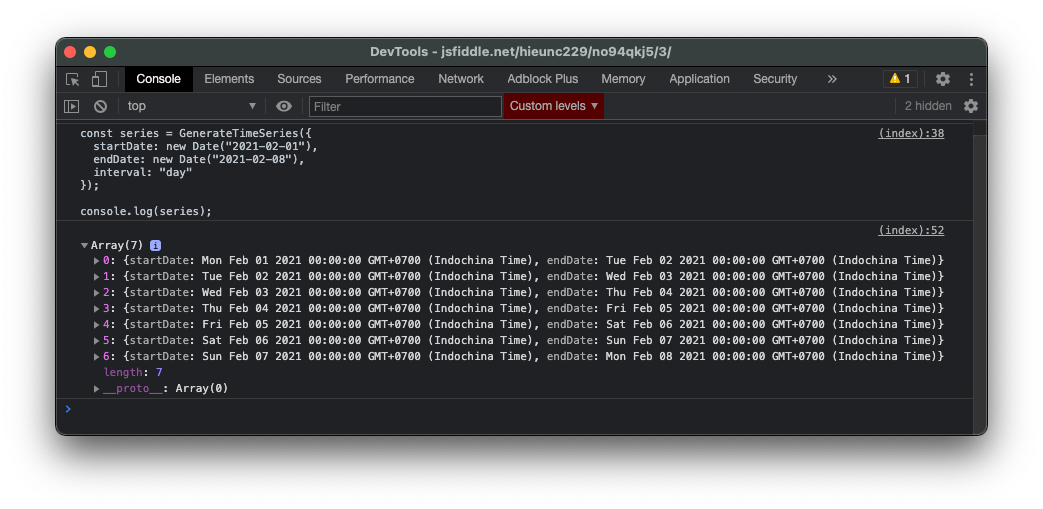
A common use-case is to generate time-series for analytics. For example, number of active users each day, start from `Feb 12, 2021` to `Mar 12, 2021`. You can use `Time Series Generator` to generate a list of 28 dates (from `start` date to `end` date).
Table of content
1. [How to use](#1-how-to-use)
2. [Installation](#2-installation)
3. [Build and Test](#3-build-and-test)
4. [License](#4-license)
5. [Feedback and Contribution](#5-feedback-and-contribution)
6. [Changelog](#6-changelog)
---
## 1. How to Use
```js
// ES6
import TimeSeries from "time-series-generator";
// none-ES6
const TimeSeries = require("time-series-generator"); //add .default in some cases
const series = TimeSeries({
startDate: Date,
endDate: Date,
interval: `millisecond` | `second` | `minute` | `hour` | `day` | `week` | `month` | `year`,
intervalValue: number, // optional
floorInput: boolean, // optional. `true` by default
});
// series => [
// { startDate: Date, endDate: Date },
// { startDate: Date, endDate: Date },
// .....
// ]
```
- `startDate`: begining of datetime period
- `endDate`: end of datetime period
- `interval`: output series based on given interval `millisecond`, `second`, ...
- `intervalValue`: the number value of `interval`, set to `1` by default. For example, `interval=second`, `intervalValue=3`, output will generate a list of date `each 3 second`.
- `floorInput`: floor date inputs to the nearest `interval` value (i.e when interval is "minute", set all "minute", "second", "millisecond" to 0)
Note: `startDate` can either be less than, or greater than `endDate`.
See [./tests/Generator.test.js](./tests/Generator.test.js) for examples
---
## 2. Installation
### Via npm (supported on browser and nodejs)
`time-series-generator` is available via `npm`. You can install using `npm` or `yarn`
```sh
# with npm
$ npm install time-series-generator --save
# with yarn
$ yarn add time-series-generator
```
### Via browser
```html
```
---
## 3. Build and Test
Note: You should build before test.
Run the following command (I'll use `yarn`, but also similar with `npm run`)
- To build as a npm module, run `yarn build`. Output files will located at `./dist`
- To build for browser, run `yarn build-browser`. Output file will located at `./browser` (only `index.min.js`)
A test file is located on `./tests` directory.
- Run test by run command `yarn test`
---
## 4. License
MIT
---
## 5. Feedback and Contribution
Please open a thread for feedback, question. Feel free to create PR for contribution.
--
## 6. Changelog
0.0.5 - added `floorInput` to floor date inputs to the nearest `interval` value
0.0.4 - initate
`time-series-generator` is a library for generating time-series. Works on NodeJS, and browsers

A common use-case is to generate time-series for analytics. For example, number of active users each day, start from `Feb 12, 2021` to `Mar 12, 2021`. You can use `Time Series Generator` to generate a list of 28 dates (from `start` date to `end` date).
Table of content
1. [How to use](#1-how-to-use)
2. [Installation](#2-installation)
3. [Build and Test](#3-build-and-test)
4. [License](#4-license)
5. [Feedback and Contribution](#5-feedback-and-contribution)
6. [Changelog](#6-changelog)
---
## 1. How to Use
```js
// ES6
import TimeSeries from "time-series-generator";
// none-ES6
const TimeSeries = require("time-series-generator"); //add .default in some cases
const series = TimeSeries({
startDate: Date,
endDate: Date,
interval: `millisecond` | `second` | `minute` | `hour` | `day` | `week` | `month` | `year`,
intervalValue: number, // optional
floorInput: boolean, // optional. `true` by default
});
// series => [
// { startDate: Date, endDate: Date },
// { startDate: Date, endDate: Date },
// .....
// ]
```
- `startDate`: begining of datetime period
- `endDate`: end of datetime period
- `interval`: output series based on given interval `millisecond`, `second`, ...
- `intervalValue`: the number value of `interval`, set to `1` by default. For example, `interval=second`, `intervalValue=3`, output will generate a list of date `each 3 second`.
- `floorInput`: floor date inputs to the nearest `interval` value (i.e when interval is "minute", set all "minute", "second", "millisecond" to 0)
Note: `startDate` can either be less than, or greater than `endDate`.
See [./tests/Generator.test.js](./tests/Generator.test.js) for examples
---
## 2. Installation
### Via npm (supported on browser and nodejs)
`time-series-generator` is available via `npm`. You can install using `npm` or `yarn`
```sh
# with npm
$ npm install time-series-generator --save
# with yarn
$ yarn add time-series-generator
```
### Via browser
```html
```
---
## 3. Build and Test
Note: You should build before test.
Run the following command (I'll use `yarn`, but also similar with `npm run`)
- To build as a npm module, run `yarn build`. Output files will located at `./dist`
- To build for browser, run `yarn build-browser`. Output file will located at `./browser` (only `index.min.js`)
A test file is located on `./tests` directory.
- Run test by run command `yarn test`
---
## 4. License
MIT
---
## 5. Feedback and Contribution
Please open a thread for feedback, question. Feel free to create PR for contribution.
--
## 6. Changelog
0.0.5 - added `floorInput` to floor date inputs to the nearest `interval` value
0.0.4 - initate