# Angular2-Busy
[](https://www.npmjs.com/package/angular2-busy) [](https://travis-ci.org/devyumao/angular2-busy)
**Angular 2 Busy** can show busy/loading indicators on any promise, or on any Observable's subscription.
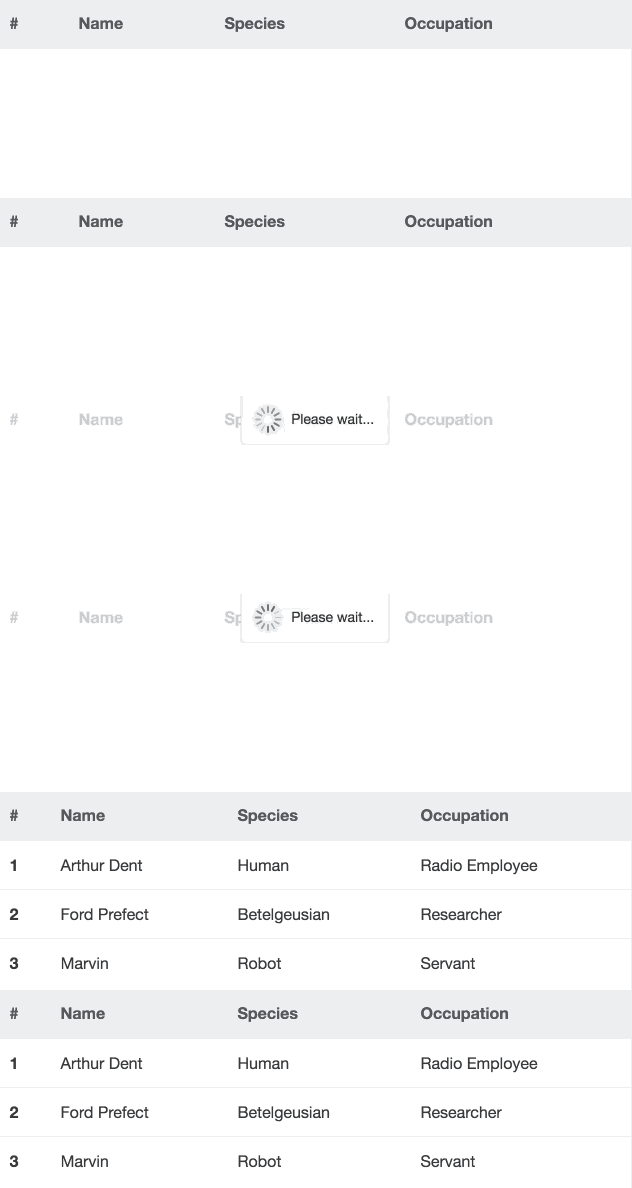
Rewritten from [angular-busy](https://github.com/cgross/angular-busy), and add some new features in terms of Angular 2.
### Built with Angular 4.0.1
## Demo
[devyumao.github.io/angular2-busy/demo/asset/](http://devyumao.github.io/angular2-busy/demo/asset/)
## Installation
```shell
npm install --save angular2-busy
```
## Link CSS
```html
```
## Getting Started
Import the `BusyModule` in your root application module:
```typescript
import {NgModule} from '@angular/core';
import {BrowserAnimationsModule} from '@angular/platform-browser/animations';
import {BusyModule} from 'angular2-busy';
@NgModule({
imports: [
// ...
BrowserAnimationsModule,
BusyModule
],
// ...
})
export class AppModule {}
```
Reference your promise in the `ngBusy` directive:
```typescript
import {Component, OnInit} from '@angular/core';
import {Http} from '@angular/http';
@Component({
selector: 'some',
template: `
`
})
class SomeComponent implements OnInit {
busy: Promise;
constructor(private http: Http) {}
ngOnInit() {
this.busy = this.http.get('...').toPromise();
}
}
```
Moreover, the subscription of an Observable is also supported:
```typescript
// ...
import {Subscription} from 'rxjs';
// ...
class SomeComponent implements OnInit {
busy: Subscription;
// ...
ngOnInit() {
this.busy = this.http.get('...').subscribe();
}
}
```
## Directive Syntax
The `ngBusy` directive expects a ***busy thing***, which means:
- A promise
- Or an Observable's subscription
- Or an array of them
- Or a configuration object
In other words, you may use flexible syntax:
```html
```
```html
```
```html
```
## Options
| Option | Required | Default | Details |
| ---- | ---- | ---- | ---- |
| busy | Required | null | A busy thing (or an array of busy things) that will cause the loading indicator to show. |
| message | Optional | 'Please wait...' | The message to show in the indicator which will reflect the updated values as they are changed. |
| backdrop | Optional | true | A faded backdrop will be shown behind the indicator if true. |
| template | Optional | A default template string | If provided, the custom template will be shown in place of the default indicatory template. The scope can be augmented with a `{{message}}` field containing the indicator message text. |
| delay | Optional | 0 | The amount of time to wait until showing the indicator. Specified in milliseconds.
| minDuration | Optional | 0 | The amount of time to keep the indicator showing even if the busy thing was completed quicker. Specified in milliseconds.|
| wrapperClass | Optional | 'ng-busy' | The name(s) of the CSS classes to be applied to the wrapper element of the indicator. |
## Overriding Defaults
The default values of options can be overriden by configuring the provider of the `BusyModule`.
In the root application module, you can do this:
```typescript
import {NgModule} from '@angular/core';
import {BusyModule, BusyConfig} from 'angular2-busy';
@NgModule({
imports: [
// ...
BusyModule.forRoot(
new BusyConfig({
message: 'Don\'t panic!',
backdrop: false,
template: '
{{message}}
',
delay: 200,
minDuration: 600,
wrapperClass: 'my-class'
})
)
],
// ...
})
export class AppModule
```
## FAQ
### The indicator's position is not inside the `ngBusy` container
You may add `position: relative` style to your `ngBusy` container.
### SystemJS Config?
You may need this in your `systemjs.config.js`:
```javascript
{
paths: {
'npm:': 'node_modules/'
},
map: {
// ...
'angular2-busy': 'npm:angular2-busy'
},
packages: {
// ...
'angular2-busy': {
main: './index.js',
defaultExtension: 'js'
}
}
}
```
## TODO
- Provide custom animations for the indicator
- Unit & E2E test
## Credits
Rewritten from [cgross](https://github.com/cgross)'s [angular-busy](https://github.com/cgross/angular-busy).
Inspired by [ajoslin](https://github.com/ajoslin)'s [angular-promise-tracker](https://github.com/ajoslin/angular-promise-tracker).
## LICENSE
This project is licensed under the MIT license. See the [LICENSE](https://github.com/devyumao/angular2-busy/blob/master/LICENSE) file for more info.