
<div align="center">

<a href="https://handsontable.com" rel="nofollow"><img src="https://raw.githubusercontent.com/handsontable/handsontable/develop/resources/handsontable-logo-blue.svg" alt="Handsontable - data grid for Angular" width="300"></a>

# Data Grid for Angular <img src="https://raw.githubusercontent.com/handsontable/handsontable/develop/resources/icons/angular-icon.svg" width="22" height="22">

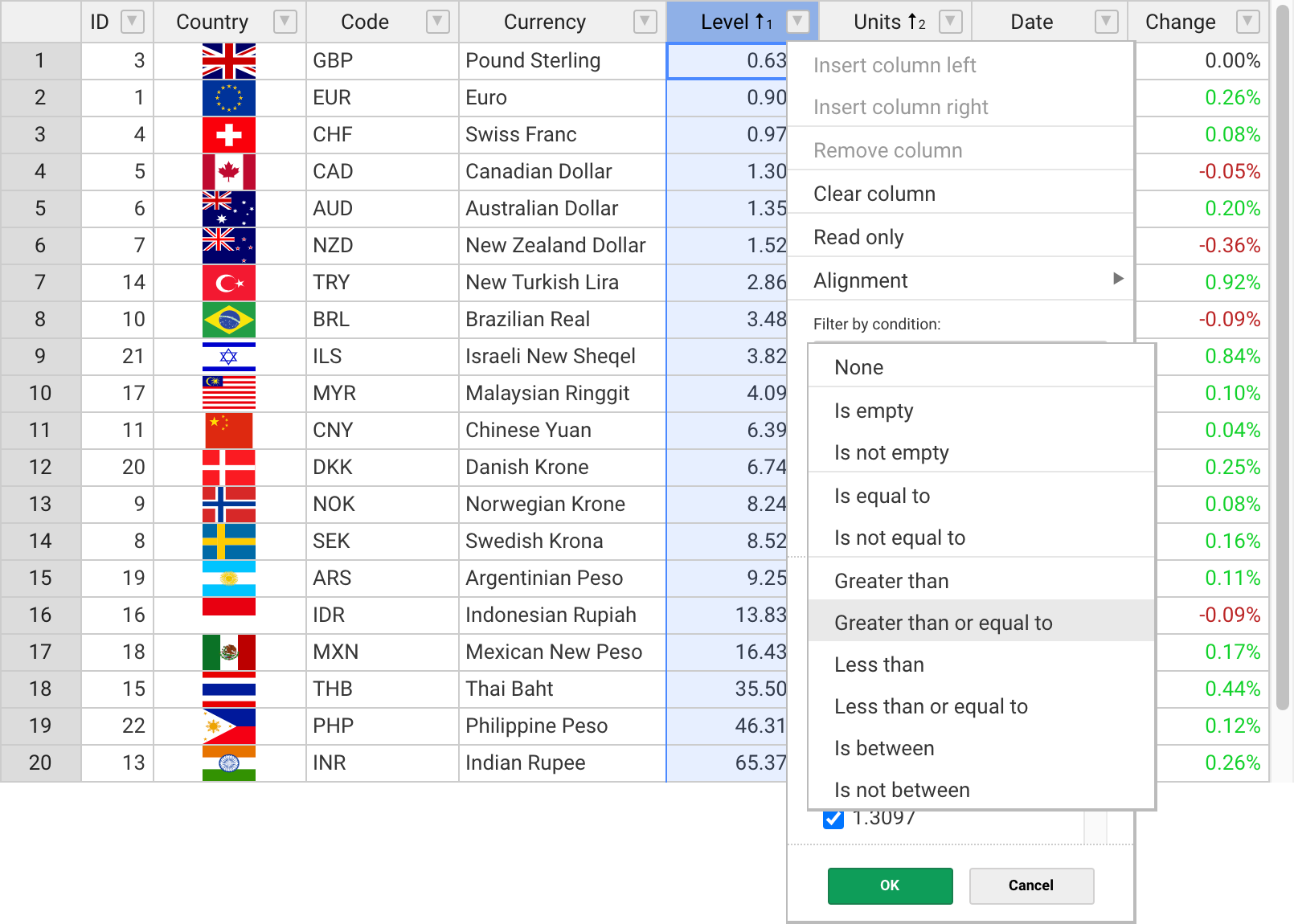
Handsontable's wrapper for Angular combines data grid features with spreadsheet-like UX. <br>
It provides data binding, data validation, filtering, sorting, and CRUD operations.

[![npm](https://img.shields.io/npm/dt/@handsontable/angular.svg)](https://npmjs.com/package/@handsontable/angular)

[![npm](https://img.shields.io/npm/dm/@handsontable/angular.svg)](https://npmjs.com/package/@handsontable/angular)

[![CI status](https://github.com/handsontable/handsontable/actions/workflows/test.yml/badge.svg?branch=master)](https://github.com/handsontable/handsontable/actions/workflows/test.yml?query=branch%3Amaster)

[![FOSSA Status](https://app.fossa.io/api/projects/git%2Bgithub.com%2Fhandsontable%2Fhandsontable.svg?type=shield)](https://app.fossa.io/projects/git%2Bgithub.com%2Fhandsontable%2Fhandsontable?ref=badge_shield)

[![Quality Gate Status](https://sonarcloud.io/api/project_badges/measure?project=handsontable_handsontable&metric=alert_status)](https://sonarcloud.io/dashboard?id=handsontable_handsontable)

---
<a href="https://handsontable.com/demo"><img src="https://raw.githubusercontent.com/handsontable/handsontable/develop/resources/handsontable-github-preview.png" alt="Handsontable data grid for Angular" width="805"/></a>

</div>

## Features

The most popular features of Handsontable for Angular:

&nbsp;&nbsp;✓&nbsp; Multiple column sorting <br>
&nbsp;&nbsp;✓&nbsp; Non-contiguous selection <br>
&nbsp;&nbsp;✓&nbsp; Filtering data <br>
&nbsp;&nbsp;✓&nbsp; Export to file <br>
&nbsp;&nbsp;✓&nbsp; Validating data <br>
&nbsp;&nbsp;✓&nbsp; Conditional formatting <br>
&nbsp;&nbsp;✓&nbsp; Merging cells <br>
&nbsp;&nbsp;✓&nbsp; Freezing rows/columns <br>
&nbsp;&nbsp;✓&nbsp; Moving rows/columns <br>
&nbsp;&nbsp;✓&nbsp; Resizing rows/columns <br>
&nbsp;&nbsp;✓&nbsp; Hiding rows/columns <br>
&nbsp;&nbsp;✓&nbsp; Context menu <br>
&nbsp;&nbsp;✓&nbsp; Comments <br>

## Documentation

- [Developer guides](https://handsontable.com/docs/angular-installation/)
- [API Reference](https://handsontable.com/docs/api/core/)
- [Changelog](https://handsontable.com/docs/release-notes/)
- [Demo](https://handsontable.com/demo)

<div id="installation"></div>

## Get Started
### Install with npm

Run the following command in your terminal
```
npm install handsontable @handsontable/angular
```

You can load it directly from [jsDelivr](https://jsdelivr.com/package/npm/@handsontable/angular) as well.
```html
<script src="https://cdn.jsdelivr.net/npm/handsontable/dist/handsontable.full.min.js"></script>
<script src="https://cdn.jsdelivr.net/npm/@handsontable/angular/bundles/handsontable-angular.umd.min.js"></script>

<link href="https://cdn.jsdelivr.net/npm/handsontable/dist/handsontable.full.min.css" rel="stylesheet">
```

The component will be available as `Handsontable.angular.HotTable`.

### Usage

Use this data grid as you would any other component in your application. [Options](https://handsontable.com/docs/api/options/) can be set as `HotTable` props.

**Styles**
```css
@import '~handsontable/dist/handsontable.full.css';
```

**Angular Module**
```js
import { BrowserModule } from '@angular/platform-browser';
import { NgModule } from '@angular/core';
import { AppComponent } from './app.component';
import { HotTableModule } from '@handsontable/angular';
 
@NgModule({
  imports: [
    BrowserModule,
    HotTableModule.forRoot()
  ],
  declarations: [ AppComponent ],
  bootstrap: [ AppComponent ],
})
export class AppModule { }
```

**Angular Component**
```js
import { Component } from '@angular/core';

@Component({
  selector: 'my-app',
  templateUrl: './app.component.html',
  styleUrls: [ './app.component.css' ],
})
export class AppComponent  {
  data: any[] = [
    ['', 'Tesla', 'Mercedes', 'Toyota', 'Volvo'],
    ['2019', 10, 11, 12, 13],
    ['2020', 20, 11, 14, 13],
    ['2021', 30, 15, 12, 13]
  ],
}
```

**Template**

```html
<hot-table [data]="data" [colHeaders]="true" [rowHeaders]="true" [width]="600" [height]="300"></hot-table>
```

### [View live demo](https://handsontable.com/docs/angular-simple-example/)

## Support

We provide support for developers working with commercial version via [contact form](https://handsontable.com/contact?category=technical_support)</a> or at support@handsontable.com.

If you use a non-commercial version then please ask your tagged question on [StackOverflow](https://stackoverflow.com/questions/tagged/handsontable).

## License

Handsontable is a commercial software with two licenses available:

- Free for non-commercial purposes such as teaching, academic research, and evaluation. [Read it here](https://github.com/handsontable/handsontable/blob/master/handsontable-non-commercial-license.pdf).
- Commercial license with support and maintenance included. See [pricing plans](https://handsontable.com/pricing).

## License key

If you use Handsontable for Angular in a project that supports your commercial activity, then you must purchase the license key at [handsontable.com](https://handsontable.com/pricing).

If you use the free for non-commercial license of Handsontable, then pass the phrase `'non-commercial-and-evaluation'`, as described in [this documentation](https://handsontable.com/docs/license-key/).

<br>
<br>

Proudly created and maintained by the [Handsontable Team](https://handsontable.com/team).
