# tooltipster-follower
Follower is a [Tooltipster](http://iamceege.github.io/tooltipster/) plugin to make tooltips follow the cursor. MIT license.
Installation
------------
Include the javascript plugin file in your page AFTER Tooltipster's file. Also include Follower's CSS file.
```html
...
...
```
> If you have no tooltips using `sideTip` in your page, you may use Tooltipster's core files instead of the bundle ones.
Usage
-----
Declare the `follower` plugin in the options of the tooltips you want to follow the cursor, instead of `sideTip`:
```javascript
$('.tooltip').tooltipster({
plugins: ['follower']
});
```
That's it! You should see your tooltip follow the mouse, at the bottom-right of the cursor.
Themes
------
Follower has the same default style and themes as Tooltipster's sideTip. They are all included in `tooltipster-follower.min.css`, so you don't need to include any other files.
To create your own style, create a sub-theme as explained in [Tooltipster's documentation](http://iamceege.github.io/tooltipster/#styling). The only difference is that you replace `.tooltipster-sidetip` by `.tooltipster-follower` in your rules.
Options
-------
`minWidth` The minimum width of the tooltip. **Default: 0**
`maxWidth` The maximum width of the tooltip. Default: **null**
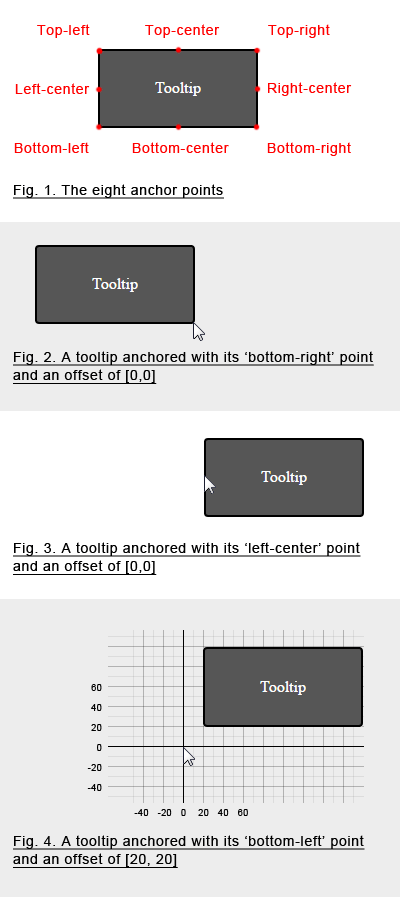
`offset` The position of the anchor in the coordinate system, in the form `[x,y]` (see the illustration below). **Default: [15,-15]**
`anchor` The anchor is the point of the tooltip which ties it to the coordinate system (see the illustration below). There are eight possible values: `top-left`, `top-center`, `top-right`, `left-center`, `left-right`, `bottom-left`, `bottom-center`, `bottom-right`. **Default: `top-left`**
> All of Tooltipster's options, methods and events remain available. Only sideTip's features will be unavailable on tooltips that use Follower instead (read this [note](http://iamceege.github.io/tooltipster/#plugins_sidetip)).
Examples
--------
```javascript
$('.tooltip').tooltipster({
anchor: 'bottom-left',
minWidth: 200,
maxWidth: 300,
offset: [20, 20],
plugins: ['follower'],
theme: 'tooltipster-noir'
});
```
Events
------
`follow` events are fired when the position of the tooltip is set. It has `event`, `helper` and `position` properties, as well as an `edit` property which is a function that you may use to edit the coordinates of the tooltip.
`position` events are fired when Tooltipster asks Follower to re-evaluate the position of the tooltip, just like sideTip. Although we kept sideTip's original name for this event, it can be misleading as it is not fired every time the tooltip actually moves (use the `follow` events for that). The event has `event`, `helper` and `position` properties, and an `edit` property which is a function you can use to edit the proposed size of the tooltip.