[](https://badge.fury.io/js/tree-ngx)
[](https://github.com/inspirsea/tree-ngx/blob/master/LICENSE)
# tree-ngx
## Introduction
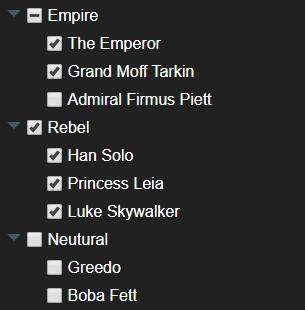
Tree-ngx is a treeview component that can easily handle thousands of nodes. It's made to be used with minimal implementation as well as being highly customizable.
Made with flexbox, and the default style is easy to override.
If you find a bug or have a feature request please open a Github issue.
## Supports
Selection
Tri-state checkboxes
Filtering
Custom Templates
Custom Styling
Callbacks
## Documentation
View the full documentation at http://emilsunesson.com/docs/tree-ngx/tree-ngx-intro
## Demo
Live demo can be found in the documentation http://emilsunesson.com/docs/tree-ngx/tree-ngx-intro
## Installation
```sh
$> npm install tree-ngx --save
```
### Include default style
```sh
@import 'tree-ngx';
```
### Include module
```sh
import { TreeNgxModule } from 'tree-ngx';
@NgModule({
imports: [TreeNgxModule]
}
```
## Example
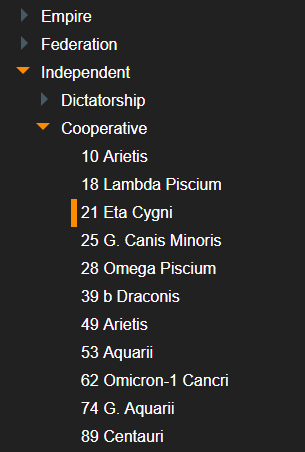
How it looks with some minor style customization.
See the working example at http://emilsunesson.com/docs/tree-ngx/tree-ngx-example.

 ### Template
Basic template implementation.
```sh
```
### Data
```sh
this.nodeItems = [{
id: '0',
name: 'Heros',
children: [
{
id: '1',
name: 'Batman',
item: {
phrase: 'I am the batman'
}
},
{
id: '2',
name: 'Superman',
item: {
phrase: 'Man of steel'
}
}
]
},
{
id: '3',
name: 'Villains',
children: [
{
id: '4',
name: 'Joker',
item: {
phrase: 'Why so serius'
}
},
{
id: '5',
name: 'Lex luthor',
item: {
phrase: 'I am the villain of this story'
}
}
]
}];
```
### Template
Basic template implementation.
```sh
```
### Data
```sh
this.nodeItems = [{
id: '0',
name: 'Heros',
children: [
{
id: '1',
name: 'Batman',
item: {
phrase: 'I am the batman'
}
},
{
id: '2',
name: 'Superman',
item: {
phrase: 'Man of steel'
}
}
]
},
{
id: '3',
name: 'Villains',
children: [
{
id: '4',
name: 'Joker',
item: {
phrase: 'Why so serius'
}
},
{
id: '5',
name: 'Lex luthor',
item: {
phrase: 'I am the villain of this story'
}
}
]
}];
```