ts-simple-ast
AST Viewers
An AST viewer is a useful way to help understand the TypeScript AST for some source code.
TypeScript AST Viewer
I’ve created this very basic web-based TypeScript AST viewer.
Features:
- View code on left, tree in middle, and selected node’s properties on right.
- Select a node in the tree to focus on that node’s properties.

I will improve and add more functionality to this in the future, but for now it will give you a good understanding of the tree.
Atom TypeScript
This AST viewer gives an excellent view of the AST.
- Install Atom.
- Install atom-typescript.
- Create a new typescript file.
-
Paste in your typescript code.

- Important: Ensure the current typescript document has focus.
- Open the command palette (Windows/Linux:
ctrl+shift+p, Mac:cmd+shift+p). -
Type
TypeScript: Ast Fulland hit enter.
-
A new tab will appear with the AST.

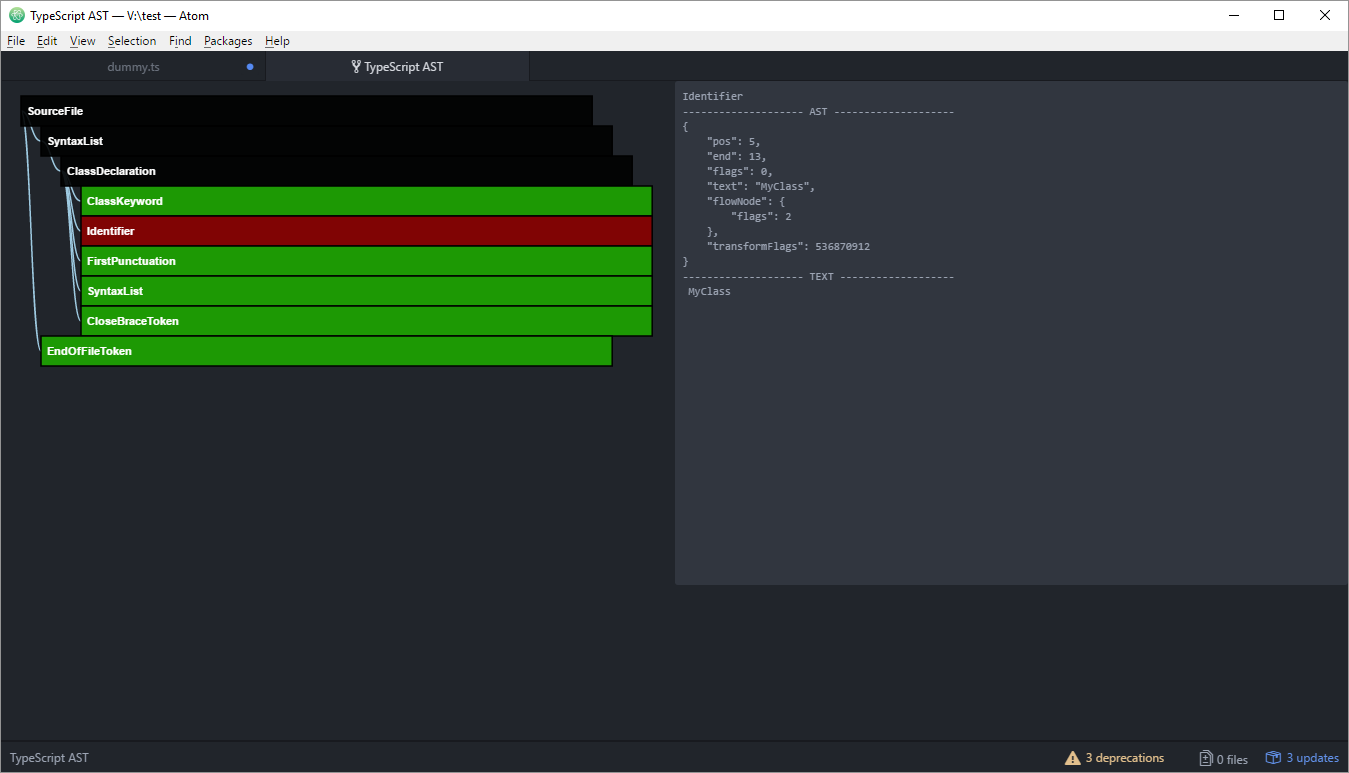
Bug warning: There seems to be an issue with the AST viewer where you have to close the “TypeScript AST” tab before running the TypeScript: Ast Full command again.