# 
> The Powerful Component to Display and Edit Data. Experience the Ultimate Data Transformer!
[](https://github.com/nhn/tui.grid/releases/latest) [](https://www.npmjs.com/package/tui-grid) [](https://github.com/nhn/tui.grid/releases/latest) [](https://github.com/nhn/tui.grid/blob/production/LICENSE) [](https://github.com/nhn/tui.grid/pulls) [](https://github.com/nhn)
## Wrappers
* [toast-ui.vue-grid](https://github.com/nhn/toast-ui.vue-grid) **Vue** wrapper component is implemented by NHN. Thanks to [@sohee-lee7](https://github.com/sohee-lee7).

## 🚩 Table of Contents
* [Collect statistics on the use of open source](#Collect-statistics-on-the-use-of-open-source)
* [Browser Support](#-browser-support)
* [The Toast UI Grid Is an Ultimate Transformer](#-the-toast-ui-grid-is-an-ultimate-transformer)
* [Data Can Be Displayed in Any Format](#data-can-be-displayed-in-any-format)
* [Provides a Variety of Editing Elements](#provides-a-variety-of-editing-elements)
* [Simple, Easy to Use Themes](#simple-easy-to-use-themes)
* [Features](#-features)
* [Examples](#-examples)
* [Install](#-install)
* [Via Package Manager](#via-package-manager)
* [Via Contents Delivery Network (CDN)](#via-contents-delivery-network-cdn)
* [Download Source Files](#download-source-files)
* [Usage](#-usage)
* [HTML](#html)
* [JavaScript](#javascript)
* [Pull Request Steps](#-pull-request-steps)
* [Setup](#setup)
* [Develop](#develop)
* [Pull Request Steps](#pull-request)
* [Dependency](#-dependency)
* [Documents](#-documents)
* [Contributing](#-contributing)
* [TOAST UI Family](#-toast-ui-family)
* [Used By](#-used-by)
* [License](#-license)
## Collect statistics on the use of open source
TOAST UI Grid applies Google Analytics (GA) to collect statistics on the use of open source, in order to identify how widely TOAST UI Grid is used throughout the world.
It also serves as important index to determine the future course of projects.
`location.hostname` (e.g. > “ui.toast.com") is to be collected and the sole purpose is nothing but to measure statistics on the usage.
To disable GA, use the following `usageStatistics` option when creating the instance.
```js
var options = {
...
usageStatistics: false
}
var instance = new Grid(options);
```
Or, include [`tui-code-snippet`](https://github.com/nhn/tui.code-snippet)(**v1.4.0** or **later**) and then immediately write the options as follows:
```js
tui.usageStatistics = false;
```
## 🌏 Browser Support
|  Chrome |
  Internet Explorer |
  Edge |
  Safari |
  Firefox |
| :---------: | :---------: | :---------: | :---------: | :---------: |
| Yes | 8+ | Yes | Yes | Yes |
## 🤖 The Toast UI Grid Is an Ultimate Transformer
### Data Can Be Displayed in Any Format
#### Styling
The TOAST UI Grid is a component that can **display**, **edit**, **add**, and **delete** multiple data.
You can append units to the data shown and use `html` to represent images and links instead of textual data.

#### Summary
The summary function allows you to caculate on multiple rows of data and display the results.
It automatically calculates the **total sum**, the **average**, the **maximum and minimum value**, and updates each result whenever the value changes.

#### Tree Data
Starting with version 3 or later, you can use tree data to represent them in a hierarchy.
Now let's process the data we want.

### Provides a Variety of Editing Elements
In order to edit the data, you don't need to use `html` to create the editing elements yourself.
It supports various `input` elements such as **text**, **select box**, **checkbox**, **radio button.**
You can set the data editing method just by setting options.
You can also show editing elements only while you're editing **using view mode**.

### Simple, Easy to Use Themes
It has three themes: **default**, **striped** (zebra pattern), and **clean** theme.
You can easily add the desired design to the themes provided through the theme API.
Themes API has been improved since version 3, allowing you to easily control the background color of the header / body area and vertical / horizontal border lines without modifying CSS styles directly.
Use the theme to customize your grid.
| default | striped | clean |
| ------- | ------- | ----- |
||||
In addition, a variety of powerful features can be found on the demo page below. 👇👇👇
## 🎨 Features
* Custom cell formatter & converter
* Various input types _(checkbox, radio, select, password, etc)_
* Full keyboard navigation _(move, select, copy, paste, delete, etc)_
* Virtual scrolling _(Handling large dataset without performance loses)_
* Copy & Paste using clipboard with 3rd party application _(Like MS-Excel or Google-spreadsheet)_
* Column resize & reorder & show & hide
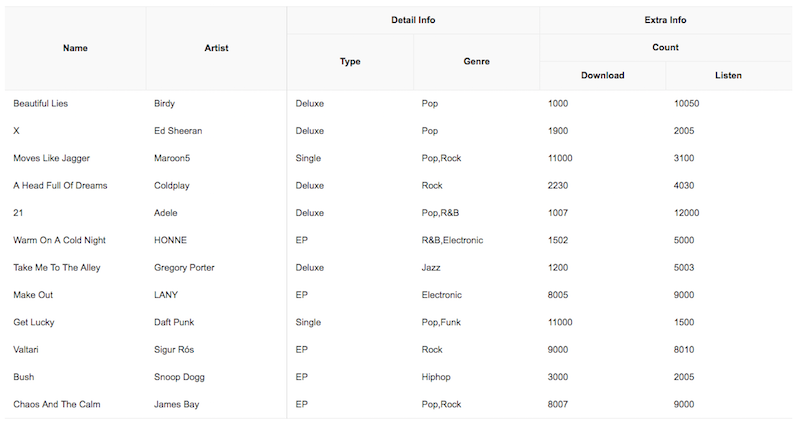
* Multi column headers
* Inline Editing
* Validation
* Selection
* Pagination
* Picking date
* Sorting
* Merging cell
* Frozen(Pinned) columns
* Relation between each columns
* Binding to remote data
* Summarize all values of each column
* Customizing styles _(Three basic themes)_
* Representing tree data
## 🐾 Examples
* [Basic](https://nhn.github.io/tui.grid/latest/tutorial-example01-basic)
* [Input types](https://nhn.github.io/tui.grid/latest/tutorial-example04-input-types)
* [Relation between columns](https://nhn.github.io/tui.grid/latest/tutorial-example05-relation-columns)
* [Applying Themes](https://nhn.github.io/tui.grid/latest/tutorial-example07-applying-themes)
* [Using DatePicker component](https://nhn.github.io/tui.grid/latest/tutorial-example08-using-datepicker)
* [Using Summary](https://nhn.github.io/tui.grid/latest/tutorial-example09-using-summary)
* [Binding to remote data](https://nhn.github.io/tui.grid/latest/tutorial-example10-using-net)
* [Using tree data](https://nhn.github.io/tui.grid/latest/tutorial-example14-tree)
Here are more [examples](https://nhn.github.io/tui.grid/latest/tutorial-example01-basic) and play with TOAST UI Grid!
## 💾 Install
TOAST UI products can be used by using the package manager or downloading the source directly.
However, we highly recommend using the package manager.
### Via Package Manager
TOAST UI products are registered in two package managers, [npm](https://www.npmjs.com/) and [bower](https://bower.io/).
You can conveniently install it using the commands provided by each package manager.
When using npm, be sure to use it in the environment [Node.js](https://nodejs.org/ko/) is installed.
#### npm
``` sh
$ npm install --save tui-grid # Latest version
$ npm install --save tui-grid@ # Specific version
```
#### bower
``` sh
$ bower install tui-grid # Latest version
$ bower install tui-grid# # Specific version
```
### Via Contents Delivery Network (CDN)
TOAST UI products are available over the CDN powered by [TOAST Cloud](https://www.toast.com).
You can use the CDN as below.
``` html
...
```
If you want to use a specific version, use the tag name instead of `latest` in the url's path.
The CDN directory has the following structure.
```
tui-grid/
├─ latest/
│ ├─ tui-grid.comb.js // This file includes the backbone and underscore.
│ ├─ tui-grid.comb.min.js
│ ├─ tui-grid.css
│ ├─ tui-grid.min.css
│ ├─ tui-grid.js
│ └─ tui-grid.min.js
├─ v2.10.0/
│ ├─ ...
```
### Download Source Files
* [Download bundle files](https://github.com/nhn/tui.grid/tree/production/dist)
* [Download all sources for each version](https://github.com/nhn/tui.grid/releases)
## 🔩 Dependency
* [jquery](https://jquery.com/) >=1.11.0 (Available with `bower` from 1.8.3)
* [underscore](http://underscorejs.org/) >=1.8.3
* [backbone](http://backbonejs.org/) >=1.3.3
* [tui-code-snippet](https://github.com/nhn/tui.code-snippett) >=1.5.0
* component (optional)
* [tui-date-picker](https://github.com/nhn/tui.date-picker) >=3.2.1
* [tui-pagination](https://github.com/nhn/tui.pagination) >=3.3.0
You can also use **lodash** instead of underscore and use **higher version of jquery** (like v2.x.x) depending on your project.
## 🔨 Usage
### HTML
Add the container element where TOAST UI Grid will be created.
``` html
```
### JavaScript
TOAST UI Grid can be used by creating an instance with the constructor function.
To get the constructor function, you should import the module using one of the following ways depending on your environment.
#### Using namespace in browser environment
``` javascript
var Grid = tui.Grid;
```
#### Using module format in node environment
``` javascript
var Grid = require('tui-grid'); /* CommonJS */
```
``` javascript
import Grid from 'tui-grid'; /* ES6 */
```
You can create an instance with options and call various APIs after creating an instance.
``` javascript
var instance = new Grid({
el: $('#grid'), // Container element
columns: [
{
title: 'Name',
name: 'name'
},
{
title: 'Artist',
name: 'artist'
},
{
title: 'Release',
name: 'release'
},
{
title: 'Genre',
name: 'genre'
}
],
data: [
{
name: 'Beautiful Lies',
artist: 'Birdy',
release: '2016.03.26',
genre: 'Pop'
}
]
});
instance.setData(newData); // Call API of instance's public method
Grid.applyTheme('striped'); // Call API of static method
```
### TypeScript
If you are using TypeScript, you must use `import module = require('module')` to import the Grid module. See ["export = " and "import = require()"](https://www.typescriptlang.org/docs/handbook/modules.html#export--and-import--require).
```typescript
import Grid = require('tui-grid');
var instance = new Grid({
// ...options
});
```
## 🔧 Pull Request Steps
TOAST UI products are open source, so you can create a pull request(PR) after you fix issues.
Run npm scripts and develop yourself with the following process.
### Setup
Fork `master` branch into your personal repository.
Clone it to local computer. Install node modules.
Before starting development, you should check to haveany errors.
``` sh
$ git clone https://github.com/{your-personal-repo}/tui.grid.git
$ cd tui.grid
$ npm install
$ npm run test
```
### Develop
Let's start development!
You can see your code is reflected as soon as you saving the codes by running a server.
Don't miss adding test cases and then make green rights.
#### Run webpack-dev-server
``` sh
$ npm run dev
$ npm run dev:ie8 # Run on Internet Explorer 8
```
#### Run karma test
``` sh
$ npm run test
```
### Pull Request
Before PR, check to test lastly and then check any errors.
If it has no error, commit and then push it!
For more information on PR's step, please see links of Contributing section.
## 📙 Documents
* [Getting Started](https://github.com/nhn/tui.grid/blob/production/docs/getting-started.md)
* [Tutorials](https://github.com/nhn/tui.grid/tree/production/docs)
* [APIs](https://nhn.github.io/tui.grid/latest)
You can also see the older versions of API page on the [releases page](https://github.com/nhn/tui.grid/releases).
## 💬 Contributing
* [Code of Conduct](https://github.com/nhn/tui.grid/blob/production/CODE_OF_CONDUCT.md)
* [Contributing guideline](https://github.com/nhn/tui.grid/blob/production/CONTRIBUTING.md)
* [Issue guideline](https://github.com/nhn/tui.grid/blob/production/docs/ISSUE_TEMPLATE.md)
* [Commit convention](https://github.com/nhn/tui.grid/blob/production/docs/COMMIT_MESSAGE_CONVENTION.md)
## 🍞 TOAST UI Family
* [TOAST UI Calendar](https://github.com/nhn/tui.calendar)
* [TOAST UI Chart](https://github.com/nhn/tui.chart)
* [TOAST UI Editor](https://github.com/nhn/tui.editor)
* [TOAST UI Components](https://github.com/nhn)
## 🚀 Used By
* [NCP - Commerce Platform](https://www.e-ncp.com/)
## 📜 License
This software is licensed under the [MIT](https://github.com/nhn/tui.grid/blob/production/LICENSE) © [NHN](https://github.com/nhn).
Firefox |
| :---------: | :---------: | :---------: | :---------: | :---------: |
| Yes | 8+ | Yes | Yes | Yes |
## 🤖 The Toast UI Grid Is an Ultimate Transformer
### Data Can Be Displayed in Any Format
#### Styling
The TOAST UI Grid is a component that can **display**, **edit**, **add**, and **delete** multiple data.
You can append units to the data shown and use `html` to represent images and links instead of textual data.

#### Summary
The summary function allows you to caculate on multiple rows of data and display the results.
It automatically calculates the **total sum**, the **average**, the **maximum and minimum value**, and updates each result whenever the value changes.

#### Tree Data
Starting with version 3 or later, you can use tree data to represent them in a hierarchy.
Now let's process the data we want.

### Provides a Variety of Editing Elements
In order to edit the data, you don't need to use `html` to create the editing elements yourself.
It supports various `input` elements such as **text**, **select box**, **checkbox**, **radio button.**
You can set the data editing method just by setting options.
You can also show editing elements only while you're editing **using view mode**.

### Simple, Easy to Use Themes
It has three themes: **default**, **striped** (zebra pattern), and **clean** theme.
You can easily add the desired design to the themes provided through the theme API.
Themes API has been improved since version 3, allowing you to easily control the background color of the header / body area and vertical / horizontal border lines without modifying CSS styles directly.
Use the theme to customize your grid.
| default | striped | clean |
| ------- | ------- | ----- |
||||
In addition, a variety of powerful features can be found on the demo page below. 👇👇👇
## 🎨 Features
* Custom cell formatter & converter
* Various input types _(checkbox, radio, select, password, etc)_
* Full keyboard navigation _(move, select, copy, paste, delete, etc)_
* Virtual scrolling _(Handling large dataset without performance loses)_
* Copy & Paste using clipboard with 3rd party application _(Like MS-Excel or Google-spreadsheet)_
* Column resize & reorder & show & hide
* Multi column headers
* Inline Editing
* Validation
* Selection
* Pagination
* Picking date
* Sorting
* Merging cell
* Frozen(Pinned) columns
* Relation between each columns
* Binding to remote data
* Summarize all values of each column
* Customizing styles _(Three basic themes)_
* Representing tree data
## 🐾 Examples
* [Basic](https://nhn.github.io/tui.grid/latest/tutorial-example01-basic)
* [Input types](https://nhn.github.io/tui.grid/latest/tutorial-example04-input-types)
* [Relation between columns](https://nhn.github.io/tui.grid/latest/tutorial-example05-relation-columns)
* [Applying Themes](https://nhn.github.io/tui.grid/latest/tutorial-example07-applying-themes)
* [Using DatePicker component](https://nhn.github.io/tui.grid/latest/tutorial-example08-using-datepicker)
* [Using Summary](https://nhn.github.io/tui.grid/latest/tutorial-example09-using-summary)
* [Binding to remote data](https://nhn.github.io/tui.grid/latest/tutorial-example10-using-net)
* [Using tree data](https://nhn.github.io/tui.grid/latest/tutorial-example14-tree)
Here are more [examples](https://nhn.github.io/tui.grid/latest/tutorial-example01-basic) and play with TOAST UI Grid!
## 💾 Install
TOAST UI products can be used by using the package manager or downloading the source directly.
However, we highly recommend using the package manager.
### Via Package Manager
TOAST UI products are registered in two package managers, [npm](https://www.npmjs.com/) and [bower](https://bower.io/).
You can conveniently install it using the commands provided by each package manager.
When using npm, be sure to use it in the environment [Node.js](https://nodejs.org/ko/) is installed.
#### npm
``` sh
$ npm install --save tui-grid # Latest version
$ npm install --save tui-grid@ # Specific version
```
#### bower
``` sh
$ bower install tui-grid # Latest version
$ bower install tui-grid# # Specific version
```
### Via Contents Delivery Network (CDN)
TOAST UI products are available over the CDN powered by [TOAST Cloud](https://www.toast.com).
You can use the CDN as below.
``` html
...
```
If you want to use a specific version, use the tag name instead of `latest` in the url's path.
The CDN directory has the following structure.
```
tui-grid/
├─ latest/
│ ├─ tui-grid.comb.js // This file includes the backbone and underscore.
│ ├─ tui-grid.comb.min.js
│ ├─ tui-grid.css
│ ├─ tui-grid.min.css
│ ├─ tui-grid.js
│ └─ tui-grid.min.js
├─ v2.10.0/
│ ├─ ...
```
### Download Source Files
* [Download bundle files](https://github.com/nhn/tui.grid/tree/production/dist)
* [Download all sources for each version](https://github.com/nhn/tui.grid/releases)
## 🔩 Dependency
* [jquery](https://jquery.com/) >=1.11.0 (Available with `bower` from 1.8.3)
* [underscore](http://underscorejs.org/) >=1.8.3
* [backbone](http://backbonejs.org/) >=1.3.3
* [tui-code-snippet](https://github.com/nhn/tui.code-snippett) >=1.5.0
* component (optional)
* [tui-date-picker](https://github.com/nhn/tui.date-picker) >=3.2.1
* [tui-pagination](https://github.com/nhn/tui.pagination) >=3.3.0
You can also use **lodash** instead of underscore and use **higher version of jquery** (like v2.x.x) depending on your project.
## 🔨 Usage
### HTML
Add the container element where TOAST UI Grid will be created.
``` html
```
### JavaScript
TOAST UI Grid can be used by creating an instance with the constructor function.
To get the constructor function, you should import the module using one of the following ways depending on your environment.
#### Using namespace in browser environment
``` javascript
var Grid = tui.Grid;
```
#### Using module format in node environment
``` javascript
var Grid = require('tui-grid'); /* CommonJS */
```
``` javascript
import Grid from 'tui-grid'; /* ES6 */
```
You can create an instance with options and call various APIs after creating an instance.
``` javascript
var instance = new Grid({
el: $('#grid'), // Container element
columns: [
{
title: 'Name',
name: 'name'
},
{
title: 'Artist',
name: 'artist'
},
{
title: 'Release',
name: 'release'
},
{
title: 'Genre',
name: 'genre'
}
],
data: [
{
name: 'Beautiful Lies',
artist: 'Birdy',
release: '2016.03.26',
genre: 'Pop'
}
]
});
instance.setData(newData); // Call API of instance's public method
Grid.applyTheme('striped'); // Call API of static method
```
### TypeScript
If you are using TypeScript, you must use `import module = require('module')` to import the Grid module. See ["export = " and "import = require()"](https://www.typescriptlang.org/docs/handbook/modules.html#export--and-import--require).
```typescript
import Grid = require('tui-grid');
var instance = new Grid({
// ...options
});
```
## 🔧 Pull Request Steps
TOAST UI products are open source, so you can create a pull request(PR) after you fix issues.
Run npm scripts and develop yourself with the following process.
### Setup
Fork `master` branch into your personal repository.
Clone it to local computer. Install node modules.
Before starting development, you should check to haveany errors.
``` sh
$ git clone https://github.com/{your-personal-repo}/tui.grid.git
$ cd tui.grid
$ npm install
$ npm run test
```
### Develop
Let's start development!
You can see your code is reflected as soon as you saving the codes by running a server.
Don't miss adding test cases and then make green rights.
#### Run webpack-dev-server
``` sh
$ npm run dev
$ npm run dev:ie8 # Run on Internet Explorer 8
```
#### Run karma test
``` sh
$ npm run test
```
### Pull Request
Before PR, check to test lastly and then check any errors.
If it has no error, commit and then push it!
For more information on PR's step, please see links of Contributing section.
## 📙 Documents
* [Getting Started](https://github.com/nhn/tui.grid/blob/production/docs/getting-started.md)
* [Tutorials](https://github.com/nhn/tui.grid/tree/production/docs)
* [APIs](https://nhn.github.io/tui.grid/latest)
You can also see the older versions of API page on the [releases page](https://github.com/nhn/tui.grid/releases).
## 💬 Contributing
* [Code of Conduct](https://github.com/nhn/tui.grid/blob/production/CODE_OF_CONDUCT.md)
* [Contributing guideline](https://github.com/nhn/tui.grid/blob/production/CONTRIBUTING.md)
* [Issue guideline](https://github.com/nhn/tui.grid/blob/production/docs/ISSUE_TEMPLATE.md)
* [Commit convention](https://github.com/nhn/tui.grid/blob/production/docs/COMMIT_MESSAGE_CONVENTION.md)
## 🍞 TOAST UI Family
* [TOAST UI Calendar](https://github.com/nhn/tui.calendar)
* [TOAST UI Chart](https://github.com/nhn/tui.chart)
* [TOAST UI Editor](https://github.com/nhn/tui.editor)
* [TOAST UI Components](https://github.com/nhn)
## 🚀 Used By
* [NCP - Commerce Platform](https://www.e-ncp.com/)
## 📜 License
This software is licensed under the [MIT](https://github.com/nhn/tui.grid/blob/production/LICENSE) © [NHN](https://github.com/nhn).