# typle
📦 Scan and install missing Typescript type definitions for dependencies in `package.json`.
 [![npm][npm-version]][npm-link]
[![npm bundle size][bundle-size]][bundlephobia]
[![npm bundle size][package-size]][packagephobia]
[![npm download count][download-count]][npm-link]
[![License][license]](./license)
__Table of Contents__
* [Features](#features)
* [Install](#install)
* [Quick start](#quick-start)
* [Usage](#usage)
- [Install command](#install-command)
- [CLI Help](#cli-help)
- [Options](#options)
- [Config file](#config-file)
- [Supported config path files](#supported-config-file-paths)
* [Monorepos](#monorepos)
* [Acknowledgements](#acknowledgements)
* [License](#license)
## Features
- ✔️ Highly customazible and easy to use.
- ✔️ Detects whether a library has built-in typings or provided by [DefinitelyTyped](https://github.com/DefinitelyTyped/DefinitelyTyped)
- ✔️ Supports multiple `package.json` files and monorepos.
- ✔️ Matches version of `@types` with its corresponding package. See [here](https://github.com/DefinitelyTyped/DefinitelyTyped#how-do-definitely-typed-package-versions-relate-to-versions-of-the-corresponding-library) for details.
- ✔️ Installs them with automatically detected __package manager__ or just updates `package.json` file.
## Install
Install package either locally in your project or globally:
```sh
# locally
npm install typle --save-dev
# globally
npm install typle -g
```
Alternatively, use `npx` directly:
```sh
npx typle
```
## Quick start
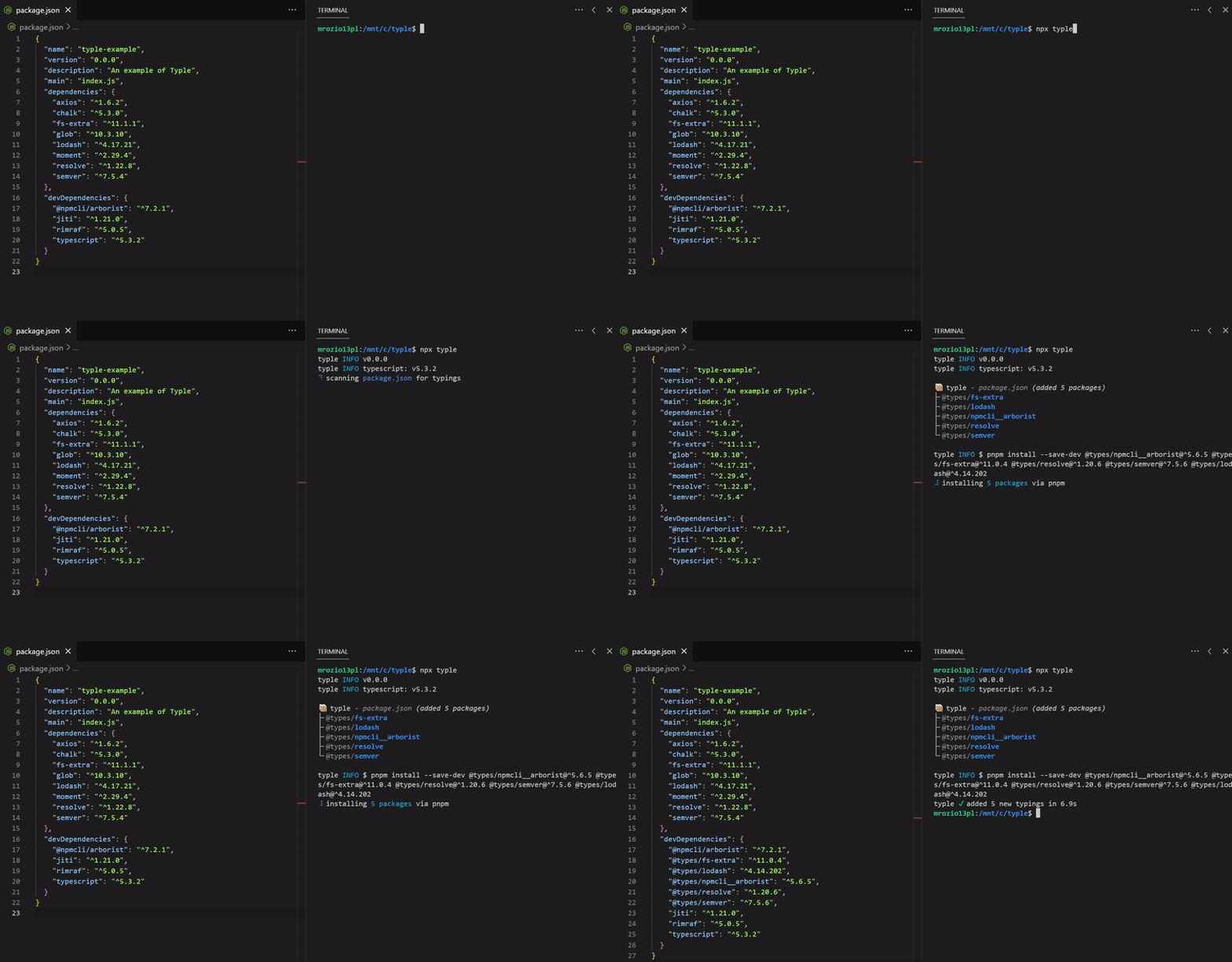
Run __typle__ in the root of your project with `package.json` inside it.
This will scan `package.json` for missing typescript declarations and install them:
```
npx typle
```
## Usage
```sh
typle [paths/to/package.json] [--options]
```
Paths can be either file paths or glob patterns, e.g. `typle packages/*` when working with a [monorepo](#monorepos).
### Install command
```sh
typle install [--options]
```
Simply install packages with their corresponding type declarations.\
All flags will be passed to a given package manager's options.
Available under alias `i`.
### CLI Help
```sh
$ typle -h
```
```
typle
Usage
$ typle [flags...] [patterns...]
Scan and install missing Typescript type definitions for dependencies in 'package.json'.
Commands
install Install packages with their corresponding type declarations. (alias: 'i')
Options
-h, --help Show help.
-v, --version Get version.
--silent Run install silently.
--install Whether to install packages automatically or just update package.json.
--pkg-manager [manager] Which package manager to use.
--ignore-packages [packages...] List of packages to ignore.
--ignore-deps [deps...] List of certain dependency fields to ignore e.g. 'dev'.
--config [path] Path to the config file.
--dry-run It won't cause any changes to package.json.
Examples
$ typle --ignore-packages nodemon eslint
$ typle packages/*
```
### Options
Options that aren't prefixed with double dash (`--`) are strictly for CLI.
| Option | Description | Default |
|---|---|:---:|
| `--silent` | Run install silently. | `true` |
| `--install` | Whether to install packages automatically or just update `package.json`. | `true` |
| `--pkg-manager` | Which package manager to use. Allowed: _npm_, _yarn_, _pnpm_ or _bun_. | _Automatically detected._ |
| `--ignore-packages` | List of packages to ignore. | - |
| `--ignore-deps` | List of certain dependency fields to ignore, e.g. to ignore `devDependencies` use `--ignore-deps devDependencies` or `--ignore-deps dev` for shorthand. | - |
| `--config` | Path to the config file. | - |
| `--dry-run` | If specified, it won't make any changes in `package.json` or install any packages. | `false` |
| `patterns` | Paths or globs where `package.json` files will be scanned. | - |
| `additionalArgs` | Additional arguments for package install.| - |
| `-v, --version` | Show version.| - |
| `-h, --help` | Show help.| - |
### Config file
Alternatively, you can use a configuration file instead with the same options in: `.typlerc.js` file (or any other [config file supported](#supported-config-file-paths)) or `typleConfig` field in your `package.json`. See [lilconfig](https://github.com/antonk52/lilconfig) for more details.\
You might also find use of `defineConfig` wrapper function that will help you with defining configuration:
```js
// .typlerc.js
import { defineConfig } from 'typle';
export default defineConfig({
silent: false,
patterns: 'packages/*',
ignorePackages: ['nodemon', 'eslint'],
/** etc... */
});
```
#### Supported config file paths
* `package.json`
* `.typlerc.js`
* `.typlerc.cjs`
* `.typlerc.json`
* `typle.config.js`
* `typle.config.cjs`
* `.config/typlerc`
* `.config/typlerc.json`
* `.config/typlerc.js`
* `.config/typlerc.cjs`
If you wish to store config in some other file path use `--config` option.
## Monorepos
You can use __typle__ in a monorepo too!
```
└─── typle (root folder)
└─── packages
│ ├─── typle
│ ├─── typle-core
│ └─── typle-util
├─── .typlerc.json
└─── package.json
```
In this example monorepo, in order to scan every folder in `packages` directory we can use the following config:
```json
// .typlerc.json
{
"patterns": "packages/*"
}
```
Then run `typle` in the root directory.
## Why?
Installing typings manually is just annoying and sometimes quite vague.
## Acknowledgements
__Typle__ was heavly inspired by [typesync](https://github.com/jeffijoe/typesync), but with many improvements and new features.
## License
MIT 💖
[npm-link]: https://npmjs.com/package/typle
[npm-version]: https://img.shields.io/npm/v/typle
[bundle-size]: https://img.shields.io/bundlephobia/min/typle
[bundlephobia]: https://bundlephobia.com/package/typle
[package-size]: https://packagephobia.com/badge?p=typle
[packagephobia]: https://packagephobia.com/result?p=typle
[download-count]: https://img.shields.io/npm/dt/typle
[license]: https://img.shields.io/npm/l/typle
[![npm][npm-version]][npm-link]
[![npm bundle size][bundle-size]][bundlephobia]
[![npm bundle size][package-size]][packagephobia]
[![npm download count][download-count]][npm-link]
[![License][license]](./license)
__Table of Contents__
* [Features](#features)
* [Install](#install)
* [Quick start](#quick-start)
* [Usage](#usage)
- [Install command](#install-command)
- [CLI Help](#cli-help)
- [Options](#options)
- [Config file](#config-file)
- [Supported config path files](#supported-config-file-paths)
* [Monorepos](#monorepos)
* [Acknowledgements](#acknowledgements)
* [License](#license)
## Features
- ✔️ Highly customazible and easy to use.
- ✔️ Detects whether a library has built-in typings or provided by [DefinitelyTyped](https://github.com/DefinitelyTyped/DefinitelyTyped)
- ✔️ Supports multiple `package.json` files and monorepos.
- ✔️ Matches version of `@types` with its corresponding package. See [here](https://github.com/DefinitelyTyped/DefinitelyTyped#how-do-definitely-typed-package-versions-relate-to-versions-of-the-corresponding-library) for details.
- ✔️ Installs them with automatically detected __package manager__ or just updates `package.json` file.
## Install
Install package either locally in your project or globally:
```sh
# locally
npm install typle --save-dev
# globally
npm install typle -g
```
Alternatively, use `npx` directly:
```sh
npx typle
```
## Quick start
Run __typle__ in the root of your project with `package.json` inside it.
This will scan `package.json` for missing typescript declarations and install them:
```
npx typle
```
## Usage
```sh
typle [paths/to/package.json] [--options]
```
Paths can be either file paths or glob patterns, e.g. `typle packages/*` when working with a [monorepo](#monorepos).
### Install command
```sh
typle install [--options]
```
Simply install packages with their corresponding type declarations.\
All flags will be passed to a given package manager's options.
Available under alias `i`.
### CLI Help
```sh
$ typle -h
```
```
typle
Usage
$ typle [flags...] [patterns...]
Scan and install missing Typescript type definitions for dependencies in 'package.json'.
Commands
install Install packages with their corresponding type declarations. (alias: 'i')
Options
-h, --help Show help.
-v, --version Get version.
--silent Run install silently.
--install Whether to install packages automatically or just update package.json.
--pkg-manager [manager] Which package manager to use.
--ignore-packages [packages...] List of packages to ignore.
--ignore-deps [deps...] List of certain dependency fields to ignore e.g. 'dev'.
--config [path] Path to the config file.
--dry-run It won't cause any changes to package.json.
Examples
$ typle --ignore-packages nodemon eslint
$ typle packages/*
```
### Options
Options that aren't prefixed with double dash (`--`) are strictly for CLI.
| Option | Description | Default |
|---|---|:---:|
| `--silent` | Run install silently. | `true` |
| `--install` | Whether to install packages automatically or just update `package.json`. | `true` |
| `--pkg-manager` | Which package manager to use. Allowed: _npm_, _yarn_, _pnpm_ or _bun_. | _Automatically detected._ |
| `--ignore-packages` | List of packages to ignore. | - |
| `--ignore-deps` | List of certain dependency fields to ignore, e.g. to ignore `devDependencies` use `--ignore-deps devDependencies` or `--ignore-deps dev` for shorthand. | - |
| `--config` | Path to the config file. | - |
| `--dry-run` | If specified, it won't make any changes in `package.json` or install any packages. | `false` |
| `patterns` | Paths or globs where `package.json` files will be scanned. | - |
| `additionalArgs` | Additional arguments for package install.| - |
| `-v, --version` | Show version.| - |
| `-h, --help` | Show help.| - |
### Config file
Alternatively, you can use a configuration file instead with the same options in: `.typlerc.js` file (or any other [config file supported](#supported-config-file-paths)) or `typleConfig` field in your `package.json`. See [lilconfig](https://github.com/antonk52/lilconfig) for more details.\
You might also find use of `defineConfig` wrapper function that will help you with defining configuration:
```js
// .typlerc.js
import { defineConfig } from 'typle';
export default defineConfig({
silent: false,
patterns: 'packages/*',
ignorePackages: ['nodemon', 'eslint'],
/** etc... */
});
```
#### Supported config file paths
* `package.json`
* `.typlerc.js`
* `.typlerc.cjs`
* `.typlerc.json`
* `typle.config.js`
* `typle.config.cjs`
* `.config/typlerc`
* `.config/typlerc.json`
* `.config/typlerc.js`
* `.config/typlerc.cjs`
If you wish to store config in some other file path use `--config` option.
## Monorepos
You can use __typle__ in a monorepo too!
```
└─── typle (root folder)
└─── packages
│ ├─── typle
│ ├─── typle-core
│ └─── typle-util
├─── .typlerc.json
└─── package.json
```
In this example monorepo, in order to scan every folder in `packages` directory we can use the following config:
```json
// .typlerc.json
{
"patterns": "packages/*"
}
```
Then run `typle` in the root directory.
## Why?
Installing typings manually is just annoying and sometimes quite vague.
## Acknowledgements
__Typle__ was heavly inspired by [typesync](https://github.com/jeffijoe/typesync), but with many improvements and new features.
## License
MIT 💖
[npm-link]: https://npmjs.com/package/typle
[npm-version]: https://img.shields.io/npm/v/typle
[bundle-size]: https://img.shields.io/bundlephobia/min/typle
[bundlephobia]: https://bundlephobia.com/package/typle
[package-size]: https://packagephobia.com/badge?p=typle
[packagephobia]: https://packagephobia.com/result?p=typle
[download-count]: https://img.shields.io/npm/dt/typle
[license]: https://img.shields.io/npm/l/typle