unplugin-transform-class
English | 简体中文
按照自定义转换规则, 转换 `html class` 选择器
---
静态class
```html
tracking-[2/5]
```
设置rules
```js
const rules = {
'/': '-s-',
':': '-c-',
'[': '-fl-',
']': '-fr-',
}
transformClass({
rules
})
```
转换后
```html
tracking-[2/5]
```
---
动态复杂class
```html
111111111
111111111
```
转换后
```html
111111111
111111111
```
## 下载
```shell
npm i unplugin-transform-class -D
```
Vite
```ts
import transformClass from 'unplugin-transform-class/vite'
import { defineConfig } from 'vite'
// https://vitejs.dev/config/
export default defineConfig({
plugins: [
// https://github.com/MellowCo/unplugin-transform-class
transformClass(),
],
})
```
webpack
```ts
const transformClass = require('unplugin-transform-class/webpack')
module.exports = {
configureWebpack: {
plugins: [
// https://github.com/MellowCo/unplugin-transform-class
transformClass(),
],
},
}
```
---
## 如何使用
### options
```ts
export interface Options {
/**
* 自定义转换规则
* @default
* {
'.': '_dl_',
'/': '_sl_',
':': '_cl_',
'%': '_pes_',
'!': '_el_',
'#': '_wn_',
'(': '_lbl_',
')': '_lbr_',
'[': '_lfl_',
']': '_lfr_',
'$': '_do_',
',': '_lco_',
'=': '_eqe_',
}
*/
rules?: Record
/**
* 排除转换目标
* @default [/[\\/]node_modules[\\/]/, /[\\/]\.git[\\/]/]
*/
exclude?: FilterPattern
/**
* 需要转换的目标
* @default [/\.[jt]sx?$/, /\.vue$/, /\.vue\?vue/]
*/
include?: FilterPattern
}
```
---
### 自定义转换规则
```ts
// webpack
// const transformClass = require('unplugin-transform-class/webpack')
// import transformClass from 'unplugin-transform-class/webpack'
// vite
import transformClass from 'unplugin-transform-class/vite'
const myRules = {
'.': '-ddd-',
'/': '-ss-',
':': '-cc-',
'%': '-pp-'
}
transformWeClass({
rules: myRules
})
```
---
### 设置 exclude include
```ts
// webpack
// const transformClass = require('unplugin-transform-class/webpack')
// import transformClass from 'unplugin-transform-class/webpack'
// vite
import transformClass from 'unplugin-transform-class/vite'
transformWeClass({
exclude: [/[\\/]node_modules[\\/]/, /[\\/]\.git[\\/]/, /[\\/]my-folder[\\/]/],
include: [/\.vue$/, /\.vue\?vue/]
})
```
---
### 工具
```ts
import { defaultRules, escapeRegExp, restoreSelector, transformCode, transformEscapESelector, transformSelector } from 'unplugin-transform-class/utils'
const code = `
tracking-[2/5]
`
const rules = {
'/': '-s-',
':': '-c-',
'[': '-fl-',
']': '-fr-',
}
const newCode = transformCode(code, rules)
```
---
## 使用场景
### 在微信小程序中使用原子化css
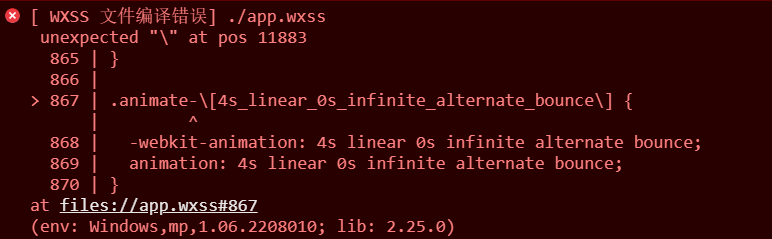
> 用于转换 `微信小程序` 不支持的 `\\`,`\:` `\[` `\$` `\.` 等转义类名, 实现在小程序中使用原子化css
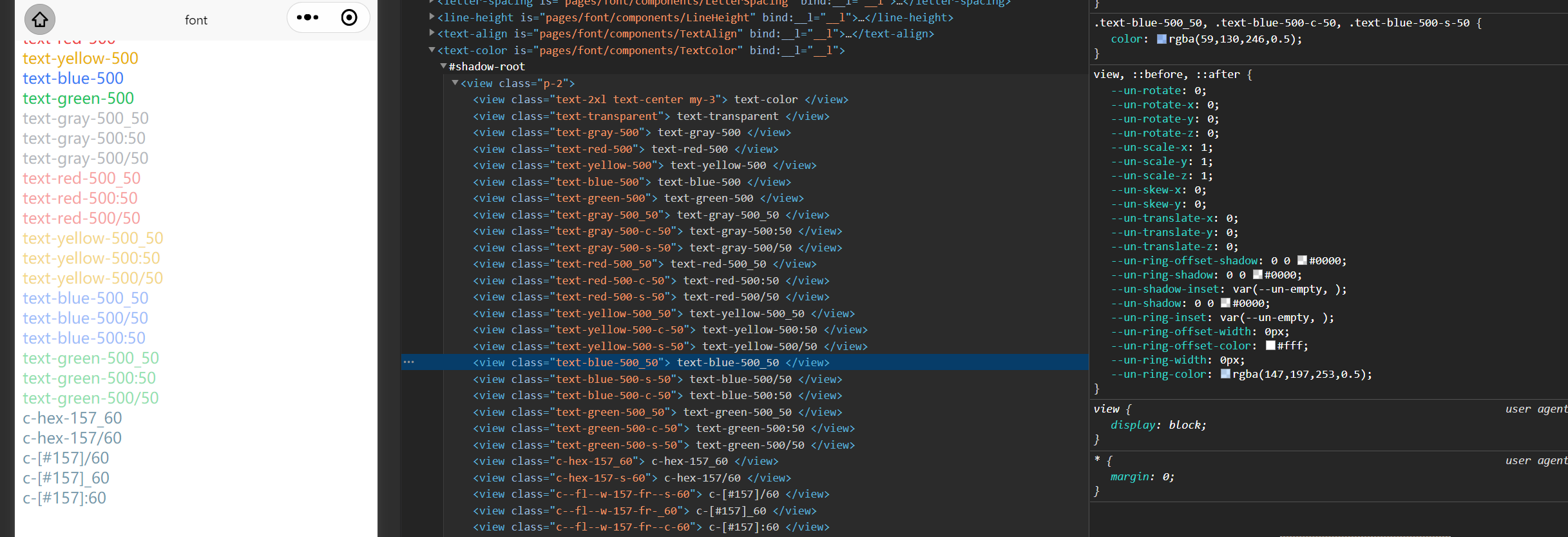
> 例如结合 [unocss 小程序预设](https://github.com/MellowCo/unocss-preset-weapp) ,实现 `unocss` 在小程序中开发使用
相关链接
* [unocss-preset-weapp](https://github.com/MellowCo/unocss-preset-weapp) - unocss 小程序预设