 ##### [CNX Corporation](https://www.cnxcorp.com)
Available for [Valence ^5.2](https://www.cnxcorp.com/valence/)
Use the valence-connect package when developing your Valence apps in Node.js. With valence-connect, your Node.js apps can participate in Valence role-based security, session management, logging and more. Writing Node.js apps for Valence using valence-connect also allows for maximum portability -- you can move your code between IBM i, Linux and Windows servers with little or no changes.
[Documentation](#ValenceConnect) [Examples](#Examples) [Tests](#Tests) [Versions](#Versions)
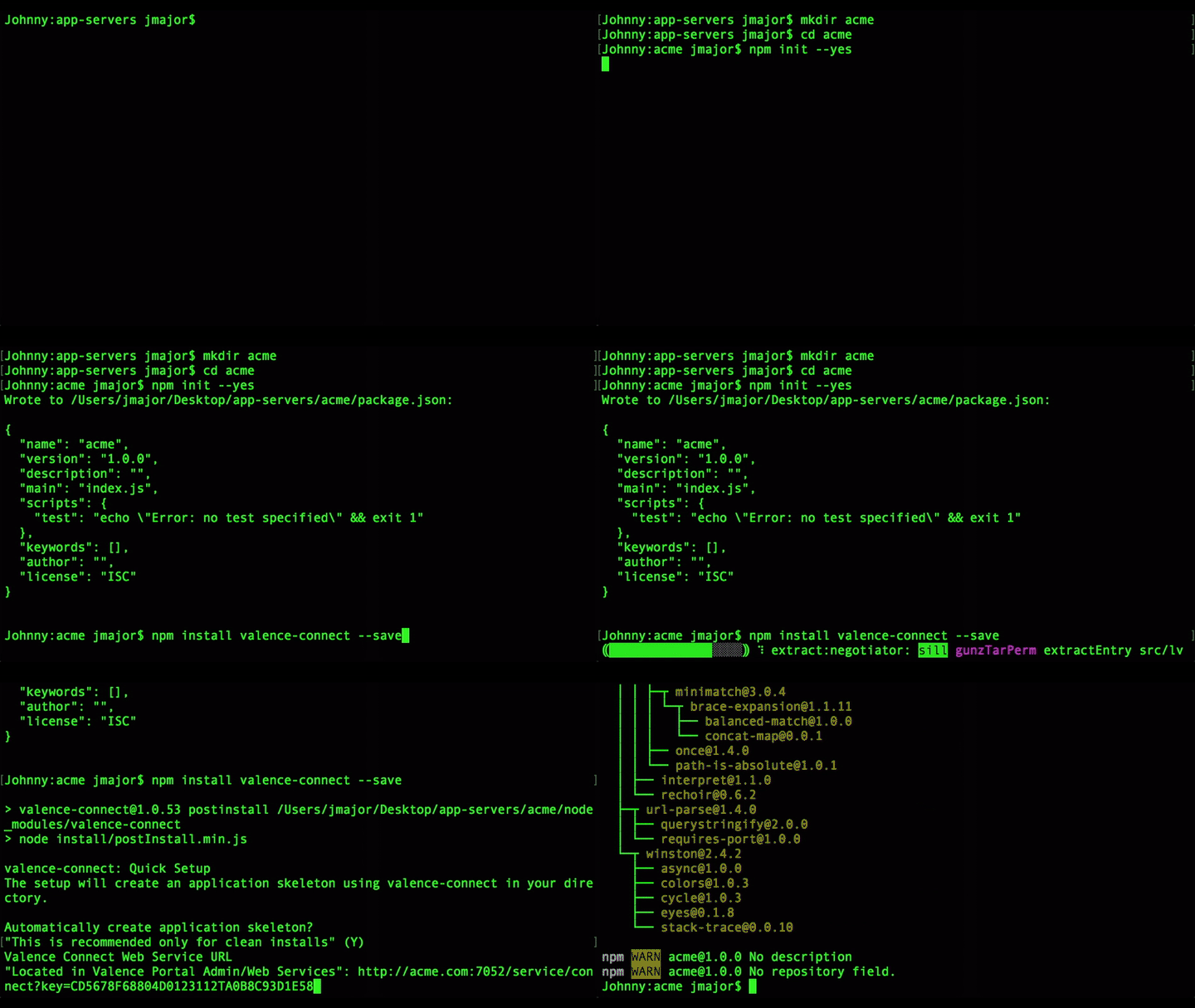
## Clean Install
```sh
mkdir acme
cd acme
npm init --yes
npm install valence-connect --save
```
After completing a clean installation start the new node server. You can find more information on starting the server below.
##### [CNX Corporation](https://www.cnxcorp.com)
Available for [Valence ^5.2](https://www.cnxcorp.com/valence/)
Use the valence-connect package when developing your Valence apps in Node.js. With valence-connect, your Node.js apps can participate in Valence role-based security, session management, logging and more. Writing Node.js apps for Valence using valence-connect also allows for maximum portability -- you can move your code between IBM i, Linux and Windows servers with little or no changes.
[Documentation](#ValenceConnect) [Examples](#Examples) [Tests](#Tests) [Versions](#Versions)
## Clean Install
```sh
mkdir acme
cd acme
npm init --yes
npm install valence-connect --save
```
After completing a clean installation start the new node server. You can find more information on starting the server below.
string | Valence Connect Web Service URL "Located in Valence Portal Admin/Web Services" |
| IBMi | boolean | Running Valence for IBM i. Pass false if connecting to Valence Universal on Windows, Linux or OS X. Defaults to true if not passed. |
| logging | boolean | When `true` will capture statistical information which can be viewed in Portal Admin-->Logs. |
[Valence Connect init](#ValenceConnect+init)
### routes/valence.js
```js
/**
* Valence Router
*/
const express = require('express'),
cors = require('cors'),
corsWhiteList = ['http://acme.com:7052'],
corsOptions = {
origin : (origin, callback) => {
if (typeof origin === 'undefined'
|| corsWhiteList.indexOf(origin) !== -1) {
callback(null, true);
} else {
callback(new Error('Not allowed by CORS'));
}
}
},
router = express.Router(),
valenceConnect = require('valence-connect'),
customers = require(global.__services + 'customers/customers');
// Initialize Valence Connect
//
valenceConnect.init();
// Allow Cross Origin
//
router.all('*', cors(corsOptions));
/**
* Check if the request session is authenticated
* @param {IncomingMessage} req http request
* @param {ServerResponse} res http response
* @param {callback} next continue
*/
let valenceCheck = (req, res, next) => {
valenceConnect.isAuthenticated(req, res)
.then(() => {
next();
});
};
// Always check before proceeding that the session is valid for all Valence requests
//
router.use(valenceCheck);
// Routes
//
// Example Valence Route "query customers"
//
router.all('/customers/queryAll', customers.queryAll.bind(customers));
module.exports = router;
```
### Tests
After performing a clean install and answering yes to "Automatically create application skeleton?" you will have an example test for the customer service using [node-tap](https://www.npmjs.com/package/tap).
Documentation: Security, session management, logging and utilities
Promise.<*>get session storage
Promise.<void>set the session storage
Promise.<void>
* [.init([options])](#ValenceConnect+init) ⇒ InitPromise
* [.dbQuery(req, [res], statement)](#ValenceConnect+dbQuery) ⇒ DbQueryPromise
* [.decodeUTF16(inStr)](#ValenceConnect+decodeUTF16) ⇒ string
* [.getParams(req, [param])](#ValenceConnect+getParams) ⇒ Object \| string \| number \| date \| array \| boolean \| \*
* [.getSessionInformation(sid)](#ValenceConnect+getSessionInformation) ⇒ SessionInformationPromise
* [.getSettings(sid, [names], [cacheBuster])](#ValenceConnect+getSettings) ⇒ SettingsPromise
* [.getUserInformation(sid, [cacheBuster])](#ValenceConnect+getUserInformation) ⇒ UserInformationPromise
* [.isAuthenticated(req, res)](#ValenceConnect+isAuthenticated) ⇒ IsAuthenticatedPromise
* [.isEmpty(value)](#ValenceConnect+isEmpty) ⇒ boolean
### new ValenceConnect()
Constructor
**Example**
```js
const valenceConnect = require('valence-connect');
```
### valenceConnect.baseInit() ⇒ Promise.<void>
init session storage
**Kind**: instance method of [ValenceConnect](#ValenceConnect)
### valenceConnect.init([options]) ⇒ InitPromise
Initialize valence connect for communication with
Valence for IBM i or Valence Universal. By default, valenceConnect.init
will look for a valence.json configuration file at the root of the
project for the required properties. You may override those
properties by passing in an options object.
**Kind**: instance method of [ValenceConnect](#ValenceConnect)
| Param | Type | Description |
| --- | --- | --- |
| [options] | object | Configuration Options |
| options.url | string | Valence Connect Web Service URL "Located in Valence Portal Admin/Web Services" |
| options.IBMi | boolean | Running Valence for IBM i. Pass false if connecting to Valence Universal on Windows, Linux or OS X. Defaults to true if not passed. |
| options.logging | boolean | When `true` will capture statistical information which can be viewed in Portal Admin-->Logs. |
**Example**
```js
// Using valence.json
//
valenceConnect.init();
```
**Example**
```js
// Passing options
//
valenceConnect.init({
url : 'http://acme.com:7052/service/connect?key=AZE678F68804D0123112TD0B8D93C1E38',
IBMi : true,
logging : false,
});
```
### valenceConnect.dbQuery(req, [res], statement) ⇒ DbQueryPromise
Run an SQL `SELECT` statement and get the results.
**Kind**: instance method of [ValenceConnect](#ValenceConnect)
**Returns**: DbQueryPromise - when fulfilled will contain an object with the results.
| Param | Type | Description |
| --- | --- | --- |
| req | IncomingMessage \| object | http request or object containing parameters to send off to process the query. Parameters: `rootName`, `maxResults`, `startFrom`. |
| [res] | ServerResponse | http response |
| statement | string | SQL statement to run. Only SELECT statements are allowed |
**Example**
```js
router.all('/customers', (req, res) => {
let statement = 'select cusno as NUMBER, cname as NAME,' +
' ccity as CITY, cstate as STATE from DEMOCMAST',
queryResponse = (response) => {
res.json(response);
},
queryError = (err) => {
res.json(err);
};
valenceConnect.dbQuery(req, res, statement)
.then(queryResponse)
.catch(queryError);
});
```
### valenceConnect.decodeUTF16(inStr) ⇒ string
Decode UTF16 hex-encoded strings
**Kind**: instance method of [ValenceConnect](#ValenceConnect)
**Returns**: string - decoded string
| Param | Type | Description |
| --- | --- | --- |
| inStr | string | string to decode |
**Example**
```js
let decodedValue = valenceConnect.decodeUTF16(encodedValue);
```
### valenceConnect.getParams(req, [param]) ⇒ Object \| string \| number \| date \| array \| boolean \| \*
Get a single request parameter or all request parameters from both the body and query string.
**Kind**: instance method of [ValenceConnect](#ValenceConnect)
| Param | Type | Description |
| --- | --- | --- |
| req | IncomingMessage | http request |
| [param] | string | parameter id |
**Example**
```js
// All Parameters
// The variable params would be an object containing all the query string
// and body parameters combined.
//
router.all('/processInventory', (req, res) => {
let params = valenceConnect.getParams(req);
if (params.inventoryId) {
// process inventory
//
}
});
```
**Example**
```js
// Single Parameter
// The inventoryId variable would be a number since the front-end passed a numeric
// value.
//
router.all('/processInventory', (req, res) => {
let inventoryId = valenceConnect.getParams(req, 'inventoryId');
if (inventoryId) {
// process inventory
//
}
});
```
### valenceConnect.getSessionInformation(sid) ⇒ SessionInformationPromise
Get the session information from the passed in session id
**Kind**: instance method of [ValenceConnect](#ValenceConnect)
**Returns**: SessionInformationPromise - when fulfilled will contain the session
information. Environment Id, Mode, Session Variables, etc.
| Param | Type | Description |
| --- | --- | --- |
| sid | string | session id |
**Example**
```js
router.all('/transferOrder', (req, res) => {
let sessionId = valenceConnect.getParams(req, 'sid'),
sessionError = (err) => {
res.json(err);
},
sessionResponse = (info) => {
if (info.envId === 1) {
// process default
//
} else {
//process other environment
//
}
};
valenceConnect.getSessionInformation(sessionId)
.then(sessionResponse)
.catch(sessionError);
});
```
### valenceConnect.getSettings(sid, [names], [cacheBuster]) ⇒ SettingsPromise
Get Valence Settings
**Kind**: instance method of [ValenceConnect](#ValenceConnect)
**Returns**: SettingsPromise - when fulfilled will be a name/value array of Valence settings
| Param | Type | Description |
| --- | --- | --- |
| sid | string | session id |
| [names] | array | optional array of setting names to get |
| [cacheBuster] | boolean | If `true` force pull of latest settings from Valence. |
**Example**
```js
router.all('/settings', (req, res) => {
let sessionId = valenceConnect.getParams(req, 'sid'),
settingsError = (err) => {
res.json(err);
},
settingsResponse = (settings) => {
res.json({
settings : settings
});
};
valenceConnect.getSettings(sessionId)
.then(settingsResponse)
.catch(settingsError);
});
```
### valenceConnect.getUserInformation(sid, [cacheBuster]) ⇒ UserInformationPromise
Get the current user information from the passed in session id
**Kind**: instance method of [ValenceConnect](#ValenceConnect)
**Returns**: UserInformationPromise - when fulfilled will contain the user
information. Id, First, Last Name, Email, etc.
| Param | Type | Description |
| --- | --- | --- |
| sid | string | session id |
| [cacheBuster] | boolean | If `true` force pull of latest users information from Valence. |
**Example**
```js
router.all('/userInformation', (req, res) => {
let sessionId = valenceConnect.getParams(req, 'sid'),
userError = (err) => {
res.json(err);
},
userResponse = (info) => {
res.json({
user : info
});
};
valenceConnect.getUserInformation(sessionId)
.then(userResponse)
.catch(userError);
});
```
### valenceConnect.isAuthenticated(req, res) ⇒ IsAuthenticatedPromise
Is the session authenticated based off the current session id on
the request object.
**Kind**: instance method of [ValenceConnect](#ValenceConnect)
| Param | Type | Description |
| --- | --- | --- |
| req | IncomingMessage | http request |
| res | ServerResponse | http response |
**Example**
```js
valenceConnect.isAuthenticated(req, res)
.then(() => {
// authenticated so continue...
//
next();
});
```
### valenceConnect.isEmpty(value) ⇒ boolean
Check to see if a value is empty
**Kind**: instance method of [ValenceConnect](#ValenceConnect)
| Param | Type | Description |
| --- | --- | --- |
| value | \* \| string | value to test if empty |
**Example**
```js
if (valenceConnect.isEmpty(value)) {
//value is empty
//
} else {
//value is not empty
//
}
```
## getSessionStorage(key) ⇒ Promise.<\*>
get session storage
**Kind**: global function
| Param | Type |
| --- | --- |
| key | string |
## setSessionStorage(key, info) ⇒ Promise.<void>
set the session storage
**Kind**: global function
| Param | Type |
| --- | --- |
| key | string |
| info | string |
[Back To Top](#ValenceTop)
## Community
[Forums](http://forums.cnxcorp.com/node/12178)
## Versions
### Prior to 1.1.1
- beta
### 1.1.1 - 2018-05-18
- General Availability
### 1.1.2 - 2018-09-12
- When calling getParams with a specific parameter value return null if not found instead of an empty object.
### 1.1.3 - 2018-12-27
- Update the required package `url-parse` minimum version to 1.4.3.
### 1.1.4 - 2020-12-21
- Update package dependencies to the latest ver
- Update core to handle dependency changes