# Discord Giveaways
[](https://discord.gg/luppux)
[](https://npmjs.com/vante-giveaways)
[](https://npmjs.com/vante-giveaways)
[](https://giveaways.vante.dev/)
Vante Giveaways is a powerful [Node.js](https://nodejs.org) module that allows you to easily create giveaways!
## Features
- ⏱️ Easy to use!
- 🔄 Automatic restart after bot crash!
- 🌐 Support for translations: adapt the strings for your own language!
- 📁 Support for all databases! (default is json)
- ⚙️ Very customizable! (prize, duration, winners, ignored permissions, bonus entries, etc...)
- 🚀 Super powerful: start, edit, reroll, end, delete and pause giveaways!
- 💥 Events: giveawayEnded, giveawayRerolled, giveawayDeleted, giveawayJoined and giveawayLeaved
- 🕸️ Support for shards!
- and much more!
## Installation
```bash
npm install --save vante-giveaways
```
## Examples
You can read this example bot on GitHub: [discord-giveaways-bot](https://github.com/vante-dev/vante-giveaways-bot)
### Launch of the module
Required Discord Intents: `Guilds` and `GuildMembers`.
```js
const Discord = require('discord.js');
const client = new Discord.Client({
intents: [
Discord.IntentsBitField.Flags.Guilds,
Discord.IntentsBitField.Flags.GuildMembers
]
});
// Requires Manager from discord-giveaways
const { GiveawaysManager } = require('vante-giveaways');
const manager = new GiveawaysManager(client, {
storage: './giveaways.json',
default: {
embedColor: '#0a0000',
buttonEmoji: '🎉',
buttonStyle: Discord.ButtonStyle.Secondary,
}
});
// We now have a giveawaysManager property to access the manager everywhere!
client.giveawaysManager = manager;
client.giveawaysManager.on('giveawayJoined', (giveaway, member, interaction) => {
if (!giveaway.isDrop) return interaction.reply({ content: `:tada: Congratulations **${member.user.username}**, you have joined the giveaway`, ephemeral: true })
interaction.reply({ content: `:tada: Congratulations **${member.user.username}**, you have joined the drop giveaway`, ephemeral: true })
});
client.giveawaysManager.on('giveawayLeaved', (giveaway, member, interaction) => {
return interaction.reply({ content: `**${member.user.username}**, you have left the giveaway`, ephemeral: true })
});
client.on('ready', () => {
console.log('Bot is ready!');
});
client.login(process.env.DISCORD_BOT_TOKEN);
```
After that, giveaways that are not yet completed will start to be updated again and new giveaways can be started.
You can pass an options object to customize the giveaways. Here is a list of them:
- **client**: the discord client (your discord bot instance).
- **[and many other optional parameters to customize the manager - read documentation](https://giveaways.vante.dev/global.html#GiveawaysManagerOptions)**
### Start a giveaway
```js
client.on('interactionCreate', (interaction) => {
const ms = require('ms');
if (interaction.isChatInputCommand() && interaction.commandName === 'start') {
// /start 2d 1 Awesome prize!
// Will create a giveaway with a duration of two days, with one winner and the prize will be "Awesome prize!"
const duration = interaction.options.getString('duration');
const winnerCount = interaction.options.getInteger('winners');
const prize = interaction.options.getString('prize');
client.giveawaysManager
.start(interaction.channel, {
duration: ms(duration),
winnerCount,
prize
})
.then((data) => {
console.log(data); // {...} (messageId, end date and more)
});
// And the giveaway has started!
}
});
```
- **options.duration**: the giveaway duration.
- **options.prize**: the giveaway prize.
- **options.winnerCount**: the number of giveaway winners.
- **[and many other optional parameters to customize the giveaway - read documentation](https://giveaways.vante.dev/global.html#GiveawayStartOptions)**
This allows you to start a new giveaway. Once the `start()` function is called, the giveaway starts, and you only have to observe the result, the package does the rest!
#### ⚠ ATTENTION!
The command examples below (reroll, edit delete, end) can be executed on any server your bot is a member of if a person has the `prize` or the `messageId` of a giveaway. To prevent abuse we recommend to check if the `prize` or the `messageId` that was provided by the command user is for a giveaway on the same server, if it is not, then cancel the command execution.
```js
const query = interaction.options.getString('query');
const giveaway =
// Search with giveaway prize
client.giveawaysManager.giveaways.find((g) => g.guildId === interaction.guildId && g.prize === query) ||
// Search with messageId
client.giveawaysManager.giveaways.find((g) => g.guildId === interaction.guildId && g.messageId === query);
// If no giveaway was found
if (!giveaway) return interaction.reply(`Unable to find a giveaway for \`${query}\`.`);
```
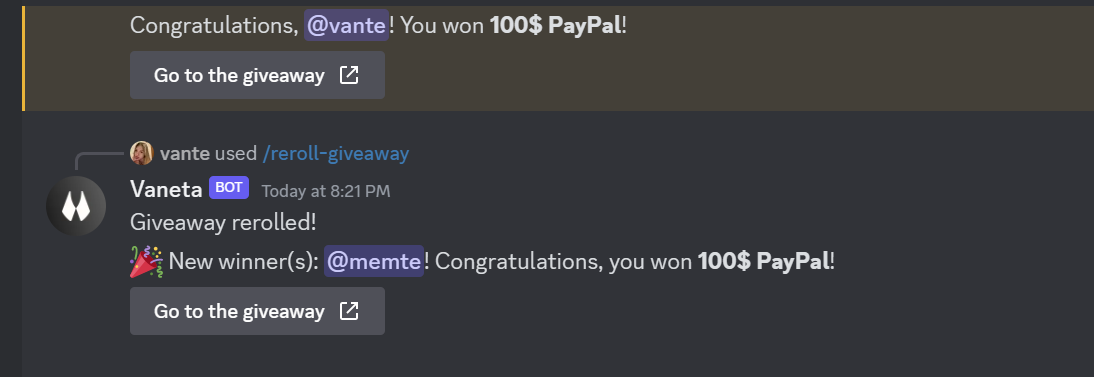
### Reroll a giveaway
```js
client.on('interactionCreate', (interaction) => {
if (interaction.isChatInputCommand() && interaction.commandName === 'reroll') {
const messageId = interaction.options.getString('message_id');
client.giveawaysManager
.reroll(messageId)
.then(() => {
interaction.reply('Success! Giveaway rerolled!');
})
.catch((err) => {
interaction.reply(`An error has occurred, please check and try again.\n\`${err}\``);
});
}
});
```
- **options.winnerCount**: the number of winners to pick.
- **options.messages**: an object with the "congrat" and the "error" message. [Usage example](https://github.com/vante-dev/vante-giveaways#-translation).
- **options.messages.replyWhenNoWinner**: Whether or not to send the "error" message when there is no winner.
 ### Edit a giveaway
```js
client.on('interactionCreate', (interaction) => {
if (interaction.isChatInputCommand() && interaction.commandName === 'edit') {
const messageId = interaction.options.getString('message_id');
client.giveawaysManager
.edit(messageId, {
addTime: 5000,
newWinnerCount: 3,
newPrize: 'New Prize!'
})
.then(() => {
interaction.reply('Success! Giveaway updated!');
})
.catch((err) => {
interaction.reply(`An error has occurred, please check and try again.\n\`${err}\``);
});
}
});
```
- **options.newWinnerCount**: the new number of winners.
- **options.newPrize**: the new prize. You can [access giveaway properties](https://github.com/vante-dev/vante-giveaways#access-giveaway-properties-in-messages).
- **options.addTime**: the number of milliseconds to add to the giveaway duration.
- **options.setEndTimestamp**: the timestamp of the new end date (for example, for the giveaway to be ended in 1 hour, set it to `Date.now() + 60000`).
- **[and many other optional parameters - read documentation](https://giveaways.vante.dev/global.html#GiveawayEditOptions)**
**Note**: to reduce giveaway duration, define `addTime` with a negative number! For example `addTime: -5000` will reduce giveaway duration by 5 seconds!
### Delete a giveaway
```js
client.on('interactionCreate', (interaction) => {
if (interaction.isChatInputCommand() && interaction.commandName === 'delete') {
const messageId = interaction.options.getString('message_id');
client.giveawaysManager
.delete(messageId)
.then(() => {
interaction.reply('Success! Giveaway deleted!');
})
.catch((err) => {
interaction.reply(`An error has occurred, please check and try again.\n\`${err}\``);
});
}
});
```
- **doNotDeleteMessage**: whether the giveaway message shouldn't be deleted.
⚠️ **Note**: when you use the delete function, the giveaway data and the message of the giveaway are deleted (by default). You cannot restore a giveaway once you have deleted it!
### End a giveaway
```js
client.on('interactionCreate', (interaction) => {
if (interaction.isChatInputCommand() && interaction.commandName === 'end') {
const messageId = interaction.options.getString('message_id');
client.giveawaysManager
.end(messageId)
.then(() => {
interaction.reply('Success! Giveaway ended!');
})
.catch((err) => {
interaction.reply(`An error has occurred, please check and try again.\n\`${err}\``);
});
}
});
```
- **noWinnerMessage**: Sent in the channel if there is no valid winner for the giveaway. [Message Options](https://github.com/vante-dev/vante-giveaways#message-options)
### Pause a giveaway
```js
client.on('interactionCreate', (interaction) => {
if (interaction.isChatInputCommand() && interaction.commandName === 'pause') {
const messageId = interaction.options.getString('message_id');
client.giveawaysManager
.pause(messageId)
.then(() => {
interaction.reply('Success! Giveaway paused!');
})
.catch((err) => {
interaction.reply(`An error has occurred, please check and try again.\n\`${err}\``);
});
}
});
```
- **options.content**: the text of the embed when the giveaway is paused. You can [access giveaway properties](https://github.com/vante-dev/vante-giveaways#access-giveaway-properties-in-messages).
- **options.unpauseAfter**: the number of milliseconds, or a timestamp in milliseconds, after which the giveaway will automatically unpause.
- **options.embedColor**: the color of the embed when the giveaway is paused.
- **options.infiniteDurationText**: The text that gets displayed next to `GiveawayMessages#drawing` in the paused embed, when there is no `unpauseAfter`.
^^^ You can [access giveaway properties](https://github.com/vante-dev/vante-giveaways#access-giveaway-properties-in-messages).
⚠️ **Note**: the pause function overwrites/edits the [pauseOptions object property](https://github.com/vante-dev/vante-giveaways#pause-options) of a giveaway!
### Unpause a giveaway
```js
client.on('interactionCreate', (interaction) => {
if (interaction.isChatInputCommand() && interaction.commandName === 'unpause') {
const messageId = interaction.options.getString('message_id');
client.giveawaysManager
.unpause(messageId)
.then(() => {
interaction.reply('Success! Giveaway unpaused!');
})
.catch((err) => {
interaction.reply(`An error has occurred, please check and try again.\n\`${err}\``);
});
}
});
```
### Fetch giveaways
```js
// A list of all the giveaways
const allGiveaways = client.giveawaysManager.giveaways; // [ {Giveaway}, {Giveaway} ]
// A list of all the giveaways on the server with Id "1909282092"
const onServer = client.giveawaysManager.giveaways.filter((g) => g.guildId === '1909282092');
// A list of the current active giveaways (not ended)
const notEnded = client.giveawaysManager.giveaways.filter((g) => !g.ended);
```
### Exempt Members
Function to filter members. If true is returned, the member will not be able to win the giveaway.
```js
client.giveawaysManager.start(interaction.channel, {
duration: 60000,
winnerCount: 1,
prize: 'Free Steam Key',
// Only members who have the "Nitro Boost" role are able to win
exemptMembers: (member, giveaway) => !member.roles.cache.some((r) => r.name === 'Nitro Boost')
});
```
**Note (only for proficients)**: if you want to use values of global variables inside of the function without using `giveaway.extraData`, you can use the [Function](https://developer.mozilla.org/en-US/docs/Web/JavaScript/Reference/Global_Objects/Function) constructor:
```js
const roleName = 'Nitro Boost';
client.giveawaysManager.start(interaction.channel, {
duration: 60000,
winnerCount: 1,
prize: 'Free Steam Key',
// Only members who have the the role which is assigned to "roleName" are able to win
exemptMembers: new Function(
'member',
'giveaway',
`return !member.roles.cache.some((r) => r.name === '${roleName}')`
)
});
```
**⚠ Note**
- You can use `this`, instead of the `giveaway` parameter, inside of the function string to access anything of the giveaway instance.
For example: `this.extraData`, or `this.client`.
- Strings have to be "stringified" (wrapped in quotation marks) again like you can see in the example.
Array brackets also have to be stated again.
- Global variables which contain numbers with more than 16 digits cannot be used.
=> Snoflakes have to be "stringified" correctly to avoid misbehaviour.
- If you want to make an asynchronous function in this format, refer to [this](https://developer.mozilla.org/en-US/docs/Web/JavaScript/Reference/Global_Objects/AsyncFunction) article.
- **Because of those various complications it is therefore highly suggested to use `giveaway.extraData` for storing variables.**
But if you really want to do it in this way and need more information/help, please visit the [Discord Server](https://discord.gg/luppux).
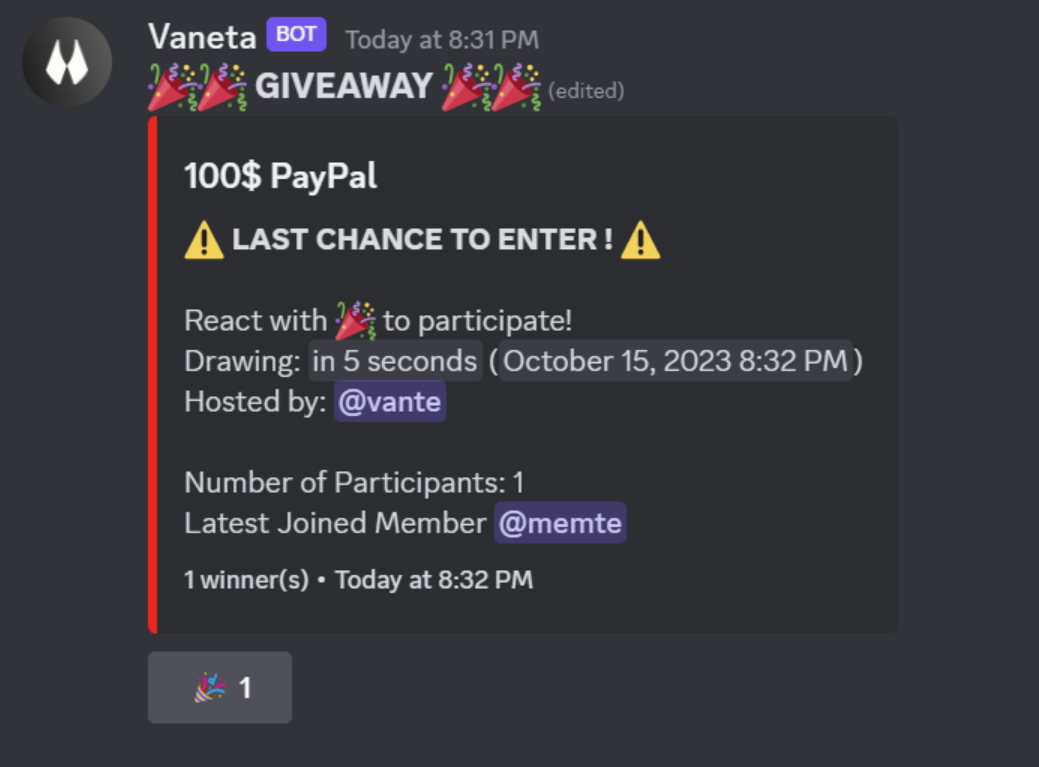
### Last Chance
```js
client.giveawaysManager.start(interaction.channel, {
duration: 60000,
winnerCount: 1,
prize: 'Discord Nitro!',
lastChance: {
enabled: true,
content: '⚠️ **LAST CHANCE TO ENTER !** ⚠️',
threshold: 10_000,
embedColor: '#FF0000'
}
});
```
- **lastChance.enabled**: if the last chance system is enabled.
- **lastChance.content**: the text of the embed when the last chance system is enabled.
^^^ You can [access giveaway properties](https://github.com/vante-dev/vante-giveaways#access-giveaway-properties-in-messages).
- **lastChance.threshold**: the number of milliseconds before the giveaway ends when the last chance system will be enabled.
- **lastChance.embedColor**: the color of the embed when last chance is enabled.
### Edit a giveaway
```js
client.on('interactionCreate', (interaction) => {
if (interaction.isChatInputCommand() && interaction.commandName === 'edit') {
const messageId = interaction.options.getString('message_id');
client.giveawaysManager
.edit(messageId, {
addTime: 5000,
newWinnerCount: 3,
newPrize: 'New Prize!'
})
.then(() => {
interaction.reply('Success! Giveaway updated!');
})
.catch((err) => {
interaction.reply(`An error has occurred, please check and try again.\n\`${err}\``);
});
}
});
```
- **options.newWinnerCount**: the new number of winners.
- **options.newPrize**: the new prize. You can [access giveaway properties](https://github.com/vante-dev/vante-giveaways#access-giveaway-properties-in-messages).
- **options.addTime**: the number of milliseconds to add to the giveaway duration.
- **options.setEndTimestamp**: the timestamp of the new end date (for example, for the giveaway to be ended in 1 hour, set it to `Date.now() + 60000`).
- **[and many other optional parameters - read documentation](https://giveaways.vante.dev/global.html#GiveawayEditOptions)**
**Note**: to reduce giveaway duration, define `addTime` with a negative number! For example `addTime: -5000` will reduce giveaway duration by 5 seconds!
### Delete a giveaway
```js
client.on('interactionCreate', (interaction) => {
if (interaction.isChatInputCommand() && interaction.commandName === 'delete') {
const messageId = interaction.options.getString('message_id');
client.giveawaysManager
.delete(messageId)
.then(() => {
interaction.reply('Success! Giveaway deleted!');
})
.catch((err) => {
interaction.reply(`An error has occurred, please check and try again.\n\`${err}\``);
});
}
});
```
- **doNotDeleteMessage**: whether the giveaway message shouldn't be deleted.
⚠️ **Note**: when you use the delete function, the giveaway data and the message of the giveaway are deleted (by default). You cannot restore a giveaway once you have deleted it!
### End a giveaway
```js
client.on('interactionCreate', (interaction) => {
if (interaction.isChatInputCommand() && interaction.commandName === 'end') {
const messageId = interaction.options.getString('message_id');
client.giveawaysManager
.end(messageId)
.then(() => {
interaction.reply('Success! Giveaway ended!');
})
.catch((err) => {
interaction.reply(`An error has occurred, please check and try again.\n\`${err}\``);
});
}
});
```
- **noWinnerMessage**: Sent in the channel if there is no valid winner for the giveaway. [Message Options](https://github.com/vante-dev/vante-giveaways#message-options)
### Pause a giveaway
```js
client.on('interactionCreate', (interaction) => {
if (interaction.isChatInputCommand() && interaction.commandName === 'pause') {
const messageId = interaction.options.getString('message_id');
client.giveawaysManager
.pause(messageId)
.then(() => {
interaction.reply('Success! Giveaway paused!');
})
.catch((err) => {
interaction.reply(`An error has occurred, please check and try again.\n\`${err}\``);
});
}
});
```
- **options.content**: the text of the embed when the giveaway is paused. You can [access giveaway properties](https://github.com/vante-dev/vante-giveaways#access-giveaway-properties-in-messages).
- **options.unpauseAfter**: the number of milliseconds, or a timestamp in milliseconds, after which the giveaway will automatically unpause.
- **options.embedColor**: the color of the embed when the giveaway is paused.
- **options.infiniteDurationText**: The text that gets displayed next to `GiveawayMessages#drawing` in the paused embed, when there is no `unpauseAfter`.
^^^ You can [access giveaway properties](https://github.com/vante-dev/vante-giveaways#access-giveaway-properties-in-messages).
⚠️ **Note**: the pause function overwrites/edits the [pauseOptions object property](https://github.com/vante-dev/vante-giveaways#pause-options) of a giveaway!
### Unpause a giveaway
```js
client.on('interactionCreate', (interaction) => {
if (interaction.isChatInputCommand() && interaction.commandName === 'unpause') {
const messageId = interaction.options.getString('message_id');
client.giveawaysManager
.unpause(messageId)
.then(() => {
interaction.reply('Success! Giveaway unpaused!');
})
.catch((err) => {
interaction.reply(`An error has occurred, please check and try again.\n\`${err}\``);
});
}
});
```
### Fetch giveaways
```js
// A list of all the giveaways
const allGiveaways = client.giveawaysManager.giveaways; // [ {Giveaway}, {Giveaway} ]
// A list of all the giveaways on the server with Id "1909282092"
const onServer = client.giveawaysManager.giveaways.filter((g) => g.guildId === '1909282092');
// A list of the current active giveaways (not ended)
const notEnded = client.giveawaysManager.giveaways.filter((g) => !g.ended);
```
### Exempt Members
Function to filter members. If true is returned, the member will not be able to win the giveaway.
```js
client.giveawaysManager.start(interaction.channel, {
duration: 60000,
winnerCount: 1,
prize: 'Free Steam Key',
// Only members who have the "Nitro Boost" role are able to win
exemptMembers: (member, giveaway) => !member.roles.cache.some((r) => r.name === 'Nitro Boost')
});
```
**Note (only for proficients)**: if you want to use values of global variables inside of the function without using `giveaway.extraData`, you can use the [Function](https://developer.mozilla.org/en-US/docs/Web/JavaScript/Reference/Global_Objects/Function) constructor:
```js
const roleName = 'Nitro Boost';
client.giveawaysManager.start(interaction.channel, {
duration: 60000,
winnerCount: 1,
prize: 'Free Steam Key',
// Only members who have the the role which is assigned to "roleName" are able to win
exemptMembers: new Function(
'member',
'giveaway',
`return !member.roles.cache.some((r) => r.name === '${roleName}')`
)
});
```
**⚠ Note**
- You can use `this`, instead of the `giveaway` parameter, inside of the function string to access anything of the giveaway instance.
For example: `this.extraData`, or `this.client`.
- Strings have to be "stringified" (wrapped in quotation marks) again like you can see in the example.
Array brackets also have to be stated again.
- Global variables which contain numbers with more than 16 digits cannot be used.
=> Snoflakes have to be "stringified" correctly to avoid misbehaviour.
- If you want to make an asynchronous function in this format, refer to [this](https://developer.mozilla.org/en-US/docs/Web/JavaScript/Reference/Global_Objects/AsyncFunction) article.
- **Because of those various complications it is therefore highly suggested to use `giveaway.extraData` for storing variables.**
But if you really want to do it in this way and need more information/help, please visit the [Discord Server](https://discord.gg/luppux).
### Last Chance
```js
client.giveawaysManager.start(interaction.channel, {
duration: 60000,
winnerCount: 1,
prize: 'Discord Nitro!',
lastChance: {
enabled: true,
content: '⚠️ **LAST CHANCE TO ENTER !** ⚠️',
threshold: 10_000,
embedColor: '#FF0000'
}
});
```
- **lastChance.enabled**: if the last chance system is enabled.
- **lastChance.content**: the text of the embed when the last chance system is enabled.
^^^ You can [access giveaway properties](https://github.com/vante-dev/vante-giveaways#access-giveaway-properties-in-messages).
- **lastChance.threshold**: the number of milliseconds before the giveaway ends when the last chance system will be enabled.
- **lastChance.embedColor**: the color of the embed when last chance is enabled.
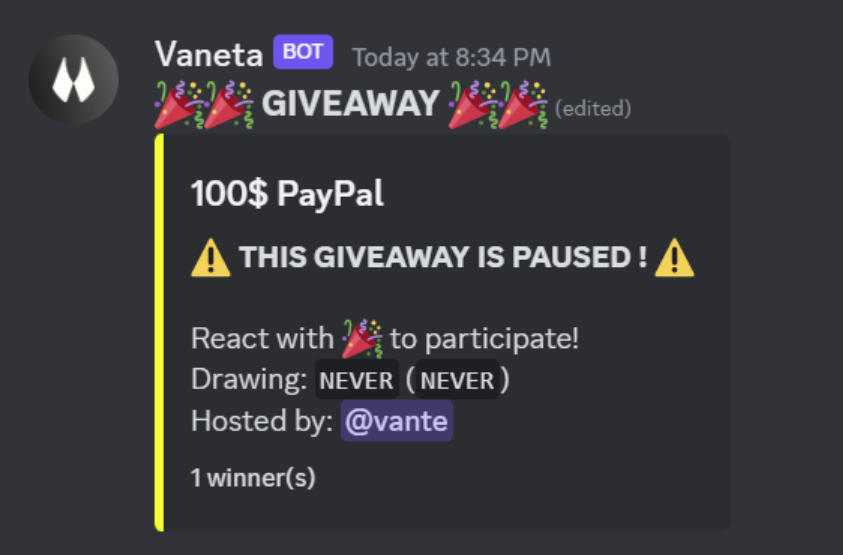
 ### Pause Options
```js
client.giveawaysManager.start(interaction.channel, {
duration: 60000,
winnerCount: 1,
prize: 'Discord Nitro!',
pauseOptions: {
isPaused: true,
content: '⚠️ **THIS GIVEAWAY IS PAUSED !** ⚠️',
unpauseAfter: null,
embedColor: '#FFFF00',
infiniteDurationText: '`NEVER`'
}
});
```
- **pauseOptions.isPaused**: if the giveaway is paused.
- **pauseOptions.content**: the text of the embed when the giveaway is paused.
^^^ You can [access giveaway properties](https://github.com/vante-dev/vante-giveaways#access-giveaway-properties-in-messages).
- **pauseOptions.unpauseAfter**: the number of milliseconds, or a timestamp in milliseconds, after which the giveaway will automatically unpause.
- **pauseOptions.embedColor**: the color of the embed when the giveaway is paused.
- **pauseOptions.infiniteDurationText**: The text that gets displayed next to `GiveawayMessages#drawing` in the paused embed, when there is no `unpauseAfter`.
^^^ You can [access giveaway properties](https://github.com/vante-dev/vante-giveaways#access-giveaway-properties-in-messages).
### Pause Options
```js
client.giveawaysManager.start(interaction.channel, {
duration: 60000,
winnerCount: 1,
prize: 'Discord Nitro!',
pauseOptions: {
isPaused: true,
content: '⚠️ **THIS GIVEAWAY IS PAUSED !** ⚠️',
unpauseAfter: null,
embedColor: '#FFFF00',
infiniteDurationText: '`NEVER`'
}
});
```
- **pauseOptions.isPaused**: if the giveaway is paused.
- **pauseOptions.content**: the text of the embed when the giveaway is paused.
^^^ You can [access giveaway properties](https://github.com/vante-dev/vante-giveaways#access-giveaway-properties-in-messages).
- **pauseOptions.unpauseAfter**: the number of milliseconds, or a timestamp in milliseconds, after which the giveaway will automatically unpause.
- **pauseOptions.embedColor**: the color of the embed when the giveaway is paused.
- **pauseOptions.infiniteDurationText**: The text that gets displayed next to `GiveawayMessages#drawing` in the paused embed, when there is no `unpauseAfter`.
^^^ You can [access giveaway properties](https://github.com/vante-dev/vante-giveaways#access-giveaway-properties-in-messages).
 ### Bonus Entries
```js
client.giveawaysManager.start(interaction.channel, {
duration: 60000,
winnerCount: 1,
prize: 'Free Steam Key',
bonusEntries: [
{
// Members who have the "Nitro Boost" role get 2 bonus entries
bonus: (member, giveaway) => (member.roles.cache.some((r) => r.name === 'Nitro Boost') ? 2 : null),
cumulative: false
}
]
});
```
- **bonusEntries[].bonus**: the filter function that takes two parameters: "member" and "giveaway", and returns the amount of additional entries.
- **bonusEntries[].cumulative**: if the amount of entries from the function can get summed with other amounts of entries.
**Note (only for proficients)**: if you want to use values of global variables inside of the function without using `giveaway.extraData`, you can use the [Function](https://developer.mozilla.org/en-US/docs/Web/JavaScript/Reference/Global_Objects/Function) constructor.
Look at the [exemptMembers](https://github.com/vante-dev/vante-giveaways#exempt-members) section for more information on that.
### Message Options
Options are available for the following messages:
`GiveawayStartOptions#GiveawayMessages#winMessage`, `GiveawayRerollOptions#messages#congrat`, `GiveawayRerollOptions#messages#error` and `client.giveawaysManager.end(messageId, noWinnerMessage)`.
You can [access giveaway properties](https://github.com/vante-dev/vante-giveaways#access-giveaway-properties-in-messages) in all embed or component properties that are a string.
The format, including all currently available options, looks like this:
```js
message: {
content: '',
embed: new Discord.EmbedBuilder(),
components: [new Discord.ActionRowBuilder()],
replyToGiveaway: true
}
```
⚠ **Note**: When sending a component, `content` or `embed` is required.
### Access giveaway properties in messages
You can access any giveaway property inside of giveaway messages with the format: `{this.}`.
For example:
```js
winMessage: 'Congratulations, {winners}! You won **{this.prize}**!\n{this.messageURL}'
```
Also, you can write JavaScript code inside of `{}`.
For example:
```js
winMessage: 'Congratulations, {winners}! You won **{this.prize.toUpperCase()}**!\n{this.messageURL}'
```
If you want to fill in strings that are not messages of a giveaway, or just custom embeds, then you can use `giveaway.fillInString(string)` for strings, `giveaway.fillInEmbed(embed)` for embeds
## 🌐 Translation
You can also pass a `messages` parameter for the `start()` function, if you want to translate the giveaway texts:
- **options.messages.giveaway**: the message that will be displayed above the embeds.
- **options.messages.giveawayEnded**: the message that will be displayed above the embeds when the giveaway is ended.
- **options.messages.giveawayEndedButton**: Displayed under the giveaway ended message when the giveaway has ended.
- **options.messages.title**: the title of the giveaway embed. Will default to the prize of the giveaway if the value is not a string.
- **options.messages.drawing**: the message that displays the drawing timestamp.
- **options.messages.dropMessage**: the message that will be displayed for drop giveaways.
- **options.messages.inviteToParticipate**: the message that invites users to participate.
- **options.messages.winMessage**: the message that will be displayed to congratulate the winner(s) when the giveaway is ended.
^^^ [Message options](https://github.com/Androz2091/discord-giveaways#message-options) are available in this message.
- **options.messages.embedFooter**: the message displayed at the bottom of the main (not ended) embed.
^^^ An empty string can be used for "deactivation", or [`iconURL` can be set](https://discord-giveaways.js.org/global.html#EmbedFooterObject).
- **options.messages.noWinner**: the message that is displayed if no winner can be drawn.
- **options.messages.hostedBy**: the message to display the host of the giveaway.
- **options.messages.winners**: simply the expression "Winner(s):" in your language.
- **options.messages.endedAt**: simply the words "Ended at" in your language.
- **options.messages.participants**: the message that displays the last participants that joined last and total participans
For example:
```js
const duration = interaction.options.getString('duration');
const winnerCount = interaction.options.getInteger('winners');
const prize = interaction.options.getString('prize');
client.giveawaysManager.start(interaction.channel, {
duration: ms(duration),
winnerCount,
prize,
messages: {
giveaway: '🎉🎉 **GIVEAWAY** 🎉🎉',
giveawayEnded: '🎉🎉 **GIVEAWAY ENDED** 🎉🎉',
giveawayEndedButton: 'Go to the giveaway',
title: '{this.prize}',
inviteToParticipate: 'React with 🎉 to participate!',
winMessage: 'Congratulations, {winners}! You won **{this.prize}**!',
drawing: 'Drawing: {timestamp-relative} ({timestamp-default})',
dropMessage: 'Be the first to react with 🎉 !',
embedFooter: '{this.winnerCount} winner(s)',
noWinner: 'Giveaway cancelled, no valid participations.',
winners: 'Winner(s):',
endedAt: 'Ended at',
hostedBy: 'Hosted by: {this.hostedBy}',
participants: 'Number of Participants: {participants}\nLatest Joined Member {member}',
}
});
```
You can [access giveaway properties](https://github.com/vante-dev/vante-giveaways#access-giveaway-properties-in-messages) in all these messages.
And for the `reroll()` function:
```js
client.giveawaysManager.reroll(messageId, {
messages: {
congrat: ':tada: New winner(s): {winners}! Congratulations, you won **{this.prize}**!',
error: 'No valid participations, no new winner(s) can be chosen!'
}
});
```
- **options.messages.congrat**: the congratulatory message.
- **options.messages.error**: the error message if there is no valid participant.
You can [access giveaway properties](https://github.com/vante-dev/vante-giveaways#access-giveaway-properties-in-messages) in these messages.
[Message options](https://github.com/vante-dev/vante-giveaways#message-options) are available in these messages.
## Custom Database
You can use your custom database to save giveaways, instead of the json files (the "database" by default for `vante-giveaways`).
For this, you will need to extend the `GiveawaysManager` class, and replace some methods with your custom ones.
There are 4 methods you will need to replace:
- `getAllGiveaways`: this method returns an array of stored giveaways.
- `saveGiveaway`: this method stores a new giveaway in the database.
- `editGiveaway`: this method edits a giveaway already stored in the database.
- `deleteGiveaway`: this method deletes a giveaway from the database (permanently).
**⚠️ All the methods should be asynchronous to return a promise!**
**SQL examples**
- [MySQL](https://github.com/vante-dev/vante-giveaways/blob/main/examples/custom-databases/mysql.js)
- SQLite
- [Quick.db](https://github.com/vante-dev/vante-giveaways/blob/main/examples/custom-databases//quick.db.js)
- [Enmap](https://github.com/vante-dev/vante-giveaways/blob/main/examples/custom-databases/enmap.js)
**NoSQL examples**
- MongoDB
- [Mongoose](https://github.com/vante-dev/vante-giveaways/blob/main/examples/custom-databases/mongoose.js)
- [QuickMongo](https://github.com/vante-dev/vante-giveaways/blob/main/examples/custom-databases/quickmongo.js) ⚠️ Not recommended for high giveaway usage, use the `mongoose` example instead
- [Apache CouchDB - Nano](https://github.com/vante-dev/vante-giveaways/blob/main/examples/custom-databases/nano.js)
- Replit Database ⚠️ Only usable if your bot is hosted on [Replit](https://replit.com/)
- [@replit/database](https://github.com/vante-dev/vante-giveaways/blob/main/examples/custom-databases/replit.js)
- [Quick.Replit](https://github.com/vante-dev/vante-giveaways/blob/main/examples/custom-databases/quick.replit.js)
## 🤝 Contribution Acknowledgments 🤝
Appreciation to [@Androzz](https://github.com/Androz2091) for granting me the opportunity to upgrade the [giveaways package](https://github.com/Androz2091/discord-giveaways).
Thanks to [@Mehmet](https://github.com/memte) for providing the excellent Bot Template.
### Bonus Entries
```js
client.giveawaysManager.start(interaction.channel, {
duration: 60000,
winnerCount: 1,
prize: 'Free Steam Key',
bonusEntries: [
{
// Members who have the "Nitro Boost" role get 2 bonus entries
bonus: (member, giveaway) => (member.roles.cache.some((r) => r.name === 'Nitro Boost') ? 2 : null),
cumulative: false
}
]
});
```
- **bonusEntries[].bonus**: the filter function that takes two parameters: "member" and "giveaway", and returns the amount of additional entries.
- **bonusEntries[].cumulative**: if the amount of entries from the function can get summed with other amounts of entries.
**Note (only for proficients)**: if you want to use values of global variables inside of the function without using `giveaway.extraData`, you can use the [Function](https://developer.mozilla.org/en-US/docs/Web/JavaScript/Reference/Global_Objects/Function) constructor.
Look at the [exemptMembers](https://github.com/vante-dev/vante-giveaways#exempt-members) section for more information on that.
### Message Options
Options are available for the following messages:
`GiveawayStartOptions#GiveawayMessages#winMessage`, `GiveawayRerollOptions#messages#congrat`, `GiveawayRerollOptions#messages#error` and `client.giveawaysManager.end(messageId, noWinnerMessage)`.
You can [access giveaway properties](https://github.com/vante-dev/vante-giveaways#access-giveaway-properties-in-messages) in all embed or component properties that are a string.
The format, including all currently available options, looks like this:
```js
message: {
content: '',
embed: new Discord.EmbedBuilder(),
components: [new Discord.ActionRowBuilder()],
replyToGiveaway: true
}
```
⚠ **Note**: When sending a component, `content` or `embed` is required.
### Access giveaway properties in messages
You can access any giveaway property inside of giveaway messages with the format: `{this.}`.
For example:
```js
winMessage: 'Congratulations, {winners}! You won **{this.prize}**!\n{this.messageURL}'
```
Also, you can write JavaScript code inside of `{}`.
For example:
```js
winMessage: 'Congratulations, {winners}! You won **{this.prize.toUpperCase()}**!\n{this.messageURL}'
```
If you want to fill in strings that are not messages of a giveaway, or just custom embeds, then you can use `giveaway.fillInString(string)` for strings, `giveaway.fillInEmbed(embed)` for embeds
## 🌐 Translation
You can also pass a `messages` parameter for the `start()` function, if you want to translate the giveaway texts:
- **options.messages.giveaway**: the message that will be displayed above the embeds.
- **options.messages.giveawayEnded**: the message that will be displayed above the embeds when the giveaway is ended.
- **options.messages.giveawayEndedButton**: Displayed under the giveaway ended message when the giveaway has ended.
- **options.messages.title**: the title of the giveaway embed. Will default to the prize of the giveaway if the value is not a string.
- **options.messages.drawing**: the message that displays the drawing timestamp.
- **options.messages.dropMessage**: the message that will be displayed for drop giveaways.
- **options.messages.inviteToParticipate**: the message that invites users to participate.
- **options.messages.winMessage**: the message that will be displayed to congratulate the winner(s) when the giveaway is ended.
^^^ [Message options](https://github.com/Androz2091/discord-giveaways#message-options) are available in this message.
- **options.messages.embedFooter**: the message displayed at the bottom of the main (not ended) embed.
^^^ An empty string can be used for "deactivation", or [`iconURL` can be set](https://discord-giveaways.js.org/global.html#EmbedFooterObject).
- **options.messages.noWinner**: the message that is displayed if no winner can be drawn.
- **options.messages.hostedBy**: the message to display the host of the giveaway.
- **options.messages.winners**: simply the expression "Winner(s):" in your language.
- **options.messages.endedAt**: simply the words "Ended at" in your language.
- **options.messages.participants**: the message that displays the last participants that joined last and total participans
For example:
```js
const duration = interaction.options.getString('duration');
const winnerCount = interaction.options.getInteger('winners');
const prize = interaction.options.getString('prize');
client.giveawaysManager.start(interaction.channel, {
duration: ms(duration),
winnerCount,
prize,
messages: {
giveaway: '🎉🎉 **GIVEAWAY** 🎉🎉',
giveawayEnded: '🎉🎉 **GIVEAWAY ENDED** 🎉🎉',
giveawayEndedButton: 'Go to the giveaway',
title: '{this.prize}',
inviteToParticipate: 'React with 🎉 to participate!',
winMessage: 'Congratulations, {winners}! You won **{this.prize}**!',
drawing: 'Drawing: {timestamp-relative} ({timestamp-default})',
dropMessage: 'Be the first to react with 🎉 !',
embedFooter: '{this.winnerCount} winner(s)',
noWinner: 'Giveaway cancelled, no valid participations.',
winners: 'Winner(s):',
endedAt: 'Ended at',
hostedBy: 'Hosted by: {this.hostedBy}',
participants: 'Number of Participants: {participants}\nLatest Joined Member {member}',
}
});
```
You can [access giveaway properties](https://github.com/vante-dev/vante-giveaways#access-giveaway-properties-in-messages) in all these messages.
And for the `reroll()` function:
```js
client.giveawaysManager.reroll(messageId, {
messages: {
congrat: ':tada: New winner(s): {winners}! Congratulations, you won **{this.prize}**!',
error: 'No valid participations, no new winner(s) can be chosen!'
}
});
```
- **options.messages.congrat**: the congratulatory message.
- **options.messages.error**: the error message if there is no valid participant.
You can [access giveaway properties](https://github.com/vante-dev/vante-giveaways#access-giveaway-properties-in-messages) in these messages.
[Message options](https://github.com/vante-dev/vante-giveaways#message-options) are available in these messages.
## Custom Database
You can use your custom database to save giveaways, instead of the json files (the "database" by default for `vante-giveaways`).
For this, you will need to extend the `GiveawaysManager` class, and replace some methods with your custom ones.
There are 4 methods you will need to replace:
- `getAllGiveaways`: this method returns an array of stored giveaways.
- `saveGiveaway`: this method stores a new giveaway in the database.
- `editGiveaway`: this method edits a giveaway already stored in the database.
- `deleteGiveaway`: this method deletes a giveaway from the database (permanently).
**⚠️ All the methods should be asynchronous to return a promise!**
**SQL examples**
- [MySQL](https://github.com/vante-dev/vante-giveaways/blob/main/examples/custom-databases/mysql.js)
- SQLite
- [Quick.db](https://github.com/vante-dev/vante-giveaways/blob/main/examples/custom-databases//quick.db.js)
- [Enmap](https://github.com/vante-dev/vante-giveaways/blob/main/examples/custom-databases/enmap.js)
**NoSQL examples**
- MongoDB
- [Mongoose](https://github.com/vante-dev/vante-giveaways/blob/main/examples/custom-databases/mongoose.js)
- [QuickMongo](https://github.com/vante-dev/vante-giveaways/blob/main/examples/custom-databases/quickmongo.js) ⚠️ Not recommended for high giveaway usage, use the `mongoose` example instead
- [Apache CouchDB - Nano](https://github.com/vante-dev/vante-giveaways/blob/main/examples/custom-databases/nano.js)
- Replit Database ⚠️ Only usable if your bot is hosted on [Replit](https://replit.com/)
- [@replit/database](https://github.com/vante-dev/vante-giveaways/blob/main/examples/custom-databases/replit.js)
- [Quick.Replit](https://github.com/vante-dev/vante-giveaways/blob/main/examples/custom-databases/quick.replit.js)
## 🤝 Contribution Acknowledgments 🤝
Appreciation to [@Androzz](https://github.com/Androz2091) for granting me the opportunity to upgrade the [giveaways package](https://github.com/Androz2091/discord-giveaways).
Thanks to [@Mehmet](https://github.com/memte) for providing the excellent Bot Template.


 ### Edit a giveaway
```js
client.on('interactionCreate', (interaction) => {
if (interaction.isChatInputCommand() && interaction.commandName === 'edit') {
const messageId = interaction.options.getString('message_id');
client.giveawaysManager
.edit(messageId, {
addTime: 5000,
newWinnerCount: 3,
newPrize: 'New Prize!'
})
.then(() => {
interaction.reply('Success! Giveaway updated!');
})
.catch((err) => {
interaction.reply(`An error has occurred, please check and try again.\n\`${err}\``);
});
}
});
```
- **options.newWinnerCount**: the new number of winners.
- **options.newPrize**: the new prize. You can [access giveaway properties](https://github.com/vante-dev/vante-giveaways#access-giveaway-properties-in-messages).
- **options.addTime**: the number of milliseconds to add to the giveaway duration.
- **options.setEndTimestamp**: the timestamp of the new end date (for example, for the giveaway to be ended in 1 hour, set it to `Date.now() + 60000`).
- **[and many other optional parameters - read documentation](https://giveaways.vante.dev/global.html#GiveawayEditOptions)**
**Note**: to reduce giveaway duration, define `addTime` with a negative number! For example `addTime: -5000` will reduce giveaway duration by 5 seconds!
### Delete a giveaway
```js
client.on('interactionCreate', (interaction) => {
if (interaction.isChatInputCommand() && interaction.commandName === 'delete') {
const messageId = interaction.options.getString('message_id');
client.giveawaysManager
.delete(messageId)
.then(() => {
interaction.reply('Success! Giveaway deleted!');
})
.catch((err) => {
interaction.reply(`An error has occurred, please check and try again.\n\`${err}\``);
});
}
});
```
- **doNotDeleteMessage**: whether the giveaway message shouldn't be deleted.
⚠️ **Note**: when you use the delete function, the giveaway data and the message of the giveaway are deleted (by default). You cannot restore a giveaway once you have deleted it!
### End a giveaway
```js
client.on('interactionCreate', (interaction) => {
if (interaction.isChatInputCommand() && interaction.commandName === 'end') {
const messageId = interaction.options.getString('message_id');
client.giveawaysManager
.end(messageId)
.then(() => {
interaction.reply('Success! Giveaway ended!');
})
.catch((err) => {
interaction.reply(`An error has occurred, please check and try again.\n\`${err}\``);
});
}
});
```
- **noWinnerMessage**: Sent in the channel if there is no valid winner for the giveaway. [Message Options](https://github.com/vante-dev/vante-giveaways#message-options)
### Pause a giveaway
```js
client.on('interactionCreate', (interaction) => {
if (interaction.isChatInputCommand() && interaction.commandName === 'pause') {
const messageId = interaction.options.getString('message_id');
client.giveawaysManager
.pause(messageId)
.then(() => {
interaction.reply('Success! Giveaway paused!');
})
.catch((err) => {
interaction.reply(`An error has occurred, please check and try again.\n\`${err}\``);
});
}
});
```
- **options.content**: the text of the embed when the giveaway is paused. You can [access giveaway properties](https://github.com/vante-dev/vante-giveaways#access-giveaway-properties-in-messages).
- **options.unpauseAfter**: the number of milliseconds, or a timestamp in milliseconds, after which the giveaway will automatically unpause.
- **options.embedColor**: the color of the embed when the giveaway is paused.
- **options.infiniteDurationText**: The text that gets displayed next to `GiveawayMessages#drawing` in the paused embed, when there is no `unpauseAfter`.
^^^ You can [access giveaway properties](https://github.com/vante-dev/vante-giveaways#access-giveaway-properties-in-messages).
⚠️ **Note**: the pause function overwrites/edits the [pauseOptions object property](https://github.com/vante-dev/vante-giveaways#pause-options) of a giveaway!
### Unpause a giveaway
```js
client.on('interactionCreate', (interaction) => {
if (interaction.isChatInputCommand() && interaction.commandName === 'unpause') {
const messageId = interaction.options.getString('message_id');
client.giveawaysManager
.unpause(messageId)
.then(() => {
interaction.reply('Success! Giveaway unpaused!');
})
.catch((err) => {
interaction.reply(`An error has occurred, please check and try again.\n\`${err}\``);
});
}
});
```
### Fetch giveaways
```js
// A list of all the giveaways
const allGiveaways = client.giveawaysManager.giveaways; // [ {Giveaway}, {Giveaway} ]
// A list of all the giveaways on the server with Id "1909282092"
const onServer = client.giveawaysManager.giveaways.filter((g) => g.guildId === '1909282092');
// A list of the current active giveaways (not ended)
const notEnded = client.giveawaysManager.giveaways.filter((g) => !g.ended);
```
### Exempt Members
Function to filter members. If true is returned, the member will not be able to win the giveaway.
```js
client.giveawaysManager.start(interaction.channel, {
duration: 60000,
winnerCount: 1,
prize: 'Free Steam Key',
// Only members who have the "Nitro Boost" role are able to win
exemptMembers: (member, giveaway) => !member.roles.cache.some((r) => r.name === 'Nitro Boost')
});
```
**Note (only for proficients)**: if you want to use values of global variables inside of the function without using `giveaway.extraData`, you can use the [Function](https://developer.mozilla.org/en-US/docs/Web/JavaScript/Reference/Global_Objects/Function) constructor:
```js
const roleName = 'Nitro Boost';
client.giveawaysManager.start(interaction.channel, {
duration: 60000,
winnerCount: 1,
prize: 'Free Steam Key',
// Only members who have the the role which is assigned to "roleName" are able to win
exemptMembers: new Function(
'member',
'giveaway',
`return !member.roles.cache.some((r) => r.name === '${roleName}')`
)
});
```
**⚠ Note**
- You can use `this`, instead of the `giveaway` parameter, inside of the function string to access anything of the giveaway instance.
For example: `this.extraData`, or `this.client`.
- Strings have to be "stringified" (wrapped in quotation marks) again like you can see in the example.
Array brackets also have to be stated again.
- Global variables which contain numbers with more than 16 digits cannot be used.
=> Snoflakes have to be "stringified" correctly to avoid misbehaviour.
- If you want to make an asynchronous function in this format, refer to [this](https://developer.mozilla.org/en-US/docs/Web/JavaScript/Reference/Global_Objects/AsyncFunction) article.
- **Because of those various complications it is therefore highly suggested to use `giveaway.extraData` for storing variables.**
But if you really want to do it in this way and need more information/help, please visit the [Discord Server](https://discord.gg/luppux).
### Last Chance
```js
client.giveawaysManager.start(interaction.channel, {
duration: 60000,
winnerCount: 1,
prize: 'Discord Nitro!',
lastChance: {
enabled: true,
content: '⚠️ **LAST CHANCE TO ENTER !** ⚠️',
threshold: 10_000,
embedColor: '#FF0000'
}
});
```
- **lastChance.enabled**: if the last chance system is enabled.
- **lastChance.content**: the text of the embed when the last chance system is enabled.
^^^ You can [access giveaway properties](https://github.com/vante-dev/vante-giveaways#access-giveaway-properties-in-messages).
- **lastChance.threshold**: the number of milliseconds before the giveaway ends when the last chance system will be enabled.
- **lastChance.embedColor**: the color of the embed when last chance is enabled.
### Edit a giveaway
```js
client.on('interactionCreate', (interaction) => {
if (interaction.isChatInputCommand() && interaction.commandName === 'edit') {
const messageId = interaction.options.getString('message_id');
client.giveawaysManager
.edit(messageId, {
addTime: 5000,
newWinnerCount: 3,
newPrize: 'New Prize!'
})
.then(() => {
interaction.reply('Success! Giveaway updated!');
})
.catch((err) => {
interaction.reply(`An error has occurred, please check and try again.\n\`${err}\``);
});
}
});
```
- **options.newWinnerCount**: the new number of winners.
- **options.newPrize**: the new prize. You can [access giveaway properties](https://github.com/vante-dev/vante-giveaways#access-giveaway-properties-in-messages).
- **options.addTime**: the number of milliseconds to add to the giveaway duration.
- **options.setEndTimestamp**: the timestamp of the new end date (for example, for the giveaway to be ended in 1 hour, set it to `Date.now() + 60000`).
- **[and many other optional parameters - read documentation](https://giveaways.vante.dev/global.html#GiveawayEditOptions)**
**Note**: to reduce giveaway duration, define `addTime` with a negative number! For example `addTime: -5000` will reduce giveaway duration by 5 seconds!
### Delete a giveaway
```js
client.on('interactionCreate', (interaction) => {
if (interaction.isChatInputCommand() && interaction.commandName === 'delete') {
const messageId = interaction.options.getString('message_id');
client.giveawaysManager
.delete(messageId)
.then(() => {
interaction.reply('Success! Giveaway deleted!');
})
.catch((err) => {
interaction.reply(`An error has occurred, please check and try again.\n\`${err}\``);
});
}
});
```
- **doNotDeleteMessage**: whether the giveaway message shouldn't be deleted.
⚠️ **Note**: when you use the delete function, the giveaway data and the message of the giveaway are deleted (by default). You cannot restore a giveaway once you have deleted it!
### End a giveaway
```js
client.on('interactionCreate', (interaction) => {
if (interaction.isChatInputCommand() && interaction.commandName === 'end') {
const messageId = interaction.options.getString('message_id');
client.giveawaysManager
.end(messageId)
.then(() => {
interaction.reply('Success! Giveaway ended!');
})
.catch((err) => {
interaction.reply(`An error has occurred, please check and try again.\n\`${err}\``);
});
}
});
```
- **noWinnerMessage**: Sent in the channel if there is no valid winner for the giveaway. [Message Options](https://github.com/vante-dev/vante-giveaways#message-options)
### Pause a giveaway
```js
client.on('interactionCreate', (interaction) => {
if (interaction.isChatInputCommand() && interaction.commandName === 'pause') {
const messageId = interaction.options.getString('message_id');
client.giveawaysManager
.pause(messageId)
.then(() => {
interaction.reply('Success! Giveaway paused!');
})
.catch((err) => {
interaction.reply(`An error has occurred, please check and try again.\n\`${err}\``);
});
}
});
```
- **options.content**: the text of the embed when the giveaway is paused. You can [access giveaway properties](https://github.com/vante-dev/vante-giveaways#access-giveaway-properties-in-messages).
- **options.unpauseAfter**: the number of milliseconds, or a timestamp in milliseconds, after which the giveaway will automatically unpause.
- **options.embedColor**: the color of the embed when the giveaway is paused.
- **options.infiniteDurationText**: The text that gets displayed next to `GiveawayMessages#drawing` in the paused embed, when there is no `unpauseAfter`.
^^^ You can [access giveaway properties](https://github.com/vante-dev/vante-giveaways#access-giveaway-properties-in-messages).
⚠️ **Note**: the pause function overwrites/edits the [pauseOptions object property](https://github.com/vante-dev/vante-giveaways#pause-options) of a giveaway!
### Unpause a giveaway
```js
client.on('interactionCreate', (interaction) => {
if (interaction.isChatInputCommand() && interaction.commandName === 'unpause') {
const messageId = interaction.options.getString('message_id');
client.giveawaysManager
.unpause(messageId)
.then(() => {
interaction.reply('Success! Giveaway unpaused!');
})
.catch((err) => {
interaction.reply(`An error has occurred, please check and try again.\n\`${err}\``);
});
}
});
```
### Fetch giveaways
```js
// A list of all the giveaways
const allGiveaways = client.giveawaysManager.giveaways; // [ {Giveaway}, {Giveaway} ]
// A list of all the giveaways on the server with Id "1909282092"
const onServer = client.giveawaysManager.giveaways.filter((g) => g.guildId === '1909282092');
// A list of the current active giveaways (not ended)
const notEnded = client.giveawaysManager.giveaways.filter((g) => !g.ended);
```
### Exempt Members
Function to filter members. If true is returned, the member will not be able to win the giveaway.
```js
client.giveawaysManager.start(interaction.channel, {
duration: 60000,
winnerCount: 1,
prize: 'Free Steam Key',
// Only members who have the "Nitro Boost" role are able to win
exemptMembers: (member, giveaway) => !member.roles.cache.some((r) => r.name === 'Nitro Boost')
});
```
**Note (only for proficients)**: if you want to use values of global variables inside of the function without using `giveaway.extraData`, you can use the [Function](https://developer.mozilla.org/en-US/docs/Web/JavaScript/Reference/Global_Objects/Function) constructor:
```js
const roleName = 'Nitro Boost';
client.giveawaysManager.start(interaction.channel, {
duration: 60000,
winnerCount: 1,
prize: 'Free Steam Key',
// Only members who have the the role which is assigned to "roleName" are able to win
exemptMembers: new Function(
'member',
'giveaway',
`return !member.roles.cache.some((r) => r.name === '${roleName}')`
)
});
```
**⚠ Note**
- You can use `this`, instead of the `giveaway` parameter, inside of the function string to access anything of the giveaway instance.
For example: `this.extraData`, or `this.client`.
- Strings have to be "stringified" (wrapped in quotation marks) again like you can see in the example.
Array brackets also have to be stated again.
- Global variables which contain numbers with more than 16 digits cannot be used.
=> Snoflakes have to be "stringified" correctly to avoid misbehaviour.
- If you want to make an asynchronous function in this format, refer to [this](https://developer.mozilla.org/en-US/docs/Web/JavaScript/Reference/Global_Objects/AsyncFunction) article.
- **Because of those various complications it is therefore highly suggested to use `giveaway.extraData` for storing variables.**
But if you really want to do it in this way and need more information/help, please visit the [Discord Server](https://discord.gg/luppux).
### Last Chance
```js
client.giveawaysManager.start(interaction.channel, {
duration: 60000,
winnerCount: 1,
prize: 'Discord Nitro!',
lastChance: {
enabled: true,
content: '⚠️ **LAST CHANCE TO ENTER !** ⚠️',
threshold: 10_000,
embedColor: '#FF0000'
}
});
```
- **lastChance.enabled**: if the last chance system is enabled.
- **lastChance.content**: the text of the embed when the last chance system is enabled.
^^^ You can [access giveaway properties](https://github.com/vante-dev/vante-giveaways#access-giveaway-properties-in-messages).
- **lastChance.threshold**: the number of milliseconds before the giveaway ends when the last chance system will be enabled.
- **lastChance.embedColor**: the color of the embed when last chance is enabled.
 ### Pause Options
```js
client.giveawaysManager.start(interaction.channel, {
duration: 60000,
winnerCount: 1,
prize: 'Discord Nitro!',
pauseOptions: {
isPaused: true,
content: '⚠️ **THIS GIVEAWAY IS PAUSED !** ⚠️',
unpauseAfter: null,
embedColor: '#FFFF00',
infiniteDurationText: '`NEVER`'
}
});
```
- **pauseOptions.isPaused**: if the giveaway is paused.
- **pauseOptions.content**: the text of the embed when the giveaway is paused.
^^^ You can [access giveaway properties](https://github.com/vante-dev/vante-giveaways#access-giveaway-properties-in-messages).
- **pauseOptions.unpauseAfter**: the number of milliseconds, or a timestamp in milliseconds, after which the giveaway will automatically unpause.
- **pauseOptions.embedColor**: the color of the embed when the giveaway is paused.
- **pauseOptions.infiniteDurationText**: The text that gets displayed next to `GiveawayMessages#drawing` in the paused embed, when there is no `unpauseAfter`.
^^^ You can [access giveaway properties](https://github.com/vante-dev/vante-giveaways#access-giveaway-properties-in-messages).
### Pause Options
```js
client.giveawaysManager.start(interaction.channel, {
duration: 60000,
winnerCount: 1,
prize: 'Discord Nitro!',
pauseOptions: {
isPaused: true,
content: '⚠️ **THIS GIVEAWAY IS PAUSED !** ⚠️',
unpauseAfter: null,
embedColor: '#FFFF00',
infiniteDurationText: '`NEVER`'
}
});
```
- **pauseOptions.isPaused**: if the giveaway is paused.
- **pauseOptions.content**: the text of the embed when the giveaway is paused.
^^^ You can [access giveaway properties](https://github.com/vante-dev/vante-giveaways#access-giveaway-properties-in-messages).
- **pauseOptions.unpauseAfter**: the number of milliseconds, or a timestamp in milliseconds, after which the giveaway will automatically unpause.
- **pauseOptions.embedColor**: the color of the embed when the giveaway is paused.
- **pauseOptions.infiniteDurationText**: The text that gets displayed next to `GiveawayMessages#drawing` in the paused embed, when there is no `unpauseAfter`.
^^^ You can [access giveaway properties](https://github.com/vante-dev/vante-giveaways#access-giveaway-properties-in-messages).
 ### Bonus Entries
```js
client.giveawaysManager.start(interaction.channel, {
duration: 60000,
winnerCount: 1,
prize: 'Free Steam Key',
bonusEntries: [
{
// Members who have the "Nitro Boost" role get 2 bonus entries
bonus: (member, giveaway) => (member.roles.cache.some((r) => r.name === 'Nitro Boost') ? 2 : null),
cumulative: false
}
]
});
```
- **bonusEntries[].bonus**: the filter function that takes two parameters: "member" and "giveaway", and returns the amount of additional entries.
- **bonusEntries[].cumulative**: if the amount of entries from the function can get summed with other amounts of entries.
**Note (only for proficients)**: if you want to use values of global variables inside of the function without using `giveaway.extraData`, you can use the [Function](https://developer.mozilla.org/en-US/docs/Web/JavaScript/Reference/Global_Objects/Function) constructor.
Look at the [exemptMembers](https://github.com/vante-dev/vante-giveaways#exempt-members) section for more information on that.
### Message Options
Options are available for the following messages:
`GiveawayStartOptions#GiveawayMessages#winMessage`, `GiveawayRerollOptions#messages#congrat`, `GiveawayRerollOptions#messages#error` and `client.giveawaysManager.end(messageId, noWinnerMessage)`.
You can [access giveaway properties](https://github.com/vante-dev/vante-giveaways#access-giveaway-properties-in-messages) in all embed or component properties that are a string.
The format, including all currently available options, looks like this:
```js
message: {
content: '',
embed: new Discord.EmbedBuilder(),
components: [new Discord.ActionRowBuilder()],
replyToGiveaway: true
}
```
⚠ **Note**: When sending a component, `content` or `embed` is required.
### Access giveaway properties in messages
You can access any giveaway property inside of giveaway messages with the format: `{this.
### Bonus Entries
```js
client.giveawaysManager.start(interaction.channel, {
duration: 60000,
winnerCount: 1,
prize: 'Free Steam Key',
bonusEntries: [
{
// Members who have the "Nitro Boost" role get 2 bonus entries
bonus: (member, giveaway) => (member.roles.cache.some((r) => r.name === 'Nitro Boost') ? 2 : null),
cumulative: false
}
]
});
```
- **bonusEntries[].bonus**: the filter function that takes two parameters: "member" and "giveaway", and returns the amount of additional entries.
- **bonusEntries[].cumulative**: if the amount of entries from the function can get summed with other amounts of entries.
**Note (only for proficients)**: if you want to use values of global variables inside of the function without using `giveaway.extraData`, you can use the [Function](https://developer.mozilla.org/en-US/docs/Web/JavaScript/Reference/Global_Objects/Function) constructor.
Look at the [exemptMembers](https://github.com/vante-dev/vante-giveaways#exempt-members) section for more information on that.
### Message Options
Options are available for the following messages:
`GiveawayStartOptions#GiveawayMessages#winMessage`, `GiveawayRerollOptions#messages#congrat`, `GiveawayRerollOptions#messages#error` and `client.giveawaysManager.end(messageId, noWinnerMessage)`.
You can [access giveaway properties](https://github.com/vante-dev/vante-giveaways#access-giveaway-properties-in-messages) in all embed or component properties that are a string.
The format, including all currently available options, looks like this:
```js
message: {
content: '',
embed: new Discord.EmbedBuilder(),
components: [new Discord.ActionRowBuilder()],
replyToGiveaway: true
}
```
⚠ **Note**: When sending a component, `content` or `embed` is required.
### Access giveaway properties in messages
You can access any giveaway property inside of giveaway messages with the format: `{this.