# versioneye-slack
Report VersionEye's information to Slack
[](https://www.npmjs.com/package/versioneye-slack)
[](https://www.npmjs.com/package/versioneye-slack)

[](https://travis-ci.org/miyajan/versioneye-slack)
[](https://www.versioneye.com/user/projects/586ba4ab3ab1480036885a4b)
[](https://david-dm.org/miyajan/versioneye-slack)
[](https://coveralls.io/github/miyajan/versioneye-slack?branch=master)

## Description
You can post the following VersionEye's information to Slack.
* your project summary
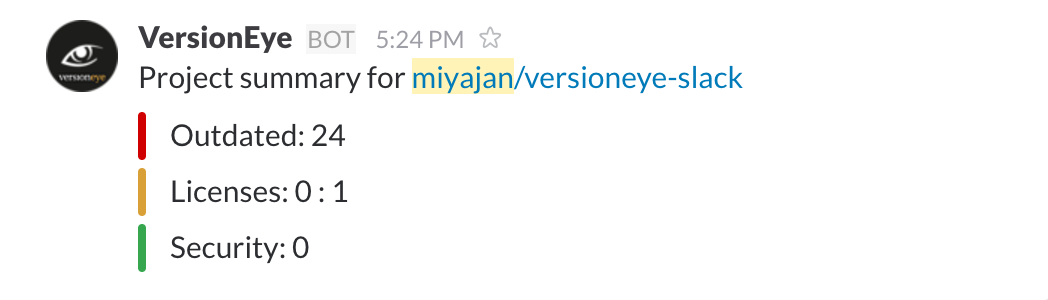 * your latest notifications
 You can use this tool from CLI or programmatically.
## Install
### CLI
```
$ npm install versioneye-slack -g
```
### programmatically
```
$ npm install versioneye-slack
```
## Usage
### CLI
```
$ versioneye-slack
```
#### Options
```
$ versioneye-slack -h
```
#### Environment Variables
You can path some options by environment variables. The command-line options are prior to environment variables.
* ```VERSIONEYE_API_KEY``` : equals to ```--versioneye-api-key```
* ```SLACK_WEBHOOK_URL``` : equals to ```--slack-webhook-url```
#### Sub-commands
##### project
Post a project summary to slack.
```
$ versioneye-slack project
# e.g.
$ versioneye-slack project miyajan/versioneye-slack
```
The organizations's API key in your organization's setting page ( ```https://www.versioneye.com/organisations//apikey``` ) is required.
###### ```-o``` or ```--org-name```
Specify organization name when you execute with a personal API key.
##### notifications
Post the latest notifications to slack.
```
$ versioneye-slack notifications
```
The personal API key in your setting page (https://www.versioneye.com/settings/api) is required.
### programmatically
You can use the same functions programmatically.
```javascript
const VersionEyeSlack = require('versioneye-slack');
const versioneyeApiKey = '';
const slackWebhookUrl = '';
const versioneyeSlack = new VersionEyeSlack(versioneyeApiKey, slackWebhookUrl);
versioneyeSlack.postProjectSummary('project name').then(response => {
console.log(response);
});
```
* ```postProjectSummary``` : equals to ```versioneye-slack project```
* ```postNotifications``` : equals to ```versioneye-slack notifications```
All methods will return Promise. The response string will be passed to ```then``` method when the request succeeds. The Error object with message string will be passed to ```catch``` method when the request fails.
## Contribution
1. Fork
2. Create a feature branch
3. Commit your changes
4. Rebase your local changes against the master branch
5. Run `npm test`
6. Create new Pull Request
## License
MIT
## Author
[miyajan](https://github.com/miyajan): Jumpei Miyata miyajan777@gmail.com
You can use this tool from CLI or programmatically.
## Install
### CLI
```
$ npm install versioneye-slack -g
```
### programmatically
```
$ npm install versioneye-slack
```
## Usage
### CLI
```
$ versioneye-slack
```
#### Options
```
$ versioneye-slack -h
```
#### Environment Variables
You can path some options by environment variables. The command-line options are prior to environment variables.
* ```VERSIONEYE_API_KEY``` : equals to ```--versioneye-api-key```
* ```SLACK_WEBHOOK_URL``` : equals to ```--slack-webhook-url```
#### Sub-commands
##### project
Post a project summary to slack.
```
$ versioneye-slack project
# e.g.
$ versioneye-slack project miyajan/versioneye-slack
```
The organizations's API key in your organization's setting page ( ```https://www.versioneye.com/organisations//apikey``` ) is required.
###### ```-o``` or ```--org-name```
Specify organization name when you execute with a personal API key.
##### notifications
Post the latest notifications to slack.
```
$ versioneye-slack notifications
```
The personal API key in your setting page (https://www.versioneye.com/settings/api) is required.
### programmatically
You can use the same functions programmatically.
```javascript
const VersionEyeSlack = require('versioneye-slack');
const versioneyeApiKey = '';
const slackWebhookUrl = '';
const versioneyeSlack = new VersionEyeSlack(versioneyeApiKey, slackWebhookUrl);
versioneyeSlack.postProjectSummary('project name').then(response => {
console.log(response);
});
```
* ```postProjectSummary``` : equals to ```versioneye-slack project```
* ```postNotifications``` : equals to ```versioneye-slack notifications```
All methods will return Promise. The response string will be passed to ```then``` method when the request succeeds. The Error object with message string will be passed to ```catch``` method when the request fails.
## Contribution
1. Fork
2. Create a feature branch
3. Commit your changes
4. Rebase your local changes against the master branch
5. Run `npm test`
6. Create new Pull Request
## License
MIT
## Author
[miyajan](https://github.com/miyajan): Jumpei Miyata miyajan777@gmail.com