# vh-check
get reliable CSS `vh` sizes for [1kb gzipped](https://bundlephobia.com/result?p=vh-check)
[](https://badge.fury.io/js/vh-check) [](https://travis-ci.org/Hiswe/vh-check)
- [the problem](#the-problem)
- [why not use viewport-units-buggyfill?](#why-not-use-viewport-units-buggyfill)
- [use](#use)
- [as a global variable](#as-a-global-variable)
- [as a commonJS module](#as-a-commonjs-module)
- [as a ES module module](#as-a-es-module-module)
- [how it works](#how-it-works)
- [returned object](#returned-object)
- [example](#example)
- [in your javascript](#in-your-javascript)
- [in your CSS](#in-your-css)
- [configuration](#configuration)
- [as a string](#as-a-string)
- [as an object](#as-an-object)
- [cssVarName](#cssvarname)
- [force](#force)
- [bind](#bind)
- [redefineVh](#redefinevh)
- [updateOnTouch](#updateontouch)
- [onUpdate](#onupdate)
- [about browser support](#about-browser-support)
- [demo](#demo)
- [github pages](#github-pages)
- [local](#local)
- [caveats](#caveats)
- [other stuff](#other-stuff)
- [changelog](#changelog)
- [migrating](#migrating)
- [run the tests](#run-the-tests)
- [thanks](#thanks)
- [related](#related)
## the problem
Browsers don't always compute the [vh unit](https://developer.mozilla.org/en-US/docs/Web/CSS/length#vh) the same way.
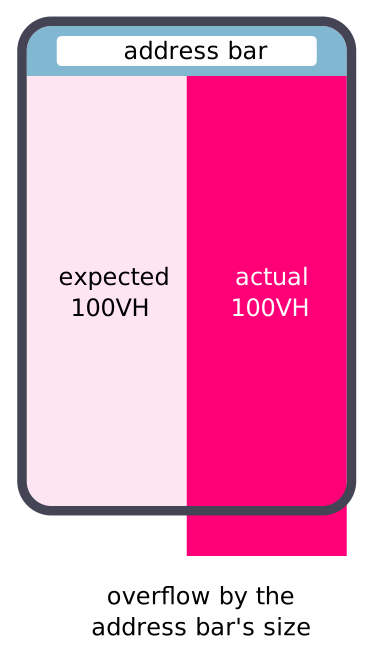
Some mobile browsers compute the `vh` CSS unit without taking care of the url bar.
That means that a `100vh` div will overflow the viewport by the size of the url bar.
This is the current behavior for:
- [Safari iOS](https://bugs.webkit.org/show_bug.cgi?id=141832)
- [Chrome android >= 56](https://developers.google.com/web/updates/2016/12/url-bar-resizing)
As explained in the chrome post, that make sense but make it hard to have a full [hero top block](https://line25.com/articles/30-web-designs-that-fully-embrace-the-hero-image).
This script will measure the difference and put it in a CSS var.
You can read more on this [css-trick article](https://css-tricks.com/the-trick-to-viewport-units-on-mobile/#article-header-id-0) by [Louis Hoebregts](https://css-tricks.com/author/louishoebregts/)
 ## why not use viewport-units-buggyfill?
It's doing a very good job:
https://github.com/rodneyrehm/viewport-units-buggyfill
But it has some problems with media-queries:
https://github.com/rodneyrehm/viewport-units-buggyfill/issues/13
## use
### as a global variable
```html
```
### as a commonJS module
```
npm install vh-check
```
```js
var check = require('vh-check')
var test = vhCheck() // return an object (see below)
```
### as a ES module module
```
npm install vh-check
```
```js
import vhCheck from 'vh-check'
const test = vhCheck()
```
### how it works
- It will update the `vh-check` CSS custom property if needed
- `vh-check` will be updated on `orientationchange` [event](https://developer.mozilla.org/en-US/docs/Web/Events/orientationchange)
- `vh-check` **will not** be updated on scroll event by default
### returned object
vh-check will return a full object:
```js
{
isNeeded: false,
// wether or not it's needed
value: 0,
// the CSS var value
vh: 480,
// a 100vh div size
windowHeight: 480,
// same value as window.innerHeight
offset: 0,
// difference between the above sizes
recompute: function computeDifference(),
// call this to programmatically get all the values and set the CSS var
// - this can be useful if you want to add your own listeners
// that will trigger a computation
unbind: function unbindVhCheckListeners(),
// call this to remove any window listeners created by vh-check
},
```
## example
### in your javascript
```js
vhCheck()
```
### in your CSS
```css
main {
height: 100vh;
/* If you need to support browser without CSS var support (<= IE11) */
height: calc(100vh - var(--vh-offset, 0px));
/* enable vh fix */
}
```
## configuration
### as a string
You can pass the CSS var name as a param to `vhCheck()` (default `vh-offset`)
```js
vhCheck('browser-address-bar')
```
In your CSS you will have to reference:
```css
main {
min-height: 100vh;
min-height: calc(100vh - var(--browser-address-bar, 0px));
}
```
### as an object
`vh-check` allows you to have more control by passing a configuration object.
```js
vhCheck({
cssVarName: 'vh-offset',
force: false,
bind: true,
redefineVh: false,
updateOnTouch: false,
onUpdate: function noop() {},
})
```
#### cssVarName
**type:** `string`
**default:** `'vh-offset'`
Change the CSS var name
#### force
**type:** `boolean`
**default:** `false`
Set the CSS var even if `100vh` computation is good
#### bind
**type:** `boolean`
**default:** `find`
Automatically bind to `orientationchange` event
#### redefineVh
**type:** `boolean`
**default:** `false`
Change the CSS var value.
Instead of being the total size of the gap, it will be 1% of the real window size.
You can find more explanation in this [CSS Trick article](https://css-tricks.com/the-trick-to-viewport-units-on-mobile/)
⚠️ **Important**
If you don't set a `cssVarName`, the CSS custom property will be named `vh` instead of `vh-offset`.
So your CSS should be:
```css
.my-element {
height: 100vh;
height: calc(var(--vh, 1vh) * 100);
}
```
#### updateOnTouch
**type:** `boolean`
**default:** `false`
Add an event listener on `touchmove` to recompute the sizes
⚠️ **Important**
- This can impact your website performances as changing sizes will make your browser [reflow](https://www.sitepoint.com/10-ways-minimize-reflows-improve-performance/)
- if `options.bind` is `false`, this will be ignored as well
#### onUpdate
**type:** `function`
**default:** `function noop(){}`
you can specify a callback which will be called with an updated `vh-check` object every time a computation occurre.
## about browser support
This library require [requestAnimationFrame](https://developer.mozilla.org/en-US/docs/Web/API/window/requestAnimationFrame) which is [IE10+](https://caniuse.com/#search=requestAnimationFrame)
You'll need a [polyfill](https://github.com/airwave-development/raf-polyfill) if you want to support older browsers
- **vh unit** – supported since [IE9+](http://caniuse.com/#search=vh)
- **calc** – supported since [IE9+](https://caniuse.com/#search=calc)
- **CSS custom properties** – supported since [IE Edge](http://caniuse.com/#feat=css-variables) and iOS 9.3+
IE11 & below will need a fallback without CSS var
- **concerned browsers** – as for now:
- Safari since iOS7+
- Chrome Android >= v56
To sum it up:
| Browser | Library will work | CSS Custom property |
| ------------- | :---------------: | :-----------------: |
| <= IE 9 | ❌ | ❌ |
| IE 10 & IE 11 | ✅ | ❌ |
| IE Edge | ✅ | ✅ |
| < iOS 9.3 | ✅ | ❌ |
## demo
### github pages
https://hiswe.github.io/vh-check/
### local
you'll need [node](https://nodejs.org/en/)
- clone the project
- `npm install`
- `npm start`
- go to: http://localhost:8080
## caveats
**On iOS only**, Chrome & Firefox will change dynamically the size of `1vh` depending on the display of the address bar.
Thus the library will return a `not needed` value.
If you want to prevent your vh's components to resize, you could fix the size of the unit like this:
```js
vhCheck({
bind: false,
redefineVh: true,
})
```
```css
.my-div {
height: calc(var(--vh, 1vh) * 100);
}
```
## other stuff
### changelog
See [CHANGELOG.md](https://github.com/Hiswe/vh-check/blob/master/CHANGELOG.md)
### migrating
See [MIGRATING.md](https://github.com/Hiswe/vh-check/blob/master/MIGRATING.md)
### run the tests
- clone the project
- `npm install`
- `npm test`
### thanks
- [Chris Butterworth](https://github.com/ChrisButterworth) for the contribution
### related
- [ios-inner-height](https://www.npmjs.com/package/ios-inner-height)
## why not use viewport-units-buggyfill?
It's doing a very good job:
https://github.com/rodneyrehm/viewport-units-buggyfill
But it has some problems with media-queries:
https://github.com/rodneyrehm/viewport-units-buggyfill/issues/13
## use
### as a global variable
```html
```
### as a commonJS module
```
npm install vh-check
```
```js
var check = require('vh-check')
var test = vhCheck() // return an object (see below)
```
### as a ES module module
```
npm install vh-check
```
```js
import vhCheck from 'vh-check'
const test = vhCheck()
```
### how it works
- It will update the `vh-check` CSS custom property if needed
- `vh-check` will be updated on `orientationchange` [event](https://developer.mozilla.org/en-US/docs/Web/Events/orientationchange)
- `vh-check` **will not** be updated on scroll event by default
### returned object
vh-check will return a full object:
```js
{
isNeeded: false,
// wether or not it's needed
value: 0,
// the CSS var value
vh: 480,
// a 100vh div size
windowHeight: 480,
// same value as window.innerHeight
offset: 0,
// difference between the above sizes
recompute: function computeDifference(),
// call this to programmatically get all the values and set the CSS var
// - this can be useful if you want to add your own listeners
// that will trigger a computation
unbind: function unbindVhCheckListeners(),
// call this to remove any window listeners created by vh-check
},
```
## example
### in your javascript
```js
vhCheck()
```
### in your CSS
```css
main {
height: 100vh;
/* If you need to support browser without CSS var support (<= IE11) */
height: calc(100vh - var(--vh-offset, 0px));
/* enable vh fix */
}
```
## configuration
### as a string
You can pass the CSS var name as a param to `vhCheck()` (default `vh-offset`)
```js
vhCheck('browser-address-bar')
```
In your CSS you will have to reference:
```css
main {
min-height: 100vh;
min-height: calc(100vh - var(--browser-address-bar, 0px));
}
```
### as an object
`vh-check` allows you to have more control by passing a configuration object.
```js
vhCheck({
cssVarName: 'vh-offset',
force: false,
bind: true,
redefineVh: false,
updateOnTouch: false,
onUpdate: function noop() {},
})
```
#### cssVarName
**type:** `string`
**default:** `'vh-offset'`
Change the CSS var name
#### force
**type:** `boolean`
**default:** `false`
Set the CSS var even if `100vh` computation is good
#### bind
**type:** `boolean`
**default:** `find`
Automatically bind to `orientationchange` event
#### redefineVh
**type:** `boolean`
**default:** `false`
Change the CSS var value.
Instead of being the total size of the gap, it will be 1% of the real window size.
You can find more explanation in this [CSS Trick article](https://css-tricks.com/the-trick-to-viewport-units-on-mobile/)
⚠️ **Important**
If you don't set a `cssVarName`, the CSS custom property will be named `vh` instead of `vh-offset`.
So your CSS should be:
```css
.my-element {
height: 100vh;
height: calc(var(--vh, 1vh) * 100);
}
```
#### updateOnTouch
**type:** `boolean`
**default:** `false`
Add an event listener on `touchmove` to recompute the sizes
⚠️ **Important**
- This can impact your website performances as changing sizes will make your browser [reflow](https://www.sitepoint.com/10-ways-minimize-reflows-improve-performance/)
- if `options.bind` is `false`, this will be ignored as well
#### onUpdate
**type:** `function`
**default:** `function noop(){}`
you can specify a callback which will be called with an updated `vh-check` object every time a computation occurre.
## about browser support
This library require [requestAnimationFrame](https://developer.mozilla.org/en-US/docs/Web/API/window/requestAnimationFrame) which is [IE10+](https://caniuse.com/#search=requestAnimationFrame)
You'll need a [polyfill](https://github.com/airwave-development/raf-polyfill) if you want to support older browsers
- **vh unit** – supported since [IE9+](http://caniuse.com/#search=vh)
- **calc** – supported since [IE9+](https://caniuse.com/#search=calc)
- **CSS custom properties** – supported since [IE Edge](http://caniuse.com/#feat=css-variables) and iOS 9.3+
IE11 & below will need a fallback without CSS var
- **concerned browsers** – as for now:
- Safari since iOS7+
- Chrome Android >= v56
To sum it up:
| Browser | Library will work | CSS Custom property |
| ------------- | :---------------: | :-----------------: |
| <= IE 9 | ❌ | ❌ |
| IE 10 & IE 11 | ✅ | ❌ |
| IE Edge | ✅ | ✅ |
| < iOS 9.3 | ✅ | ❌ |
## demo
### github pages
https://hiswe.github.io/vh-check/
### local
you'll need [node](https://nodejs.org/en/)
- clone the project
- `npm install`
- `npm start`
- go to: http://localhost:8080
## caveats
**On iOS only**, Chrome & Firefox will change dynamically the size of `1vh` depending on the display of the address bar.
Thus the library will return a `not needed` value.
If you want to prevent your vh's components to resize, you could fix the size of the unit like this:
```js
vhCheck({
bind: false,
redefineVh: true,
})
```
```css
.my-div {
height: calc(var(--vh, 1vh) * 100);
}
```
## other stuff
### changelog
See [CHANGELOG.md](https://github.com/Hiswe/vh-check/blob/master/CHANGELOG.md)
### migrating
See [MIGRATING.md](https://github.com/Hiswe/vh-check/blob/master/MIGRATING.md)
### run the tests
- clone the project
- `npm install`
- `npm test`
### thanks
- [Chris Butterworth](https://github.com/ChrisButterworth) for the contribution
### related
- [ios-inner-height](https://www.npmjs.com/package/ios-inner-height)