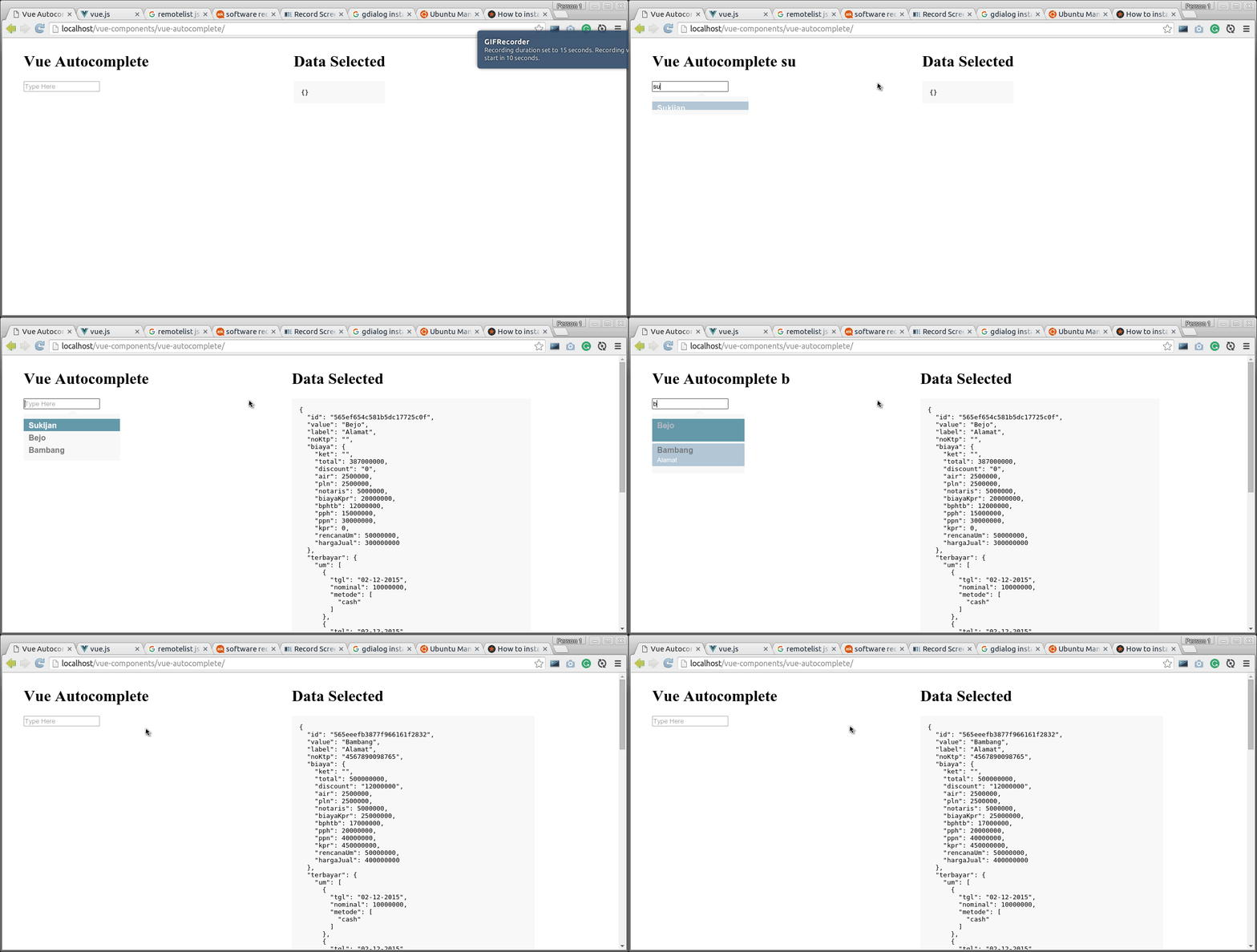
# vue-autocomplete
Autocomplete Component for [Vue.Js](http://vuejs.org)
## Intro
Vue Autocomplete is a Vue.Js component to make some suggestions for user input. come with .vue and .js file make it easier to be installed for your next project.
Vue Autocomplete is inspired by [aFarkas remote-list Jquery Plugin](https://github.com/aFarkas/remote-list). crafted with simple javascript (Also ES6 support), and doesn't require Jquery.
## Features
- full customizable
- Already, Complete callback event
- Included `.vue` file
- well commented code
- writen in ES6 (Still in Learning now)
- doesn't require any javascript libs, except [Vue.Js](http://vuejs.org)
- Support multiple autocomplete components
## Install
Simply include the [vue-autocomplete.js](./vue-autocomplete.js) to your HTML or web page file, next to [Vue.Js](http://vuejs.org). You can take a peek an example at [example.html](./example.html). And don't forget to include [vue-autocomplete.css](./vue-autocomplete.css) file when you choose this way.
Or
You can import [vue-autocomplete.vue](./vue-autocomplete.vue) to your vue component file like [this](./vueku.js) and process it with your preprocessor.
```javascript
import autocomplete from ./vue-autocomplete.vue
// Or
var autocomplete = require('./vue-autocomplete.vue');
```
## Usage
minimal:
```html
```
Full Example:
```html
```
## Additional parameters
If you need to pass more parameters in url, use Computed Properties (https://vuejs.org/guide/computed.html) :
Example:
``` computed: {
param: function () {
return 'foo=' + this.bar + '&q';
}
}```
in component change ```param ="q" for :param="param" ```
## Props
##### `name` (*) : Component Identity
will use for Identify the autocomplete component. for multiple use purpose.
##### `url` (*) : Ajax URL to fetch
the URL must be active (not from file). the component will fetch JSON from this URL with (default : `q`) query. like:
`http://some-url.com/API/list?q=`.
There are no filter and limit action inside the component. So, do it in your API logic.
##### `param` : name of the search query in Ajax call. default ( q )
##### `min` : Minimum input typed chars before performing the search query. default ( 3 )
##### `limit` : amount of query limit in ajax call.
example, `limit=5` the AJAX URL will be `http://some-url.com/API/list?q=blabla&limit=5`
##### `anchor`(*) : Anchor for Suggestion list
Anchor for listing suggestions. Example `anchor="name"` will get the name object of your JSON data for suggestion listing like ("Bambang", "Sukijan", "Bejo") in the demo above.
##### `label` : Description for Suggestion list
For description to your suggestion. the uses is like `anchor` props but for the description of each suggestion. like ("Alamat", "alamat sesuai ktp", "alamat") in the demo above. not required but if it's null the component will look bad.
##### `model` : v-model like for your component
v-model like of component to make two data binding working like usual.
##### `placeholder` : input placeholder (optional)
##### `class` : Component Class (optional)
will generate an class for input element. this only for the input element in autocomplete.
##### `id` : Component Id (optional)
will generate an Id for input element.
## Callback Events
Make an events in component's parent than the [vue-autocomplete](https://github.com/BosNaufal/vue-autocomplete) component will dispatch some events to it.
```javascript
...
events: {
/**
* Global Autocomplete Callback Event
*
* @event-name autocomplete:{event-name}
* @param {String} name name of auto
* @param {Object} data
* @param {Object} json - ajax-loaded only
*/
// Autocomplete on before ajax progress
'autocomplete:before-ajax': function (name,data){
console.log('before-ajax',name,data);
},
// Autocomplete on ajax progress
'autocomplete:ajax-progress': function(name,data){
console.log('ajax-progress',data);
},
// Autocomplete on ajax loaded
'autocomplete:ajax-loaded': function(name,data,json){
console.log('ajax-loaded',data,json);
},
// Autocomplete on focus
'autocomplete:focus': function(name,evt){
console.log('focus',name,evt);
},
// Autocomplete on input
'autocomplete:input': function(name,data){
console.log('input',data);
},
// Autocomplete on blur
'autocomplete:blur': function(name,evt){
console.log('blur',evt);
},
// Autocomplete on show
'autocomplete:show': function(name){
console.log('show',name);
},
// Autocomplete on selected
'autocomplete:selected': function(name,data){
console.log('selected',data);
this.data = data;
},
// Autocomplete on hide
'autocomplete:hide': function(name){
console.log('hide',name);
},
/**
* Spesific Autocomplete Callback Event By Name
*
* @event-name autocomplete-{component-name}:{event-name}
* @param {String} name name of auto
* @param {Object} data
* @param {Object} json - ajax-loaded only
*/
// Autocomplete on before ajax progress
'autocomplete-people:before-ajax': function(data){
console.log('before-ajax-people',data);
},
// Autocomplete on ajax progress
'autocomplete-people:ajax-progress': function(data){
console.log('ajax-progress-people',data);
},
// Autocomplete on ajax loaded
'autocomplete-people:ajax-loaded': function(data,json){
console.log('ajax-loaded-people',data,json);
},
// Autocomplete-people on focus
'autocomplete-people:focus': function(evt){
console.log('focus-people',evt);
},
// Autocomplete-people on input
'autocomplete-people:input': function(data){
console.log('input-people',data);
},
// Autocomplete-people on blur
'autocomplete-people:blur': function(evt){
console.log('blur-people',evt);
},
// Autocomplete-people on show
'autocomplete-people:show': function(){
console.log('show-people');
},
// Autocomplete-people on selected
'autocomplete-people:selected': function(data){
console.log('selected-people',data);
},
// Autocomplete-people on hide
'autocomplete-people:hide': function(){
console.log('hide-people');
},
}
```
## Clear Method
If you need to Clear or Netralize your autocomplete, You can simply make some refs then call a method named ```clearInput()```. You can take a look at the [Example](./index.html) :
```html
```
```javascript
// ... another vue scope
methods: {
clearAutocomplete() {
this.$refs.myAutocomplete.clearInput()
}
},
// ...
```
## Thank You for Making this helpful for your projects~
Hopefully this can be usefull for the others.
## Let's talk about some projects with me
Just Contact Me At:
- Email: [bosnaufalemail@gmail.com](mailto:bosnaufalemail@gmail.com)
- Skype Id: bosnaufal254
- twitter: [@BosNaufal](https://twitter.com/BosNaufal)
## License
[MIT](http://opensource.org/licenses/MIT)
Copyright (c) 2016 - forever Naufal Rabbani