# Vue-Contextmenu-json
A contextmenu component for Vue.The most thought i want to show is ```Use the contextmenu without template```,you just need a json data and a directive which binds on the element.
# Usage
in main.js
```javascript
import VueContextMenu from 'vue-contextmenu-json';

Vue.use(VueContextmenu);
``` 
in *.vue
```javascript
<template>
    <div>
        <anyElement v-contextmenu='{array:theArrayData,id:theIdYouWant}'></anyElement>
    </div>
</template>

<script>
    export default {
        data () {
            return {
                theArrayData:[
                    {name:'Operation 1',function:'funca',child:null},
                    {name:'Operation 2',function:'funca',child:[
                        {name:'Operation 2-1',function:'funca'}
                    ]}
                ]
            }
        },
        methods:{
            funca () {
                console.log(1);
            }
        }
    }
</script>
```
You can bind directive in any Template you want ,and you don't need to write the Contextmenu Template.

# Modifiers
**click**  
You can left click your element to show menu
```javascript
<anyElement v-contextmenu.click='{...}'>
```

# Parameter
|name|type|content|
|:-|:-|:-|
|array|Array|the json object which defined in your data function,every element is Object|
|id|String|distinguish from more contextmenus in one vue template|

And the array parameter is

|name|type|content|
|:-|:-|:-|
|name|String|the contextmenu name|
|function|String|the contextmenu operation you want to use,just the ```function name``` you defined in methods object.You can use ```this``` to be vue  instance,and ```node``` to be the element you open contextmenu |
|child|Array|the submenu or subsubsubsubmenu :) ,which should same format parameter|

# Example
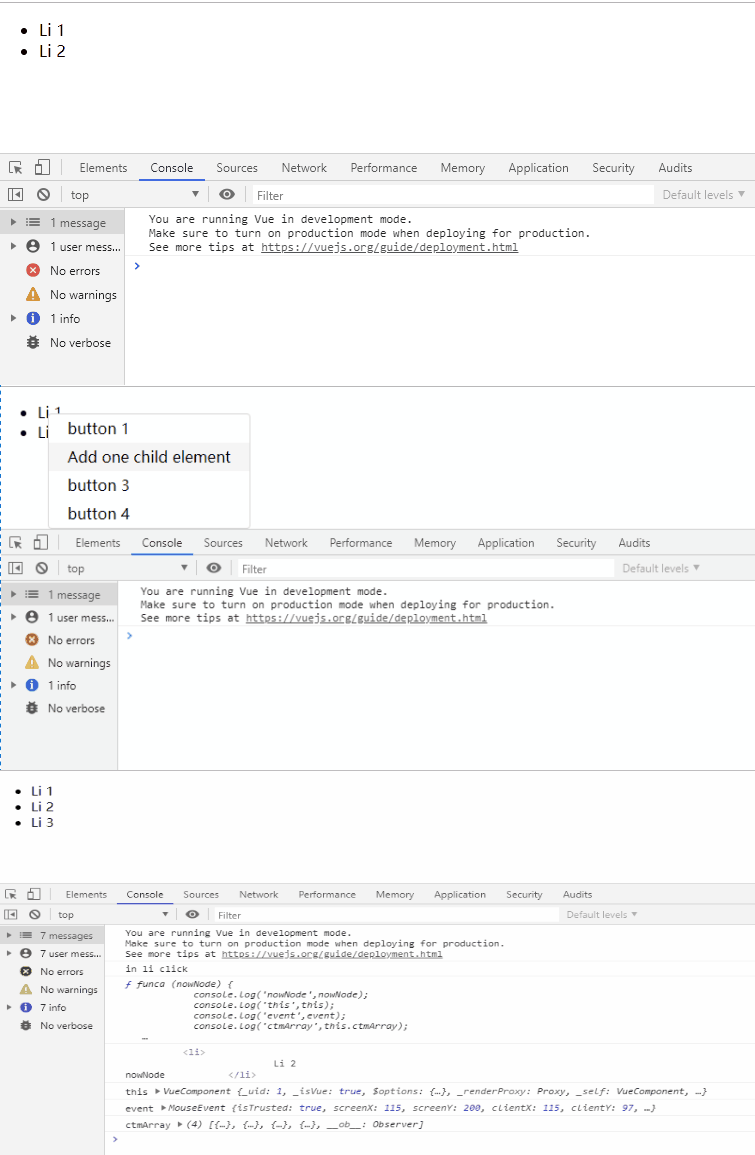
![gifhome_755x385.gif](https://i.loli.net/2019/08/18/wEIACnURtSVmuP9.gif)

```javascript
<template>
    <div>
        <ul v-contextmenu='{array:ctmArray,id:"c"}'>
            <li v-for='item in array' :key='item.name'>
                    {{item.name}}
            </li>
        </ul>
        <!--
        <button @click='comName = null'>button</button>
        <i-ctm  v-if='comName === "i-ctm"' :array='ctmArray'></i-ctm>
        -->
    </div>
</template>

<script>
import iCtm from './components/contextmenu/index.js'
export default {
    name:'app',
    components:{
        'i-ctm':iCtm
    },
    data () {
        return {
            comName:'i-ctm',
            array:[
                {name:'Li 1'},
                {name:'Li 2'}
            ],
            ctmArray:[
                {name:'button 1',function:'funca',child:[
                    {name:'1-1111111',function:'funca',child:[
                        {name:'1-1111-11111',function:'funca'}
                    ]}
                ]},
                {name:'button 2',function:'funca'},
                {name:'button 3',function:'funca'},
                {name:'button 4',function:'funca'}
            ]
        }
    },
    methods:{
        funca (node) {
            this.array.push({name:'Li 3'});
            console.log(node); //  the element you open contextmenu, like 'Li 3' li
        }
    }
}
</script>
```

# Update Log
**2019-09-09**  
完成左键鼠标点击仍可以实现弹窗功能

# End
If you have any problem or thoughts you think will make this component better,please let me know .