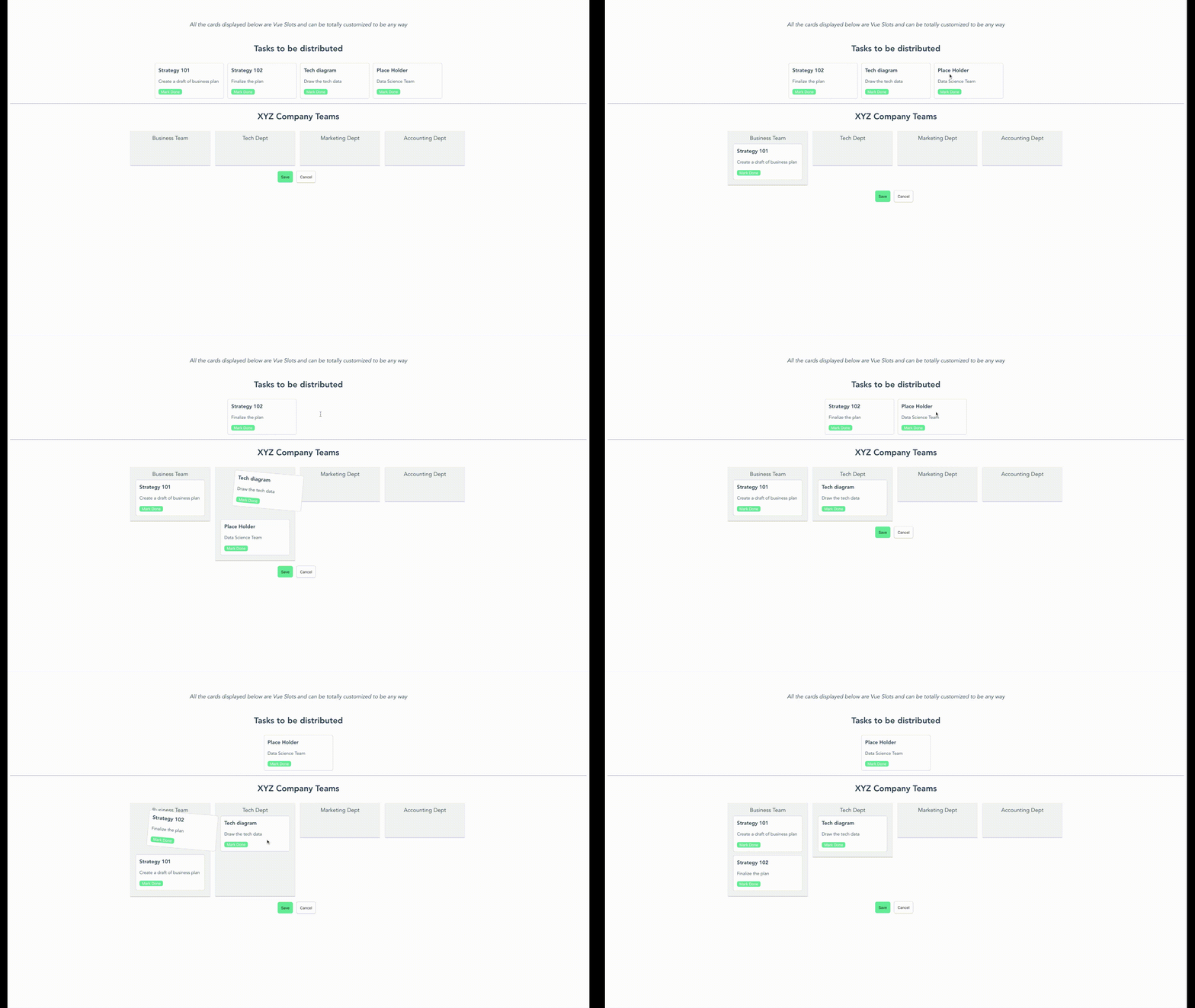
A simple kanban board where the items can be dragged and dropped from the list. This is a hybrid implementation of vue-smooth-dnd.
## Demo
## Usage
#### Installation
To use the vue-drag-n-drop module, you first need to install the module.
```
npm install vue-drag-n-drop
```
or
```
yarn add vue-drag-n-drop
```
#### Use Case
``` html
```
`MyComponent.vue`
```html
{{data.title}}
{{data.description}}
```
## Documentation
#### Instantiating the component
To put the component in your code, you can simply run `import DragDrop from 'vue-drag-n-drop';`. Then, use it in the code as:
```html
```
`originalData` in the above code is assumed to be a list of string. However, you can also pass in the list of custom objects like this:
```js
[
{
title: 'Strategy 101',
description: 'Create a draft of business plan',
time: '3 days',
done: false
},
{
title: 'Strategy 102',
description: 'Finalize the plan',
time: '4 days',
done: false
}
]
```
When you pass your own objects instead of a list of string, you also need to provide a custom component to handle view/action of this object since you can virtually pass any kind of object.
#### Events
When you use the component, you can also listen to some events that happen inside the component like drag, drop, save and cancel
```html
```
`save` - This event is triggered when you click save from inside the component. It gives back the final state of the data in corresponding buckets.
`cancel` - This gives you a choice on how to handle the cancellationn event.
`dropInOriginalBucket` - This event is emitted everytime there is a drop event for original bucket. You provides an object with `startIndex`, `endIndex` and `payload`.
`dropInDestinationBucket` - This event is emitted for each dropzone in the destination bucket. First parameter returns the dropzone name and second parameter returns the drop info `startIndex`, `endIndex` and `payload`.
#### Custom Component for list of objects
`vue-drag-n-drop` uses Vue Named Slots. So, the users can pass in custom component that will have access to the data for the single item. You can impolement the slots like below:
```html
```
Here, `dd-card` is the slot name. The component provides a `cardData` variable provides the access of a single object from the original data. If slots aren't used, the component assumes that original data is a list of string. This makes it compatible with older version.
#### CSS Modification
To modify the CSS style, you can override these css classes from your component:
```
.vue-drag-n-drop # This holds the whole container.
.dd-title # Class for modifying the titles
.dd-first-group # Class to modify the first (original) container. It holds the list of
cards
.dd-card-ghost # Class provided for drag class by smooth-dnd
.dd-card-ghost-drop # Class provided for drop by smooth-dnd
.dd-result-group # Class to modify the second drop container (Result container)
.dd-drop-container # Class to modify the style of each column for second container
```
## Support for SSR/Nuxt
Currently, Server Side Rendering is **not** supported. To use it in SSR/Nuxt project, you need to specify Nuxt that this plugin needs to render on the client side.
To specify Nuxt to render it on client-side, create a JS file under `~/plugins/` or add to existing one:
`~/plugins/vue-drap-n-drop.js`
```
import Vue from 'vue';
import DragDrop from 'vue-drag-n-drop';
Vue.use(DragDrop);
```
Add the plugin to `nuxt.config.js`
```
plugins: [
{
src: './plugins/vue-drag-n-drop.js',
ssr: false
}
],
```
## Contributions
Feel free to raise an issue or create a Pull Request if you see ways that can improve this library.
## Current Contributors
[](https://sourcerer.io/fame/smaharj1/smaharj1/vue-drag-and-drop-kanban/links/0)[](https://sourcerer.io/fame/smaharj1/smaharj1/vue-drag-and-drop-kanban/links/1)[](https://sourcerer.io/fame/smaharj1/smaharj1/vue-drag-and-drop-kanban/links/2)[](https://sourcerer.io/fame/smaharj1/smaharj1/vue-drag-and-drop-kanban/links/3)[](https://sourcerer.io/fame/smaharj1/smaharj1/vue-drag-and-drop-kanban/links/4)[](https://sourcerer.io/fame/smaharj1/smaharj1/vue-drag-and-drop-kanban/links/5)[](https://sourcerer.io/fame/smaharj1/smaharj1/vue-drag-and-drop-kanban/links/6)[](https://sourcerer.io/fame/smaharj1/smaharj1/vue-drag-and-drop-kanban/links/7)
## License
[MIT](https://opensource.org/licenses/MIT)