# vue-image-crop-upload
## [中文文档](https://github.com/dai-siki/vue-image-crop-upload/blob/master/README-zh.md).

A beautiful vue component for image crop and upload.

**Notice**: This component is designed for pc, **not recommended for use on the mobile side**.

[![GitHub issues](https://img.shields.io/github/issues/dai-siki/vue-image-crop-upload.svg)](https://github.com/dai-siki/vue-image-crop-upload/issues)
[![GitHub forks](https://img.shields.io/github/forks/dai-siki/vue-image-crop-upload.svg)](https://github.com/dai-siki/vue-image-crop-upload/network)
[![GitHub stars](https://img.shields.io/github/stars/dai-siki/vue-image-crop-upload.svg)](https://github.com/dai-siki/vue-image-crop-upload/stargazers)
[![Twitter](https://img.shields.io/twitter/url/https/github.com/dai-siki/vue-image-crop-upload.svg?style=social)](https://twitter.com/intent/tweet?text=Wow:&url=%5Bobject%20Object%5D)

[![NPM](https://nodei.co/npm/vue-image-crop-upload.png?downloads=true&downloadRank=true&stars=true)](https://nodei.co/npm/vue-image-crop-upload/)

## Change log
#### @3.0.0
- Compatible vue3


## Demo
[Click me](http://dai-siki.github.io/vue-image-crop-upload/example-3/demo.html).


## Screenshot
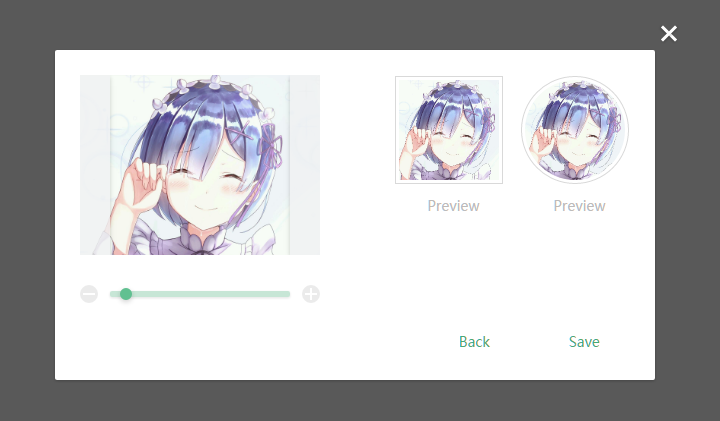
![screenshot](screenshot/1.png)

## Brower compatibility
IE10+

## Install
#### npm
```shell
$ npm install vue-image-crop-upload
```


## Usage
#### Props
| Name              | Type               | Default             | Description                                         |
| ----------------| ---------------- | ---------------| ------------------------------------------|
| url             | String            |  ''                | Server api path,like "/avatar/upload", If empty, will not be uploaded    |
| method				| String		| 'POST'               | request http method |
| field       | String   | 'upload'     | Upload input filename, used for server side get the file stream.    |
| value             | Boolean            | twoWay            | show or not    |
| params             | Object            |  null                | POST Params，like "{k:v}"    |
| headers             | Object            |  null                | POST request header，like "{k:v}"    |
| langType             | String            | 'zh'                 | language type    |
| langExt             | Object            |                   | language extend    |
| width             | Number            |   200                | width of receive image     |
| height             | Number            |  200                 | height of receive image   |
| imgFormat             | string            | 'png'                  | jpg/png, Server api receive file type.    |
| imgBgc             | string            | '#fff'                  | background color, if the imgFormat prop is jpg   |
| noCircle          | Boolean             | false         | disable circle preview |
| noSquare          | Boolean             | false         | disable square preview |
| noRotate          | Boolean             | true         | disable rotate function |
| withCredentials          | Boolean             | false         | support cross-domain |

#### Events
| Name              | Description                                         |
| ----------------| ------------------------------------------|
| srcFileSet   |Once you've selected the file, params( fileName, fileType, fileSize )     |
| cropSuccess   | image crop success, params( imageDataUrl, field )     |
| cropUploadSuccess | upload success, params( jsonData, field )    |
| cropUploadFail    | upload fail, params( status, field )    |

#### Language package
[view details](http://dai-siki.github.io/vue-image-crop-upload/utils/language.js).

#### Example Of "langExt"
```js
{
    hint: 'Click or drag the file here to upload',
    loading: 'Uploading…',
    noSupported: 'Browser is not supported, please use IE10+ or other browsers',
    success: 'Upload success',
    fail: 'Upload failed',
    preview: 'Preview',
    btn: {
    	off: 'Cancel',
    	close: 'Close',
    	back: 'Back',
    	save: 'Save'
    },
    error: {
    	onlyImg: 'Image only',
    	outOfSize: 'Image exceeds size limit: ',
    	lowestPx: 'Image\'s size is too low. Expected at least: '
    }
}
```

#### Example vue@3
```html
<div id="app">
	<a class="btn" @click="toggleShow">set avatar</a>
	<my-upload field="img"
        @crop-success="cropSuccess"
        @crop-upload-success="cropUploadSuccess"
        @crop-upload-fail="cropUploadFail"
        v-model="show"
		:width="300"
		:height="300"
		url="/upload"
		:params="params"
		:headers="headers"
		img-format="png"></my-upload>
	<img :src="imgDataUrl">
</div>

<script>
	import 'babel-polyfill'; // es6 shim
	import Vue from 'vue';
	import myUpload from 'vue-image-crop-upload';

	new Vue({
		el: '#app',
		data: {
			show: true,
			params: {
				token: '123456798',
				name: 'avatar'
			},
			headers: {
				smail: '*_~'
			},
			imgDataUrl: '' // the datebase64 url of created image
		},
		components: {
			'my-upload': myUpload
		},
		methods: {
			toggleShow() {
				this.show = !this.show;
			},
            /**
			 * crop success
			 *
			 * [param] imgDataUrl
			 * [param] field
			 */
			cropSuccess(imgDataUrl, field){
				console.log('-------- crop success --------');
				this.imgDataUrl = imgDataUrl;
			},
			/**
			 * upload success
			 *
			 * [param] jsonData  server api return data, already json encode
			 * [param] field
			 */
			cropUploadSuccess(jsonData, field){
				console.log('-------- upload success --------');
				console.log(jsonData);
				console.log('field: ' + field);
			},
			/**
			 * upload fail
			 *
			 * [param] status    server api return error status, like 500
			 * [param] field
			 */
			cropUploadFail(status, field){
				console.log('-------- upload fail --------');
				console.log(status);
				console.log('field: ' + field);
			}
		}
	});
</script>
```

#### Example vue@2
```html
<div id="app">
	<a class="btn" @click="toggleShow">set avatar</a>
	<my-upload field="img"
        @crop-success="cropSuccess"
        @crop-upload-success="cropUploadSuccess"
        @crop-upload-fail="cropUploadFail"
        v-model="show"
		:width="300"
		:height="300"
		url="/upload"
		:params="params"
		:headers="headers"
		img-format="png"></my-upload>
	<img :src="imgDataUrl">
</div>

<script>
	import 'babel-polyfill'; // es6 shim
	import Vue from 'vue';
	import myUpload from 'vue-image-crop-upload/upload-2.vue';

	new Vue({
		el: '#app',
		data: {
			show: true,
			params: {
				token: '123456798',
				name: 'avatar'
			},
			headers: {
				smail: '*_~'
			},
			imgDataUrl: '' // the datebase64 url of created image
		},
		components: {
			'my-upload': myUpload
		},
		methods: {
			toggleShow() {
				this.show = !this.show;
			},
            /**
			 * crop success
			 *
			 * [param] imgDataUrl
			 * [param] field
			 */
			cropSuccess(imgDataUrl, field){
				console.log('-------- crop success --------');
				this.imgDataUrl = imgDataUrl;
			},
			/**
			 * upload success
			 *
			 * [param] jsonData  server api return data, already json encode
			 * [param] field
			 */
			cropUploadSuccess(jsonData, field){
				console.log('-------- upload success --------');
				console.log(jsonData);
				console.log('field: ' + field);
			},
			/**
			 * upload fail
			 *
			 * [param] status    server api return error status, like 500
			 * [param] field
			 */
			cropUploadFail(status, field){
				console.log('-------- upload fail --------');
				console.log(status);
				console.log('field: ' + field);
			}
		}
	});
</script>
```

#### Example vue@1
```html
<div id="app">
	<a class="btn" @click="toggleShow">set avatar</a>
	<my-upload field="img"
		:width="300"
		:height="300"
		url="/upload"
		:params="params"
		:headers="headers"
        lang-type="en"
		:value.sync="show"
		img-format="png"></my-upload>
	<img :src="imgDataUrl">
</div>

<script>
	import 'babel-polyfill'; // es6 shim
	import Vue from 'vue';
	import myUpload from 'vue-image-crop-upload/upload-1.vue';

	new Vue({
		el: '#app',
		data: {
			show: true,
			params: {
				token: '123456798',
				name: 'avatar'
			},
			headers: {
				smail: '*_~'
			},
			imgDataUrl: '' // the datebase64 url of created image
		},
		components: {
			'my-upload': myUpload
		},
		methods: {
			toggleShow() {
				this.show = !this.show;
			}
		},
		events: {
			/**
			 * crop success
			 *
			 * [param] imgDataUrl
			 * [param] field
			 */
			cropSuccess(imgDataUrl, field){
				console.log('-------- crop success --------');
				this.imgDataUrl = imgDataUrl;
			},
			/**
			 * upload success
			 *
			 * [param] jsonData   server api return data, already json encode
			 * [param] field
			 */
			cropUploadSuccess(jsonData, field){
				console.log('-------- upload success --------');
				console.log(jsonData);
				console.log('field: ' + field);
			},
			/**
			 * upload fail
			 *
			 * [param] status    server api return error status, like 500
			 * [param] field
			 */
			cropUploadFail(status, field){
				console.log('-------- upload fail --------');
				console.log(status);
				console.log('field: ' + field);
			}
		}
	});

</script>
```
