# Introduction
Vue storefront uses two primary data sources:
1. IndexedDb/WebSQL data store in the browser - using localForage (https://github.com/localForage/localForage)
2. Server data source via vue-storefront-api (https://github.com/DivanteLtd/vue-storefront-api) - which API is compliant with ElasticSearch (regarding product catalog)
## Local data store
You can access localForage repositories thru `Vue.$db` or `global.db` objects anywhere in the code BUT all data-related operations SHOULD be placed in Vuex stores.
Details on localForage API: http://localforage.github.io/localForage/
We basicaly have following data stores accesible in the browser (`/core/store/index.js`):
```js
Vue.prototype.$db = {
ordersCollection: new UniversalStorage(localForage.createInstance({
name: 'shop',
storeName: 'orders'
})),
categoriesCollection: new UniversalStorage(localForage.createInstance({
name: 'shop',
storeName: 'categories'
})),
attributesCollection: new UniversalStorage(localForage.createInstance({
name: 'shop',
storeName: 'attributes'
})),
cartsCollection: new UniversalStorage(localForage.createInstance({
name: 'shop',
storeName: 'carts'
})),
elasticCacheCollection: new UniversalStorage(localForage.createInstance({
name: 'shop',
storeName: 'elasticCache'
})),
productsCollection: new UniversalStorage(localForage.createInstance({
name: 'shop',
storeName: 'products'
})),
claimsCollection: new UniversalStorage(localForage.createInstance({
name: 'shop',
storeName: 'claims'
})),
wishlistCollection: new UniversalStorage(localForage.createInstance({
name: 'shop',
storeName: 'wishlist'
})),
compareCollection: new UniversalStorage(localForage.createInstance({
name: 'shop',
storeName: 'compare'
})),
usersCollection: new UniversalStorage(localForage.createInstance({
name: 'shop',
storeName: 'user'
})),
syncTaskCollection: new UniversalStorage(localForage.createInstance({
name: 'shop',
storeName: 'syncTasks'
})),
checkoutFieldsCollection: new UniversalStorage(localForage.createInstance({
name: 'shop',
storeName: 'checkoutFieldValues'
})),
newsletterPreferencesCollection: new UniversalStorage(localForage.createInstance({
name: 'shop',
storeName: 'newsletterPreferences'
}))
}
global.db = Vue.prototype.$db // localForage instance
```
## Example Vuex store
Here you have example on how to the Vuex store should be constructed. Please notice the *Ajv data validation*:
```js
import * as types from '../mutation-types'
import { ValidationError } from 'core/lib/exceptions'
import * as entities from 'core/lib/entities'
import * as sw from 'core/lib/sw'
import config from '../../config'
const Ajv = require('ajv') // json validator
// initial state
const state = {
checkoutQueue: [] // queue of orders to be sent to the server
}
const getters = {
}
// actions
const actions = {
/**
* Place order - send it to service worker queue
* @param {Object} commit method
* @param {Object} order order data to be send
*/
placeOrder ({ commit }, order) {
const ajv = new Ajv()
const validate = ajv.compile(require('core/models/order.schema.json'))
if (!validate(order)) { // schema validation of upcoming order
throw new ValidationError(validate.errors)
}
commit(types.CHECKOUT_PLACE_ORDER, order)
}
}
// mutations
const mutations = {
/**
* Add order to sync. queue
* @param {Object} product data format for products is described in /doc/ElasticSearch data formats.md
*/
[types.CHECKOUT_PLACE_ORDER] (state, order) {
const ordersCollection = global.db.ordersCollection
const orderId = entities.uniqueEntityId(order) // timestamp as a order id is not the best we can do but it's enough
order.order_id = orderId.toString()
order.transmited = false
order.created_at = new Date()
order.updated_at = new Date()
ordersCollection.setItem(orderId.toString(), order).catch((reason) => {
console.debug(reason) // it doesn't work on SSR
}).then((resp) => {
sw.postMessage({ config: config, command: types.CHECKOUT_PROCESS_QUEUE }) // process checkout queue
console.debug('Order placed, orderId = ' + orderId)
}) // populate cache
},
/**
* Add order to sync. queue
* @param {Object} queue
*/
[types.CHECKOUT_LOAD_QUEUE] (state, queue) {
state.checkoutQueue = queue
console.debug('Order queue loaded, queue size is: ' + state.checkoutQueue.length)
}
}
export default {
namespaced: true,
state,
getters,
actions,
mutations
}
```
## Data formats & validation
Data formats for vue-storefront and vue-storefront-api are the same JSON files. There is Ajv validator (https://github.com/epoberezkin/ajv) used for validation.
The convention is, that schemas are stored under `/src/models` - for example [Order schema](https://github.com/DivanteLtd/vue-storefront/blob/master/core/models/order.schema.json).
Validation of objects is rather straight forward:
```js
const Ajv = require('ajv') // json validator
const ajv = new Ajv()
const validate = ajv.compile(require('core/models/order.schema.json'))
if (!validate(order)) { // schema validation of upcoming order
throw new ValidationError(validate.errors)
}
```
Validation errors format:
```json
[ { keyword: 'additionalProperties',
dataPath: '',
schemaPath: '#/additionalProperties',
params: { additionalProperty: 'id' },
message: 'should NOT have additional properties' } ]
```
### Orders
`Orders` repository stores all orders transmitted and *to be transmitted* (aka. order queue) used by service worker.
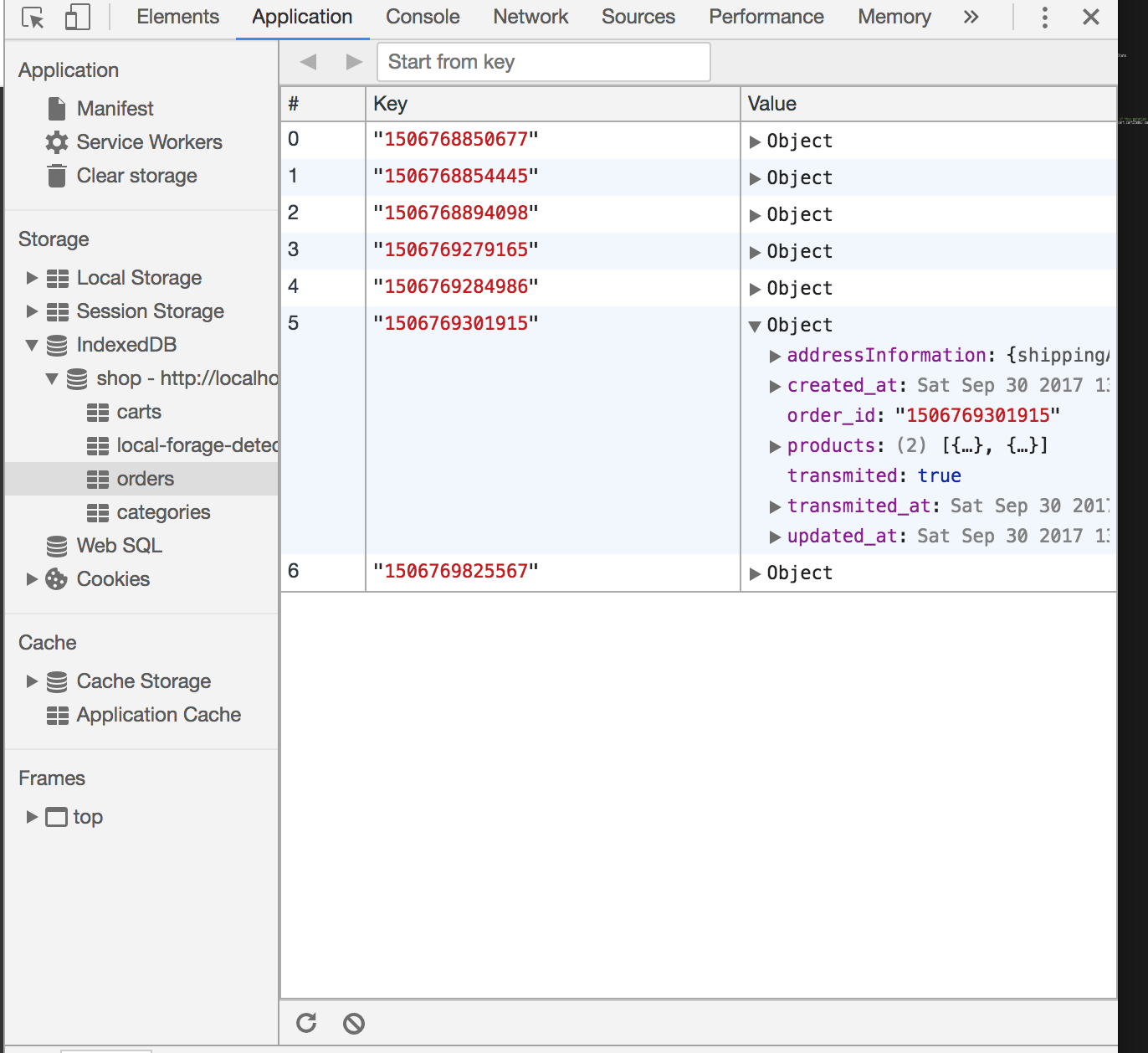
Here you have a validation schema for order: https://github.com/DivanteLtd/vue-storefront/blob/master/core/models/order.schema.json
```json
{
"order_id": "123456789",
"created_at": "2017-09-28 12:00:00",
"updated_at": "2017-09-28 12:00:00",
"transmited_at": "2017-09-28 12:00:00",
"transmited": false,
"products": [{
"sku": "product_dynamic_1",
"qty": 1,
"name": "Product one",
"price": 19,
"product_type": "simple"
},
{
"sku": "product_dynamic_2",
"qty": 1,
"name": "Product two",
"price": 54,
"product_type": "simple"
}
],
"addressInformation": {
"shippingAddress": {
"region": "MH",
"region_id": 0,
"country_id": "PL",
"street": [
"Street name line no 1",
"Street name line no 2"
],
"company": "Company name",
"telephone": "123123123",
"postcode": "00123",
"city": "Cityname",
"firstname": "John ",
"lastname": "Doe",
"email": "john@doe.com",
"region_code": "MH",
"sameAsBilling": 1
},
"billingAddress": {
"region": "MH",
"region_id": 0,
"country_id": "PL",
"street": [
"Street name line no 1",
"Street name line no 2"
],
"company": "abc",
"telephone": "1111111",
"postcode": "00123",
"city": "Mumbai",
"firstname": "Sameer",
"lastname": "Sawant",
"email": "john@doe.com",
"prefix": "address_",
"region_code": "MH"
},
"shipping_method_code": "flatrate",
"shipping_carrier_code": "flatrate",
"payment_method_code": "cashondelivery"
}
}
```
### Categories
`Categories` is a hash organized by category 'slug' (for example for category with name = 'Example category', slug = 'example-category')
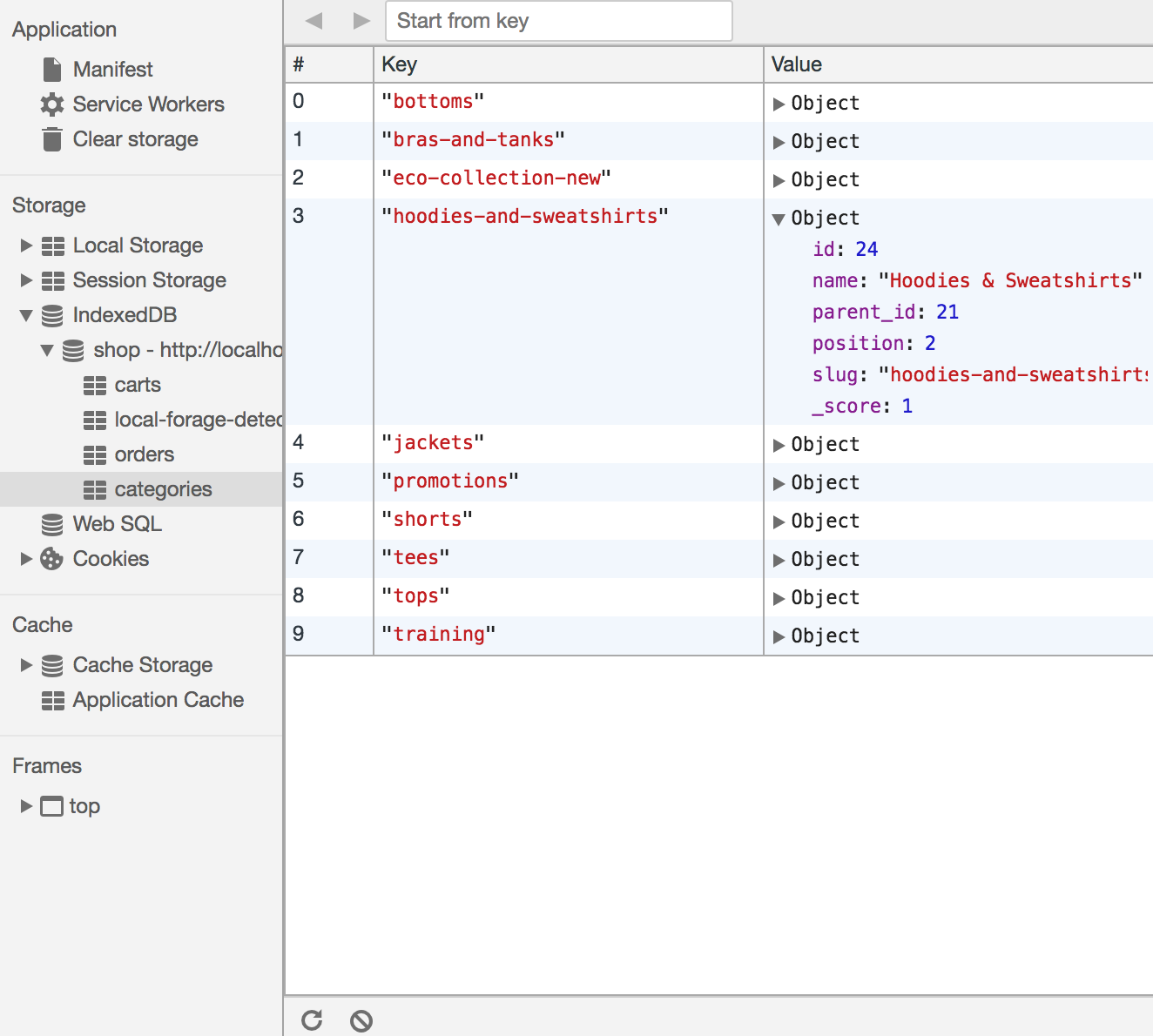.
If category do have any child categories - you have access to them via "children_data" property.
```json
{
"id":13,
"parent_id":11,
"name":"Bottoms",
"is_active":true,
"position":2,
"level":3,
"product_count":0,
"children_data":[
{
"id":18,
"parent_id":13,
"name":"Pants",
"is_active":true,
"position":1,
"level":4,
"product_count":156,
"children_data":[
]
},
{
"id":19,
"parent_id":13,
"name":"Shorts",
"is_active":true,
"position":2,
"level":4,
"product_count":148,
"children_data":[
]
}
],
"tsk":1505573191094
}
```
### Carts
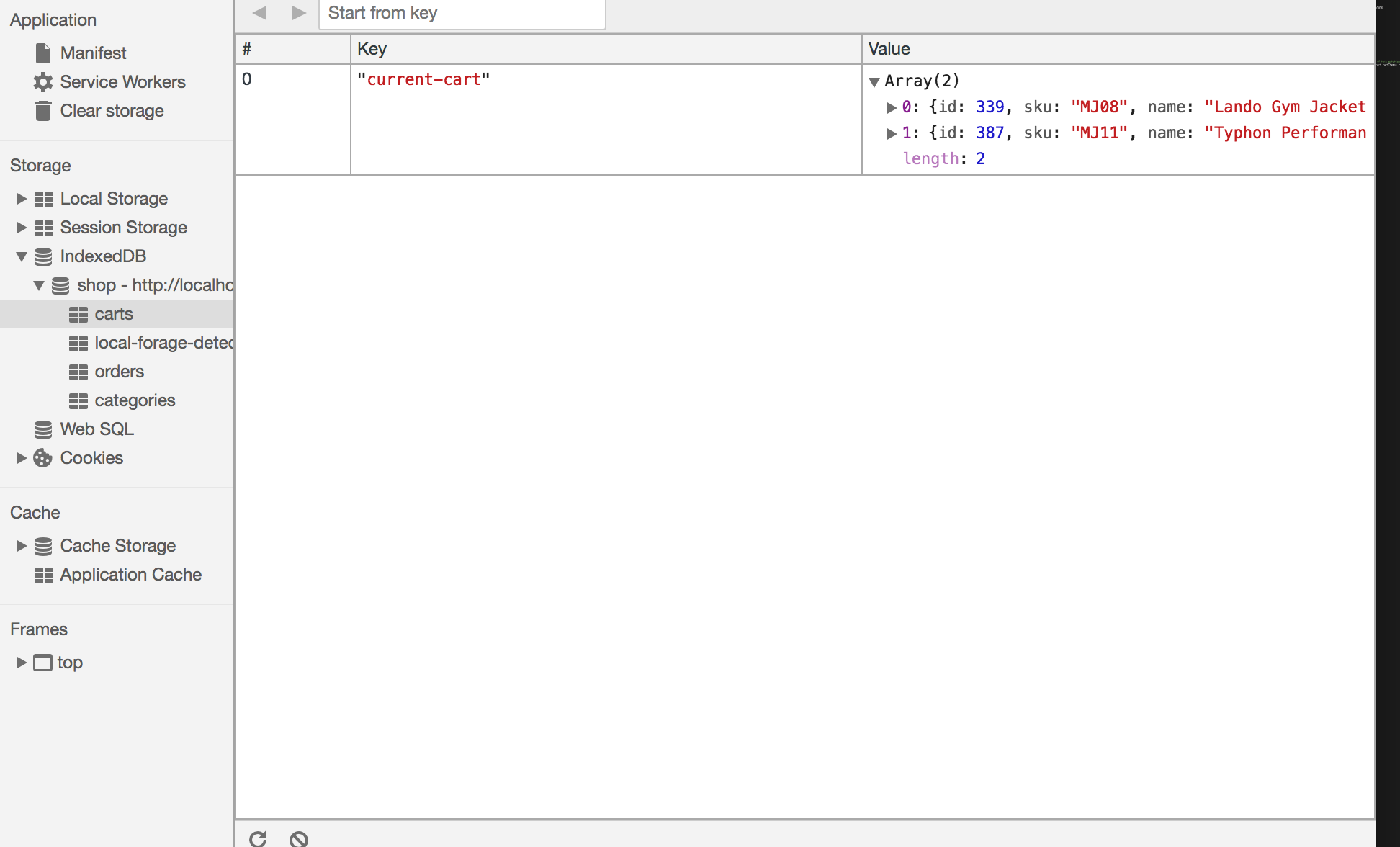
`Carts` is a store for shopping cart with default key = 'current-cart' representing current shopping cart.
Cart object is an array consit of Products with additional field `qty` in case when 2+ items are ordered.
```json
[
{
"id":26,
"qty":5,
"sku":"24-WG081-blue",
"name":"Sprite Stasis Ball 55 cm",
"attribute_set_id":12,
"price":23,
"status":1,
"visibility":1,
"type_id":"simple",
"created_at":"2017-09-16 13:46:48",
"updated_at":"2017-09-16 13:46:48",
"extension_attributes":[
],
"product_links":[
],
"tier_prices":[
],
"custom_attributes":null,
"category":[
],
"tsk":1505573582376,
"description":"The Sprite Stasis Ball gives you the toned abs, sides, and back you want by amping up your core workout. With bright colors and a burst-resistant design, it's a must-have for every hard-core exercise addict. Use for abdominal conditioning, balance training, yoga, or even physical therapy.
- Durable, burst-resistant design.
- Hand pump included.
",
"image":"/l/u/luma-stability-ball.jpg",
"small_image":"/l/u/luma-stability-ball.jpg",
"thumbnail":"/l/u/luma-stability-ball.jpg",
"color":"50",
"options_container":"container2",
"required_options":"0",
"has_options":"0",
"url_key":"sprite-stasis-ball-55-cm-blue",
"tax_class_id":"2",
"activity":"8,11",
"material":"44",
"gender":"80,81,82,83,84",
"category_gear":"87",
"size":"91"
}
]
```