





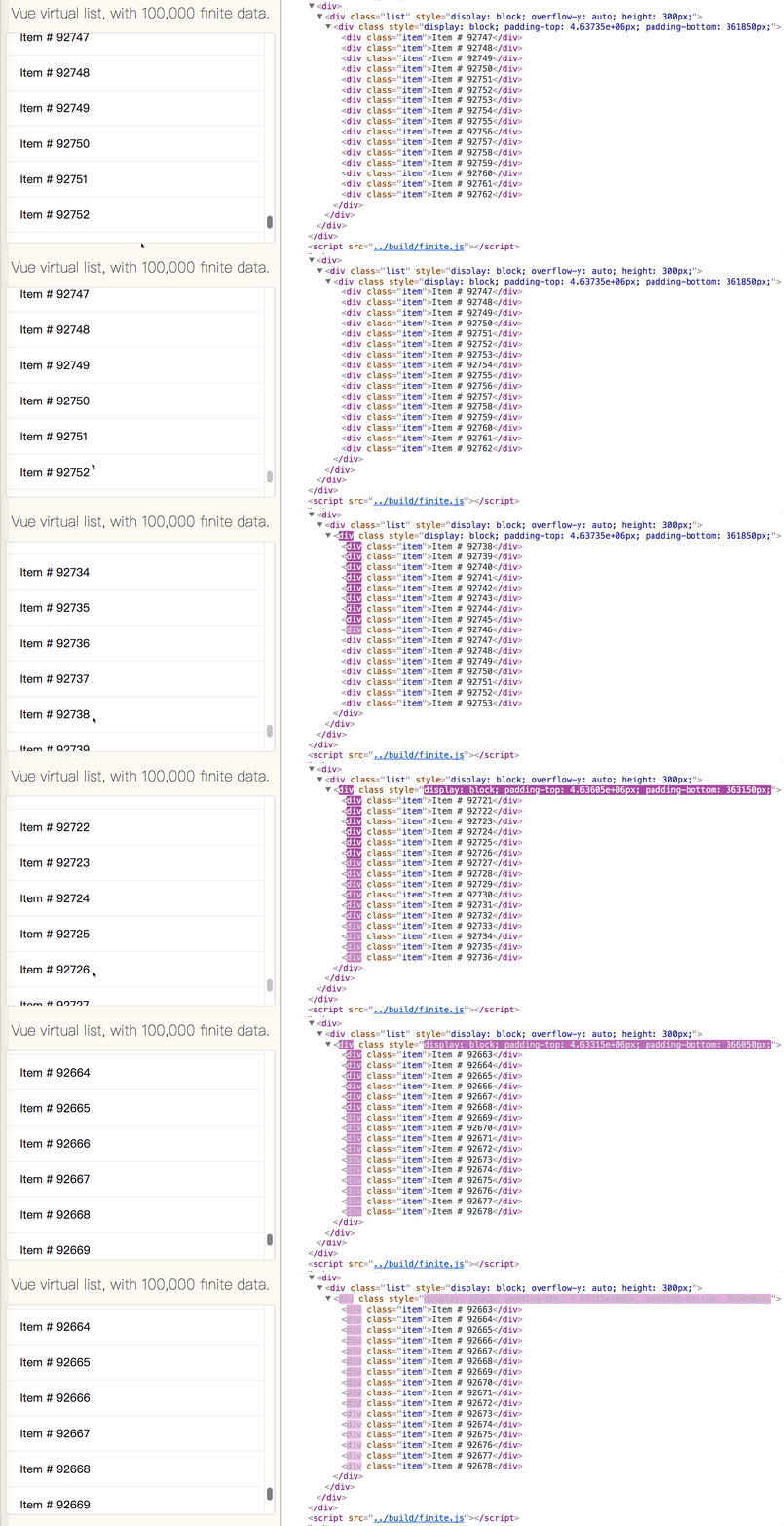
 ## Simple usage
```console
npm install vue-virtual-scroll-list --save
```
### vfor-mode
All you need to care about is only data!
```vue
## Simple usage
```console
npm install vue-virtual-scroll-list --save
```
### vfor-mode
All you need to care about is only data!
```vue
 | Prop | Type | Required | Description |
|-----------|---------------------|----------|-------------------------------------------------------------------------------------------------------------------------------------------------------------------------------------------------------------------------------------------------------------------------------------------|
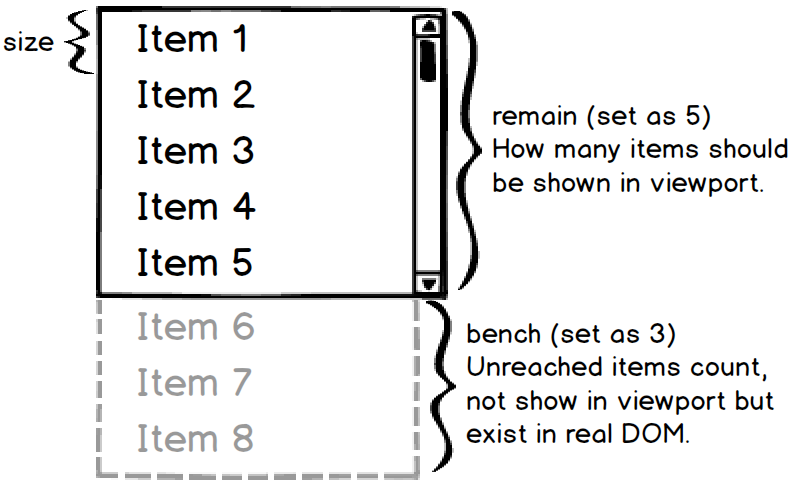
| size | Number | ✓ | Each list item height, in variable height, this prop just use to calculate the virtual-list outside container viewport fixed height. |
| remain | Number | ✓ | How many items should be shown in virtual-list viewport, so `size` and `remain` determine the outside container viewport height (`size × remian`). |
| bench | Number | * | Default value is equal to `remain`, unreached items count, not show in virtual-list viewport but exist in real DOM, the larger the bench, the higher the scroll performance will achieved. |
| start | Number | * | Default value is `0`, the initial scroll start index. It must be integer and in the range of list index, if invalid there will be effected as `0` or the last one. |
| offset | Number | * | Default value is `0`, the initial scroll offset. If both `start` and `offset` are assigned at initialization, `start` is preferred. |
| debounce | Number | * | It's disabled by default, milliseconds of using `debounce` function to ensure scroll event doesn't fire so often that it bricks browser performance. |
| rtag | String | * | Default value is `div`, the virtual-list root element tag name, in all cases it's style is set to `display: block;` |
| wtag | String | * | Default value is `div`, the virtual-list item wrapper element tag name, in all cases it's style is set to `display: block;` |
| wclass | String | * | Default is no classname, the virtual-list item wrapper element class, if assign this prop, you better **not** to change it's [CSS box model](https://developer.mozilla.org/en-US/docs/Web/CSS/CSS_Box_Model/Introduction_to_the_CSS_box_model). |
| pagemode | Boolean | * | Let virtual-list scroll with page viewport. |
| totop | Function | * | Called when virtual-list is scrolled to top, no param. |
| tobottom | Function | * | Called when virtual-list is scrolled to bottom, no param. |
| onscroll | Function | * | Called when virtual-list is scrolling, with param: [`(event, data)`](https://github.com/tangbc/vue-virtual-scroll-list/releases/tag/v1.1.7). |
| variable | Function or Boolean | * | Used in variable height, if assign `Function`, this prop is a variable height getter function which is called with param: `(index)` when each item is ready to be calculated; if assign `Boolean`, virtual-list will get each item variable height by it's inline style height automatic. |
| item | Component | * | Using in `item-mode`, list item vue component. |
| itemcount | Number | * | Using in `item-mode`, list data total counts. |
| itemprops | Function | * | Using in `item-mode`, a function call when each item is going to be rendered. |
## Public methods
Here are some usefull public methods you can call via [`ref`](https://vuejs.org/v2/guide/components-edge-cases.html#Accessing-Child-Component-Instances-amp-Child-Elements):
* `forceRender()`: force render virtual-list if you need or make it refresh.
* `updateVariable(index)`: update item height by index in variable height list.
## Contributions
Welcome to improve vue-virtual-scroll-list with any issue, pull request or code review.
## Changelogs
Maintain and update occasionally, for changes see [release](https://github.com/tangbc/vue-virtual-scroll-list/releases).
## License
[MIT License](https://github.com/tangbc/vue-virtual-scroll-list/blob/master/LICENSE)
| Prop | Type | Required | Description |
|-----------|---------------------|----------|-------------------------------------------------------------------------------------------------------------------------------------------------------------------------------------------------------------------------------------------------------------------------------------------|
| size | Number | ✓ | Each list item height, in variable height, this prop just use to calculate the virtual-list outside container viewport fixed height. |
| remain | Number | ✓ | How many items should be shown in virtual-list viewport, so `size` and `remain` determine the outside container viewport height (`size × remian`). |
| bench | Number | * | Default value is equal to `remain`, unreached items count, not show in virtual-list viewport but exist in real DOM, the larger the bench, the higher the scroll performance will achieved. |
| start | Number | * | Default value is `0`, the initial scroll start index. It must be integer and in the range of list index, if invalid there will be effected as `0` or the last one. |
| offset | Number | * | Default value is `0`, the initial scroll offset. If both `start` and `offset` are assigned at initialization, `start` is preferred. |
| debounce | Number | * | It's disabled by default, milliseconds of using `debounce` function to ensure scroll event doesn't fire so often that it bricks browser performance. |
| rtag | String | * | Default value is `div`, the virtual-list root element tag name, in all cases it's style is set to `display: block;` |
| wtag | String | * | Default value is `div`, the virtual-list item wrapper element tag name, in all cases it's style is set to `display: block;` |
| wclass | String | * | Default is no classname, the virtual-list item wrapper element class, if assign this prop, you better **not** to change it's [CSS box model](https://developer.mozilla.org/en-US/docs/Web/CSS/CSS_Box_Model/Introduction_to_the_CSS_box_model). |
| pagemode | Boolean | * | Let virtual-list scroll with page viewport. |
| totop | Function | * | Called when virtual-list is scrolled to top, no param. |
| tobottom | Function | * | Called when virtual-list is scrolled to bottom, no param. |
| onscroll | Function | * | Called when virtual-list is scrolling, with param: [`(event, data)`](https://github.com/tangbc/vue-virtual-scroll-list/releases/tag/v1.1.7). |
| variable | Function or Boolean | * | Used in variable height, if assign `Function`, this prop is a variable height getter function which is called with param: `(index)` when each item is ready to be calculated; if assign `Boolean`, virtual-list will get each item variable height by it's inline style height automatic. |
| item | Component | * | Using in `item-mode`, list item vue component. |
| itemcount | Number | * | Using in `item-mode`, list data total counts. |
| itemprops | Function | * | Using in `item-mode`, a function call when each item is going to be rendered. |
## Public methods
Here are some usefull public methods you can call via [`ref`](https://vuejs.org/v2/guide/components-edge-cases.html#Accessing-Child-Component-Instances-amp-Child-Elements):
* `forceRender()`: force render virtual-list if you need or make it refresh.
* `updateVariable(index)`: update item height by index in variable height list.
## Contributions
Welcome to improve vue-virtual-scroll-list with any issue, pull request or code review.
## Changelogs
Maintain and update occasionally, for changes see [release](https://github.com/tangbc/vue-virtual-scroll-list/releases).
## License
[MIT License](https://github.com/tangbc/vue-virtual-scroll-list/blob/master/LICENSE)