[](https://badge.fury.io/js/vue-wait)
---
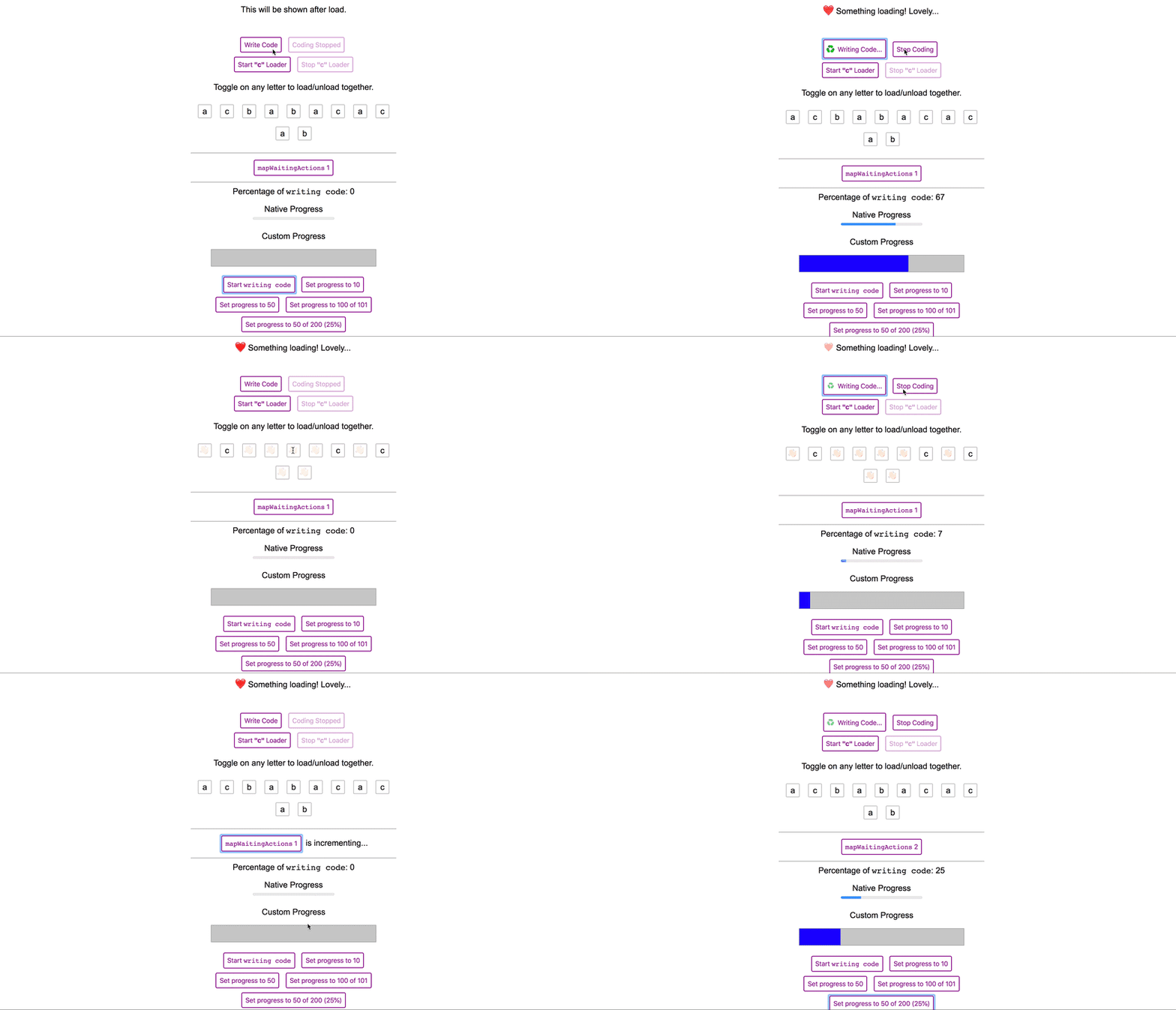
> [Play with demo above](https://f.github.io/vue-wait/).
**vue-wait** helps to manage multiple loading states on the page without any conflict. It's based on a **very simple idea** that manages an array (or Vuex store optionally) with multiple loading states. The **built-in loader component** listens its registered loader and immediately become loading state.
# ⏩Quick Start
If you are a **try and learn** developer, you can start trying the **vue-wait** now using [codesandbox.io](https://codesandbox.io).
[](https://codesandbox.io/s/85q3vpm42?autoresize=1&hidenavigation=1&module=%2Fsrc%2Fcomponents%2FMyList.vue)
### 1. Install:
```bash
yarn add vue-wait
```
### 2. Require:
#### For Vue 2.x
```js
import VueWait from 'vue-wait'
Vue.use(VueWait)
new Vue({
// your vue config
wait: new VueWait(),
})
```
#### For Vue 3.x
```js
import { createApp } from 'vue'
import { createVueWait } from 'vue-wait'
import App from './App.vue'
const VueWait = createVueWait()
createApp(App) // Create app with root component
.use(VueWait) // Register vue-wait
.mount('#app')
```
### 3. Use in Your Components
```vue
Loading the list...
{{ item }}
```
> **vue-wait has more abilities to make the management easier, please read the complete documentation.**
# ▶️Detailed Start
## 📦 Requirements
- [Vue.js](https://vuejs.org) (v2.0.0+)
## 🚀 Power Supplies
- [Vuex](http://vuex.vuejs.org), optionally (v2.0.0+)
## 🔧 Installation
via CLI:
```bash
$ yarn add vue-wait
# or if you using npm
$ npm install vue-wait
```
via Vue UI:
## 📖 Usage
```js
import VueWait from 'vue-wait'
Vue.use(VueWait) // add VueWait as Vue plugin
```
Then you should register `wait` property (`VueWait` instance) to the Vue instance:
```js
new Vue({
el: '#app',
store,
wait: new VueWait({
// Defaults values are following:
useVuex: false, // Uses Vuex to manage wait state
vuexModuleName: 'wait', // Vuex module name
registerComponent: true, // Registers `v-wait` component
componentName: 'v-wait', // component name, you can set `my-loader` etc.
registerDirective: true, // Registers `v-wait` directive
directiveName: 'wait', // directive name, you can set `my-loader` etc.
}),
});
```
## ♻️ Usage with Vuex
Simply set `useVuex` parameter to `true` and optionally override
`vuexModuleName`
```js
import VueWait from 'vue-wait'
Vue.use(Vuex)
Vue.use(VueWait) // add VueWait as Vue plugin
```
Then you should register `VueWait` module:
```js
new Vue({
el: '#app',
store,
wait: new VueWait({
useVuex: true, // You must pass this option `true` to use Vuex
vuexModuleName: 'vuex-example-module' // It's optional, `wait` by default.
}),
});
```
Now `VueWait` will use `Vuex` store for data management which can be traced in `Vue DevTools > Vuex`
## ♻️ Usage with Nuxt.js
Add `vue-wait/nuxt` to modules section of `nuxt.config.js`
```js
{
modules: [
// Simple usage
'vue-wait/nuxt'
// Optionally passing options in module configuration
['vue-wait/nuxt', { useVuex: true }]
],
// Optionally passing options in module top level configuration
wait: { useVuex: true }
}
```
## 🔁 `VueWait` Options
You can use this options for customize VueWait behavior.
| Option Name | Type | Default | Description |
| ----------- | ---- | ------- | ----------- |
| `accessorName` | `String` | `"$wait"` | You can change this value to rename the accessor. E.g. if you rename this to `$w`, your `VueWait` methods will be accessible by `$w.waits(..)` etc. |
| `useVuex` | `Boolean` | `false` | Use this value for enabling integration with `Vuex` store. When this value is true `VueWait` will store data in `Vuex` store and all changes to this data will be made by dispatching actions to store |
| `vuexModuleName` | `String` | `"wait"` | Name for `Vuex` store if `useVuex` set to true, otherwise not used. |
| `registerComponent` | `Boolean` | `true` | Registers `v-wait` component. |
| `componentName` | `String` | `"v-wait"` | Changes `v-wait` component name. |
| `registerDirective` | `Boolean` | `true` | Registers `v-wait` directive. |
| `directiveName` | `String` | `"v-wait"` | Changes `v-wait` directive name. |
## 🌈 Global Template Helpers
**vue-wait** provides some helpers to you to use in your templates.
All features can be obtained from $wait property in Vue components.
#### `.any`
Returns boolean value if any loader exists in page.
```vue
Please wait...
```
#### `.is(loader String | Matcher)` or `.waiting(loader String | Matcher)`
Returns boolean value if given loader exists in page.
```vue
Creating User...
```
You can use **`waiting`** alias instead of **`is`**.
```vue
Fetching users...
```
Also you can use matcher to make it more flexible:
Please see [matcher](https://github.com/sindresorhus/matcher/) library to see how to use matchers.
```vue
Creating something...
```
#### `.is(loaders Array)` or `.waiting(loaders Array)`
Returns boolean value if some of given loaders exists in page.
```vue
Creating User...
```
#### `.start(loader String)`
Starts the given loader.
```vue
```
#### `.end(loader String)`
Stops the given loader.
```vue
```
#### `.progress(loader String, current [, total = 100])`
Sets the progress of the given loader.
```vue
```
##### Completing the Progress
To complete the progress, `current` value should be set bigger than `100`.
If you `total` is given, `current` must be bigger than `total`.
```vue
```
or
```vue
```
#### `.percent(loader String)`
Returns the percentage of the given loader.
```vue
```
## 🏹 Directives
You can use directives to make your template cleaner.
#### `v-wait:visible='"loader name"'`
Shows if the given loader is loading.
```vue
Creating User...
```
#### `v-wait:hidden='"loader name"'` or `v-wait:visible.not='"loader name"'`
Hides if the given loader is loading.
```vue
Some Content
```
#### `v-wait:disabled='"loader name"'`
Sets `disabled="disabled"` attribute to element if the given loader is loading.
```vue
```
#### `v-wait:enabled='"loader name"'` or `v-wait:disabled.not='"loader name"'`
Removes `disabled="disabled"` attribute to element if the given loader is loading.
```vue
```
#### `v-wait:click.start='"loader name"'`
Starts given loader on click.
```vue
```
#### `v-wait:click.end='"loader name"'`
Ends given loader on click.
```vue
```
#### `v-wait:toggle='"loader name"'`
Toggles given loader on click.
```vue
```
#### `v-wait:click.progress='["loader name", 80]'`
Sets the progress of given loader on click.
```vue
```
## 🔌 Loading Action and Getter Mappers
**vue-wait** provides `mapWaitingActions` and `mapWaitingGetters` mapper to be used with your Vuex stores.
Let's assume you have a store and async **action**s called `createUser` and `updateUser`.
It will call the methods you map and will start loaders while action is resolved.
```js
import { mapWaitingActions, mapWaitingGetters } from 'vue-wait'
// ...
methods: {
...mapWaitingActions('users', {
getUsers: 'loading users',
createUser: 'creating user',
updateUser: 'updating user',
}),
},
computed: {
...mapWaitingGetters({
somethingWithUsers: [
'loading users',
'creating user',
'updating user',
],
deletingUser: 'deleting user',
}),
}
// ...
```
You can also map **action** to custom method and customize loader name like in example below:
```js
import { mapWaitingActions, mapWaitingGetters } from 'vue-wait'
// ...
methods: {
...mapWaitingActions('users', {
getUsers: { action: 'getUsers', loader: 'loading users' },
createUser: { action: 'createUser', loader: 'creating user'},
createSuperUser: { action: 'createUser', loader: 'creating super user' },
}),
},
// ...
```
There is also possibility to use array as a second argument to mapWaitingActions:
```js
// ...
methods: {
...mapWaitingActions('users', [
'getUsers',
{ method: 'createUser', action: 'createUser', loader: 'creating user'},
{ method: 'createSuperUser', action: 'createUser', loader: 'creating super user' },
]),
},
// ...
```
### ☢️Advanced Getters and Actions Usage
> The Vuex module name is `wait` by default. If you've changed on config, you should get it by `rootGetters['/is']` or `rootGetters['/any']`.
You can access `vue-wait`'s Vuex getters using `rootGetters` in Vuex.
```js
getters: {
cartOperationInProgress(state, getters, rootState, rootGetters) {
return rootGetters['wait/is']('cart.*');
}
},
```
And you can start and end loaders using `wait` actions. You must pass `root: true` option to the `dispatch` method.
```js
actions: {
async addItemToCart({ dispatch }, item) {
dispatch('wait/start', 'cart.addItem', { root: true });
await CartService.addItem(item);
dispatch('wait/end', 'cart.addItem', { root: true });
}
},
```
#### `waitFor(loader String, func Function [,forceSync = false])`
Decorator that wraps function, will trigger a loading and will end loader after the original function (`func` argument) is finished.
By default `waitFor` return async function, if you want to wrap default sync function pass `true` in last argument
_Example using with async function_
```js
import { waitFor } from 'vue-wait';
...
methods: {
fetchDataFromApi: waitFor('fetch data', async function () {
function sleep(ms) {
return new Promise(resolve => setTimeout(resolve, ms));
}
// do work here
await sleep(3000);
// simulate some api call
this.fetchResponse = Math.random()
})
}
...
```
See also `examples/wrap-example`
## 💧 Using `v-wait` Component
If you disable `registerComponent` option then import and add `v-wait` into components
```js
import vLoading from 'vue-wait/src/components/v-wait.vue'
components: {
'v-wait': vLoading
}
```
In template, you should wrap your content with `v-wait` component to show loading on it.
```vue
This will be shown when "fetching data" loader starts.
This will be shown when "fetching data" loader ends.
```
Better example for a `button` with loading state:
```vue
```
## 🔁 Transitions
You can use transitions with `v-wait` component.
Just pass `` props and listeners to the `v-wait` with `transition` prop.
```vue
Loading...
My content
```
## ⚡️ Making Reusable Loader Components
With reusable loader components, you will be able to use custom loader components as example below. This will allow you to create better **user loading experience**.
In this example above, the **tab gets data from back-end**, and the **table loads data from back-end at the same time**. With **vue-wait**, you will be able to manage these two seperated loading processes easily:
```vue
{{ tab.name }}
```
You may want to design your own reusable loader for your project. You better create a wrapper component called `my-waiter`:
```vue
tr:
loading: Yükleniyor...
en:
loading: Loading...
{{ $t('loading') }}
```
Now you can use your spinner everywhere using `slot='waiting'` attribute:
```vue
My main content after fetching data...
```
## 📦 Using with external spinner libraries
You can use `vue-wait` with another spinner libraries like [epic-spinners](https://github.com/epicmaxco/epic-spinners) or other libraries. You just need to add `slot="waiting"` to the component and Vue handles rest of the work.
First register the component,
```js
import { OrbitSpinner } from 'epic-spinners';
Vue.component('orbit-spinner', OrbitSpinner);
```
Then use it in your as a `v-wait`'s `waiting` slot.
```vue
```
... and done!
For other libraries you can use, please see [Loaders section of **vuejs/awesome-vue**](https://github.com/vuejs/awesome-vue#loader).
## 🚌 Run example
Use `npm run dev-vuex`, `npm run dev-vue` or `npm run dev-wrap` commands.
for running examples locally.
## ✔ Testing components
You can test components using `vue-wait` but it requires configuration. Let's take a basic component for instance:
```vue

 Loading the list...
 ## 📖 Usage
```js
import VueWait from 'vue-wait'
Vue.use(VueWait) // add VueWait as Vue plugin
```
Then you should register `wait` property (`VueWait` instance) to the Vue instance:
```js
new Vue({
el: '#app',
store,
wait: new VueWait({
// Defaults values are following:
useVuex: false, // Uses Vuex to manage wait state
vuexModuleName: 'wait', // Vuex module name
registerComponent: true, // Registers `v-wait` component
componentName: 'v-wait', //
## 📖 Usage
```js
import VueWait from 'vue-wait'
Vue.use(VueWait) // add VueWait as Vue plugin
```
Then you should register `wait` property (`VueWait` instance) to the Vue instance:
```js
new Vue({
el: '#app',
store,
wait: new VueWait({
// Defaults values are following:
useVuex: false, // Uses Vuex to manage wait state
vuexModuleName: 'wait', // Vuex module name
registerComponent: true, // Registers `v-wait` component
componentName: 'v-wait', //  In this example above, the **tab gets data from back-end**, and the **table loads data from back-end at the same time**. With **vue-wait**, you will be able to manage these two seperated loading processes easily:
```vue
In this example above, the **tab gets data from back-end**, and the **table loads data from back-end at the same time**. With **vue-wait**, you will be able to manage these two seperated loading processes easily:
```vue