# vue3-insta-stories
> A VueJs Plugin for Instagram like stories
## Demo
## This is a demo presentation, feel free to design your stories & slides as you wish.
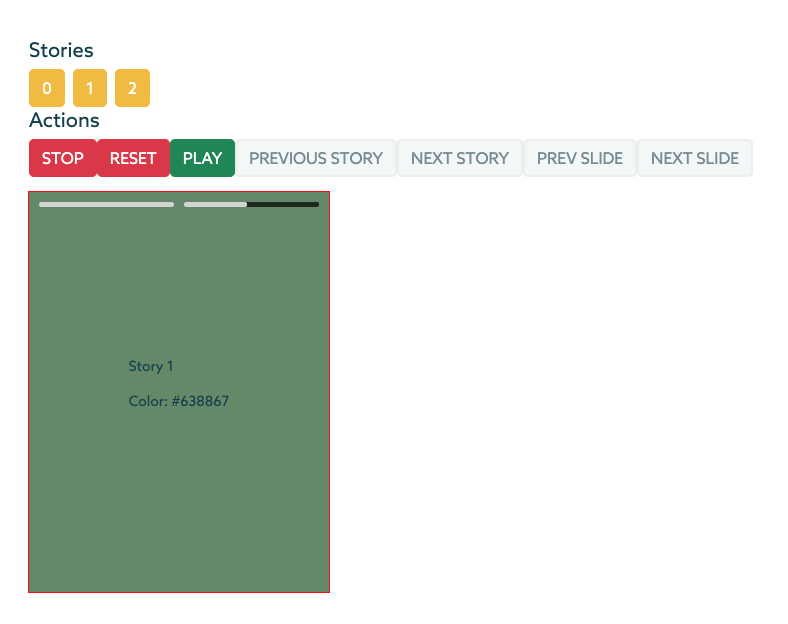
## Features
- Responsive component
- Custom design ready
- Feel free to design your slides and stories as you wish
- Swipe events
- Scroll top/bottom on big screens (Pc) to go to another story
- Custom duration per each slide
- Built-in actions [Stop,Rest,Play,Previous Story etc.]
- Built-in Event [ended,next_story,next_slide etc.]
You can clone this directory and run the command below to generate a demo Vue 3 project using this plugin!
```
npm run serve:demo
```
## Dependencies
This plugin uses **AnimeJS** && **HammerJS**. Install them using the below commands:
```
npm i animejs
npm i hammerjs
```
## Installation
```
npm i vue3-insta-stories
```
## Read before implementation
### **Stories** component is a responsive component, so it should be places inside a container with a specific width and height, and the component will stretch it's self into the parent container.
## Implementation
```html
{{ story.custom_attribute }}
Color: {{ slide.color }}
```
### Import **Stories** component into your preferred component.
### In case you want to use the Actions provided by this Component than you also need to import **ref** from vue;
```js
import Stories from "vue3-insta-stories";
import { ref } from "vue";
export default {
components: { Stories },
name: "YourCustomComponent",
setup() {
const stories_component = ref(null);
return {
stories_component,
};
},
data() {
return {
duration: 5000,
stories: [
{
//Add as many custom attributes per story as you like
custom_attribute: "Story 1",
slides: [
{
// The attributes below [id,color] are custom attributes
// Add the duration attribute in case you want to add a custom duration for this slide
id: 1,
color: "#D53738",
duration: 3000
},
{
id: 2,
color: "#638867",
duration: 10000
},
],
},
{
custom_attribute: "Story 2",
slides: [
{
id: 3,
color: "#DAF7A6"
},
],
},
...
],
};
},
```
## Events and How To Use them
1. ended
2. next_story
3. prev_story
4. prev_slide
5. next_slide
```html
```
```js
export default {
methods: {
//Events
endedEvent() {
console.log("endedEvent");
},
prevStoryEvent() {
console.log("prevStoryEvent");
},
nextStoryEvent() {
console.log("nextStoryEvent");
},
prevSlideEvent() {
console.log("prevSlideEvent");
},
nextSlideEvent() {
console.log("nextSlideEvent");
},
slideChangedEvent(index){
console.log("slideChangedEvent: " + index);
},
swipe_left() {
console.log("swipe_left Event");
this.stories_component.nextStory();
},
swipe_right() {
console.log("swipe_right Event");
this.stories_component.prevStory();
},
swipe_up() {
console.log("swipe_up Event");
},
swipe_down() {
console.log("swipe_down Event");
this.stopStory();
// -- Close slider
},
},
...
```
## Methods
1. stopStory
2. resetStory
3. playStory
4. prevStory
5. nextStory
6. prevSlide
7. nextSlide
```html
```
```js
export default {
methods: {
//Actions
storyClicked(index) {
this.stories_component.playStory(index);
},
stopStory() {
this.stories_component.stopStory();
},
resetStory() {
this.stories_component.resetStory();
},
playStory() {
this.stories_component.playStory();
},
prevStory() {
this.stories_component.prevStory();
},
nextStory() {
this.stories_component.nextStory();
},
prevSlide() {
this.stories_component.prevSlide();
},
nextSlide() {
this.stories_component.nextSlide();
},
recalculateDimensions(){
this.stories_component.recalculateDimensions();
}
},
...
```