# Webform Toolkit
[](https://badge.fury.io/js/webform-toolkit) [](https://www.npmjs.com/package/webform-toolkit) [](https://github.com/nuxy/webform-toolkit/actions) [](https://packagephobia.com/result?p=webform-toolkit) [](https://github.com/nuxy/webform-toolkit/releases) [](https://github.com/nuxy/no-ai-badge)
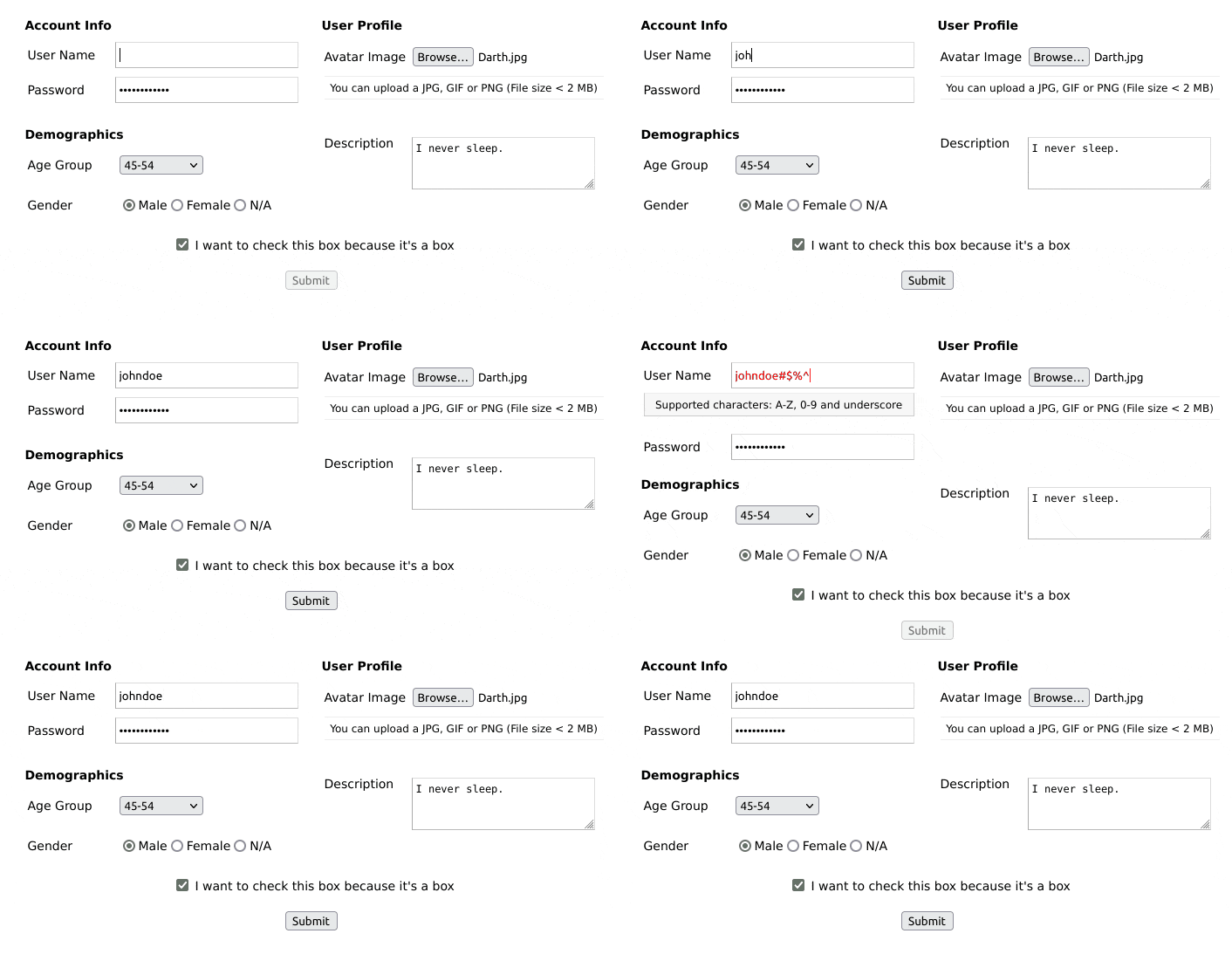
Create a HTML form with field validation and custom errors.
## Features
- Extensible HTML/CSS interface.
- Compatible with all modern desktop and mobile web browsers.
- Easy to set-up and customize. **No dependencies**.
- Provides form input validation using REGEX ([regular expressions](http://www.regular-expressions.info/reference.html))
- Supports synchronous form-data POST
- Supports FORM submit callback for custom AJAX handling.
- Supports dynamic ([on the fly](#adding-fields)) field creation.
Checkout the [demo](https://nuxy.github.io/webform-toolkit) for examples of use.
## Dependencies
- [Node.js](https://nodejs.org)
## Installation
Install the package into your project using [NPM](https://npmjs.com), or download the [sources](https://github.com/nuxy/webform-toolkit/archive/master.zip).
$ npm install webform-toolkit
## Usage
There are two ways you can use this package. One is by including the JavaScript/CSS sources directly. The other is by importing the module into your component.
### Script include
After you [build the distribution sources](#cli-options) the set-up is fairly simple..
```html
```
### Module import
If your using a modern framework like [Aurelia](https://aurelia.io), [Angular](https://angular.io), [React](https://reactjs.org), or [Vue](https://vuejs.org)
```javascript
import WebFormToolkit from 'webform-toolkit';
import 'webform-toolkit/dist/webform-toolkit.css';
const webformToolkit = new WebformToolkit(container, settings, callback);
```
### HTML markup
```html
```
### Example
```javascript
const settings = {
action: 'https://www.domain.com/handler',
params: 'name1=value1&name2=value2',
submit: false, // Override submit button creation.
groups: [
{
legend: 'Login Form',
fields: [
{
id: 'username',
label: 'User Name',
type: 'text',
name: 'username',
value: null,
maxlength: 15,
filter: '^\\w{0,15}$',
description: null,
placeholder: null,
error: 'Supported characters: A-Z, 0-9 and underscore',
required: true
},
{
id: 'password',
label: 'Password',
type: 'password',
name: 'password',
value: null,
maxlength: 15,
filter: '^(?!password)(.{0,15})$',
description: null,
placeholder: null,
error: 'The password entered is not valid',
required: true
}
]
}
]
};
const container = document.getElementById('webform-toolkit');
const webformToolkit = new WebformToolkit(container, settings, callback);
```
## Supported types
[checkbox](https://developer.mozilla.org/en-US/docs/Web/HTML/Element/input/checkbox), [color](https://developer.mozilla.org/en-US/docs/Web/HTML/Element/input/color), [date](https://developer.mozilla.org/en-US/docs/Web/HTML/Element/input/date), [email](https://developer.mozilla.org/en-US/docs/Web/HTML/Element/input/email), [file](https://developer.mozilla.org/en-US/docs/Web/HTML/Element/input/file), [hidden](https://developer.mozilla.org/en-US/docs/Web/HTML/Element/input/hidden), [number](https://developer.mozilla.org/en-US/docs/Web/HTML/Element/input/number), [password](https://developer.mozilla.org/en-US/docs/Web/HTML/Element/input/password), [quantity](https://developer.mozilla.org/en-US/docs/Web/HTML/Element/input/quantity), [radio](https://developer.mozilla.org/en-US/docs/Web/HTML/Element/input/radio), [range](https://developer.mozilla.org/en-US/docs/Web/HTML/Element/input/range), [select](https://developer.mozilla.org/en-US/docs/Web/HTML/Element/select), [submit](https://developer.mozilla.org/en-US/docs/Web/HTML/Element/input/submit), [text](https://developer.mozilla.org/en-US/docs/Web/HTML/Element/input/text), [textarea](https://developer.mozilla.org/en-US/docs/Web/HTML/Element/textarea), [time](https://developer.mozilla.org/en-US/docs/Web/HTML/Element/input/time)
## Field definitions
| Attribute | Description | Required |
|-------------|---------------------------------------------------------|----------|
| id | Field ID value. | true |
| label | Field label value. | true |
| type | [Supported types](#supported-types) | true |
| name | Form element name. | true |
| value | Default value. | false |
| maxlength | Input maximum length ([password](https://developer.mozilla.org/en-US/docs/Web/HTML/Element/input/password), [text](https://developer.mozilla.org/en-US/docs/Web/HTML/Element/input/text)) | false |
| max | Input number max ([number](https://developer.mozilla.org/en-US/docs/Web/HTML/Element/input/number), [quantity](https://developer.mozilla.org/en-US/docs/Web/HTML/Element/input/quantity)) | false |
| min | Input number min ([number](https://developer.mozilla.org/en-US/docs/Web/HTML/Element/input/number), [quantity](https://developer.mozilla.org/en-US/docs/Web/HTML/Element/input/quantity)) | false |
| step | Input number step ([range](https://developer.mozilla.org/en-US/docs/Web/HTML/Element/input/range)) | false |
| filter | Validate form input using REGEX | false |
| description | Custom field description ([Supported text tokens](#supported-text-tokens)). | false |
| placeholder | Input field type placeholder text. | false |
| error | Custom error message (Required, if `filter` is defined) | false |
| required | Required field. | false |
## Supported text tokens
The following Markdown elements are supported in the `description` attribute:
| Token Type | Example |
|--------------|--------------------------|
| Bold | **bold** |
| Italic | *italic* |
| Link | [alt text](https://www.example.com) |
## Callback processing
When a callback function is defined a form object is returned. This allows you to define a custom AJAX handler based on the requirements of your application. The following function corresponds to the [example](#usage) provided above.
```javasctipt
function callback(form) {
const xhr = new XMLHttpRequest();
xhr.addEventListener('load', function() {
if (this.status == 200) {
alert(response);
}
});
xhr.open('POST', form.getAttribute('action'));
xhr.send(new FormData(form));
}
```
## Adding fields
I have added a method to dynamically create form fields that can be added to an existing webform. An optional callback has also been provided to for post-processing FORM and field elements. This makes it easy to show/hide fields using conditions and expressions.
```javascript
webformToolkit.create({
id: 'new_field_id',
label: 'New Field',
type: 'text',
name: 'new_field',
value: null,
maxlength: null,
filter: '^[a-zA-Z0-9_]{0,255}$',
description: 'This is my new field',
placeholder: null,
error: 'Supported characters: A-Z, 0-9 and underscore',
required: true
},
function(form, elm) {
form.appendChild(elm); // default: last in fieldset
});
```
## Best practices
Just because you are filtering form input on the client-side is NO EXCUSE to not do the same on the server-side. Security is a two-way street, and BOTH ends should be protected.
## Developers
### CLI options
Run [ESLint](https://eslint.org) on project sources:
$ npm run lint
Transpile ES6 sources (using [Babel](https://babeljs.io)) and minify to a distribution:
$ npm run build
Run [WebdriverIO](https://webdriver.io) E2E tests:
$ npm run test
## Contributions
If you fix a bug, or have a code you want to contribute, please send a pull-request with your changes. (Note: Before committing your code please ensure that you are following the [Node.js style guide](https://github.com/felixge/node-style-guide))
## Versioning
This package is maintained under the [Semantic Versioning](https://semver.org) guidelines.
## License and Warranty
This package is distributed in the hope that it will be useful, but without any warranty; without even the implied warranty of merchantability or fitness for a particular purpose.
_webform-toolkit_ is provided under the terms of the [MIT license](http://www.opensource.org/licenses/mit-license.php)
## Author
[Marc S. Brooks](https://github.com/nuxy)