# fm-text

> 通用文本

## 使用方法
```vue
<template>
  <div class="container">
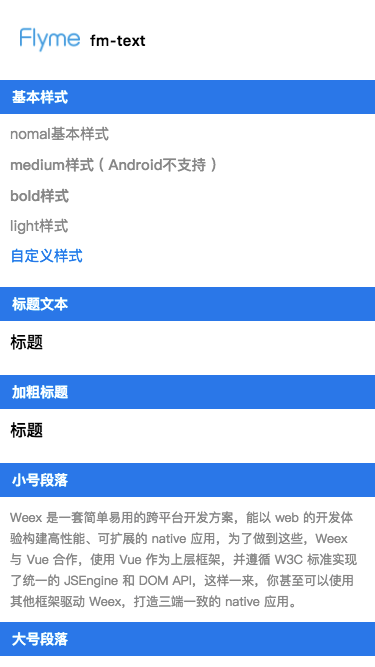
    <fm-text class="text" value="nomal基本样式" />
    <fm-text class="text" font-weight="medium" value="medium样式"/>
    <fm-text class="text" font-weight="bold" value="bold样式"/>
    <fm-text class="text" font-weight="light" value="light样式"/>
    <fm-text class="text customStyle" value="自定义样式"/>
    <fm-text class="text" size="large" value="大号段落"/>
  </div>
</template>

<script>
  import { FmText } from 'weex-flymeui';
  export default {
    components: { FmText },
  };
</script>
```

更多详细代码例子可以参考 [demo](https://github.com/FlymeApps/weex-flymeui/blob/master/example/component/text/index.vue)

## 可配置参数
| Prop | Type | Required | Default | Description |
|-------------|------------|--------|-----|-----|
| value | `String` |`Y`| `''` | 内容 |
| font-weight | `String` |`N`| `normal` | 字重，有 `light`, `normal`, `medium`, `bold` 4 种 |
| size | `String` |`N`| `normal` | 段落大小，有 `small`, `normal`, `large`, `huge` 4 种 |
## 示例
<div class="img-txt">
![](http://image.res.meizu.com/image/flyme-icon/ef9001d3cd104b989144ed7963f39111z)
</div>

