# wxc-cell 

> Weex 单元格组件，可用作展示列表信息、链接或者表单等  

### 规则
  - 一般由主要信息、操作动作组成，信息在左、操作在右
  - 可以对 `label, title, value` 进行 `slot` 覆盖
  
## [Demo](https://h5.m.taobao.com/trip/wxc-cell/index.html?_wx_tpl=https%3A%2F%2Fh5.m.taobao.com%2Ftrip%2Fwxc-cell%2Fdemo%2Findex.native-min.js)
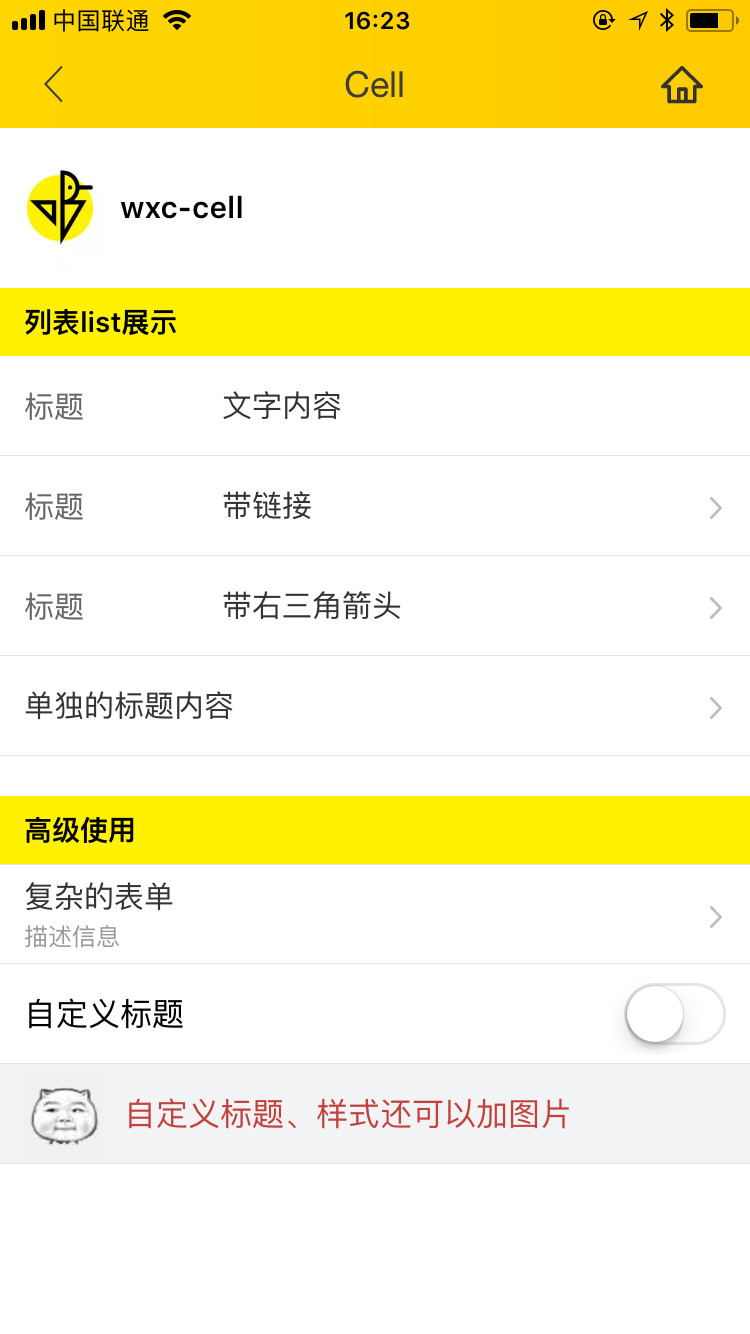
<img src="https://img.alicdn.com/tfs/TB1mIA5c5qAXuNjy1XdXXaYcVXa-750-1334.jpg" width="240"/>&nbsp;&nbsp;&nbsp;&nbsp;<img src="https://img.alicdn.com/tfs/TB15ta_SpXXXXcFaVXXXXXXXXXX-191-197.png" width="160"/>

## 使用方法

```vue
<template>
  <div class="container">
    <div class="demo">
      <text class="demo-title">列表list展示</text>

      <wxc-cell label="标题"
                title="Weex Ui"
                :has-arrow="true"
                @wxcCellClicked="wxcCellClicked"
                :has-margin="true"></wxc-cell>

      <wxc-cell label="标题"
                title="带链接"
                :has-arrow="true"
                link="https://h5.m.taobao.com/trip/home/index.html"
                @wxcCellClicked="wxcCellClicked"
                spm="181.12312312.12312.d01"
                :has-top-border="false"></wxc-cell>

      <wxc-cell label="标题"
                title="Weex Ui"
                :has-arrow="true"
                @wxcCellClicked="wxcCellClicked"
                :has-top-border="false"></wxc-cell>

    </div>
    <div class="demo">
      <text class="demo-title">不配置label</text>
      <wxc-cell title="标题"
                :has-arrow="true"
                @wxcCellClicked="wxcCellClicked"
                :has-top-border="true"></wxc-cell>
    </div>

    <div class="demo">
      <text class="demo-title">配置附加信息</text>
      <wxc-cell title="标题"
                desc="这里是附加信息"
                :has-arrow="true"
                @wxcCellClicked="wxcCellClicked"
                :has-top-border="true"></wxc-cell>
    </div>

    <div class="demo">
      <text class="demo-title">不显示箭头</text>
      <wxc-cell title="标题"
                :has-arrow="false"
                @wxcCellClicked="wxcCellClicked"
                :has-top-border="true"></wxc-cell>
    </div>
    <div class="demo">
      <text class="demo-title">自定义子元素</text>
      <wxc-cell title="这里是标题"
                :has-arrow="false"
                :has-top-border="true">
        <switch slot="value"></switch>
      </wxc-cell>
    </div>
  </div>
</template>

<script>
  import { WxcCell } from 'weex-ui';
  export default {
    components: { WxcCell },
    methods: {
      wxcCellClicked (e) {
        console.log(e)
      }
    }
  };
</script>
```
更详细代码可以参考 [demo](https://github.com/apache/incubator-weex-ui/blob/master/example/cell/index.vue)


### 可配置参数

| Prop      | Type   |Required  | Default   | Description  |
|-------------|------------|--------|--------|-----|
| label | `String` | `N`|  `-` |前置标签 |
| title | `String` | `N`|  `-` |标题 |
| desc  | `String` | `N`| `-` | 展示说明信息 |
| link  | `String` | `N`| `-`| 跳转链接，无链接不跳转 |
| arrow-icon | `String` | `N`|`箭头` |  覆盖右向箭头 |
| has-arrow | `Bool` |`N`| `false` |  是否显示箭头 |
| has-top-border | `Bool` | `N`| `false` |  是否有上边框 |
| has-bottom-border | `Bool` | `N`| `true` | 是否有下边框 |
| has-vertical-indent | `Bool` | `N`| `true` |  是否有垂直间距 |
| has-margin | `Bool` |`N`| `false` | cell之间是否有margin |
| cell-style | `Object` |`N`| `{}` | 自定义cell的样式 |
| extraContent | `String` |`N`| `{}` | 额外的内容 |


### Slot
1. `<slot name="label"></slot>`：label卡槽，替换默认 label 占位
2. `<slot name="title"></slot>`：title卡槽，替换默认 title 占位
3. `<slot name="value"></slot>`：右边卡槽，有需要传入输入框、checkbox的场景


### 事件回调
```
//点击事件回调  `@wxcCellClicked="wxcCellClicked"`
```