# Win95 Media Player
 A React media player component inspired by the Media Player app that shipped with Windows 95 (one of the early versions of Windows Media Player).
Works on the web, in an Electron app, or anywhere ReactDOM will run!
### [See it live!](https://benwiley4000.github.io/win95-media-player/)
A React media player component inspired by the Media Player app that shipped with Windows 95 (one of the early versions of Windows Media Player).
Works on the web, in an Electron app, or anywhere ReactDOM will run!
### [See it live!](https://benwiley4000.github.io/win95-media-player/)
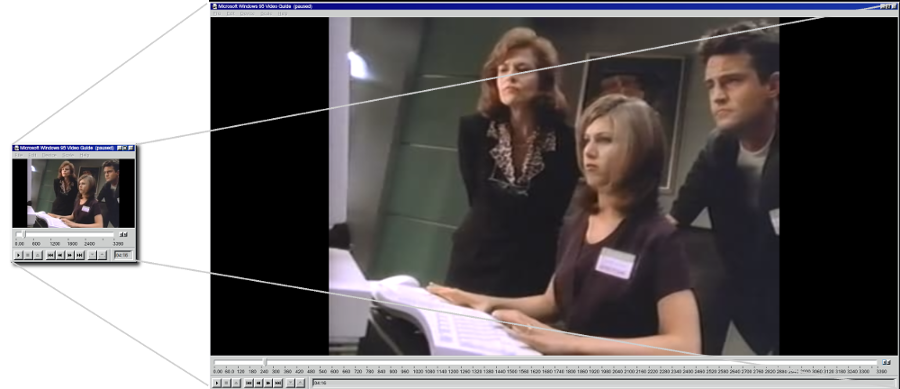 Under the hood we rely on two React component libraries:
- [Cassette](https://github.com/benwiley4000/cassette), which powers the media playback itself
- [@arturbien](https://github.com/arturbien)'s [React95](https://github.com/arturbien/React95), UI components built to resemble Windows 95
## install
```console
npm install win95-media-player
```
## quick start
The first thing you need is a working React application. If you don't have one, you can try [create-react-app](https://github.com/facebook/create-react-app) to skip all the annoying parts of setting one up.
After that, adding Win95 Media Player to your app is simple!
Assuming you have this in your html...
```html
```
Just run this JavaScript:
```jsx
// JavaScript
import React from 'react';
import ReactDOM from 'react-dom';
import { MediaPlayer } from 'win95-media-player';
const playlist = [
{
url: 'https://archive.org/download/CC1301_windows_95/CC1301_windows_95_512kb.mp4',
title: 'Computer Chronicles - Windows 95'
}
];
ReactDOM.render(
,
document.getElementById('app')
);
```
And you should have a working MediaPlayer on your page! It should look something [like this](https://benwiley4000.github.io/win95-media-player/quickstart.html).
## api
### MediaPlayer
A fully-functional media player component. Accepts all the props accepted by `MediaPlayerUI` and Cassette's [`PlayerContextProvider`](https://benwiley4000.github.io/cassette/styleguide/#playercontextprovider)
### MediaPlayerUI
The UI component used by `MediaPlayer`. If you're building a more complex media player app with Cassette, you can render this directly inside of a React tree wrapped by a `PlayerContextProvider` to hook into the surrounding `playerContext`.
#### props
| Prop name | Prop type | Default value | Description |
| ---------------- | --------- | --------------------------------------------- | ------------------------------------------------------------------------------------------------------------------------------------------------------------ |
| `getDisplayText` | Function | `track => track.title` | Receives a [track](https://benwiley4000.github.io/cassette/styleguide/#track) object (or `undefined` if none is active) and returns a string of display text |
| `showVideo` | Boolean | `false` | A boolean which must be set `true` to display video |
| `fullscreenEnabled` | Boolean | `false` | If set `true`, adds a maximize button to the title bar which will trigger fullscreen mode |
| `className` | String | | An optional CSS class name to pass to the outer window div |
| `style` | Object | | An optional React style object to pass to the outer window div |
## special thanks
[@felixrieseberg](https://github.com/felixrieseberg)'s [windows95](https://github.com/felixrieseberg/windows95) app allowed me to play around with the *real* Windows 95 Media Player so I could extract the concept for this project.
Under the hood we rely on two React component libraries:
- [Cassette](https://github.com/benwiley4000/cassette), which powers the media playback itself
- [@arturbien](https://github.com/arturbien)'s [React95](https://github.com/arturbien/React95), UI components built to resemble Windows 95
## install
```console
npm install win95-media-player
```
## quick start
The first thing you need is a working React application. If you don't have one, you can try [create-react-app](https://github.com/facebook/create-react-app) to skip all the annoying parts of setting one up.
After that, adding Win95 Media Player to your app is simple!
Assuming you have this in your html...
```html
```
Just run this JavaScript:
```jsx
// JavaScript
import React from 'react';
import ReactDOM from 'react-dom';
import { MediaPlayer } from 'win95-media-player';
const playlist = [
{
url: 'https://archive.org/download/CC1301_windows_95/CC1301_windows_95_512kb.mp4',
title: 'Computer Chronicles - Windows 95'
}
];
ReactDOM.render(
,
document.getElementById('app')
);
```
And you should have a working MediaPlayer on your page! It should look something [like this](https://benwiley4000.github.io/win95-media-player/quickstart.html).
## api
### MediaPlayer
A fully-functional media player component. Accepts all the props accepted by `MediaPlayerUI` and Cassette's [`PlayerContextProvider`](https://benwiley4000.github.io/cassette/styleguide/#playercontextprovider)
### MediaPlayerUI
The UI component used by `MediaPlayer`. If you're building a more complex media player app with Cassette, you can render this directly inside of a React tree wrapped by a `PlayerContextProvider` to hook into the surrounding `playerContext`.
#### props
| Prop name | Prop type | Default value | Description |
| ---------------- | --------- | --------------------------------------------- | ------------------------------------------------------------------------------------------------------------------------------------------------------------ |
| `getDisplayText` | Function | `track => track.title` | Receives a [track](https://benwiley4000.github.io/cassette/styleguide/#track) object (or `undefined` if none is active) and returns a string of display text |
| `showVideo` | Boolean | `false` | A boolean which must be set `true` to display video |
| `fullscreenEnabled` | Boolean | `false` | If set `true`, adds a maximize button to the title bar which will trigger fullscreen mode |
| `className` | String | | An optional CSS class name to pass to the outer window div |
| `style` | Object | | An optional React style object to pass to the outer window div |
## special thanks
[@felixrieseberg](https://github.com/felixrieseberg)'s [windows95](https://github.com/felixrieseberg/windows95) app allowed me to play around with the *real* Windows 95 Media Player so I could extract the concept for this project.