wtt
A cli for Windows Terminal
Notice ‼ This CLI isn't fully completed yet and some features are missing. The project is functional for the main purpose (installing themes)
## Abstract
wtt is a command line interface written in Node.js to add more utility to the Windows Terminal application such as *theme installing*, *configuration file backups*, and more to come in the future.
---
## Setup Process
There are two methods, from the NPM package manager or locally as a standalone folder.
### NPM
> ``npm install wintt``
Run wtt with ``npx wintt``
### Locally
Clone the repository
> ``git clone https://github.com/rainwashed/wtt.git``
Install the dependencies
> ``npm install wintt``
Run wtt with ``node index.js``
### Binary
Download the binary from [here](https://github.com/rainwashed/wtt/releases/tag/build)
Run wtt with ``.\wintt.exe``
---
## Common Issues
### **Windows Script Host**
If during ``npx wintt``, you encounter an issue like this:
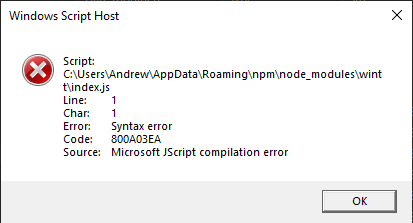
there is no need to worry. Just head to ``C:\Users\[system username]\AppData\Roaming\npm\node_modules\wintt``, find the ``index.js`` file, right click it, and press **Open With -> Choose another app -> More -> Look for another item on this PC** and locate the Node.js runtime (typically located at ``C:\Program Files\nodejs\node.exe``)
### **themeData returned invalid.**
If you encounter an issue that says **themeData returned invalid**:
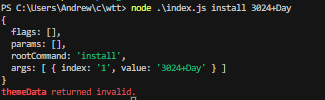
just use the corresponding theme index number instead of the theme name (ex 3024 Day -> 0)
---
## Documentation
wtt has 6 core commands, and those are as follows.
- list
- install
- backup
- upload
- download
- clean
The syntax for wtt is \
```wtt --flags -params=value [...arguments]```
The ``main_command`` must be either ``["list", "install", "backup", "upload", "download", "clean", "about", "credits", "help"]`` \
``--flags`` are to be assumed as options that go from false ❌ to true ✅ unless otherwise stated
``Flags`` and ``params`` can be in any order (ie before the main_command or after), but ``arguments`` must follow the ``main_command``
#### **List**
List theme schemes or details about a specific theme
> Arguments: Theme name or index number \
> Valid Parameters: None \
> Valid Flags: None
#### **Install**
Install a theme schema
> Arguments: Theme name or index number \
> Valid Parameters: None \
> Valid Flags: None
> For theme names that contain a space, replace the space with a + \
> (ex: 3024 Day -> 3024+Day)
> or optionally use the theme index number \
> (ex: 3024 Day -> 0)
#### **Backup**
Backup the Windows Terminal configuration file to a local location (default: C:/Users/systemUsername/Documents/wtt)
> Arguments: None \
> Valid Parameters: None \
> Valid Flags: None
#### **Upload**
Upload the Windows Terminal configuration file to a GitHub repository
> Arguments: None \
> Valid Parameters: None \
> Valid Flags: None
#### **Download**
Download the Windows Terminal configuration file from the GitHub repository
> Arguments: None \
> Valid Parameters: None \
> Valid Flags: None
#### **Clean**
Reset the Windows Terminal configuration file to the original (the default backup when first running wtt backup)
> Arguments: None \
> Valid Parameters: None \
> Valid Flags: None
### Minor Commands
#### **About**
List system information and wtt information such as version, configuration file, valid backups, etc.
> Arguments: None \
> Valid Parameters: None \
> Valid Flags: None
#### **Credits**
List authors, contributors, dependencies, and other information regarding the project
> Arguments: None \
> Valid Parameters: None \
> Valid Flags: None
#### **help**
Show documentation on a specific command or show this screen
> Arguments: command \
> Valid Parameters: None \
> Valid Flags: None
---
## License
This project is under the **GNU General Public License v3** and can be viewed in the [LICENSE](./LICENSE) file.