# zebra-striped 🦓
Generate barcodes natively in React Native with the ZXing library underhood!
## The story behind
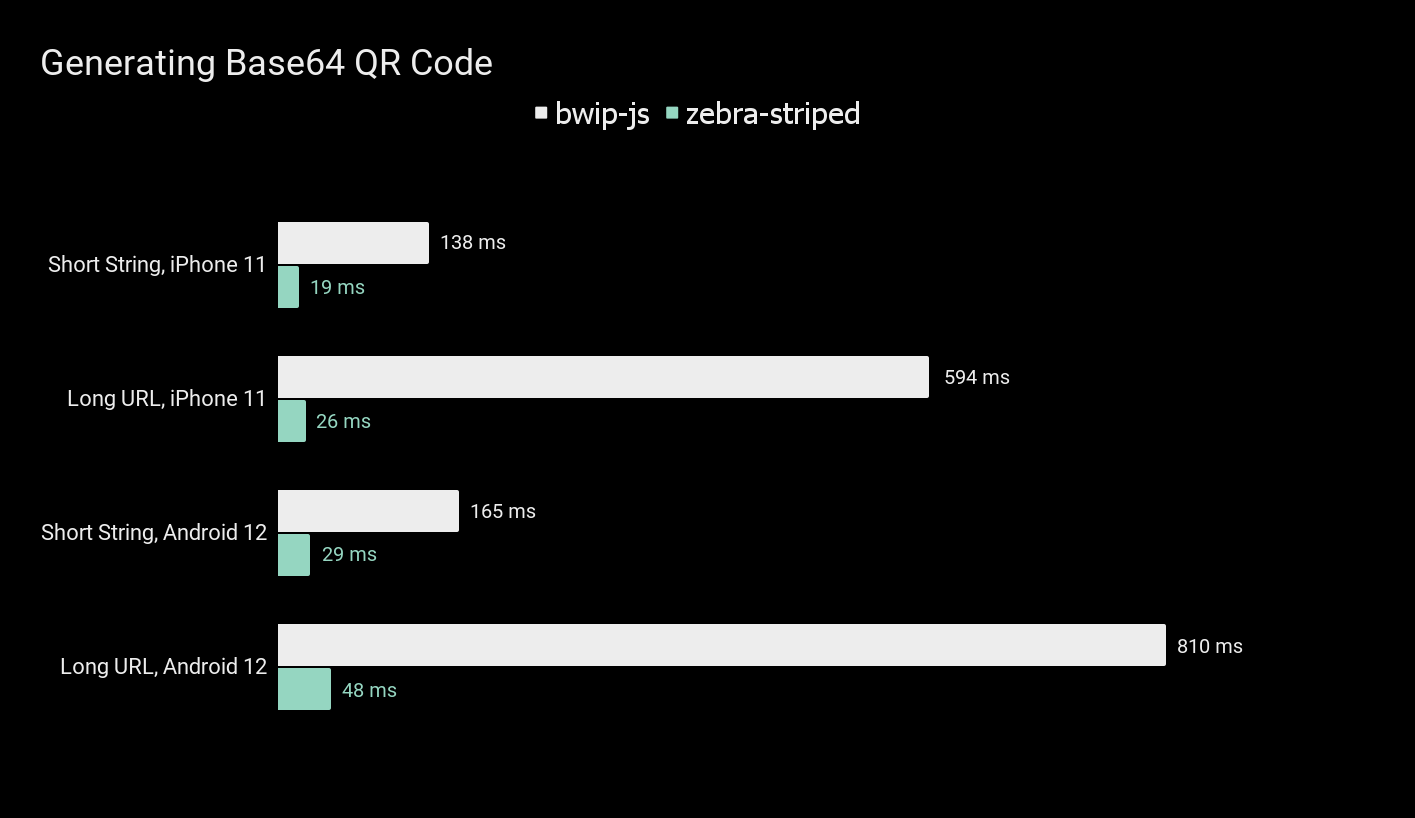
When I was working on generating QR codes in one of the apps for a client, I realized that JS-based libraries like [BWIP JS](https://www.npmjs.com/package/bwip-js) are not very performant in React Native apps, where performance is especially important for keeping users happy.
I decided to experiment a little and learn about Expo Native Modules, Swift, and Kotlin. This led to the creation of **zebra-striped** - a performant, native-based library for generating various types of barcodes for React Native.
Feedback is highly appreciated!
## Supported code formats
| 1D Codes | 2D Codes |
| -------- | ----------- |
| Code 128 | QR |
| Code 39 | PDF417 |
| Code 93 | Aztec |
| Codabar | Data Matrix |
| EAN-13 | |
| EAN-8 | |
| ITF | |
| UPC-E | |
| UPC-A | |
## Performance 🏎️
## Usage
Here's a basic usage of **ZebraCode** component:
```js
```
Want a custom colors? 🎨 I've got you covered:
```js
```
(Colors are accepted only in HEX)
Or maybe you just want to have a data returned in Base64 format? Here's how you can do it:
```js
const base64Image = getBase64Code("I'm base64'ed!", "qr", {
width: 300,
height: 300,
});
```
```js
const base64Image = getBase64Code("I'm custom-colored!", "qr", {
width: 300,
height: 300
}, "#141414", #ffffff);
```
## Installation
#### Add the package to your npm dependencies
```
npm install zebra-striped
```
### Expo 🚀
After installation you'll need to rebuild your dev client. Zebra 🦓 will not work in Expo Go!
### Plain React Native 📚
For plain React Native project you must install and configure `expo` package, follow the ["Install Expo modules in an existing React Native project"](https://docs.expo.dev/bare/installing-expo-modules/) article.
#### iOS 📱
Make sure to run `pod install` in `ios` folder.
## Contributing
Contributions are very welcome, I'm open for any suggestions!