ZippyDamn! is a ZippyShare Unofficial CLI (downloader & search) for nodejs
## Installation
Use the package manager npm to install _ZippyDamn!_ CLI
```bash
npm install zippydamn -g
```
## Usage
```bash
Usage: zippydamn [global options] command
Options:
-s, --search search file on zippyshare.com
-d, --download extract url and give you downloadable link
-dl, --downloadFile extract url, download and save file to local (path is optional)
-h, --help display help for command
Example command:
$ zippydamn -s song
$ zippydamn -d https://www19.zippyshare.com/v/lKeHaNxX/file.html
$ zippydamn -dl https://www19.zippyshare.com/v/lKeHaNxX/file.html
$ zippydamn -dl https://www19.zippyshare.com/v/lKeHaNxX/file.html C:\Users\Windows\Music
```
| Feature | Status |
|---------------------|--------|
| Extract Link | OK |
| Multiple Extract Link| DISABLED |
| Search File | OK |
| Download File | OK (Beta) |
| Multiple Download File | PROGRESS |
# Upcoming Feature
Zippydamn! Website
please open-source do your magic :)
---
## UPDATE V0.0.8 !
### Added optional path to save files
```bash
zippydamn -dl https://www19.zippyshare.com/v/lKeHaNxX/file.html C:\Users\Windows\Music
```
_File will be saved in C:\Users\Windows\Music_
## UPDATE V0.0.7 !
### Multi download feature is disabled
*for next update, this feature will be exist again :)*
### Now you can download & save to local disk without providing CSE API Key
*but you still using CSE API Key for searching :D*
### Change callback code to async await :D
Callback is suck you know? >:), so i decided move to async await! :D
---
## UPDATE V0.0.6 !
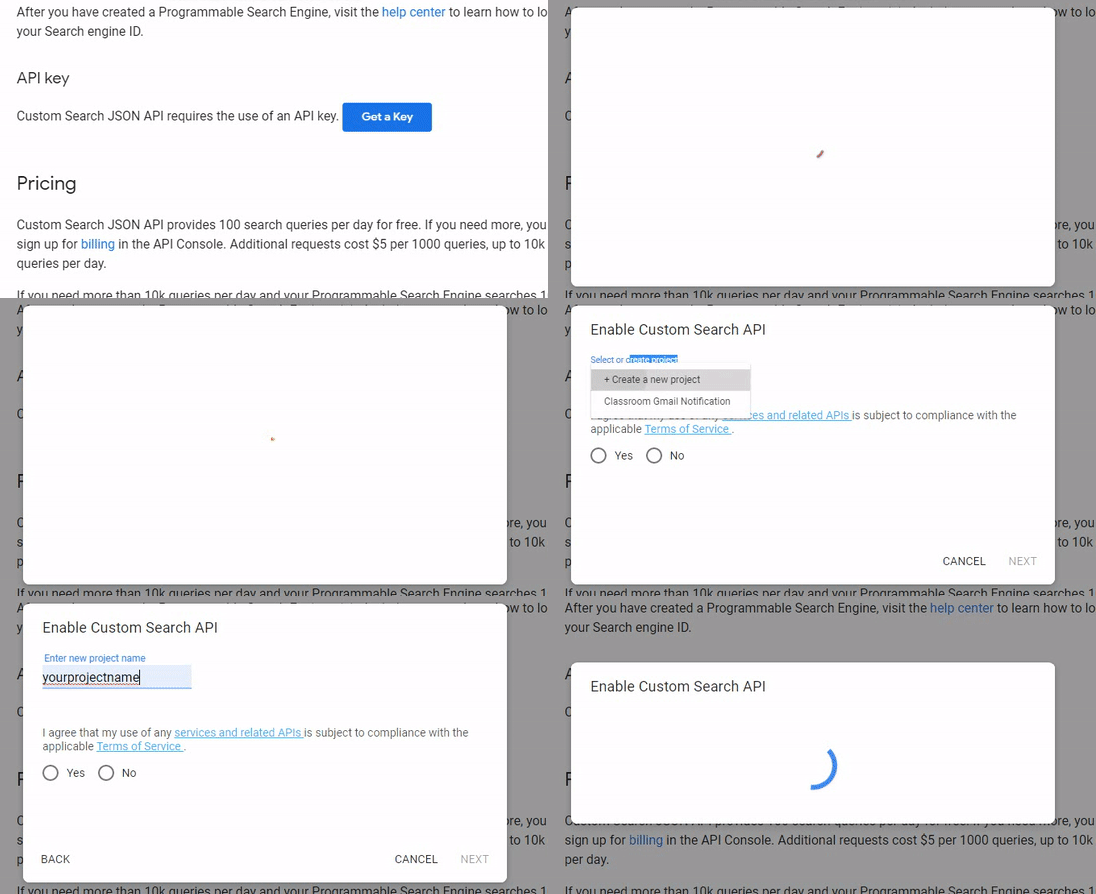
### ZippyDamn search need a Google CSE API Key to run
1. Open [https://developers.google.com/custom-search/v1/overview](https://developers.google.com/custom-search/v1/overview)
2. Click "Get a Key"
3. Write your project name
4. Replace "YOUR_API_KEY" with your Google Key in .env file
```GOOGLE_CSE_KEY = "YOUR_API_KEY"```
### Added a Download feature (beta)
So you can download and save your zippyshare file to local disk
*with tiny progress bar :) ~*
## Contributing <3
Pull requests are welcome. For major changes, please open an issue first to discuss what you would like to change.
Please make sure to update tests as appropriate.
## License
[MIT](https://choosealicense.com/licenses/mit/)
---
Made with <3 by Virdio